Identifying the best phones with ANDROID AUTO requires evaluating thermal dissipation, USB-C power negotiation, dual-band satellite positioning, and 5 GHz Wi-Fi direct stability rather than raw processing benchmarks alone. Reliable vehicle projection demands continuous display rendering on the head unit, simultaneous bidirectional data transfer, background GPS tracking, and wireless media streaming, which rapidly induces thermal throttling on unoptimized devices. Handsets featuring modern Qualcomm Snapdragon or Google Tensor platforms paired with robust vapor chamber cooling and clean USB-PD profiles maintain steady frame rates without cycling connection drops.
- Operating System Minimums: Wired connections require Android 8.0 or higher with an active data plan; wireless Android Auto requires Android 11.0 or higher with 5 GHz Wi-Fi projection support.
- Thermal Dissipation: Sustained navigation and media streaming generate excessive heat; devices with dedicated vapor chambers prevent aggressive processor throttling and unexpected disconnections.
- Cable and Port Standards: High-speed USB 3.2 Gen 2 or robust USB 2.0 Type-C interfaces supporting USB Power Delivery (USB-PD) ensure phones charge while driving rather than slowly depleting battery reserves.
- Positioning Hardware: Dual-frequency GNSS (L1+L5 bands) prevents navigation drift in urban canyons when vehicle head units lack integrated GPS passthrough antennas.
Core Hardware Specifications for In-Vehicle Projection
Running Android Auto transforms a smartphone into a secondary graphical rendering unit. The handset does not simply output an HDMI video feed; it computes the interface layout, processes navigation vector data via Google Maps or Waze, decodes audio streams, manages background telemetry, and compresses the final graphical display into an H.264 or H.265 video stream sent across USB or Wi-Fi Direct to the vehicle head unit. Consequently, specific internal hardware determines connection stability.
1. Thermal Dissipation and Vapor Chamber Design
Thermal loading remains the primary failure mode for mobile devices connected to vehicle infotainment systems. During summer operations, ambient cabin temperatures combined with direct solar radiation through vehicle windshields place severe strain on smartphone batteries and system-on-chip (SoC) architectures.
Phones that handle Android Auto most effectively incorporate multi-layer graphite sheets coupled with large copper or stainless steel vapor chambers. Without adequate passive thermal spreading, the battery management system (BMS) limits charging current to protect lithium-ion pouch cells, often causing the battery percentage to drop even while plugged into a vehicle USB port. If internal temperatures exceed factory safety thresholds (typically 43°C to 45°C on the battery sensor), the device aggressively downclocks processor cores, introducing audio stutter, dropped frame rates on the vehicle display, and eventual system disconnects.
2. Modem Architecture and Dual-Band GNSS
Dead-reckoning vehicle sensors vary wildly across model years. While modern factory infotainment systems running Android Automotive OS or proprietary gateways (such as Ford SYNC 4 or GM Infotainment 3) pass vehicle-speed sensor (VSS) and roof-mounted shark-fin GPS data to the phone via projection protocols, aftermarket head units and older factory radios often do not. In those setups, the smartphone must supply its own positional data.
Flagship and premium mid-range devices equipped with dual-band GNSS radios (tracking both L1 and L5 GPS frequencies, E1/E5a Galileo, and B1/B2a BeiDou) secure sub-meter positioning accuracy. Single-frequency (L1-only) modems frequently reflect off highway overpasses and skyscrapers, resulting in errant vehicle rerouting, incorrect turn prompts, and delayed departure calculations.
3. USB Controller Standards and Power Delivery Compliance
Wired connectivity requires consistent physical and electrical signaling. Handsets with USB-C ports adhering strictly to USB Implementers Forum (USB-IF) specifications handle fast-changing automotive power states reliably. Vehicles equipped with USB-A legacy ports typically supply only 5 volts at 0.5 to 1.5 amps (2.5W to 7.5W), which cannot offset the power draw of active projection.
Modern devices supporting USB Power Delivery (USB-PD 3.0 and PPS protocols) negotiate voltage steps dynamically (5V, 9V, 12V) when plugged into 12V auxiliary socket adapters or native USB-C vehicle ports. This allows the phone to sustain continuous 18W to 30W charging rates while running projection tasks without damaging internal power management ICs (PMICs).
Comparison of Phone Classes for Android Auto Performance
| Device Tier / Category | Thermal Endurance | GPS Architecture | Wi-Fi Projection Bands | USB Interface Speed | Overall Suitability |
|---|---|---|---|---|---|
| Flagship (Pixel 8/9, Galaxy S23/S24) | High (Active vapor chambers) | Dual-frequency (L1+L5) | 2.4 GHz, 5 GHz, Wi-Fi 6E/7 | USB 3.2 Gen 1 / Gen 2 | Optimal for sustained daily driving & wireless use |
| Upper Mid-Range (Pixel 8a, Galaxy A54/A55) | Moderate to High | Mixed (L1 single or L1+L5) | 2.4 GHz, 5 GHz, Wi-Fi 6 | USB 2.0 Type-C | Excellent value; wired charging speeds slightly limited |
| Budget Tier (Entry Android 13/14) | Low (Heatsink constraints) | Single-band (L1 only) | 2.4 GHz only or basic 5 GHz | USB 2.0 Type-C | Prone to thermal disconnects & interface stutter |
| Ruggedized Industrial Handsets | Extremely High (Thick chassis) | Multi-constellation L1+L5 | Dual-band standard | Sealed USB 2.0/3.0 | Durable; thick cases block wireless charging pads |
Operating System Requirements: Android Auto Wireless vs. Wired
Compatibility differs significantly depending on whether the vehicle infotainment unit requires a physical USB tether or utilizes wireless projection over local Wi-Fi Direct networks.
Wired Android Auto Minimums
- OS Version: Android 8.0 (Oreo) or higher.
- Connection: High-quality USB cable rated for data transfer (USB 2.0 minimum, 480 Mbps transfer rate, shielded twisted pair).
- Services: Active mobile data plan and Google Play Services enabled.
Wireless Android Auto Prerequisites
- Android 11.0 or Higher: Any phone running standard Android 11, 12, 13, 14, or 15 supports wireless projection natively without third-party utility applications.
- 5 GHz Wi-Fi Hardware: Handsets must support 5.0 GHz Wi-Fi Direct. Android Auto wireless does not operate over standard Bluetooth for display rendering; Bluetooth handles initial handshake, telephone signaling, and hands-free profile switching, after which all video frames and audio data transfer across an ad-hoc 5 GHz Wi-Fi link.
- Regional Regulatory Compliance: Certain countries outside the United States restrict in-cabin 5 GHz Wi-Fi operation (specifically UNII-3 bands), which automatically disables wireless projection protocols on regionally locked hardware.
Thermal Management and In-Vehicle Wireless Charging Hazards
Vehicles manufactured with integrated Qi wireless charging pads frequently present problems for wireless Android Auto users. Inductive wireless charging generates substantial waste heat via magnetic eddy currents inside receiver coils. When combined with simultaneous 5 GHz Wi-Fi transmission, active cellular handoffs across highway towers, and GPS calculation, the total thermal accumulation quickly triggers safety shutoffs.
Drivers using wireless projection often report that their phone stops charging at 80% or shuts down completely with a high-temperature warning after 30 to 45 minutes of transit. To mitigate this issue:
- Position the phone in a location exposed to air conditioning vent flow rather than enclosed center console bins.
- Use an active cooling phone mount if utilizing wireless charging cradles.
- Prioritize direct USB-PD wired charging during long road trips to bypass the thermal inefficiency of Qi inductive pads.
Cable Selection and Diagnostic Checks for Wired Stability
Over 80 percent of intermittent Android Auto connection dropped states originate in physical cable faults, connector degradation, or pin oxidation rather than software bugs inside the Android OS.
USB Cable Specifications
Automotive environments subject cables to severe mechanical vibration, thermal cycling (-20°F to 140°F interior cabin swings), and frequent bending around center consoles. Cables must have:
- Length Limitations: Do not exceed 3.3 feet (1 meter). Longer cables introduce signal degradation and resistance drops that corrupt high-speed USB data packets.
- Internal Pull-Up Resistors: Type-A to Type-C cables must feature a 56kΩ pull-up resistor to ensure the phone does not draw excessive current from the head unit port, which can blow automotive instrument panel fuses.
- Mechanical Fitment: USB-C female receptacles on phones easily accumulate pocket lint. Compressed debris prevents complete physical latching of USB-C retention clips, causing instantaneous disconnections whenever the vehicle traverses pavement expansion joints or railroad crossings.
Infotainment Gateway and Firmware Variables
The smartphone represents only half of the projection equation. The vehicle head unit runs embedded operating systems (such as QNX, Linux, or Android Automotive) governed by strict timing parameters. Older head units with slow microprocessors often fail to process handshake responses within the standard timeout window, causing the phone to abort initialization.
Factory Head Units
Automakers frequently issue Technical Service Bulletins (TSBs) and over-the-air (OTA) software updates that resolve projection crashes. For instance, early implementations of Ford SYNC 3, Chevrolet MyLink, and Honda Display Audio suffered from USB buffer overflows that caused the infotainment screen to freeze while the phone continued operating normally. Verifying that the vehicle audio unit runs the latest manufacturer firmware revision is necessary before replacing a mobile device.
Aftermarket Systems
Units produced by brands like Kenwood, Alpine, Pioneer, and Sony require dedicated firmware flashes via USB thumb drives to maintain compatibility with updated Android API levels. Additionally, aftermarket wiring harnesses must ground the head unit parking brake bypass wire properly; an incorrect ground wire installation can trigger lockout states where Android Auto refuses to launch initial setup menus.
Common Mistakes
- Assuming Fast Processors Guarantee Stability: Purchasing high-performance gaming phones that lack optimized baseband modems or thermal software controls often leads to worse vehicle stability than choosing balanced standard commercial devices.
- Using Non-Data USB Charging Cables: Using budget charging cables that omit internal data lines (D+ and D-) prevents the head unit from detecting the mobile device, resulting in power delivery without data handshake.
- Neglecting Port Cleaning: Replacing a smartphone due to random disconnects when the actual cause is compacted pocket lint inside the phone USB-C port blocking structural pin contact.
- Stacking Wireless Projection With Inductive Charging in Sunlit Mounts: Positioning a device on a dashboard suction mount directly under direct sunlight while simultaneously running wireless projection and charging creates rapid thermal emergency shutdowns.
- Relying on Single-Band USB Hubs: Adding unpowered multi-port splitters to factory vehicle USB inputs splits the data channel, violating Android Auto hardware timing criteria and dropping connection integrity.
When to Seek Professional Automotive Electronics Service
While most Android Auto complications trace back to phone settings, cable specs, or app cache corruption, certain issues require professional diagnosis:
- Faulty Vehicle USB Hub Modules: Many modern vehicles (such as late-model Fords, GMs, and Toyotas) utilize an isolated, powered USB interface hub located inside the center console. If internal voltage step-down regulators fail, the port supplies erratic power, disconnecting the phone continuously. Dealership or 12-volt specialty technicians can test port voltage under load using inline digital multimeters.
- Antenna Passthrough Failures: If navigation accuracy fails exclusively when plugged into the car, the infotainment unit GPS antenna splitter or roof shark-fin module may be defective, passing corrupted vehicle positional coordinates to the phone.
- CAN-Bus Communication Errors: When the vehicle display reads “Device Not Supported” across multiple verified phones and certified cables, the body control module (BCM) or infotainment gateway module may require factory-level diagnostic scanning and module resets via bidirectional scan tools.
For related guidance on this topic, see Best Phones for Android Auto, Android Auto Adapter Buying Guide and Best Tablets for Android Auto.
Frequently Asked Questions
Do all Android phones support Android Auto?
Most phones running Android 8.0 or higher support wired Android Auto, provided they have Google Mobile Services (GMS) pre-installed. Devices lacking official Google licensing (such as standard mainland Chinese market models or modern Huawei devices running HarmonyOS) do not natively run Android Auto services without complex rooting and service sideloading.
Why does wireless Android Auto drain phone battery so quickly?
Wireless Android Auto forces the phone to execute graphics encoding, continuous GPS geolocation tracking, and high-throughput 5 GHz Wi-Fi Direct data transmission simultaneously. This heavy processor workload continuously prevents the device SoC from entering power-saving sleep states, causing power consumption rates of 10% to 20% per hour if not connected to a physical charger.
What is the difference between Android Auto and Android Automotive OS?
Android Auto is a projection platform driven entirely by a smartphone connected via USB cable or Wi-Fi to a vehicle display screen. Android Automotive OS (AAOS) is a standalone operating system built directly into the vehicle hardware architecture by the manufacturer (found in vehicles from Volvo, Polestar, GM, and others), running independently without requiring a mobile phone connection.
Can budget Android phones run wireless Android Auto smoothly?
Budget phones can establish a wireless connection if they support Android 11 and 5 GHz Wi-Fi, but entry-level processors often experience interface lag, dropped navigation frames, and audio stuttering. Budget devices also lack extensive vapor chamber cooling, making them significantly more vulnerable to thermal throttling during long trips.

Pros
- Wide height range supports different shooting positions
- Gesture control is designed to start or pause tracking without an app
- 360° rotation and 270° up-and-down adjustment support multiple angles
- Listed for use with Android and iPhone devices
Cons
- Face-tracking performance may be affected by fast movement
- The stated optimal tracking distance is within 5 meters
- Detailed operating-system requirements and full specifications are not provided
The YUANRAN face-tracking selfie stick is designed for video recording, live streaming, video calls, online classes, and related uses. Its built-in tracking camera is listed with 360° rotation, face and body recognition, and gesture controls. The listing states that the 👌 gesture starts tracking and the 🖐️ gesture pauses tracking.
The stand adjusts from 12.59 to 70.9 inches. It supports horizontal and vertical shooting, with 360° panoramic rotation and 270° up-and-down adjustment. A standard 1/4-inch screw thread is provided for compatible digital cameras, action cameras, GoPro cameras, and ring lights. The product listing identifies compatibility with Android and iPhone devices and states that no app is required.
The listing notes that tracking may not work when movement is too fast or when the distance exceeds the stated optimal tracking range of 5 meters.
Detailed Review
What stands out in the currently available product data:
- 360° face and body tracking with automatic rotation
- Adjustable height from 12.59 to 70.9 inches
- Gesture controls for starting and pausing tracking
- No app download required
- Standard 1/4-inch screw thread for compatible cameras, action cameras, and ring lights
- Supports horizontal and vertical shooting
Best For / Avoid If
Best for buyers prioritizing
- Wide height range supports different shooting positions
- Gesture control is designed to start or pause tracking without an app
- 360° rotation and 270° up-and-down adjustment support multiple angles
Consider another option if
- Face-tracking performance may be affected by fast movement
- The stated optimal tracking distance is within 5 meters
- Detailed operating-system requirements and full specifications are not provided

Pros
- Supports wireless Android Auto in vehicles and head units with wired-only Android Auto
- Includes a multifunction button for pairing and switching between phones
- Companion app supports updates, troubleshooting, customization, and localized Wi-Fi settings
Cons
- Only compatible with vehicles or head units that exclusively support wired Android Auto
- Requires an Android 11 or higher phone on Google's official Android Auto compatible smartphone list
- External interference from sources such as cell towers, Wi-Fi hotspots, dashcams, or other wireless devices may affect connection stability
AAWireless TWO is a wireless Android Auto adapter for vehicles and head units that exclusively support wired Android Auto. It requires a compatible phone running Android 11 or higher and includes a multifunction button for pairing and switching between phones. The plug-and-play adapter works with a free companion app for updates, troubleshooting, customization, and localized Wi-Fi settings. External wireless interference may affect connection stability.
Specifications
| Color | Black |
|---|---|
| Dimensions | 2.16535 x 1.37795 x 0.59055 inches |
| Weight | 0.03968320716 pounds |
| Product Group | Wireless |
| Binding | Electronics |
Verify the current product variation before purchase; specifications may change.
Detailed Review
What stands out in the currently available product data:
- Converts compatible factory wired Android Auto systems to wireless Android Auto
- Supports phones running Android 11 or higher
- Multifunction button supports phone pairing and switching
- Can connect unlimited phones for shared vehicle use
- Plug-and-play setup is designed without technical skills
- Free companion app provides updates, troubleshooting, and customization
Best For / Avoid If
Best for buyers prioritizing
- Supports wireless Android Auto in vehicles and head units with wired-only Android Auto
- Includes a multifunction button for pairing and switching between phones
- Companion app supports updates, troubleshooting, customization, and localized Wi-Fi settings
Consider another option if
- Only compatible with vehicles or head units that exclusively support wired Android Auto
- Requires an Android 11 or higher phone on Google's official Android Auto compatible smartphone list
- External interference from sources such as cell towers, Wi-Fi hotspots, dashcams, or other wireless devices may affect connection stability

Pros
- Supports CarPlay and Android Auto connectivity
- Data transfer rate is listed up to 10Gbps
- Tangle-resistant cable design
- Broad compatibility with listed USB-C smartphones and tablets
Cons
- Cable length is not provided
- Charging wattage and voltage are not provided
- Specific iOS, Android, and vehicle requirements are not provided
The ienza USB-A to USB-C Media CarPlay, Android Auto, Navigation & Charger Cable Cord is listed for connecting compatible vehicles and USB-C devices. The cable is described as supporting wired Apple CarPlay, Android Auto, navigation, music streaming, charging, and data transfer rates up to 10Gbps.
Listed compatible devices include iPhone 17, iPhone 16, iPhone 15, iPhone Air, iPad 10th generation, iPad Pro, iPad Air 4th and 5th generation, iPad mini 6th generation, Samsung Galaxy and Note devices, Google Pixel, Motorola or Moto, LG, and other smartphones with a USB-C port. The cable is also described as tangle-resistant. Cable length, charging wattage, voltage, and specific operating-system or vehicle requirements are not provided.
Specifications
| Size | 20 inches |
|---|---|
| Weight | 0.0375 pounds |
| Product Group | Personal Computer |
| Binding | Unknown Binding |
Verify the current product variation before purchase; specifications may change.
Detailed Review
What stands out in the currently available product data:
- USB-A to USB-C connector configuration
- Listed for wired Apple CarPlay and Android Auto
- Supports navigation and music streaming connections
- Data transmission rate listed up to 10Gbps
- Tangle-resistant design
- Compatible with listed iPhone, iPad, Samsung, Google Pixel, Motorola, LG, and other USB-C devices
Best For / Avoid If
Best for buyers prioritizing
- Supports CarPlay and Android Auto connectivity
- Data transfer rate is listed up to 10Gbps
- Tangle-resistant cable design
Consider another option if
- Cable length is not provided
- Charging wattage and voltage are not provided
- Specific iOS, Android, and vehicle requirements are not provided

Pros
- Combines selfie-stick and tripod functionality in one travel-size design
- Supports eye-level placement for standing live streams and group shots
- Phone clamp fits devices up to 3.9 inches wide, including most cases
- USB-C rechargeable remote does not require an app
Cons
- The published data does not specify the remote's exact battery life beyond stating that it lasts hours on a single charge
- Not designed for underwater use or extreme cold
- The published data does not provide detailed tripod load-capacity specifications
The LISEN 67-inch selfie stick tripod folds to 12.6 inches and extends to 67 inches. Its three legs use a preloaded spring and deploy when the base is tapped on the ground. The phone clamp fits phones up to 3.9 inches wide, including most cases. The head provides 360-degree swivel and 180-degree tilt.
Creator-focused connections include a cold shoe for a microphone or LED fill light and an included 1/4-inch-20 adapter for action cameras, monitors, or teleprompters. The rechargeable Bluetooth remote pairs with iPhone and Android without an app, works from up to 30 feet away, charges via USB-C, and stores inside the handle. The remote is not designed for underwater use or extreme cold.
Detailed Review
What stands out in the currently available product data:
- Auto-open tripod legs deploy in approximately 0.01 seconds when the base is tapped on the ground
- Extends from 12.6 inches folded to 67 inches fully open
- Rechargeable Bluetooth remote works with iPhone and Android without an app
- Remote trigger range is up to 30 feet and the remote stores inside the handle
- Cold shoe supports a microphone or LED fill light
- Included 1/4-inch-20 adapter connects action cameras, monitors, or teleprompters
Best For / Avoid If
Best for buyers prioritizing
- Combines selfie-stick and tripod functionality in one travel-size design
- Supports eye-level placement for standing live streams and group shots
- Phone clamp fits devices up to 3.9 inches wide, including most cases
Consider another option if
- The published data does not specify the remote's exact battery life beyond stating that it lasts hours on a single charge
- Not designed for underwater use or extreme cold
- The published data does not provide detailed tripod load-capacity specifications

Pros
- Combines wireless CarPlay and Android Auto in one device
- Supports automatic reconnection after initial Bluetooth pairing
- Includes both USB-A and USB-C connection options
- Retains listed factory control functions, including touchscreen and steering-wheel controls
Cons
- Only compatible with vehicles that already support factory wired CarPlay or wired Android Auto
- Android compatibility requires Android 11 or above
- The product listing does not provide a detailed specifications table
The Teeran 2-in-1 Wireless CarPlay and Android Auto Adapter converts a compatible factory wired system to wireless connectivity. It is intended for vehicles with original wired CarPlay or wired Android Auto and is not compatible with vehicles that lack either wired system.
- Device compatibility: iPhone 6 or later and Android 11 or above
- Connections: USB-A and USB-C extension cables included
- Wireless features: Bluetooth pairing, automatic reconnection, and 2.4GHz plus 5GHz dual-band chips
- Supported functions: Apple Maps, Google Maps, Spotify, Siri, Voice Assistant, touchscreen controls, steering-wheel buttons, rotary knobs, and voice commands
- Design: Compact tapered housing designed for a flush fit near the USB port
- Operating range: -20°C to 70°C
- Support: 18 months of product protection, lifetime technical support, and free firmware updates listed through 2026
- ASIN: B0GWMFSZW
Detailed Review
What stands out in the currently available product data:
- Supports wireless CarPlay and wireless Android Auto through one adapter
- Compatible with vehicles that already have factory wired CarPlay or wired Android Auto
- Supports iPhone 6 or later and Android 11 or above devices
- Includes USB-A and USB-C extension cables for different vehicle USB ports
- Supports touchscreen, steering-wheel buttons, rotary knobs, and voice commands
- Compact tapered design is intended to sit nearly flush with the USB port
Best For / Avoid If
Best for buyers prioritizing
- Combines wireless CarPlay and Android Auto in one device
- Supports automatic reconnection after initial Bluetooth pairing
- Includes both USB-A and USB-C connection options
Consider another option if
- Only compatible with vehicles that already support factory wired CarPlay or wired Android Auto
- Android compatibility requires Android 11 or above
- The product listing does not provide a detailed specifications table

Pros
- 10Gbps data-transfer specification
- 3-foot length helps reduce cable clutter
- Supports Android Auto and Apple CarPlay according to the product listing
- Nylon braiding and an aluminum alloy case are specified
Cons
- Not intended for high-wattage laptops rated at 65W or higher
- The listing limits intended use to cables no longer than 3 feet
- iOS system requirements and detailed connector specifications are not provided
The CONMDEX USB Cable 2-Pack includes 3-foot cables designed for vehicle consoles and desktop setups. The listing specifies support for Android Auto and Apple CarPlay, 10Gbps data transfer, and 3A/18W fast charging for smartphones and tablets.
- Brand: CONMDEX
- Category: USB Cables
- Package: 2 cables
- Length: 3 feet
- Data transfer: Up to 10Gbps, listed as USB 3.1 Gen 2 performance
- Charging: 3A/18W for smartphones and tablets
- Materials: Aluminum alloy case and nylon braiding
- Listed compatibility: Android Auto, Apple CarPlay, iPhone 17/16, Samsung Galaxy S25/S24 Ultra, PS5/PS4 controllers, and external SSDs
- Limitations: Not intended for laptops requiring 65W or higher, and intended for use at lengths no longer than 3 feet
Detailed Review
What stands out in the currently available product data:
- Designed for stable Android Auto and Apple CarPlay connectivity
- Supports stated data transfer speeds of up to 10Gbps
- Provides 3A/18W fast charging for smartphones and tablets
- Includes two 3-foot cables for car consoles and desktop setups
- Uses a premium nylon braid and aluminum alloy case
- Listed for use with iPhone 17/16, Samsung Galaxy S25/S24 Ultra, PS5/PS4 controllers, and external SSDs
Best For / Avoid If
Best for buyers prioritizing
- 10Gbps data-transfer specification
- 3-foot length helps reduce cable clutter
- Supports Android Auto and Apple CarPlay according to the product listing
Consider another option if
- Not intended for high-wattage laptops rated at 65W or higher
- The listing limits intended use to cables no longer than 3 feet
- iOS system requirements and detailed connector specifications are not provided
Pros
- Supports wireless Android Auto for compatible vehicles
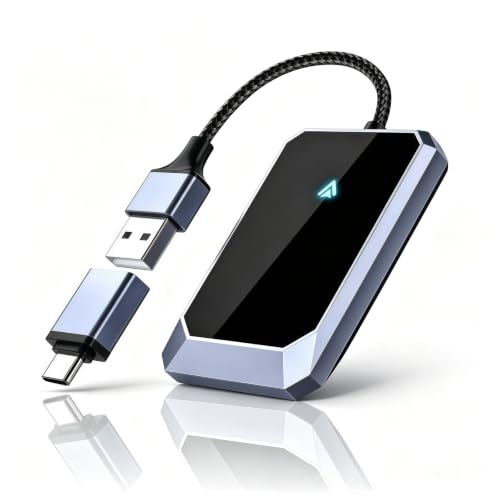
- Includes a USB-to-USB-C adapter
- Compact aluminum design is intended to fit without obstructing the driver's view
- Includes a 365-day warranty and lifetime technical support
Cons
- Requires a vehicle equipped with wired Android Auto
- Requires an Android 10 or later phone and is not for iOS
- The published data does not provide a specific vehicle compatibility list
The Aswoema wireless Android Auto adapter connects Android 10 or later phones to compatible vehicles equipped with wired Android Auto. The listing names Google, Samsung, OnePlus, and other Android phones as supported devices and claims compatibility with more than 800 car models.
The adapter has a compact, lightweight aluminum construction and includes a USB-to-USB-C adapter. The listed features also describe access to navigation, music, calls, messages, and voice assistant functions while retaining the vehicle's original control logic and sound system. Compatibility with iOS is explicitly excluded. The product includes a 365-day warranty and lifetime technical support.
Specifications
| Color | Gray |
|---|---|
| Dimensions | 2.64 x 1.65 x 0.35 inches |
| Weight | 0.1 pounds |
| Product Group | Personal Computer |
Verify the current product variation before purchase; specifications may change.
Detailed Review
What stands out in the currently available product data:
- Converts wired Android Auto connectivity to a wireless connection
- Supports Android 10 or later phones, including Google, Samsung, and OnePlus devices
- Advertised compatibility with over 800 car models
- Compact, lightweight aluminum construction
- Includes a USB-to-USB-C adapter for wider port compatibility
- Uses an A7S chip for wireless connection stability
Best For / Avoid If
Best for buyers prioritizing
- Supports wireless Android Auto for compatible vehicles
- Includes a USB-to-USB-C adapter
- Compact aluminum design is intended to fit without obstructing the driver's view
Consider another option if
- Requires a vehicle equipped with wired Android Auto
- Requires an Android 10 or later phone and is not for iOS
- The published data does not provide a specific vehicle compatibility list

Pros
- USB 3.1 Gen 2 supports data transfer speeds up to 10Gbps
- Supports Android Auto and iPhone 15 series CarPlay connections
- Uses a nylon-braided cable and includes a 56KΩ pull-up resistor
- Listed compatibility includes Samsung T7 Shield, Extreme Portable SSD and other devices
Cons
- Does not support video output
- The published data does not provide an iOS requirement or detailed vehicle compatibility list
- The cable is limited to 1.5 feet in length
The SUNGUY USB-C to USB-A cable is a 1.5-foot USB 3.1 Gen 2 cable rated for data transfer speeds up to 10Gbps and charging power up to 3A. It is listed for Android Auto, iPhone 15 series CarPlay connections, computers, tablets, smartphones and portable SSDs.
- Connector type: USB-C to USB-A
- Data standard: USB 3.1 Gen 2
- Maximum listed data transfer speed: 10Gbps
- Maximum listed charging power: 3A
- Backward compatibility: USB 3.0 and USB 2.0
- Video output: Not supported
- Included: One 1.5-foot cable
- Support: 12-month product replacement warranty and lifetime 24/7 technical support
Specifications
| Color | Grey |
|---|---|
| Size | 1.5ft |
| Product Group | Personal Computer |
| Binding | Unknown Binding |
Verify the current product variation before purchase; specifications may change.
Detailed Review
What stands out in the currently available product data:
- Supports data transfer speeds up to 10Gbps
- Supports charging up to 3A
- Listed for use with Android Auto and CarPlay
- 1.5-foot cable length suits compact car and device connections
- Backwards compatible with USB 3.0 and USB 2.0
- Compatible with listed phones, computers, tablets and portable SSDs
Best For / Avoid If
Best for buyers prioritizing
- USB 3.1 Gen 2 supports data transfer speeds up to 10Gbps
- Supports Android Auto and iPhone 15 series CarPlay connections
- Uses a nylon-braided cable and includes a 56KΩ pull-up resistor
Consider another option if
- Does not support video output
- The published data does not provide an iOS requirement or detailed vehicle compatibility list
- The cable is limited to 1.5 feet in length

Pros
- Supports Android Auto and CarPlay use
- Offers up to 10Gbps data transfer
- Provides up to 15W charging
- Listed compatibility includes smartphones, tablets, and USB-C SSDs
Cons
- USB 2.0 vehicle ports may cause protocol mismatch, device recognition failure, slow charging, or charging failure
- The published data does not specify iOS or Android operating-system requirements beyond the Android Auto and CarPlay claims
The DteeDck 3ft USB-A to USB-C cable is designed for Android Auto and CarPlay users. It supports up to 10Gbps synchronous data transfer and charging up to 15W at 5V and 3A. Listed compatible devices include Galaxy series phones, Google Pixel series phones, iPhone series devices, tablets, USB-C solid-state drives, and SSD enclosures.
The cable uses a TPE inner layer and a braided outer layer described as providing interference resistance. USB 2.0 vehicle ports may experience protocol mismatch with the USB 3.2 cable, which can result in device recognition failure, slower charging, or charging failure. The product listing includes 2-year Coverage Care and DT Technical Support.
Specifications
| Color | Grey |
|---|---|
| Size | 3 Feet |
| Product Group | Personal Computer |
| Binding | Misc. |
Verify the current product variation before purchase; specifications may change.
Detailed Review
What stands out in the currently available product data:
- Designed for Android Auto and CarPlay users
- Supports up to 10Gbps synchronous data transfer
- Supports charging up to 15W at 5V and 3A
- 3ft cable length
- Compatible with USB-C devices including Galaxy, Google Pixel, iPhone, tablets, and USB-C SSDs
- Braided outer layer and TPE inner layer are described as providing interference resistance
Best For / Avoid If
Best for buyers prioritizing
- Supports Android Auto and CarPlay use
- Offers up to 10Gbps data transfer
- Provides up to 15W charging
Consider another option if
- USB 2.0 vehicle ports may cause protocol mismatch, device recognition failure, slow charging, or charging failure
- The published data does not specify iOS or Android operating-system requirements beyond the Android Auto and CarPlay claims