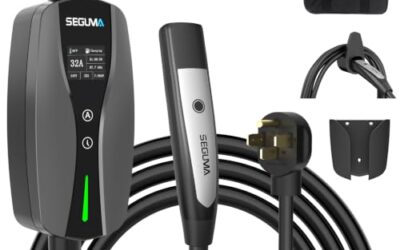
Why some EV charging adapters do not support DC charging comes down to more than plug shape: DC fast charging needs suitable power connections, vehicle communication, and compatible hardware at both ends. An adapter that works for AC charging may only route AC conductors, so it cannot make a DC charger work with a vehicle that lacks the matching DC charging path.
- AC and DC charging use different power paths and communication requirements.
- A connector that physically fits does not prove an adapter supports DC charging.
- Vehicle model year, region, software, charging network, and adapter type can change compatibility.
- Use an adapter only for the exact charging direction and use case approved for your vehicle and charger.
Many EV adapters connect one AC charging connector standard to another. They may route alternating-current power and the signals used to start and control AC charging. DC fast charging uses a different power path: the charger supplies direct current to the vehicle’s battery system, and the vehicle and charger must exchange information before and during charging.
That difference is why a simple AC adapter cannot be assumed to work at a DC fast charger. It may lack the DC power contacts, wiring, communication connections, or control functions required for fast charging. An adapter does not turn AC into DC or add a DC charging system to a vehicle.
With DC fast charging, conversion from grid power to the DC power used by the battery happens in the charging station, not in a basic connector adapter. The vehicle’s battery management system and charging hardware still need to accept the charger’s output and communicate correctly. The vehicle may also need to authorize the session and manage charging limits.
AC and DC adapters solve different compatibility problems
| Charging setup | What adapter may do | What it cannot establish by itself |
|---|---|---|
| AC charging | Connect compatible AC plugs and route the required AC and control connections. | That every vehicle, EVSE, and adapter combination will communicate or charge. |
| DC fast charging | Connect a specifically supported vehicle inlet and DC charger interface. | That the vehicle supports the charger’s DC protocol, power path, or network access. |
| AC-to-DC conversion | A basic passive adapter does not perform this conversion. | That an AC charging connection can become DC fast charging through a plug change. |
For example, the J1772 connector is commonly used for AC charging in North America. A CCS1 inlet combines a J1772-shaped upper section for AC with additional lower contacts used for DC charging. An adapter that only connects the AC portion does not provide those DC contacts or the related charging functions.
NACS is used for both AC and DC charging, but a shared connector shape does not make every adapter or vehicle combination compatible with both. Adapter design, vehicle support, software, and charger network rules still matter. Connector appearance is a clue, not a compatibility guarantee.
What a DC-compatible adapter needs to support
A DC adapter must be made for the specific connection direction and charging standards involved. Depending on the system, its design may need to carry high-voltage DC, connect the correct power contacts, and support communication between vehicle and charger. The vehicle and station must also recognize one another and agree on charging conditions.
This is why DC adapters are not interchangeable simply because both ends fit. Some adapters are intended for AC charging only. Others are built and approved for a particular DC fast-charging path, such as connecting a supported vehicle to a specific charger type. A product’s stated use matters more than its physical shape.
Do not assume that an adapter works in both directions. A connector transition that lets one vehicle use a particular charger may not let a different vehicle use the same charger, or let the original vehicle use a different network. Charging direction, vehicle inlet, charger plug, and network support all need to match.
Compatibility factors that can change the answer
Vehicle model year and charging hardware
Vehicles with the same model name can have different inlets, charging hardware, or software by model year and market. Some vehicles may need a software update or an approved adapter for a particular DC network. Check the owner’s manual and vehicle maker’s current charging guidance for the exact model year and region.
Connector standard and charging direction
Identify the vehicle inlet and charger plug, then check what each adapter end is intended to connect. A connector may support AC, DC, or both, depending on its standard and implementation. Confirm whether the adapter is for AC charging or DC fast charging, and whether it is meant for the direction you need.
Voltage and current limits
DC fast chargers and vehicles operate within electrical limits. The vehicle and charger manage the charging session, but an adapter must also be rated for its intended use. The adapter cannot raise the vehicle’s maximum charging capability, and a higher-rated charger does not mean the vehicle will charge at that rate.
Communication, authorization, and software
DC charging requires communication between charger and vehicle. A failed session can result from an incompatible adapter, unsupported vehicle software, charger communication trouble, or network authorization. A connector that latches in place does not show that these systems are working.
Compatibility can also vary by charging network and location. Regional connector standards and vehicle configurations differ. Check current guidance for the specific vehicle, adapter, charger network, and country rather than relying on a general claim that an adapter supports “fast charging.”
How to check an adapter before using a DC charger
- Identify the vehicle inlet. Use the owner’s manual or vehicle maker’s charging information. Note model year and market.
- Identify the charger plug and type. Check whether the station offers AC charging or DC fast charging. Similar-looking plugs can serve different charging paths.
- Read the adapter’s intended use. Look for explicit DC fast-charging support, compatible connector standards, charging direction, and vehicle or network limits.
- Check vehicle and network guidance. Confirm that the vehicle maker and charging network support the adapter combination. Check for any required software update or account authorization.
- Stop if compatibility is unclear. Do not force a plug, modify an adapter, or use a unit with damaged contacts, exposed wiring, heat damage, or an uncertain rating.
For home charging context, the U.S. Department of Energy’s Alternative Fuels Data Center explains how EV home charging works. CarTechTalk’s EV Charging & Automotive Power section covers related charging topics.
Common mistakes
- Assuming a snug fit means DC compatibility. Physical fit does not confirm correct power connections or communication.
- Calling every high-power session “DC fast charging.” Charging speed alone does not identify whether a charger supplies AC or DC.
- Expecting an adapter to change the vehicle. A connector adapter cannot add missing DC charging hardware or raise the vehicle’s charging limit.
- Ignoring the charging direction. An adapter may work from one charger type to one vehicle inlet but not in reverse.
- Relying on a broad label. Terms such as “universal” or “fast charging” do not replace specific compatibility information for your vehicle and charger.
When to get professional help
Stop using the adapter if it becomes unusually hot, shows damage, produces an electrical smell, or repeatedly interrupts charging. Do not open or repair high-voltage charging equipment yourself. Contact the vehicle maker, charging network, or a qualified EV service professional when the correct adapter is uncertain or charging faults continue with a supported setup.
If a compatible charging session fails, note the vehicle model year, charger type, adapter model, error message, and whether the issue repeats at another supported station. Those details can help the network or service team separate an adapter mismatch from a charger fault or vehicle issue.
Gear that can help
If you need EV charging adapters or EV chargers for this job, these picks already appear in our EV charging adapters guides. Check the full guide for fit and who should skip each one.
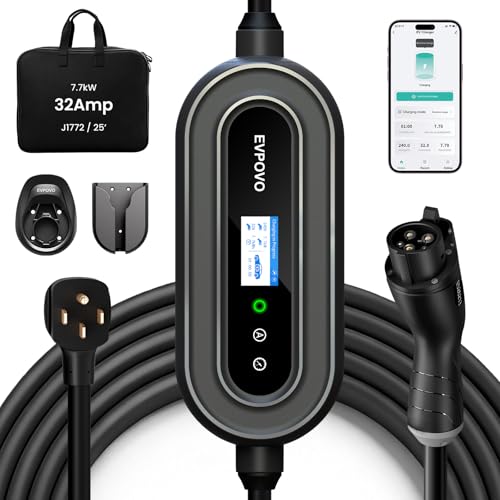
Pros
- Supports both Level 2 charging through a NEMA 14-50 connection and 120V emergency use
- Offers adjustable amperage settings for different breaker capacities
- Provides a long 25-foot cable and weatherproof NEMA Type 4 enclosure
- Lists compatibility with J1772 vehicles, including numerous Ford, Jeep, Toyota, Hyundai, Kia, Chevrolet, Volkswagen, Honda, Acura, BMW, and Rivian models
Cons
- The 120V 5-15 connector is described for emergency use rather than primary high-speed charging
- The source data does not identify a specific model number beyond the EVPOVO product name
Specifications
| Color | 32A Stone Blue J1772 |
|---|---|
| Dimensions | 15 x 10 x 6 inches |
| Product Group | Automotive Parts and Accessories |
Best For / Avoid If
Best for buyers prioritizing
- Supports both Level 2 charging through a NEMA 14-50 connection and 120V emergency use
- Offers adjustable amperage settings for different breaker capacities
- Provides a long 25-foot cable and weatherproof NEMA Type 4 enclosure
Consider another option if
- The 120V 5-15 connector is described for emergency use rather than primary high-speed charging
- The source data does not identify a specific model number beyond the EVPOVO product name

Pros
- Dual-voltage operation supports both 120V and 240V outlets
- Long 25-foot cable can reach vehicles in garages, driveways, and outdoor parking areas
- Adjustable current settings help match charging and electrical requirements
- Compatible with most North American J1772 EVs and PHEVs
Cons
- Tesla and other NACS-equipped vehicles require a compatible J1772 adapter
- The maximum 32A and 7.68kW charging specification applies to 240V NEMA 14-50 operation
- Charging controls use onboard buttons, with no Wi-Fi or mobile app specified
Specifications
| Color | black |
|---|---|
| Size | 32A |
| Weight | 10.3 Pounds |
| Product Group | Automotive Parts and Accessories |
| Binding | Tools & Home Improvement |
Best For / Avoid If
Best for buyers prioritizing
- Dual-voltage operation supports both 120V and 240V outlets
- Long 25-foot cable can reach vehicles in garages, driveways, and outdoor parking areas
- Adjustable current settings help match charging and electrical requirements
Consider another option if
- Tesla and other NACS-equipped vehicles require a compatible J1772 adapter
- The maximum 32A and 7.68kW charging specification applies to 240V NEMA 14-50 operation
- Charging controls use onboard buttons, with no Wi-Fi or mobile app specified

Pros
- Long 25-foot charging cable provides extended reach
- WiFi app supports charging control, scheduling, current adjustment, and energy tracking
- J1772 connector is compatible with North American EV and PHEV models
- Weatherproof IP66/NEMA-4 enclosure is suited to indoor or outdoor charging locations
Cons
- Requires a dedicated 50A circuit and a 4-prong NEMA 14-50 outlet
- Tesla charging requires a separate J1772-to-NACS adapter, which is not included
- Smart app features require a 2.4 GHz WiFi network with internet access
Specifications
| Color | Black |
|---|---|
| Size | 40 |
| Dimensions | 4.724409444 x 6.299212592 x 1.968503935 inches |
| Product Group | Automotive Parts and Accessories |
| Binding | Electronics |
Best For / Avoid If
Best for buyers prioritizing
- Long 25-foot charging cable provides extended reach
- WiFi app supports charging control, scheduling, current adjustment, and energy tracking
- J1772 connector is compatible with North American EV and PHEV models
Consider another option if
- Requires a dedicated 50A circuit and a 4-prong NEMA 14-50 outlet
- Tesla charging requires a separate J1772-to-NACS adapter, which is not included
- Smart app features require a 2.4 GHz WiFi network with internet access
For a closer look at a related choice, see Portable EV Charger Buying Guide, How to Inspect an EV Charging Cable Safely and How To Read An EV Charging Session Receipt.
FAQ
Can an AC adapter be used at a DC fast charger?
Not unless it is specifically made and supported for that DC charging connection. An adapter intended only for AC does not supply the DC contacts and functions required for fast charging.
Does a CCS or NACS plug always mean DC charging will work?
No. A connector standard may support DC, but the exact vehicle, adapter, software, charger, and network still need to be compatible.
Can an adapter make my EV charge faster?
No. An adapter does not raise the vehicle’s charging limit. Actual charging depends on vehicle capability, charger output, battery conditions, and the charging system’s controls.
Why does my DC adapter fit but the charger will not start?
A physical fit can coexist with a communication, authorization, software, or compatibility problem. Check the vehicle and network guidance, then contact the charging network or vehicle maker if the supported setup still fails.
Sources and further reading
- Charging Electric Vehicles at Home (Alternative Fuels Data Center): Overview of home EV charging and charging equipment.
- Procurement and Installation for EV Charging Infrastructure (Alternative Fuels Data Center): Information on EV charging infrastructure and installation.