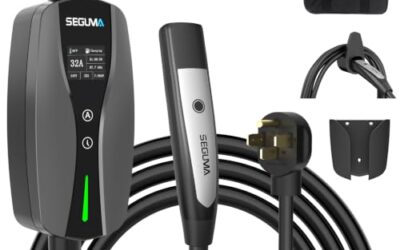
To inspect an EV charging cable safely, stop the charging session, disconnect it as the vehicle and charger manuals direct, and check the unplugged equipment for damage. Do not use a cable with exposed conductors, cracked connectors, heat damage, or signs of water inside; arrange qualified service or replacement instead.
Key takeaways
- Inspect the cable, both connectors, and any attached control box while equipment is unplugged and cool.
- Look for cuts, crushed sections, bent or loose contacts, discoloration, melted plastic, and corrosion.
- Keep damaged or wet equipment out of service. Do not open, splice, tape, or probe it.
- Check the cable and connector instructions for your specific charging equipment and vehicle. Connector type and model year can affect fit and charging support.
- A visual inspection can find visible problems, but cannot certify internal electrical safety.
Before inspecting an EV charging cable
First identify what you are checking. A portable charging cord, a permanently installed home EVSE cable, and a public charging station cable can have different designs and service procedures. The cable may also have an attached control box. Follow the instructions for that exact equipment rather than treating every cable as interchangeable.
End the charging session using the vehicle or charger controls, then disconnect in the order described in the manuals. Some systems lock the connector until the session ends. Do not pull hard, twist a locked plug, or disconnect equipment in a way the manufacturer warns against. If the connector will not release, stop and use the vehicle or station’s documented release procedure.
Inspect only equipment that is unplugged from the vehicle and power source, where the instructions allow you to disconnect it. Let hot equipment cool. Keep hands dry, and work in a well-lit, dry place. Never open the control box, remove a station cover, touch exposed wiring, or use a meter to probe charging contacts during a visual check.
How to inspect an EV charging cable safely: step-by-step
- Check the charging history and conditions. Note any recent charging interruption, fault message, unusual warmth, odor, or visible damage. These details help distinguish a cable concern from a vehicle, outlet, or charging-station problem. Do not keep charging to see whether a warning returns.
- Inspect the full cable length. Lay the unplugged cable out without stretching it. Look for cuts, deep scrapes, cracks, flattened or pinched areas, swelling, kinks, and sections with a changed shape. Pay close attention near the connector ends, where repeated bending can stress the cable. Surface dirt alone is different from damage through the outer jacket.
- Check both connector housings. Look for cracks, missing pieces, loose parts, distorted plastic, burn marks, and discoloration. Examine the plug face without putting fingers or tools into its openings. Contacts should not appear bent, pushed back, heavily corroded, or coated in debris. Do not scrape or bend contacts to make them fit.
- Inspect the vehicle-side latch and grip areas. Check for a broken latch, damaged release button, or a housing that seems loose. A connector that cannot latch or release as intended should not be forced into use. Vehicle inlet damage needs attention too, but do not probe or dismantle the inlet.
- Look over the control box and its cable entries. If your cord has an in-line control unit, check its enclosure, display, strain reliefs, and attached wires for cracks, loose seams, impact damage, or heat marks. Do not open the enclosure or attempt an internal repair.
- Check for moisture or contamination. Look for water inside a connector, condensation, mud, road salt, oil, or other material that could affect contact. Do not plug in wet equipment or use compressed air, solvents, or household cleaners unless the equipment instructions allow that cleaning method. If moisture may have entered a sealed part, contact the equipment provider.
- Check the power-end connection. For a portable charger, inspect the plug and cord where they meet, and check the outlet visually for scorching, cracks, or looseness. Do not remove outlet covers or touch wiring. For a permanently installed station, look only at accessible exterior parts; leave internal wiring and covers to a qualified electrician or service provider.
- Confirm connector and equipment match. Compare the connector with the vehicle’s charging inlet and the equipment label or manual. J1772 and NACS are not the same physical connector, and adapters have their own vehicle, charger, and regional limits. A connector that fits does not by itself prove the equipment supports the vehicle’s charging needs.
- Decide whether it can return to service. If you find damage, moisture inside, or any sign of overheating, keep the cable out of service. If inspection finds no visible damage, reconnect and charge only according to the equipment and vehicle instructions. Stop if a fault, unusual heat, smell, sound, or interruption occurs.
What findings mean: stop, clean, or ask for help?
| Finding | Safe response | Why it matters |
|---|---|---|
| Exposed wire, cut jacket, melted housing, burn marks, or cracked connector | Stop using the cable. Do not tape, splice, or bend it back into shape. | Visual inspection cannot establish that damaged insulation or contacts remain safe. |
| Connector is wet inside, or moisture may have entered a sealed control unit | Keep it disconnected and ask the equipment provider about service. | Drying the outside does not establish that internal parts are dry or undamaged. |
| Loose, bent, pushed-back, or corroded contact | Do not use tools to straighten or clean it. Contact the charger provider or a qualified service professional. | Contact damage can affect the connection and may worsen if forced. |
| Dust or loose debris on an accessible exterior surface | Clean only as the equipment manual permits, with equipment disconnected. | Cleaning methods vary; liquids or sharp tools can damage parts. |
| No visible damage, but charging still faults or stops | Record the displayed message and contact the vehicle or charger service provider. | A visual check cannot rule out an internal cable, vehicle, station, or supply fault. |
Why compatibility matters
Charging equipment compatibility depends on more than whether a plug appears to fit. Vehicle model year, inlet type, charging equipment, adapter approval, and regional electrical standards can affect what works. Some vehicles support more than one charging arrangement through approved equipment; others may require a specific connector or adapter. Use the vehicle manual and charger documentation to identify supported combinations.
Charging speed also depends on the vehicle, charger, and electrical supply, not cable appearance alone. Do not assume a cable is suitable because it worked with another EV. Do not use an unapproved adapter, extension cord, or improvised connector to overcome a mismatch. For background on home charging equipment and installation, see the Alternative Fuels Data Center guide to charging electric vehicles at home.
If you are comparing home charging setups, our overview of EV charger options for different home charging setups covers equipment choices. A buying guide cannot replace your vehicle or charger manual for cable inspection or compatibility.
Common mistakes
- Inspecting while charging. End the session and disconnect as directed before handling the cable. Do not handle contacts or open equipment while energized.
- Assuming a clean exterior proves safety. A cable can have an internal fault that a visual check cannot reveal. Charging errors or unusual heat still need attention.
- Using tape as a repair. Tape does not restore a cable’s original insulation, sealing, or strain relief. Do not splice or patch a charging cable.
- Forcing a connector. A plug that resists insertion or removal may be misaligned, locked, damaged, or incompatible. Follow the documented release steps and stop if it remains stuck.
- Cleaning contacts with improvised tools. Metal tools, abrasives, and unapproved fluids can damage contacts or leave residue. Follow the equipment maker’s cleaning instructions.
- Blaming the cable for every charging fault. A fault can involve the vehicle, charging station, outlet, or supply. Record the message and report it rather than replacing parts based on a guess.
When to get professional help
Keep equipment out of service and contact the charger manufacturer, station operator, vehicle dealer, or a qualified electrician when you see exposed conductors, melting, burn marks, a loose connector, repeated charging faults, or damage to a wall-mounted unit. Use an electrician for fixed wiring, outlet, or installation concerns. Do not remove station covers or attempt electrical repairs yourself.
For public charging equipment, stop using the cable and report the fault to the station operator. Do not leave a damaged plug where another driver might use it if the station has a fault-reporting process. If smoke, sparks, or active burning occurs, move away and contact emergency services as appropriate; do not touch the equipment.
Seek vehicle service if the inlet appears damaged, the connector will not latch or release through the normal procedure, or multiple known-compatible chargers produce a vehicle-side warning. A shop can diagnose the vehicle system; a visual cable check alone cannot identify the failed component.
Gear that can help
If you need EV chargers for this job, these picks already appear in our EV chargers guides. Check the full guide for fit and who should skip each one.

Pros
- Offers both Level 1 and Level 2 charging options
- Includes NEMA 6-20 and NEMA 5-15 connection options
- Provides up to 3.84kW output in Level 2 mode
- Includes automatic temperature-related power reduction and charging resumption
Cons
- Level 2 charging requires a dedicated NEMA 6-20 outlet
- The NEMA 5-15 connection must be manually adjusted to 12A
- Charging an 87kWh battery is listed as approximately 22.4 hours at Level 2 and over 60 hours at Level 1; actual time depends on the vehicle and circuit
Specifications
| Color | Black |
|---|---|
| Size | 16A J1772 Connector |
| Dimensions | 12 x 16 x 5 inches |
| Product Group | Automotive Parts and Accessories |
| Binding | Electronics |
Best For / Avoid If
Best for buyers prioritizing
- Offers both Level 1 and Level 2 charging options
- Includes NEMA 6-20 and NEMA 5-15 connection options
- Provides up to 3.84kW output in Level 2 mode
Consider another option if
- Level 2 charging requires a dedicated NEMA 6-20 outlet
- The NEMA 5-15 connection must be manually adjusted to 12A
- Charging an 87kWh battery is listed as approximately 22.4 hours at Level 2 and over 60 hours at Level 1; actual time depends on the vehicle and circuit
Pros
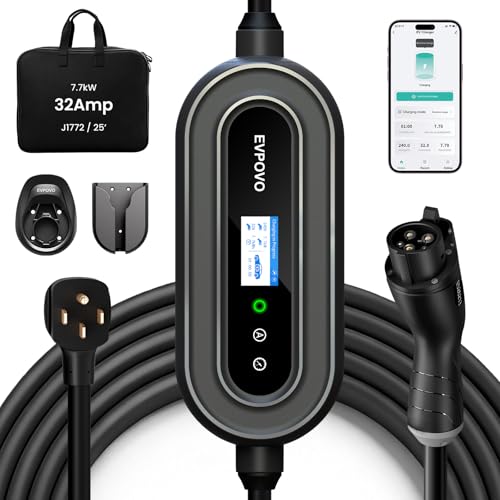
- Supports both Level 2 charging through a NEMA 14-50 connection and 120V emergency use
- Offers adjustable amperage settings for different breaker capacities
- Provides a long 25-foot cable and weatherproof NEMA Type 4 enclosure
- Lists compatibility with J1772 vehicles, including numerous Ford, Jeep, Toyota, Hyundai, Kia, Chevrolet, Volkswagen, Honda, Acura, BMW, and Rivian models
Cons
- The 120V 5-15 connector is described for emergency use rather than primary high-speed charging
- The source data does not identify a specific model number beyond the EVPOVO product name
Specifications
| Color | 32A Stone Blue J1772 |
|---|---|
| Dimensions | 15 x 10 x 6 inches |
| Product Group | Automotive Parts and Accessories |
Best For / Avoid If
Best for buyers prioritizing
- Supports both Level 2 charging through a NEMA 14-50 connection and 120V emergency use
- Offers adjustable amperage settings for different breaker capacities
- Provides a long 25-foot cable and weatherproof NEMA Type 4 enclosure
Consider another option if
- The 120V 5-15 connector is described for emergency use rather than primary high-speed charging
- The source data does not identify a specific model number beyond the EVPOVO product name

Pros
- Dual-voltage operation supports both 120V and 240V outlets
- Long 25-foot cable can reach vehicles in garages, driveways, and outdoor parking areas
- Adjustable current settings help match charging and electrical requirements
- Compatible with most North American J1772 EVs and PHEVs
Cons
- Tesla and other NACS-equipped vehicles require a compatible J1772 adapter
- The maximum 32A and 7.68kW charging specification applies to 240V NEMA 14-50 operation
- Charging controls use onboard buttons, with no Wi-Fi or mobile app specified
Specifications
| Color | black |
|---|---|
| Size | 32A |
| Weight | 10.3 Pounds |
| Product Group | Automotive Parts and Accessories |
| Binding | Tools & Home Improvement |
Best For / Avoid If
Best for buyers prioritizing
- Dual-voltage operation supports both 120V and 240V outlets
- Long 25-foot cable can reach vehicles in garages, driveways, and outdoor parking areas
- Adjustable current settings help match charging and electrical requirements
Consider another option if
- Tesla and other NACS-equipped vehicles require a compatible J1772 adapter
- The maximum 32A and 7.68kW charging specification applies to 240V NEMA 14-50 operation
- Charging controls use onboard buttons, with no Wi-Fi or mobile app specified
Next step: Best EV Charging Cable Organizer for Winter Storage and How to Troubleshoot Public EV Charging Payment Failures.
Frequently asked questions
How often should I inspect an EV charging cable?
Check it before use if it has been run over, sharply bent, exposed to impact, or stored in harsh conditions. A quick look during routine handling can also catch visible wear. Follow any inspection schedule in the cable or vehicle instructions.
Can I use an EV cable with a small cut in its outer jacket?
Do not use a cable with a cut that reaches or may reach its insulation or conductors. If you cannot tell whether damage is only superficial, keep it out of service and ask the equipment provider. Do not cover a cut with tape.
Can an EV charging cable get wet?
Weather ratings and permitted outdoor use vary by equipment. Follow the cable and charger instructions for rain and outdoor storage. Never connect a wet plug or use equipment with water inside a connector or control unit.
Can I test a cable with a multimeter?
A basic visual inspection does not require electrical probing, and testing procedures are equipment-specific. Do not probe charging contacts or open a control unit. Have a qualified service provider diagnose suspected internal faults.
Sources and further reading
- Charging Electric Vehicles at Home (Alternative Fuels Data Center): Learn about home charging equipment and charging arrangements.
- Procurement and Installation for EV Charging Infrastructure (Alternative Fuels Data Center): Review planning and installation considerations for charging infrastructure.