What to do if car electronics stop working on a road trip: move to a safe location, check whether the engine and safety systems still work, then inspect power, battery, fuses, and connections in that order. Do not keep driving if headlights, brake lights, hazard lights, steering assist, braking assist, or warning systems fail.
Modern vehicles combine 12-volt power, high-voltage hybrid or EV systems, control modules, networks, screens, phones, and accessory wiring. One weak battery connection can create many unrelated-looking symptoms. A calm, staged diagnosis helps separate a minor accessory problem from a fault that needs towing.
Key takeaways
- Pull off the road before troubleshooting.
- Check whether the problem affects one accessory or the whole vehicle.
- Inspect battery terminals, ground connections, fuses, and charging warnings.
- Do not replace a fuse with a larger fuse or metal object.
- Do not touch orange high-voltage cables on hybrid or electric vehicles.
- Use a scan tool only after basic power checks, and never treat code clearing as a repair.
- Call roadside assistance when critical lighting, braking, steering, or power systems fail.
Quick symptom-to-cause checklist
| Symptom | Possible cause | First safe check |
|---|---|---|
| Everything goes dark | Loose battery terminal, discharged battery, main fuse, ground fault | Stop driving and inspect visible battery connections |
| Engine runs, screen and radio fail | Accessory fuse, infotainment module, software lockup, low system voltage | Check other accessories and ignition-cycle once |
| Headlights or hazards fail | Fuse, switch, body-control fault, wiring problem | Use safe roadside lighting and arrange assistance |
| Battery warning appears | Alternator, belt, wiring, battery, or charging-control fault | Turn off nonessential loads and head toward a safe stopping place |
| Phone will not connect | Cable, USB port, phone setting, pairing, app, or firmware issue | Test another cable or connection without distracting the driver |
| EV or hybrid shows a power warning | 12-volt fault, traction-battery fault, charging-system fault, or control error | Follow vehicle warning instructions and avoid high-voltage components |
1. Get safe before diagnosing
Reduce speed and leave traffic lanes when electronics fail. Use hazards if they still work. Stop on a shoulder, parking lot, service area, or other location away from moving traffic. Set the parking brake and keep occupants clear of traffic.
At night or in poor weather, visibility matters more than diagnosis. Do not stand behind the vehicle to inspect wiring. If the vehicle cannot move safely, call roadside assistance or emergency services. Follow local rules for warning triangles, flares, and reflective gear.
Turn off the engine only when the vehicle sits in a safe place. Some vehicles need ignition power for electronic parking-brake operation, gear selection, or hazard-light control. Read the owner manual if a shutdown warning appears.
2. Identify what still works
Make a short inventory. Check engine operation, instrument cluster, headlights, brake lights, turn signals, hazard lights, horn, wipers, HVAC blower, radio, USB ports, windows, locks, and dashboard warnings.
One dead accessory points toward its fuse, switch, wiring, or control module. Several dead systems point toward low voltage, a ground problem, a main fuse, or a network fault. Electronics may also shut down during a low-voltage event to preserve starting power.
Ask whether failure began after a jump-start, battery replacement, heavy rain, an accessory installation, a collision, or charging an EV. Timing can narrow the search without proving cause.
3. Check battery power and visible connections
For a conventional gasoline or diesel vehicle, inspect the 12-volt battery only after parking safely. Look for a loose terminal, heavy corrosion, damaged cable, cracked case, or ground strap separated from body metal. Do not short terminals with tools.
A battery can show enough voltage for interior lights but fail under starter load. A basic voltage reading does not prove battery health. A load test or conductance test gives a better answer, but roadside testing equipment and vehicle specifications vary.
Do not disconnect the battery as a first response. Some vehicles lose window settings, radio security functions, learned values, alarm settings, or steering-angle data. Battery removal can also hide useful fault information.
Hybrid and EV models often use a separate 12-volt battery to power computers, locks, displays, and contactors. A charged traction battery does not guarantee that the 12-volt system works. Never touch orange cables, service plugs, or high-voltage components unless trained and authorized for that vehicle.
4. Look for charging-system warnings
A battery-shaped warning lamp often points to a charging-system problem, not a simple battery problem. Possible causes include an alternator, belt, cable, fuse, voltage regulator, or control fault. A vehicle may continue running briefly while battery voltage falls, then lose lights and engine control.
Turn off seat heaters, rear defroster, high-power audio, unnecessary USB devices, and other loads. Keep required lights and ventilation on when safety requires them. Drive only far enough to reach a safe stopping point if critical systems still function. A tow is safer when the warning remains on, lights dim, the belt is damaged, or the engine begins to stall.
5. Check fuses without creating another fault
Use the fuse diagrams in the owner manual. Vehicle fuse locations and ratings differ by model-year, trim, engine, and market. Some cars use several fuse boxes, including locations under the hood, inside the cabin, or near the trunk.
Inspect the fuse linked to the failed accessory. Replace it only with the same type and rating. If the replacement blows immediately, a short circuit or failed component may exist. Stop replacing fuses and arrange diagnosis.
Never install a larger fuse, wrap a fuse with foil, bridge terminals, or use a random fuse from another circuit. Those actions can overheat wiring and start a fire. Some high-current fuses need special tools or service procedures. Leave them alone if access is unclear.
6. Reset only low-risk electronics
Infotainment systems can freeze while the rest of the vehicle works. Park first. Turn the vehicle off, open and close the driver door, lock the vehicle, and wait several minutes before restarting if the manual permits that process.
Use the system’s documented reset method. Avoid repeated ignition cycling when the vehicle shows a powertrain, braking, steering, or high-voltage warning. A reset can clear a temporary software state, but it cannot repair damaged wiring, a weak battery, failed hardware, or a charging fault.
For phone and connectivity failures, try a different approved cable, another USB port, or Bluetooth pairing after parking. Phone OS versions, vehicle model-year, infotainment firmware, and regional software can change Apple CarPlay and Android Auto behavior. A phone connection problem usually does not explain dead headlights or a dead instrument cluster.
CarPlay model support varies by vehicle. Apple maintains a CarPlay available models list. Android Auto setup can depend on phone OS, cable quality, vehicle software, and regional support. Google documents current steps in its Android Auto setup guide.
7. Use a scan tool after basic checks
An OBD2 scan tool can show diagnostic trouble codes from supported modules. It may help identify low system voltage, communication loss, charging faults, or a failed sensor. Connector access, protocol support, and module coverage vary by vehicle model-year and scan tool.
Basic code readers often cover engine emissions data but cannot access body, airbag, ABS, steering, battery, or EV modules. Some vehicles also require security access or manufacturer-level software for service functions.
Record codes before clearing them. Clearing codes erases diagnostic clues and may reset readiness monitors. It does not repair the underlying fault. A code points toward a circuit or operating condition, not always a failed part. A low-voltage event can create many communication codes at once.
The SAE J1962 connector standard covers the physical diagnostic connector, while SAE J1979 covers diagnostic test modes. Vehicle software can still limit what a tool reads or controls.
Decision tree for roadside action
- Critical safety function failed? Stop driving. Call roadside assistance or emergency services if traffic creates immediate danger.
- Engine stopped or will not restart? Move occupants to safety if possible. Check for obvious battery connection problems only from a safe position. Arrange a jump-start or tow based on the manual and vehicle type.
- Battery or charging warning remains on? Turn off nonessential loads and seek a safe stop. Tow if lights dim, the belt is damaged, or stalling is likely.
- Only one accessory failed? Check its fuse and visible cable. Try one documented reset after parking.
- Several systems failed after rain, impact, or accessory work? Stop repeated resets. Water intrusion, damaged wiring, or a loose ground needs professional diagnosis.
- EV or hybrid warning appears? Follow the manual’s shutdown and roadside instructions. Do not open high-voltage covers or touch orange cables.
Common mistakes
- Continuing to drive with no headlights, hazards, brake lights, or instrument warnings.
- Assuming a new battery fixes every low-voltage code.
- Replacing a blown fuse with a higher-rated fuse.
- Disconnecting the battery before recording codes and settings.
- Using a jump-start procedure meant for a different vehicle type.
- Blaming a phone or infotainment system for a vehicle-wide power failure.
- Touching hybrid or EV high-voltage parts without training.
- Trusting a cheap scan tool to access every vehicle module.
When to get professional help
Get a tow or mobile technician when safety lighting, braking assist, steering assist, engine control, or charging functions fail. Professional help also fits repeated fuse failures, burning smells, hot cables, melted connectors, water inside fuse boxes, damaged wiring, and unexplained battery drain.
Ask for a charging-system test, battery test, voltage-drop test, fuse and ground inspection, and full-module scan when symptoms affect several systems. Give the technician the vehicle model-year, engine or powertrain type, warning messages, recent repairs, jump-start history, and every code recorded.
Aftermarket lighting, audio equipment, dash cameras, remote starters, trailer wiring, USB chargers, and alarm systems can create parasitic drain or network interference. Tell the technician about every modification, even if it worked before the failure.
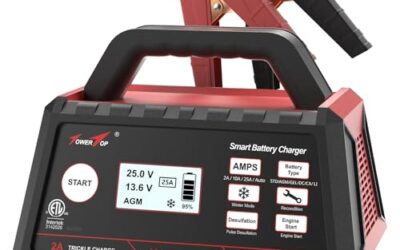
For tire pressure equipment and battery tools carried on long trips, keep vehicle-specific instructions with the gear. Related guidance on storing readings appears in digital tire pressure gauges with memory. Battery charging and testing equipment belongs to a separate category with its own connection and polarity limits, covered on the battery chargers and testers page.
Gear that can help
If you need jump starters or tire inflators or fast car chargers for this job, these picks already appear in our jump starters guides. Check the full guide for fit and who should skip each one.

Pros
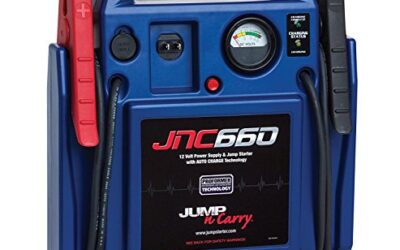
- Supports a stated range of gas and diesel engine sizes
- Combines jump-starting capability with power-bank and emergency-light functions
- Includes reverse-polarity, short-circuit, overheating, overvoltage, overload, deep-discharge, and overcurrent protections
- Provides a built-in handle for portability
Specifications
| Color | Gray-blue |
|---|---|
| Dimensions | 7.4409448743 x 3.6614173191 x 1.7716535415 inches |
| Weight | 1.4109584768 pounds |
| Product Group | Automotive Parts and Accessories |
| Binding | Automotive |
Best For / Avoid If
Best for buyers prioritizing
- Supports a stated range of gas and diesel engine sizes
- Combines jump-starting capability with power-bank and emergency-light functions
- Includes reverse-polarity, short-circuit, overheating, overvoltage, overload, deep-discharge, and overcurrent protections

Pros
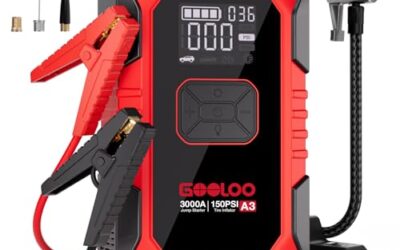
- Combines jump-starting, tire inflation, device charging, and emergency lighting in one unit
- Includes USB-C 65W charging and 160W DC continuous output
- Supports tire inflation for pickup trucks and smaller vehicles
- Provides listed protection features and a 24-month warranty
Cons
- Charging adapter is not included
- Vehicle compatibility is limited to the stated 12V system and engines up to 10L
- Amazon listing shows a 4.3 rating from 0 reviews, so review evidence is unavailable
Specifications
| Color | black and grey |
|---|---|
| Size | 4000A MV24A |
| Dimensions | 2.1653543285 x 5.2755905458 x 9.3700787306 inches |
| Weight | 5.3 pounds |
| Product Group | Automotive Parts and Accessories |
| Binding | Automotive |
Best For / Avoid If
Best for buyers prioritizing
- Combines jump-starting, tire inflation, device charging, and emergency lighting in one unit
- Includes USB-C 65W charging and 160W DC continuous output
- Supports tire inflation for pickup trucks and smaller vehicles
Consider another option if
- Charging adapter is not included
- Vehicle compatibility is limited to the stated 12V system and engines up to 10L
- Amazon listing shows a 4.3 rating from 0 reviews, so review evidence is unavailable

Pros
- High stated peak current and compatibility with gas engines up to 9.0L and diesel engines up to 7.0L
- Includes multiple listed electrical and temperature safety protections
- Combines jump-starting, USB-device charging, and emergency lighting in one device
- The package includes heavy-duty clamps and a storage case
Cons
- The listing does not identify a specific charging adapter or connector type
Specifications
| Color | red |
|---|---|
| Size | 3000A |
| Dimensions | 6 x 4.5 x 7 inches |
| Weight | 1.2 pounds |
| Product Group | Automotive Parts and Accessories |
Best For / Avoid If
Best for buyers prioritizing
- High stated peak current and compatibility with gas engines up to 9.0L and diesel engines up to 7.0L
- Includes multiple listed electrical and temperature safety protections
- Combines jump-starting, USB-device charging, and emergency lighting in one device
Consider another option if
- The listing does not identify a specific charging adapter or connector type
FAQ
Can a dead car battery make all electronics stop working?
Yes. A discharged battery, loose terminal, failed ground, or main fuse can shut down many systems. A battery test and voltage-drop test separate battery weakness from cable and charging faults.
Should I disconnect my car battery to reset electronics?
Usually no. Battery removal can erase settings, trigger security functions, and remove useful fault clues. Use the owner’s documented reset method first.
Can I drive with a battery warning light on?
Only far enough to reach a safe stopping place when vehicle functions remain normal. The vehicle may stall after stored battery power runs out. Tow service is safer when lights dim or critical systems act strangely.
Why did a jump-start create many warning lights?
Low voltage can interrupt communication between control modules. Some warnings clear after stable voltage and a proper drive cycle, while others need a scan and repair.
Can an OBD2 scanner fix stopped electronics?
No. A scanner reads data and codes, and some advanced tools perform service functions. It cannot repair a battery, fuse, wire, module, or charging system. Clearing codes only removes stored records.
Sources and further reading
- J1962 Diagnostic Connector standard (SAE International): Physical connector requirements for vehicle diagnostic equipment.
- J1979 E/E Diagnostic Test Modes standard (SAE International): Diagnostic test modes and data services used by supported scan tools.
- Check for Recalls (NHTSA): Search vehicle recalls by VIN or vehicle details.