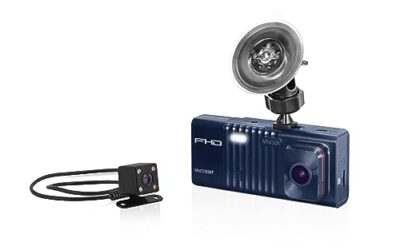

Dash cam parking mode is a feature that allows dash cameras to continue recording video when your vehicle is turned off and parked. This mode is crucial for vehicle owners who want to protect their car from theft or vandalism while it is not being driven. It uses built-in sensors to automatically detect events and start recording without any manual intervention from the driver.
In this article, we will explain what dash cam parking mode is, how it works, its benefits, how to set it up, limitations, and common mistakes to avoid. Understanding this technology helps you make informed decisions about vehicle security and choose the right equipment for your needs.
How Does Dash Cam Parking Mode Work?
When the car is parked, the dash cam remains powered by the vehicle’s battery or a dedicated capacitor. It uses various sensors to detect if the vehicle is being tampered with or if an incident is occurring. Common triggers include motion detection, where the camera senses movement in its field of view, or impact sensors that detect sudden changes in acceleration, indicating a collision or forced entry.
Once triggered, the dash cam starts recording in high definition, often with a loop recording system that overwrites old footage when the memory card is full. This ensures continuous coverage without manual resets in most cases. The process begins with the dash cam entering a standby mode when the car is parked. It monitors its sensors continuously. When an event is detected, it switches to recording mode, saving the footage to the SD card.
This setup is particularly useful in urban areas where parking is common and incidents can occur at any time. For example, in residential neighborhoods, it can record if someone is tampering with your car. In parking lots, it can capture accidents involving your vehicle. The recording is usually in 1080p or 2K resolution to ensure clarity of the incident. It is important to note that parking mode does not interfere with normal driving mode when you start the car. The dash cam will automatically switch back to normal recording once the vehicle is started and the ignition is on. This seamless transition is a key feature of well-designed dash cams.
Benefits of Dash Cam Parking Mode
One of the main benefits is deterrence. A visible dash cam can discourage potential thieves from targeting your vehicle. It also provides evidence in case of an accident or break-in. The recorded footage can be used for insurance claims or police reports. Additionally, it offers peace of mind knowing that your car is being monitored even when you are not around.
Understanding the technology behind dash cam parking mode involves knowing that these devices are equipped with advanced electronics that allow them to operate independently of the vehicle’s ignition. Many use supercapacitors to store energy, which can provide power for several hours even if the battery is disconnected. The process begins with the dash cam entering a standby mode when the car is parked. It monitors its sensors continuously. When an event is detected, it switches to recording mode, saving the footage to the SD card.
This setup is particularly useful in urban areas where parking is common and incidents can occur at any time. For example, in residential neighborhoods, it can record if someone is tampering with your car. In parking lots, it can capture accidents involving your vehicle. The recording is usually in 1080p or 2K resolution to ensure clarity of the incident. It is important to note that parking mode does not interfere with normal driving mode when you start the car. The dash cam will automatically switch back to normal recording once the vehicle is started and the ignition is on. This seamless transition is a key feature of well-designed dash cams.
How to Set Up Dash Cam Parking Mode
To enable parking mode, you need a dash cam that supports this feature. Most modern dash cams have it built-in. To enable parking mode, you need a dash cam that supports this feature. Most modern dash cams have it built-in.
- Install your dash cam according to the manufacturer’s instructions.
- Connect the dash cam to a constant power source using a hardwire kit to ensure it stays powered when the car is off.
- Access the dash cam’s menu through the LCD screen or app if it has one.
- Enable motion detection and adjust the sensitivity settings.
- Set the recording quality and resolution for parking mode.
- Insert a high-quality SD card with sufficient capacity.
Make sure to check the compatibility with your vehicle’s voltage, usually 12V or 24V, and the connector type. Always ensure that the SD card is formatted correctly and is of sufficient speed, such as U3 or V30, for smooth video recording. In terms of power, using a hardwire kit is recommended over using the cigarette lighter socket, as the latter can be unreliable when the car is off. The hardwire kit connects directly to the car’s fuse box, providing constant power. This is essential for parking mode to function properly.
Limitations and Compatibility
Not all dash cams have parking mode. Some basic models may not support it. The effectiveness depends on the camera’s field of view and sensor quality. In some cases, it may not detect subtle movements. Weather conditions can affect performance, so choose a weatherproof dash cam. Some parking modes may have a time limit or require manual reset. Not all dash cams have parking mode. Some basic models may not support it. The effectiveness depends on the camera’s field of view and sensor quality. In some cases, it may not detect subtle movements. Weather conditions can affect performance, so choose a weatherproof dash cam. Some parking modes may have a time limit or require manual reset.
| Aspect | Details |
|---|---|
| Sensor Types | Motion, impact, or both |
| Power Source | Hardwire or capacitor |
| Recording Resolution | 1080p, 2K, 4K |
| Compatibility | 12V or 24V vehicle systems |
Legal aspects also play a role. In some regions, using dash cams is legal, but always check local laws regarding recording in public spaces. Some areas may have restrictions on recording in certain locations. However, for your own vehicle, it is generally fine. The footage can be used as evidence, but ensure it is not tampered with and is properly stored. Back up the recordings regularly to prevent loss of important data.
Common Mistakes When Using Dash Cam Parking Mode
One common mistake is not enabling the parking mode at all, which defeats the purpose. Another is using a low-quality SD card that does not support the required speed for smooth recording. Overlooking the power connection can lead to the dash cam turning off after the car is parked. Setting the sensitivity too low may miss important events. One common mistake is not enabling the parking mode at all, which defeats the purpose. Another is using a low-quality SD card that does not support the required speed for smooth recording. Overlooking the power connection can lead to the dash cam turning off after the car is parked. Setting the sensitivity too low may miss important events.
When to Get Professional Help
If your dash cam is not functioning properly in parking mode, it may be a hardware issue. Consult a professional technician or the manufacturer for troubleshooting. If your dash cam is not functioning properly in parking mode, it may be a hardware issue. Consult a professional technician or the manufacturer for troubleshooting.
Gear that can help
If you need dash cams for this job, these picks already appear in our dash cams guides. Check the full guide for fit and who should skip each one.

Pros
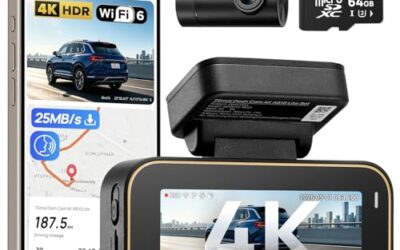
- Four-camera coverage records the front, rear, and both sides of the vehicle
- A 64GB memory card is included for immediate recording
- GPS and 5GHz Wi-Fi support app-based video management and location tracking
- The G-sensor automatically locks footage when sudden shakes or collisions are detected
Cons
- The parking monitoring function requires a separately purchased hardwire kit
Specifications
| Color | Gold |
|---|---|
| Dimensions | 1.5 x 2.2 x 6.3 inches |
| Product Group | Electronics |
Best For / Avoid If
Best for buyers prioritizing
- Four-camera coverage records the front, rear, and both sides of the vehicle
- A 64GB memory card is included for immediate recording
- GPS and 5GHz Wi-Fi support app-based video management and location tracking
Consider another option if
- The parking monitoring function requires a separately purchased hardwire kit

Pros
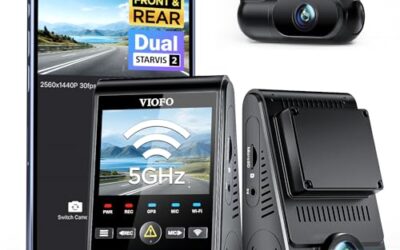
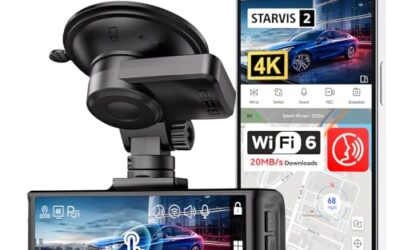
- High-resolution 4K front and 1080P rear recording
- STARVIS 2 sensor with WDR and HDR features for varied lighting conditions
- Supercapacitor design is specified as more heat-resistant than a lithium battery
- Includes an 18-month warranty and customer support
Cons
- A hardwire kit is needed for the listed parking modes
Specifications
| Color | black |
|---|---|
| Size | F7NP-128GB SD Card |
| Dimensions | 3.7401574765 x 1.46062991977 x 0.79133858187 inches |
| Weight | 0.25 Pounds |
| Product Group | Electronics |
| Binding | Electronics |
Best For / Avoid If
Best for buyers prioritizing
- High-resolution 4K front and 1080P rear recording
- STARVIS 2 sensor with WDR and HDR features for varied lighting conditions
- Supercapacitor design is specified as more heat-resistant than a lithium battery
Consider another option if
- A hardwire kit is needed for the listed parking modes

Pros
- Provides four-camera coverage around the vehicle
- Includes night vision with eight infrared lights and WDR technology
- Supports time-lapse, loop recording and incident-lock functions
- Offers Wi-Fi app integration for iOS and Android devices
Cons
- GPS tracking requires a separately sold GPS logger
- Parking mode requires a separately sold ACC hardwire kit
Specifications
| Color | Black |
|---|---|
| Size | Compact size |
| Dimensions | 6.5 x 1.8 x 2.5 inches |
| Weight | 0.3125 pounds |
| Product Group | Wireless |
| Binding | Electronics |
Best For / Avoid If
Best for buyers prioritizing
- Provides four-camera coverage around the vehicle
- Includes night vision with eight infrared lights and WDR technology
- Supports time-lapse, loop recording and incident-lock functions
Consider another option if
- GPS tracking requires a separately sold GPS logger
- Parking mode requires a separately sold ACC hardwire kit
FAQ
What is dash cam parking mode?
Dash cam parking mode is the ability of a dash cam to record video while the vehicle is parked and unoccupied, typically triggered by motion or impact.
How does dash cam parking mode differ from normal recording?
Normal recording happens when the car is in use, while parking mode activates automatically when the car is off and parked.
Does dash cam parking mode drain the car battery?
With a proper hardwire kit and capacitor, it draws minimal power and should not significantly drain the battery.
Which vehicles are compatible with dash cam parking mode?
Most modern vehicles with 12V or 24V systems are compatible, but check the dash cam’s specifications for your model year.
How long should the SD card be for parking mode?
A 128GB or larger card is recommended for extended parking surveillance without frequent overwriting.