Top Picks at a Glance
The safest SD card choice for a Thinkware dash cam is a Thinkware-branded card whose capacity is supported by your exact camera model. Of the 10 cards considered, the Thinkware 128GB MicroSD Card for Thinkware Dash offers the most balanced combination of capacity and documented Thinkware-specific positioning. The 256GB version is better suited to compatible cameras used extensively for parking surveillance, while the 32GB and 64GB versions cover lighter recording needs.
- Best balance for a compatible Thinkware camera: Thinkware 128GB MicroSD Card for Thinkware Dash
- Best for maximum supported capacity: THINKWARE 256GB MicroSD Card for Thinkware Dash
- Best lower-cost official option: THINKWARE 32GB MicroSD Card for Thinkware Dash
- Best middle-ground official option: THINKWARE 64GB MicroSD Card for Thinkware Dash
SanDisk, Samsung, VIOFO, and Gigastone offer endurance-oriented alternatives, but the published information does not confirm Thinkware-specific compatibility. Check your camera manual for its maximum capacity and card requirements before buying any third-party card.
CarTechTalk may earn a commission from qualifying purchases made through product links. This does not change how the cards are evaluated. Listed prices were observed when this guide was prepared and can change, so confirm the current price before ordering.

Pros
- High-endurance design is intended for continuous video recording
- 256GB capacity can store more Full HD or 4K video than lower-capacity versions
- Listed durability protections cover temperature, water, shock, humidity, and magnets
- Includes support for C10, U3, V30, and 4K UHD video
Cons
- The up-to-20,000-hour recording claim applies to Full HD video, with less recording time for 4K UHD
- Actual user storage is less than 256GB
- Nintendo Switch 2 compatibility is specifically excluded
The SanDisk 256GB High Endurance Video microSDXC Card with Adapter is designed for dash cams and home monitoring systems. It lists C10, U3, V30, and 4K UHD support and is compatible with Nintendo Switch, but not Nintendo Switch 2.
SanDisk states that the card can record for up to 20,000 hours of Full HD video. Actual saved video hours are lower for 4K UHD video, and total recording time depends on the device and video settings. The card has listed temperature-proof, water-proof, shock-proof, humidity-proof, and magnet-proof protection. These durability claims apply to the card only and are subject to the product packaging and official SanDisk limitations.
The stated capacity is 256GB, with actual user storage lower than the listed capacity.
Specifications
| Color | Black |
|---|---|
| Size | 256 GB |
| Dimensions | 0.6 x 0.4 x 0.1 Inches |
| Weight | 0.0100089866948 Pounds |
| Product Group | Personal Computer |
| Binding | Personal Computers |
Verify the current product variation before purchase; specifications may change.
Detailed Review
What stands out in the currently available product data:
- Designed for dash cams and home monitoring systems
- 256GB capacity for saving more video
- Supports C10, U3, V30, and 4K UHD video
- SanDisk states up to 20,000 hours of Full HD recording
- Built and tested for temperature, water, shock, humidity, and magnet resistance
- Includes an adapter
Best For / Avoid If
Best for buyers prioritizing
- High-endurance design is intended for continuous video recording
- 256GB capacity can store more Full HD or 4K video than lower-capacity versions
- Listed durability protections cover temperature, water, shock, humidity, and magnets
Consider another option if
- The up-to-20,000-hour recording claim applies to Full HD video, with less recording time for 4K UHD
- Actual user storage is less than 256GB
- Nintendo Switch 2 compatibility is specifically excluded

Pros
- High-endurance design is intended for extended-use applications
- Supports Ultra HD 4K recording
- Listed transfer speeds reach up to 100MB/s
- Includes waterproof, anti-X-ray, and anti-magnetic protection
Cons
- Detailed specifications were not provided
- Compatibility details beyond dash cameras and action cameras were not provided
- The published data does not specify a sustained write speed
The VIOFO 256GB Industrial Grade High Endurance microSDXC Card is designed for high-durability applications, including dash cameras and action cameras. It supports Ultra HD 4K recording and lists transfer speeds of up to 100MB/s for moving files between the card and a computer.
The published product information describes the card as waterproof, anti-X-ray, and anti-magnetic, making it suitable for harsh conditions. Detailed specifications and additional compatibility requirements were not provided.
Detailed Review
What stands out in the currently available product data:
- 256GB storage capacity
- Industrial-grade, high-endurance design
- Designed for dash cameras and action cameras
- Supports Ultra HD 4K recording
- Transfer speeds of up to 100MB/s
- Waterproof, anti-X-ray, and anti-magnetic protection
Best For / Avoid If
Best for buyers prioritizing
- High-endurance design is intended for extended-use applications
- Supports Ultra HD 4K recording
- Listed transfer speeds reach up to 100MB/s
Consider another option if
- Detailed specifications were not provided
- Compatibility details beyond dash cameras and action cameras were not provided
- The published data does not specify a sustained write speed

Pros
- Built for long-duration recording and repeated rewriting
- Supports high-resolution FHD and 4K video
- Specified operating temperature range of -25°C to 85°C
- Warranty coverage is listed as up to five years
Cons
- Operating-system and vehicle compatibility details are not provided
- The published data does not specify the adapter type or included accessories beyond the adapter
- Warranty duration may vary by capacity or other conditions
The Samsung PRO Endurance 128GB microSDXC Memory Card with Adapter is designed for continuous recording in CCTV systems, dash cams, and body cams. It supports FHD and 4K recording and lists read/write speeds up to 100/40MB/s.
- Capacity: 128GB
- Format: microSDXC
- Recording endurance: up to 140,000 hours
- Operating temperature: -25°C to 85°C
- Included accessory: adapter
- Warranty: up to five years
- Compatibility and operating-system requirements: not provided
Specifications
| Color | White |
|---|---|
| Size | 128GB |
| Dimensions | 0.03937 x 0.59055 x 0.43307 Inches |
| Weight | 0.000551155655 pounds |
| Product Group | Personal Computer |
| Binding | Personal Computers |
Verify the current product variation before purchase; specifications may change.
Detailed Review
What stands out in the currently available product data:
- Designed for continuous recording and rewriting in monitoring devices
- Supports dash cams, CCTV systems, and body cams
- Supports FHD and 4K video recording
- Read speeds up to 100MB/s and write speeds up to 40MB/s
- Rated for up to 140,000 hours of recording
- Includes a microSD adapter
Best For / Avoid If
Best for buyers prioritizing
- Built for long-duration recording and repeated rewriting
- Supports high-resolution FHD and 4K video
- Specified operating temperature range of -25°C to 85°C
Consider another option if
- Operating-system and vehicle compatibility details are not provided
- The published data does not specify the adapter type or included accessories beyond the adapter
- Warranty duration may vary by capacity or other conditions

Pros
- High-endurance TLC design is marketed for dash cams
- Supports UHS-I, A1, V30, and U3 classifications
- Includes useful accessories for SD-card-compatible devices
- Provides environmental protection claims including waterproof and shockproof construction
Cons
- The published data does not provide detailed operating-temperature limits or other environmental specifications
- The published data does not identify a specific dash cam model or vehicle compatibility beyond the listed brands
- Amazon review count is listed as 0, so no customer-review sample is available in the published data
The Gigastone 256GB MicroSD card is a TLC high-endurance MicroSDXC card with UHS-I, A1, V30, and U3 classifications. It is marketed for dash cams and is listed as compatible with REDTIGER, Rove, VIOFO, VANTRUE, PRUVEEO, and ARIFAYZ devices. The card supports read speeds up to 100MB/s, write speeds up to 60MB/s, and 4K Ultra HD video displaying and recording. It is described as waterproof, shockproof, temperature-proof, and X-ray-proof. The package includes one MicroSD card, one MicroSD-to-SD adapter, and one mini case. Gigastone lists a 5-year limited warranty and 5 years of free data recovery.
Detailed Review
What stands out in the currently available product data:
- 256GB storage capacity
- TLC high-endurance design for dash cam use
- Read speeds up to 100MB/s and write speeds up to 60MB/s
- Supports 4K Ultra HD video displaying and recording
- Waterproof, shockproof, temperature-proof, and X-ray-proof construction
- Includes a MicroSD-to-SD adapter and mini case
Best For / Avoid If
Best for buyers prioritizing
- High-endurance TLC design is marketed for dash cams
- Supports UHS-I, A1, V30, and U3 classifications
- Includes useful accessories for SD-card-compatible devices
Consider another option if
- The published data does not provide detailed operating-temperature limits or other environmental specifications
- The published data does not identify a specific dash cam model or vehicle compatibility beyond the listed brands
- Amazon review count is listed as 0, so no customer-review sample is available in the published data

Pros
- High-endurance design is intended for continuous recording applications
- Supports U3 and V30 video-speed classifications
- Includes an adapter for added device compatibility
- Designed for use in harsh conditions according to the published product information
Cons
- The stated recording time is for Full HD video, and actual saved hours are lower for 4K UHD video
- Compatibility and video support can vary by host device, file attributes, and usage conditions
- Nintendo Switch 2 compatibility is not supported
The SanDisk 128GB High Endurance Video microSDXC Card is designed for dash cams and home monitoring systems. It has C10, U3, and V30 classifications, supports Full HD and 4K UHD video when supported by the host device, and includes an adapter.
The card is described as temperature-proof, waterproof, shockproof, humidity-proof, and magnet-proof. SanDisk states that it can record for up to 10,000 hours under specified conditions, with actual saved hours varying by resolution and other factors. It is compatible with Nintendo Switch, but not Nintendo Switch 2.
Specifications
| Color | Black |
|---|---|
| Size | 128 GB |
| Dimensions | 0.4 x 0.6 x 0.1 Inches |
| Weight | 0.0100089866948 pounds |
| Product Group | Personal Computer |
| Binding | Personal Computers |
Verify the current product variation before purchase; specifications may change.
Detailed Review
What stands out in the currently available product data:
- Designed for dash cams and home monitoring systems
- High-endurance design supports recording for up to 10,000 hours under stated conditions
- Supports Full HD and 4K UHD video recording when compatible with the host device
- Includes a microSD card adapter
- Rated C10, U3, and V30
- Card is described as temperature-proof, waterproof, shockproof, humidity-proof, and magnet-proof
Best For / Avoid If
Best for buyers prioritizing
- High-endurance design is intended for continuous recording applications
- Supports U3 and V30 video-speed classifications
- Includes an adapter for added device compatibility
Consider another option if
- The stated recording time is for Full HD video, and actual saved hours are lower for 4K UHD video
- Compatibility and video support can vary by host device, file attributes, and usage conditions
- Nintendo Switch 2 compatibility is not supported

Pros
- Large 128GB capacity can reduce overwriting too soon while parked
- Designed for plug-in setup and camera formatting
- Suitable for commuters, rideshare drivers, and fleet vehicles
Cons
- Parking-event capture requires parking mode and hardwiring to be enabled
- Specific technical specifications are not provided
- Compatibility with non-THINKWARE dash cam systems is not stated
The THINKWARE 128GB MicroSD Card is designed for THINKWARE dash cam systems and provides storage for continuous driving recordings, loop recording, and parking surveillance. Its stated uses include motion and impact event capture when parking mode and hardwiring are enabled. The card is also described as suitable for time lapse and energy saving modes, with a plug-in setup followed by camera formatting.
- Capacity: 128GB
- Category: Micro SD Cards
- Intended use: THINKWARE dash cam recording and parking surveillance
- Specific technical specifications: Not provided
Detailed Review
What stands out in the currently available product data:
- 128GB capacity extends continuous dash cam coverage
- Designed for THINKWARE dash cam systems
- Supports loop recording for daily driving
- Intended for parking surveillance and parking-event capture
- Handles repeated write cycles for ongoing recording
- Provides storage for time lapse and energy saving modes
Best For / Avoid If
Best for buyers prioritizing
- Large 128GB capacity can reduce overwriting too soon while parked
- Designed for plug-in setup and camera formatting
- Suitable for commuters, rideshare drivers, and fleet vehicles
Consider another option if
- Parking-event capture requires parking mode and hardwiring to be enabled
- Specific technical specifications are not provided
- Compatibility with non-THINKWARE dash cam systems is not stated
Pros
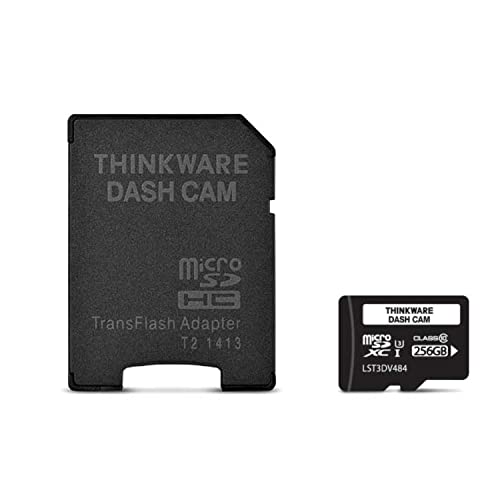
- Large 256GB storage capacity
- Supports seamless loop recording
- Designed for Thinkware dash cam use
- Suitable for front-facing camera, commuting, rideshare, fleet, and parking-surveillance applications
Cons
- Specific supported Thinkware dash cam models are not provided
- Operating temperature range and other detailed specifications are not provided
- Motion detection and time-lapse support is limited to select models
The THINKWARE 256GB microSD card is intended for Thinkware dash cams and provides storage for continuous recording with loop recording. Its listed features include cold-weather performance, stable writes to help reduce startup errors, and capacity designed to reduce overwrite frequency. Motion detection and time-lapse modes are supported on select models. Specific model compatibility and detailed technical specifications are not provided.
Detailed Review
What stands out in the currently available product data:
- 256GB capacity supports longer dash cam recording periods
- Loop recording helps preserve crucial clips during continuous recording
- Designed for use with Thinkware dash cams
- Stable writes are intended to reduce startup errors in cold conditions
- Ample capacity lowers overwrite frequency between recording loops
- Supports motion detection and time-lapse modes on select Thinkware models
Best For / Avoid If
Best for buyers prioritizing
- Large 256GB storage capacity
- Supports seamless loop recording
- Designed for Thinkware dash cam use
Consider another option if
- Specific supported Thinkware dash cam models are not provided
- Operating temperature range and other detailed specifications are not provided
- Motion detection and time-lapse support is limited to select models
Pros
- Designed specifically for Thinkware dash cams
- Supports continuous loop recording
- Supports motion and impact event capture in supported parking modes
- Offers in-camera formatting and computer file transfers
Cons
- Specific compatible Thinkware dash cam models are not listed
- Detailed technical specifications are not provided
- The listing does not provide operating-system or card-format requirements
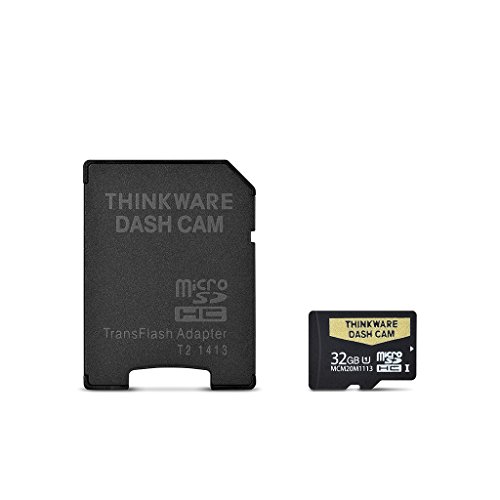
The THINKWARE 32GB microSD card is intended for use with Thinkware dash cams. It supports continuous loop recording and is described as providing reliable writes for daily driving, commutes, rideshare use, and road trips.
- Capacity: 32GB
- Recording: Continuous loop recording
- Event capture: Motion and impact recording in supported parking modes
- File management: In-camera formatting and computer transfers
- Compatibility: Thinkware dash cams; specific models are not provided
- Specifications: Detailed technical specifications are not provided
Detailed Review
What stands out in the currently available product data:
- 32GB capacity for storing dash cam footage
- Designed for Thinkware dash cam performance
- Supports continuous loop recording
- Intended to help reduce dropped frames, stutter, and recording corruption
- Supports motion and impact event capture in compatible parking modes
- Supports in-camera formatting and file management
Best For / Avoid If
Best for buyers prioritizing
- Designed specifically for Thinkware dash cams
- Supports continuous loop recording
- Supports motion and impact event capture in supported parking modes
Consider another option if
- Specific compatible Thinkware dash cam models are not listed
- Detailed technical specifications are not provided
- The listing does not provide operating-system or card-format requirements

Pros
- Designed for continuous dash cam recording
- 64GB capacity supports longer recording loops before overwriting
- Intended for Thinkware dash cam features including incident capture and parking surveillance
- Plug-in setup is described as suitable for new installations or replacements
Cons
- Specific compatible Thinkware dash cam models are not provided
- Read and write speed specifications are not provided
- Warranty and operating-temperature information are not provided
The THINKWARE 64GB MicroSD Card is a high-endurance memory card intended for Thinkware dash cams. The published product information describes it as suitable for continuous loop recording, parking surveillance when enabled, motion and incident capture, time-lapse, and motion detection on compatible models. Specific compatibility details, speed ratings, warranty information, and operating-temperature specifications are not provided.
Detailed Review
What stands out in the currently available product data:
- 64GB capacity for looped dash cam video recording
- High-endurance design intended for constant loop writes
- Supports continuous recording for daily driving and road trips
- Works with parking surveillance when the feature is enabled
- Supports motion and incident capture on compatible Thinkware models
- Supports time-lapse and motion detection modes on compatible models
Best For / Avoid If
Best for buyers prioritizing
- Designed for continuous dash cam recording
- 64GB capacity supports longer recording loops before overwriting
- Intended for Thinkware dash cam features including incident capture and parking surveillance
Consider another option if
- Specific compatible Thinkware dash cam models are not provided
- Read and write speed specifications are not provided
- Warranty and operating-temperature information are not provided

Pros
- Designed for high-durability recording applications
- Supports Ultra HD 4K recording
- Provides transfer speeds of up to 100MB/s
- Includes waterproof, anti-X-ray, and anti-magnetic protection
Cons
- Operating temperature and other detailed specifications are not provided
- Device-specific compatibility information is not provided
- The published data lists an Amazon rating of 4.2 from 0 reviews
The VIOFO 128GB industrial-grade high-endurance microSDXC card is intended for dash cams and action cameras, with an emphasis on extended recording durability. It supports Ultra HD 4K recording and transfer speeds of up to 100MB/s.
- Capacity: 128GB
- Card type: microSDXC
- Protection: Waterproof, anti-X-ray, and anti-magnetic
- Supported recording: Ultra HD 4K
- Transfer speed: Up to 100MB/s
- Other specifications: Not provided
Detailed Review
What stands out in the currently available product data:
- 128GB storage capacity
- Designed for extended-endurance recording
- Suitable for dash cams and action cameras
- Supports Ultra HD 4K recording
- Transfer speeds of up to 100MB/s
- Waterproof, anti-X-ray, and anti-magnetic design
Best For / Avoid If
Best for buyers prioritizing
- Designed for high-durability recording applications
- Supports Ultra HD 4K recording
- Provides transfer speeds of up to 100MB/s
Consider another option if
- Operating temperature and other detailed specifications are not provided
- Device-specific compatibility information is not provided
- The published data lists an Amazon rating of 4.2 from 0 reviews
Choosing Factors for Dash Cams & Vehicle Cameras
This guide is an editorial comparison of the published manufacturer specifications, intended uses, capacities, endurance claims, and prices. CarTechTalk did not perform road, thermal, or write-cycle testing on these cards.
Compatibility received the most weight. Dash cams continuously overwrite old video, so a card marketed for repeated dash-cam recording is more appropriate than a conventional general-storage card. However, being suitable for dash cams generally does not prove compatibility with a particular Thinkware model. The four Thinkware-branded options therefore receive the primary recommendations.
Capacity was considered in relation to loop recording and parking surveillance, without estimating recording hours because actual retention depends on the camera, channel count, resolution, frame rate, compression, and recording mode. No usable customer-review excerpts were provided, and each listed review count was zero, so ratings and buyer sentiment were excluded.
Comparison of the 10 Cards
| Card | Brand | Capacity | Observed price |
|---|---|---|---|
| SANDISK 256GB High Endurance Video microSDXC Card | SanDisk | 256GB | $65.99 |
| VIOFO 256GB Industrial Grade High Endurance | VIOFO | 256GB | $109.99 |
| Samsung PRO Endurance 128GB microSDXC Memory Card | Samsung | 128GB | $63.33 |
| Thinkware 128GB MicroSD Card for Thinkware Dash | THINKWARE | 128GB | $99.99 |
| 【5 Yrs Free Data Recovery】【Dash Cam】 GIGASTONE | Gigastone | 256GB | $69.99 |
| SANDISK 128GB High Endurance Video microSDXC Card | SanDisk | 128GB | $34.99 |
| THINKWARE 256GB MicroSD Card for Thinkware Dash | THINKWARE | 256GB | $149.99 |
| VIOFO 128GB Industrial Grade High Endurance | VIOFO | 128GB | $72.99 |
| THINKWARE 32GB MicroSD Card for Thinkware Dash | THINKWARE | 32GB | $39.99 |
| THINKWARE 64GB MicroSD Card for Thinkware Dash | THINKWARE | 64GB | $69.99 |
Sizing, Fitment, and Setup Notes
Check the Exact Thinkware Model First
Do not assume that every Thinkware dash cam supports 256GB simply because a Thinkware-branded 256GB card exists. Maximum capacity can vary by camera and firmware. Verify the supported card type, capacity, and any formatting instructions in the manual or official support material for your model.
Match Capacity to the Recording System
A front-only camera generally generates less data than a dual-channel or three-channel system at comparable settings. Higher resolution, frame rate, and bitrate can also shorten the amount of footage retained. Advertised resolution alone does not establish license-plate readability; motion, exposure, compression, glare, and the camera sensor also matter.
Larger cards do not improve image quality. Their principal benefit is a longer interval before ordinary footage is recycled, assuming the camera supports the capacity.
Use an Endurance-Oriented Card
Dash cams repeatedly write and erase data, making endurance-oriented cards preferable to cards designed mainly for occasional file storage. Speed labels such as C10, U3, and V30 address minimum performance classes, but they do not by themselves establish write-cycle life or camera compatibility.
Format and Inspect the Card
Format the card using the camera’s recommended procedure and schedule. Formatting removes footage, so export important clips first. Periodically confirm that new files open correctly rather than waiting until an incident reveals a recording problem. Replace a card if the camera repeatedly reports errors after correct formatting, but also check the camera, firmware, power connection, and card-slot condition before assuming the card alone is responsible.
Parking Mode and Vehicle Power
A larger card does not activate parking mode. Depending on the Thinkware camera and installation, parking recording may require a compatible hardwire kit or external battery. Low-voltage protection details were not provided for these cards because that protection belongs to the camera or power accessory, not the memory card.
Vehicle 12V and USB outlets may switch off with the ignition or remain live, depending on the vehicle. An always-live outlet can drain the starter battery. Consult the camera and vehicle documentation and see CarTechTalk’s supporting guides to how to hardwire a dash cam, dash cam parking mode, and dash cam battery drain.
What to Check Before Buying
- Find the camera’s supported capacity. Eliminate any card larger than the documented maximum.
- Confirm the required format and speed class. Do not rely solely on the card’s capacity.
- Estimate your retention needs. Frequent driving, multiple channels, and parking recording generally favor more capacity.
- Decide how much compatibility certainty is worth. Official Thinkware cards cost more in this comparison, while third-party Thinkware support is not documented in the published data.
- Plan ongoing maintenance. Check recordings, export incidents promptly, and format according to Thinkware’s instructions.
For a broader system-level decision, consult CarTechTalk’s guides to how to choose a dash cam and dash cam storage.
For related guidance on this topic, see Best Dash Cam Cameras for Cars by Channel Count and Budget, Best Dashcam and Best Dash Cam With Multiple Cameras.
Answers to Common Questions
Can I use any microSD card in a Thinkware dash cam?
No universal compatibility can be established from the published data. Check the manual for the exact model, including maximum capacity, card type, and formatting requirements. A card marketed for dash cams is not automatically approved for every Thinkware camera.
Is 128GB or 256GB better for a Thinkware dash cam?
Choose 256GB only if the camera explicitly supports it and you benefit from longer retention. Otherwise, 128GB is a more moderate choice. Neither capacity improves footage quality.
Does parking mode require a special SD card?
Parking recording benefits from an endurance-oriented card because it adds write activity, but the card does not provide power or activate parking mode. A compatible hardwire kit or external battery may be required.
How often should I format the card?
Follow the schedule and procedure in your Thinkware documentation; no universal interval was provided. Back up important files before formatting because the process erases stored footage.
Are dash cams legal to use?
Rules governing windshield placement, audio recording, and sharing footage vary. Mount the camera so it does not obstruct the driver’s view, tell occupants about cabin or audio recording when appropriate, and check applicable state and local requirements. This is general guidance, not legal advice.
Our Verdict
Among these 10 cards, the Thinkware 128GB MicroSD Card for Thinkware Dash is the most balanced recommendation when a camera supports 128GB. The official 256GB card is preferable for compatible systems that need more loop-recording or parking-surveillance retention, while the official 32GB and 64GB cards suit lighter use.
The SanDisk, Samsung, VIOFO, and Gigastone cards offer relevant endurance, capacity, or speed claims, but their published specifications do not verify Thinkware compatibility. Regardless of brand, confirm your exact camera’s supported capacity and formatting requirements before purchasing.