The best license plate backup camera for most buyers is not necessarily the model with the widest advertised field of view. It is the camera that matches the display’s signal format, video input, and supported resolution. Based on the published manufacturer specifications, the PixelMan Backup Camera,AHD 1080P Metal 170 Degree is the strongest fit for an AHD-capable display, while the eRapta ERT01 HD Backup Camera Rear View License is a more straightforward choice for a CVBS system. The eRapta Backup Camera, AHD & CVBS License Plate offers the most flexible listed signal support.
These are wired camera-only products, not complete backup-camera systems with displays. Confirm your screen or head unit has a compatible RCA video input before buying. Prices cited here were observed between $17.99 and $39.99 and can change.
The Quick Answer
- Best for an AHD-capable display: PixelMan PMD2A-S
- Best for AHD/CVBS flexibility: eRapta AGQT01
- Best straightforward CVBS option: eRapta ERT01
- Best full license-plate-frame design: GLK B07KH4ZQC4
- Best for a long vehicle: GLK B07Y5Z4WFP with its listed 32.8-foot cable
- Lowest observed price: Kairiyard license plate camera
CarTechTalk may earn a commission from qualifying purchases made through product links, without affecting the price you pay.
Pros
- AHD 1080P output is supported with a compatible display
- Wide-angle 170° lens is specified for rear visibility
- Alloy housing and IP69 waterproof protection are listed
- Two mounting options are included, including a license-plate bracket
Cons
- Requires a screen with an RCA input
- 1080P AHD output requires a display that supports AHD signals
- The listing states that it does not work with dash cams or mirror cameras
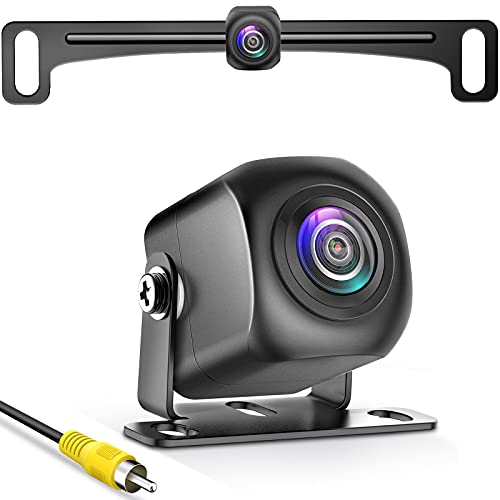
The PixelMan PMD2A-S is a vehicle backup camera with HD and AHD signal switching. The listing specifies 1080P AHD output when the camera is used with a compatible AHD display, along with a 170° wide-angle optical glass lens and a 1/2.7-inch AHD 1080P chip.
- Housing: Alloy construction with listed IP69 waterproof protection
- Connector: RCA
- Mounting: Two brackets, including a license-plate bracket option
- Cable: Thick copper-core power cable
- Compatibility: Designed for screen systems with RCA input; the listing states it does not work with dash cams or mirror cameras
- Included: Installation tools and accessories
Specifications
| Color | PMD2A-S-brb |
|---|---|
| Dimensions | 7.87 x 3.54 x 1.97 inches |
| Weight | 0.7054792384 pounds |
| Product Group | Wireless |
| Binding | Electronics |
Verify the current product variation before purchase; specifications may change.
Detailed Review
What stands out in the currently available product data:
- Supports HD and AHD signal switching
- Provides 1080P output when connected to a compatible AHD display
- Uses a 170° wide-angle optical glass lens
- Features a sturdy alloy housing and listed IP69 waterproof protection
- Includes two mounting brackets for different installation options
- Uses a thick copper-core power cable
Best For / Avoid If
Best for buyers prioritizing
- AHD 1080P output is supported with a compatible display
- Wide-angle 170° lens is specified for rear visibility
- Alloy housing and IP69 waterproof protection are listed
Consider another option if
- Requires a screen with an RCA input
- 1080P AHD output requires a display that supports AHD signals
- The listing states that it does not work with dash cams or mirror cameras
Pros
- AHD support enables the listed 1080P image output
- CVBS compatibility supports vehicles using that signal type
- RCA connectivity works with compatible radios, DVD players, OEM navigators and displays
- 12-24V DC compatibility covers a range of vehicle power systems
Cons
- The vehicle must support either AHD or CVBS video signals
- For CVBS vehicles, the blue wire must be cut before use
- An RCA video input is required, and the product's operating-system requirements are not provided
The eRapta AGQT01 is a vehicle backup camera for front or rear viewing in cars, pickups, SUVs, minivans and sedans. It supports AHD and CVBS signal types, with 1080P AHD output and an RCA video connection for compatible radios, DVD players, OEM navigators or displays.
- Power: 12-24V DC
- Video connection: RCA
- Signal types: AHD and CVBS
- Housing: IP69K-rated metal housing
- Vehicle compatibility: Cars, pickups, SUVs, minivans and sedans
- CVBS setup: Cut the blue wire before use if the vehicle uses CVBS
- Cable: 26-foot AV cable connection
Compatibility with the vehicle's supported video signal and an RCA video input should be confirmed before installation.
Specifications
| Color | Dark Black |
|---|---|
| Dimensions | 9.4 x 0.8 x 1 inches |
| Product Group | Wireless |
Verify the current product variation before purchase; specifications may change.
Detailed Review
What stands out in the currently available product data:
- Supports 1080P AHD video output
- Compatible with AHD and CVBS signal types
- Uses an RCA video connection
- Supports 12-24V DC power supplies
- IP69K-rated waterproof, dustproof and shockproof housing
- Designed for cars, pickups, SUVs, minivans and sedans
Best For / Avoid If
Best for buyers prioritizing
- AHD support enables the listed 1080P image output
- CVBS compatibility supports vehicles using that signal type
- RCA connectivity works with compatible radios, DVD players, OEM navigators and displays
Consider another option if
- The vehicle must support either AHD or CVBS video signals
- For CVBS vehicles, the blue wire must be cut before use
- An RCA video input is required, and the product's operating-system requirements are not provided

Pros
- Compatible with cars, pickup trucks, SUVs, minivans, and sedans that support CVBS video
- Long 26-foot RCA video cable supports connection to compatible radios, DVD players, OEM navigators, and displays
- Includes multiple mounting brackets and installation accessories
- Provides stated 149-degree viewing coverage and 10 LED night-vision lights
Cons
- Compatible with vehicles that support CVBS signal type only
- Requires a display with an RCA video input
- The published data does not provide a specific camera resolution or operating-system requirement
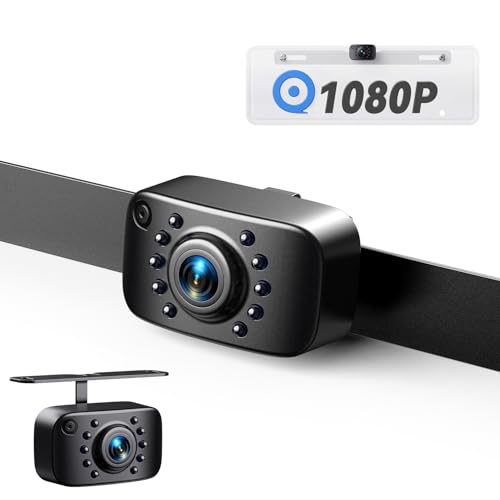
The eRapta ERT01 is a universal wired backup camera designed for cars, pickup trucks, SUVs, minivans, and sedans. It supports 12–24V DC power and connects to compatible radios, DVD players, OEM navigators, or other displays through a 26-foot RCA AV cable.
The camera has a stated 149-degree viewing angle with an adjustable up-and-down angle, six glass lenses, and 10 LED lights that automatically provide illumination when powered. Its housing is rated IP69K for dustproof, shockproof, and waterproof performance.
Compatibility is limited to vehicles that support CVBS video signal type. The package includes one backup camera, two metal brackets, one AV cable, one power cable, and an installation manual. The product listing also states a two-year warranty and lifetime technical support.
Specifications
| Color | Black |
|---|---|
| Size | 9.4*0.8*1 inch |
| Dimensions | 9.4 x 1 x 1.3 inches |
| Weight | 0.18 pounds |
| Product Group | Wireless |
| Binding | Electronics |
Verify the current product variation before purchase; specifications may change.
Detailed Review
What stands out in the currently available product data:
- Supports 12–24V DC power systems
- Uses a 26-foot RCA AV video cable for compatible displays
- Provides a stated 149-degree viewing angle with an adjustable up-and-down angle
- Includes 10 LED lights for night vision illumination
- Features an IP69K-rated housing
- Includes two metal brackets for license plate, trunk, side, or mirror mounting
Best For / Avoid If
Best for buyers prioritizing
- Compatible with cars, pickup trucks, SUVs, minivans, and sedans that support CVBS video
- Long 26-foot RCA video cable supports connection to compatible radios, DVD players, OEM navigators, and displays
- Includes multiple mounting brackets and installation accessories
Consider another option if
- Compatible with vehicles that support CVBS signal type only
- Requires a display with an RCA video input
- The published data does not provide a specific camera resolution or operating-system requirement
Pros
- Wide 170° viewing angle
- Adjustable lens angle with 45° up-and-down movement
- IP67-rated aluminum-zinc housing
- Eight-LED color night-vision design
Cons
- Monitor is not included
- License plate size should be checked before purchase
- Requires an NTSC-compatible display and trigger-wire connection when used with a car radio player
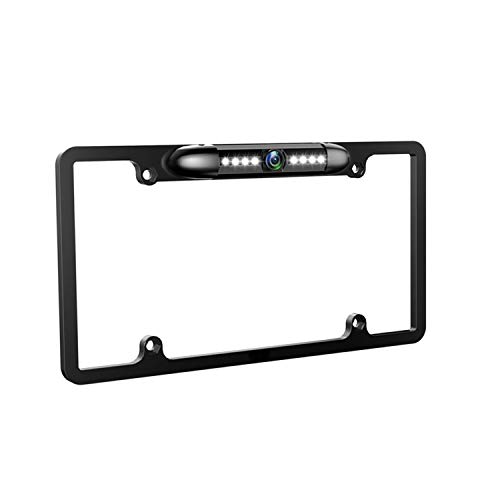
The GLK license plate backup camera is designed as a plate-frame-mounted rear camera for most vehicles that use a standard US license plate. It features a 170° viewing angle, an 8-LED color night-vision system, and a lens with 45° of physical up-and-down adjustment.
The aluminum-zinc housing is rated IP67 for waterproof, shockproof, and dustproof protection. The camera uses NTSC mode and CVBS video output. A green wire can be cut to disable the guide line, although the connected monitor may have its own guide-line setting. The camera is intended for rear use only, does not include a monitor, and requires the appropriate display mode and trigger-wire connection when connected to a car radio player.
Specifications
| Color | Black-USA License plate frame backup camera |
|---|---|
| Dimensions | 6.2598425133 x 3.1102362173 x 0.393700787 inches |
| Weight | 0.04 Pounds |
| Product Group | Wireless |
| Binding | Electronics |
Verify the current product variation before purchase; specifications may change.
Detailed Review
What stands out in the currently available product data:
- 170° viewing angle for a wide rearward view
- Eight LEDs provide color night vision for dark locations
- IP67-rated housing is described as waterproof, shockproof, and dustproof
- Camera lens angle adjusts 45° up and down
- Guide line can be disabled by cutting the green wire
- Supports NTSC mode with CVBS video output
Best For / Avoid If
Best for buyers prioritizing
- Wide 170° viewing angle
- Adjustable lens angle with 45° up-and-down movement
- IP67-rated aluminum-zinc housing
Consider another option if
- Monitor is not included
- License plate size should be checked before purchase
- Requires an NTSC-compatible display and trigger-wire connection when used with a car radio player

Pros
- Wide 170-degree viewing angle
- Long 32.8-foot RCA cable is included
- Supports front or rear camera installation
- IP67 waterproof housing is specified
Cons
- Wired installation requires routing an RCA cable
- Changing front/rear mode or disabling guide lines requires cutting wire loops and restarting the radio or monitor
- Specific vehicle make and model compatibility is not provided
The GLK license plate backup camera is a wired front or rear-view camera with 750 TV lines, 960×576 pixel output, 7 LED night vision, and a 170-degree viewing angle. Its lens can be physically adjusted by 45 degrees. The camera uses an aluminum-zinc housing with an IP67 waterproof rating and includes a 32.8-foot RCA cable for 12V cars, vans, and trucks.
The camera defaults to rear-view mode with guide lines. Cutting the white wire loop changes it to front-camera mode, while cutting the green wire loop turns off the guide lines. The radio or monitor should be restarted after installation or cutting a wire loop.
Specifications
| Color | Black-HD Upgrade License plate frame backup camera |
|---|---|
| Dimensions | 12.2 x 6.34 x 0.31 inches |
| Product Group | Wireless |
| Binding | Electronics |
Verify the current product variation before purchase; specifications may change.
Detailed Review
What stands out in the currently available product data:
- 750 TV lines and 960×576 pixel image output
- 7 LED night vision with an automatic lighting feature
- 170-degree viewing angle with a physically adjustable 45-degree lens
- Can be configured for front or rear use
- Guide line can be switched off by cutting the specified green wire loop
- IP67-rated waterproof aluminum-zinc housing
Best For / Avoid If
Best for buyers prioritizing
- Wide 170-degree viewing angle
- Long 32.8-foot RCA cable is included
- Supports front or rear camera installation
Consider another option if
- Wired installation requires routing an RCA cable
- Changing front/rear mode or disabling guide lines requires cutting wire loops and restarting the radio or monitor
- Specific vehicle make and model compatibility is not provided

Pros
- Supports both front-view and rear-view installation
- Long 8 m/26.2 ft video cable is included
- Guide lines can be kept or removed by cutting the designated wire loop
- IP69K waterproof construction is specified
Cons
- A display screen is not included
- The monitor or radio must be restarted after cutting wire loops
- Connector type and detailed specifications are not provided
The GLK vehicle backup camera is designed for front or rear installation on 12V cars, SUVs, trucks, RVs, trailers, minivans, and sedans. It features HD day and night vision, 9 LED lights, a 149° wide viewing angle, an adjustable lens, and an IP69K waterproof design.
- Includes an 8 m/26.2 ft video cable
- Guide lines can be kept or removed
- Restart the monitor or radio after cutting wire loops
- Display screen not included
Detailed Review
What stands out in the currently available product data:
- HD day and night image support with a glass lens and upgraded chips
- Nine LED lights that automatically turn off in bright areas
- Selectable front or rear camera installation
- 149° wide viewing angle with an adjustable camera lens
- IP69K waterproof design for rain, fog, and snow conditions
- Includes an 8 m/26.2 ft video cable for longer vehicles
Best For / Avoid If
Best for buyers prioritizing
- Supports both front-view and rear-view installation
- Long 8 m/26.2 ft video cable is included
- Guide lines can be kept or removed by cutting the designated wire loop
Consider another option if
- A display screen is not included
- The monitor or radio must be restarted after cutting wire loops
- Connector type and detailed specifications are not provided

Pros
- Wide 170-degree fisheye lens
- Metal housing and stated IP69 waterproof rating
- Compatible with RCA-equipped NTSC displays
- Includes two mounting brackets and a mini 4-pin connector
Cons
- Requires an RCA connector and NTSC-compatible display; PAL systems are not compatible
- Supports 1080P devices only and is not compatible with dashcams, GPS devices, or in-car recording equipment
- A vehicle trigger wire must be connected when the vehicle has one
The Pixelman HD Backup Camera License Plate Rear View Camera is a wired vehicle backup camera with a 1/2.7-inch sensor chip, 170-degree fisheye lens, and noise reduction technology. It uses a metal housing, Nano sealant infusion, and a stated IP69 waterproof rating.
- Connection: RCA-equipped displays using the NTSC system
- Compatibility: Requires a 1080P-compatible display; PAL systems are not compatible
- Cable and connector: Pure copper shielded cable and mini 4-pin connector with proprietary cables
- Installation: Includes two installation brackets
- Additional requirement: A vehicle trigger wire must be connected if the vehicle has one
- Support: 30-day refund and 36-month replacement guarantee
Specifications
| Dimensions | 8.27 x 3.15 x 1.89 inches |
|---|---|
| Weight | 0.5070632026 Pounds |
| Product Group | Wireless |
| Binding | Electronics |
Verify the current product variation before purchase; specifications may change.
Detailed Review
What stands out in the currently available product data:
- Uses a 1/2.7-inch sensor chip and 170-degree fisheye lens
- Includes noise reduction technology for image quality in bright or dark conditions
- Features a metal housing with an IP69 waterproof rating
- Uses a pure copper shielded cable for signal transmission
- Includes two installation brackets and a mini 4-pin connector
- Offers a 30-day refund and 36-month replacement guarantee
Best For / Avoid If
Best for buyers prioritizing
- Wide 170-degree fisheye lens
- Metal housing and stated IP69 waterproof rating
- Compatible with RCA-equipped NTSC displays
Consider another option if
- Requires an RCA connector and NTSC-compatible display; PAL systems are not compatible
- Supports 1080P devices only and is not compatible with dashcams, GPS devices, or in-car recording equipment
- A vehicle trigger wire must be connected when the vehicle has one
Pros
- Combines a license plate frame with a rear-view camera
- Offers a wide stated 170° viewing angle
- Includes eight white LEDs instead of infrared lighting
- IP67 waterproof and shockproof construction is specified
Cons
- Only suitable for 12V DC power
- CVBS is the default video signal, and the listing does not provide connector details
- The listing does not provide detailed installation instructions or additional compatibility specifications
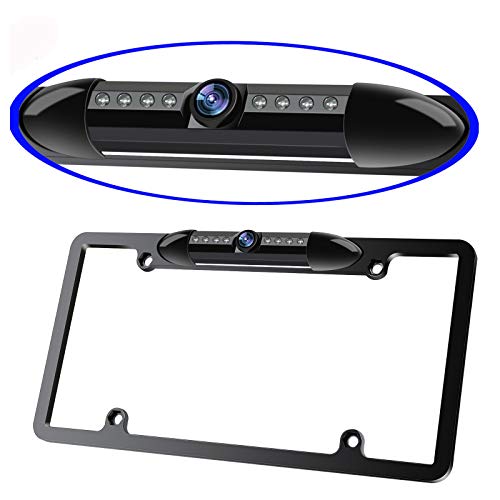
The ATOKIT license plate frame backup camera is designed for vehicles that use a standard US license plate. It uses a high-sensitivity color CMOS image sensor, provides a stated 170° viewing angle, and includes mirror-image functionality.
The camera uses a CVBS signal and is specified for 12V DC power. The white cable controls the ruler line: the listing states that cutting the cable disables the ruler line. Eight white LEDs are included for nighttime or dark-space visibility.
The housing is described as IP67 waterproof and shockproof. Connector type, detailed dimensions, and additional vehicle compatibility information are not provided in the published product data.
Detailed Review
What stands out in the currently available product data:
- Designed for vehicles using a standard US license plate
- Provides a stated 170° viewing angle
- Uses eight white LEDs for nighttime or dark-space visibility
- Features an IP67 waterproof and shockproof design
- Uses a CVBS video signal
- Includes ruler-line control through the white cable
Best For / Avoid If
Best for buyers prioritizing
- Combines a license plate frame with a rear-view camera
- Offers a wide stated 170° viewing angle
- Includes eight white LEDs instead of infrared lighting
Consider another option if
- Only suitable for 12V DC power
- CVBS is the default video signal, and the listing does not provide connector details
- The listing does not provide detailed installation instructions or additional compatibility specifications

Pros
- Wide 170-degree viewing angle is intended to help reduce blind spots while reversing
- Eight LED lights are provided for improved visibility in dark conditions
- License plate mounting does not require drilling according to the product description
- Includes a 19.7-foot RCA video cable for connection to a radio, screen, or monitor
Cons
- The listed 480P resolution is lower than higher-resolution backup camera options
- A compatible radio, screen, or monitor is required, but no display is included in the published data
- Operating-system requirements and detailed connector specifications are not provided
The Kairiyard License Plate Backup Camera is a rear-view camera for cars, trucks, SUVs, RVs, pickups, and trailers with 12V-24V vehicle systems. It provides a 480P image, a 170-degree viewing angle, eight LED lights for night visibility, and an IP69-rated housing made from aviation aluminum alloy. The camera has an adjustable vertical viewing angle of up to 45 degrees and mounts to a license plate frame without drilling according to the product description. Installation involves connecting the camera power to the reversing light and connecting the included 19.7-foot RCA video cable to a compatible radio, screen, or monitor.
Detailed Review
What stands out in the currently available product data:
- 480P image with stated true-color reproduction
- 170-degree wide viewing angle
- Eight LED lights for enhanced night vision
- IP69 waterproof housing with sealed glue-filling construction
- Adjustable vertical viewing angle up to 45 degrees
- Designed for 12V-24V vehicles, including cars, trucks, SUVs, RVs, pickups, and trailers
Best For / Avoid If
Best for buyers prioritizing
- Wide 170-degree viewing angle is intended to help reduce blind spots while reversing
- Eight LED lights are provided for improved visibility in dark conditions
- License plate mounting does not require drilling according to the product description
Consider another option if
- The listed 480P resolution is lower than higher-resolution backup camera options
- A compatible radio, screen, or monitor is required, but no display is included in the published data
- Operating-system requirements and detailed connector specifications are not provided
Evaluation Criteria for Dash Cams & Vehicle Cameras
We evaluated all nine products covered using manufacturer-listed signal formats, voltage requirements, connector information, cable length, mounting design, field of view, weather-resistance rating, and configurable features. Compatibility received more weight than promotional image-quality language because a camera using the wrong video standard may produce no image, a monochrome image, or an unstable signal.
No CarTechTalk installation or road evaluation evidence was provided. There were also no customer review excerpts or nonzero review counts available, so our recommendations do not rely on buyer feedback or Amazon ratings. Image quality, night performance, waterproof durability, and long-term reliability remain manufacturer claims rather than independently verified findings.
What to Verify Before You Buy
| Model | Observed price | Listed voltage | Signal information | Listed view | Weather rating |
|---|---|---|---|---|---|
| PixelMan PMD2A-S | $38.29 | Not provided | HD/AHD switchable | 170° | IP69 |
| eRapta AGQT01 | $39.99 | 12–24V DC | AHD/CVBS | Not provided | IP69K |
| eRapta ERT01 | $22.99 | 12–24V DC | CVBS | 149° | IP69K |
| GLK frame camera | $30.99 | Not provided | NTSC/CVBS | 170° | IP67 |
| GLK front/rear view | $31.99 | 12V | Not provided | 170° | IP67 |
| GLK B089LS12PH | $18.99 | 12V | Not provided | 149° | IP69K |
| Pixelman B08H4W9Z7Z | $35.98 | Not provided | NTSC/RCA | 170° | IP69 |
| ATOKIT frame camera | $36.99 | 12V DC | CVBS | 170° | IP67 |
| Kairiyard | $17.99 | 12–24V | Not provided | 170° | IP69 |
A factory infotainment display may not accept a generic RCA camera without an interface adapter, even when the vehicle already has a screen. Verify the video input and signal standard rather than assuming universal compatibility. AHD can carry higher-resolution analog video, while CVBS is a lower-resolution composite standard commonly accepted by aftermarket displays. NTSC and PAL are also not interchangeable unless the monitor supports both.
Most of these cameras are intended to receive power from the reverse-light circuit, which turns the camera on when reverse is selected. Installation requires identifying the correct positive and ground wires, routing video cable through the cabin, and protecting every exterior pass-through. If you are uncertain about vehicle wiring, use a qualified installer. Disconnect power before making connections, and do not route cables where they can interfere with airbags, pedals, hinges, or hot and moving components.
Matching One to Your Vehicle
- Start with the display. Confirm RCA input, AHD or CVBS support, NTSC compatibility where applicable, and the highest accepted resolution.
- Check vehicle voltage. Several options support 12–24V, while others are explicitly limited to 12V. Do not assume compatibility when voltage is not provided.
- Measure the cable route. Measure the actual path through trim and flexible boots, not a straight line from camera to dashboard. Longer vehicles benefit from the listed 26- to 32.8-foot cables.
- Choose frame or hidden-bracket mounting. A full frame is tidy but must not obscure plate numbers, registration stickers, or jurisdiction names. A compact bracket is less visually intrusive and may offer more placement flexibility.
- Treat viewing angle as a tradeoff. A wider lens shows more of the surrounding area but can make objects appear smaller and more distorted. An adjustable angle is important for keeping the bumper edge visible as a distance reference.
- Use guide lines cautiously. The listed guide lines are not documented as steering-responsive or vehicle-calibrated. Treat them as visual references, not exact clearance measurements.
Common Buying Questions
Will these cameras work with a factory screen?
Not necessarily. A factory screen may use a proprietary connector, digital bus, or coded camera interface rather than a conventional RCA input. An adapter may be required, but adapter compatibility is not provided in the published product data.
Does a license plate backup camera include a monitor?
No monitor is listed with these nine cameras. They are intended to connect to a compatible radio, monitor, or other in-vehicle display.
Is 170 degrees always better than 149 degrees?
No. A 170-degree lens provides broader coverage, but fisheye distortion can reduce the apparent size of obstacles. A 149-degree camera may offer a more natural perspective. Installation height and lens adjustment can matter as much as the advertised angle.
Do LED lights guarantee good night vision?
No. The manufacturers list LEDs on several models, but usable low-light detail also depends on the sensor, lens, exposure, display, vehicle lighting, and environmental glare. No comparative night footage or independent measurements were provided.
Can a rear camera be used as a front camera?
Only models with a listed front/rear orientation option should be considered for that use. The two switchable GLK cameras provide configuration loops for changing orientation. Restarting the radio or monitor after changing those loops is part of the manufacturer’s instructions.
Closing Recommendation
The best license plate backup camera depends first on signal compatibility. Choose the PixelMan PMD2A-S for a verified AHD-capable display, or the eRapta AGQT01 when AHD/CVBS flexibility is the priority. For a conventional CVBS installation, the eRapta ERT01 combines explicit signal documentation, 12–24V support, a 26-foot cable, and two mounting brackets.
Buy the GLK full-frame model when plate-frame integration matters, and consider the GLK front/rear camera when its 32.8-foot cable solves a long routing problem. Whichever model fits your use case, verify the display input, signal format, voltage, cable length, and plate-mount legality before ordering. Confirm the current price as well, since the observed prices can change.
For related guidance on this topic, see Best Rear View Backup Camera for Wired, Wireless, and Factory-Swap Installs, Best Backup Camera For Pickup Truck and Best Wireless Backup Camera for Trucks.