To check EV charging adapter compatibility, match the adapter to the vehicle inlet, charger plug, charging type, and electrical limits. Check your vehicle’s model year and manual, because connector support and approved adapter use can vary by vehicle and charging network.
- Identify whether you need AC charging or DC fast charging. An adapter for one type may not work for the other.
- Match both ends: one side must fit the charger plug, and the other must fit the vehicle inlet.
- Check vehicle, charger, and adapter limits. A connector that fits does not prove the setup can charge.
- For DC fast charging, confirm the vehicle and charging network support that specific adapter and charging route.
- Do not force connectors or use damaged, modified, or unapproved equipment.
How EV charging adapter compatibility works
An EV charging adapter changes the connector interface between a charger cable and a vehicle inlet. It does not automatically change charging type, raise the vehicle’s charging capacity, or make every charger compatible.
Compatibility is a match across the full charging path: charger, cable, adapter, vehicle inlet, and vehicle charging system. Each part has a role. The connector shape helps determine whether parts can physically mate, while electrical ratings and vehicle software determine whether charging can operate within allowed limits.
In the United States, drivers may encounter J1772 and NACS connectors for AC charging, plus CCS1 and NACS connectors for DC fast charging. Connector standards and vehicle support continue to change, so the model year matters. A vehicle may have a different inlet or approved charging options than a later version of the same model.
Use the vehicle owner’s manual and the automaker’s current charging guidance as the main reference. Check charger-network instructions too. A network may allow an adapter only for certain vehicles, stations, or charging directions.
How to check EV charging adapter compatibility step by step
- Record your vehicle details. Note make, model, model year, market, and inlet type. Use the manual or automaker account information if you are unsure. Trim can matter when charging equipment differs across versions.
- Identify the charging source. Determine whether the station or home charger supplies AC charging or DC fast charging. Check the charger label, screen, or network listing. Do not infer charging type from plug appearance alone.
- Read both connector names. Identify the charger-side plug and vehicle-side inlet. The adapter must match the plug on one end and the inlet on the other. Confirm direction: an adapter that lets one charger type connect to a particular vehicle may not work in reverse.
- Check vehicle approval. Look for adapter guidance from the vehicle maker or charging network. For DC fast charging, this check is especially important. Some combinations rely on vehicle and station communication, not only a physical connection.
- Compare electrical limits. Review the adapter’s rated voltage and current, then compare them with charger output and vehicle input limits. The lowest applicable limit governs the setup. The vehicle may charge below the charger’s advertised maximum.
- Check cable and environment limits. Follow instructions for outdoor use, temperature, storage, and strain relief. Use only equipment rated for the intended charging conditions. Do not let an adapter hang under cable tension.
- Inspect before use. Check for cracks, bent contacts, dirt, moisture, heat damage, or loose parts. Stop if connector pins or housing look damaged. Never force a plug into an inlet.
- Use the specified connection sequence. Follow instructions from the vehicle, charger, adapter, and network. If the charger displays an error, stop and consult the relevant manual or support channel rather than repeatedly reconnecting.
Compatibility checks by charging type
| Charging setup | What to match | Key limit |
|---|---|---|
| AC home or public charging | Charger plug, adapter direction, vehicle inlet, and AC ratings | Vehicle onboard charger sets how much AC power the vehicle can accept. |
| DC fast charging | Vehicle inlet, station plug, network approval, and supported adapter route | Physical fit alone does not establish DC charging communication or authorization. |
| Portable charging equipment | Vehicle connection, supply requirements, cable rating, and equipment instructions | An adapter does not make an unsuitable electrical supply safe or suitable. |
| Older or newly updated vehicle | Exact model year, market, inlet, and current automaker guidance | Connector and software support can differ across model years or updates. |
Connector fit is not the same as charging compatibility
A plug that slides into an adapter and an adapter that fits the vehicle are only the first checks. Charging equipment also has to support the correct charging method and communicate with the vehicle. A passive connector adapter cannot convert AC power to DC or make an unsupported charging protocol work.
Power limits also remain in place. If a charger can supply more power than the vehicle can accept, the vehicle generally controls its intake within its own operating limits. The adapter must still be rated for the setup, and the charger or vehicle may restrict or refuse charging if requirements do not match.
Charging speed can vary with battery temperature, state of charge, station output, and vehicle limits. Do not treat the adapter’s rating as a promise of a particular charging speed.
Model year, region, and software can change the answer
Automakers can change inlet types or charging support between model years. A nameplate alone is not enough to identify compatibility. Confirm the exact vehicle version and market, especially when the car was imported or has had charging equipment changed.
Software and network support can also affect charging. A vehicle may need a software update or an account setting for a network feature, while a charger may follow its own compatibility list. Phone operating system compatibility matters only when an app or account is required to start or manage charging; it does not change the adapter’s electrical fit.
For home charging, installation and supply requirements are separate from connector compatibility. The U.S. Department of Energy’s home charging overview explains common home charging arrangements. For a broader view of charging setup decisions, see CarTechTalk’s EV charger guide for home charging setups.
Common mistakes
- Buying by connector shape alone. The adapter can fit while the vehicle, network, or charging protocol still rejects the connection.
- Mixing AC and DC adapters. AC charging adapters are not substitutes for DC fast-charging adapters.
- Ignoring direction. Adapter names and listings may describe charger-to-vehicle direction. Confirm which connector goes on each end.
- Assuming newer means universal. A newer inlet does not guarantee support at every station or with every adapter.
- Using an adapter to solve a power-supply problem. It cannot correct an unsuitable circuit, damaged cable, or incompatible charger.
- Relying on another driver’s setup. Similar vehicle names can hide differences in model year, market, inlet, or software support.
When to get professional help
Stop and contact the vehicle maker, charger network, or a qualified EV charging electrician when instructions conflict, the setup repeatedly fails, or a connector becomes unusually hot, smells burnt, sparks, or shows damage. Do not open or modify charging equipment. For home electrical concerns, use a qualified electrician who can assess the installed equipment and applicable requirements.
If a public station reports an error, note the station ID and message, then contact the network. A fault may come from the station, vehicle, adapter, account, or connection. Do not assume the adapter is the cause based on one failed session.
Gear that can help
If you need EV charging adapters or EV chargers for this job, these picks already appear in our EV charging adapters guides. Check the full guide for fit and who should skip each one.

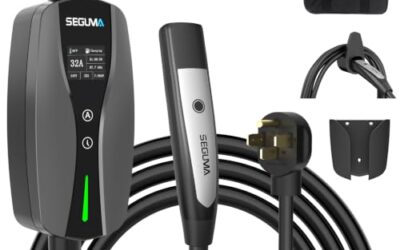
Pros
- Supports both Level 1 and Level 2 charging
- Includes connections for compatible 120V and 240V outlets
- Provides adjustable current and delayed-charging controls
- Offers J1772 compatibility for listed BEV and PHEV applications
- Includes ETL certification, FCC listing, and a stated two-year warranty
Cons
- Not compatible with Tesla vehicles or NACS connectors
Specifications
| Color | BLACK |
|---|---|
| Size | BLACK,SAE,J1772 |
| Dimensions | 2.2 x 3.03 x 9.17 inches |
| Weight | 7.7 Pounds |
| Product Group | Automotive Parts and Accessories |
Best For / Avoid If
Best for buyers prioritizing
- Supports both Level 1 and Level 2 charging
- Includes connections for compatible 120V and 240V outlets
- Provides adjustable current and delayed-charging controls
Consider another option if
- Not compatible with Tesla vehicles or NACS connectors
Pros
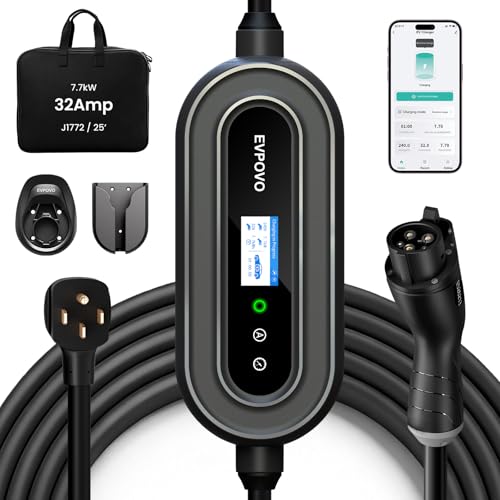
- Supports both Level 2 charging through a NEMA 14-50 connection and 120V emergency use
- Offers adjustable amperage settings for different breaker capacities
- Provides a long 25-foot cable and weatherproof NEMA Type 4 enclosure
- Lists compatibility with J1772 vehicles, including numerous Ford, Jeep, Toyota, Hyundai, Kia, Chevrolet, Volkswagen, Honda, Acura, BMW, and Rivian models
Cons
- The 120V 5-15 connector is described for emergency use rather than primary high-speed charging
- The source data does not identify a specific model number beyond the EVPOVO product name
Specifications
| Color | 32A Stone Blue J1772 |
|---|---|
| Dimensions | 15 x 10 x 6 inches |
| Product Group | Automotive Parts and Accessories |
Best For / Avoid If
Best for buyers prioritizing
- Supports both Level 2 charging through a NEMA 14-50 connection and 120V emergency use
- Offers adjustable amperage settings for different breaker capacities
- Provides a long 25-foot cable and weatherproof NEMA Type 4 enclosure
Consider another option if
- The 120V 5-15 connector is described for emergency use rather than primary high-speed charging
- The source data does not identify a specific model number beyond the EVPOVO product name
Related reading: How to Inspect an EV Charging Cable Safely and What To Check Before Buying A Used EV Charging Cable.
Frequently asked questions
Can an EV charging adapter increase charging speed?
No. An adapter connects compatible equipment; it does not raise the vehicle’s charging limit or the station’s available output. Charging speed depends on the vehicle, charger, battery conditions, and other operating limits.
Can I use one adapter for AC and DC charging?
Do not assume so. AC and DC charging use different electrical paths and requirements. Use an adapter specifically approved for the charging type and vehicle-network combination.
Does a connector that fits mean it is safe to charge?
No. Fit confirms only a physical connection. Check ratings, charging type, vehicle support, equipment condition, and instructions before charging.
Where can I check my vehicle’s approved adapter list?
Start with the owner’s manual and automaker’s current charging support pages. For public DC charging, also check the charging network’s instructions for your exact vehicle and station type.
Sources and further reading
- Charging Electric Vehicles at Home (Alternative Fuels Data Center): Explains common home charging equipment and setup considerations.
- Procurement and Installation for EV Charging Infrastructure (Alternative Fuels Data Center): Covers planning and installation considerations for EV charging infrastructure.