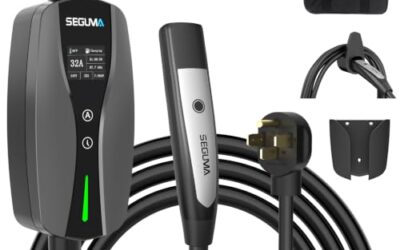
This guide explains how to stop an EV charging session safely: end charging through the vehicle, charger, or charging-network controls before removing the connector. Wait for the vehicle or charger to release the plug, then disconnect it without force. Exact controls vary by vehicle model year, charging equipment, connector, and network.
- Use the control that started or manages the session when possible.
- Wait for charging to stop and the connector lock to release before unplugging.
- Do not pull, twist, or pry a locked connector.
- Follow vehicle and charger instructions if controls fail or the plug stays locked.
For most charging sessions, stop power through the vehicle, charger, or charging network first. Confirm that charging has ended, unlock the connector if needed, then remove it by its handle. Keep the connector and cable clear of standing water, traffic, and trip hazards while disconnecting.
Public chargers and home charging equipment do not all use the same stop sequence. A vehicle may stop charging when a scheduled limit is reached, while a public charging network may require you to end the session in its app or at the charger. Use the instructions shown by your specific vehicle and equipment.
Step-by-step shutdown
- Park and check the equipment. Keep the vehicle in the state required by its manual. Check that the cable and connector look intact. If you see exposed wire, melting, smoke, or other damage, do not touch the equipment. Move away and contact the charging-site operator or emergency services if there is immediate danger.
- End the session using the available control. Use the vehicle’s charging menu, the charger’s stop button or screen, or the charging network’s app or instructions. If a payment card or account started the session, the network may require that same method to end it.
- Wait for charging to stop. Look for a stopped or completed status on the vehicle display, charger, or app. The display may take time to update. Do not treat an app connection error by itself as proof that power has stopped.
- Unlock the connector. Use the vehicle’s unlock control or key fob if the connector remains secured. Some vehicles keep the connector locked until charging ends or the doors are unlocked. Follow the vehicle manual; behavior can differ by model year and settings.
- Remove the connector by its handle. Pull straight out without yanking the cable. Do not force a plug that remains locked. For public charging, return the connector to its holder and follow the charger’s on-screen instructions.
- Check the session status. Confirm that the vehicle is no longer charging and that the public charging session has ended. If billing or session status remains unclear, contact the network operator using the number or support option shown on the charger.
Which control should stop charging?
The best stop control is usually the one tied to the active charging session. That could be a vehicle menu, charger interface, mobile app, or access card. The table gives a practical starting point, not a universal operating rule.
| Charging setup | First control to try | What to check |
|---|---|---|
| Home AC charger | Vehicle charging menu or scheduled-charge control | Confirm vehicle reports charging stopped before unplugging. |
| Public AC charger | Network app, charger screen, or the method used to start | Check both charger and vehicle status; then release the vehicle lock. |
| Public DC fast charger | Charger stop control or network app | Wait for the charger to end power transfer and the vehicle to release the connector. |
| Charge ends at a set limit | Vehicle display or charging app | Confirm the session ended, especially if billing continues by session time. |
AC charging and DC fast charging use different equipment and power paths, so their displays and shutdown behavior can differ. Connector standards also vary by vehicle and charging station. North American vehicles may use different AC and DC connector arrangements, and adapters or network features can add limits. Do not assume that a stop button, app screen, or connector-release method works the same way across every station.
What if the connector will not release?
A connector that stays locked may reflect an active session, a vehicle lock setting, a delayed status update, or a fault. Start with the least disruptive checks. Confirm that charging has stopped, use the vehicle’s unlock control, and follow the charger’s displayed directions. If the session began in an app, check that app for an end-session control or instructions.
Do not pull hard, twist the connector, use tools, or try to defeat the locking mechanism. Do not disconnect a home charger by opening electrical panels or handling wiring. If the cable or plug is hot, damaged, sparking, or making an unusual sound, stop interacting with it and contact the equipment operator or a qualified electrician, depending on location and equipment.
For a public station, contact the network operator if its controls do not end the session or the connector remains trapped. For a home charger, consult the charger and vehicle manuals. If the vehicle lock continues to malfunction after the charger session has ended, arrange service through a qualified repair facility or the vehicle maker’s support channel.
Home charging and scheduled sessions
Home charging often runs under a schedule, charge limit, or utility-rate setting. A vehicle can pause power without ending a schedule, and a charger can have its own controls. Check the vehicle display or charging app to distinguish a paused session from a completed one.
If you need to disconnect before a scheduled session ends, use the vehicle’s normal charging-stop or unlock procedure. Avoid switching off a circuit breaker as a routine way to stop charging. A breaker may be needed during an emergency or under specific instructions, but using it as a regular control can leave the vehicle or charger without a normal shutdown sequence.
Home charger installation and operation depend on the equipment and electrical setup. For related background, see the U.S. Department of Energy’s guide to charging electric vehicles at home and its information on EV charging infrastructure installation. CarTechTalk’s home EV charger guide covers charging setup considerations.
Common mistakes
- Pulling before the session ends. The vehicle may still lock the connector. Stop charging first, then wait for release.
- Using the wrong app or account. Public charging networks can manage sessions separately. Use the same network or access method used to start charging.
- Assuming a full battery ends billing. Session fees and idle fees depend on network terms. Check the charger or app for session status and applicable fees.
- Forcing a stuck plug. Force can damage the connector, vehicle inlet, or locking parts. Stop and seek operator or service help.
- Relying only on a phone notification. Phone OS, app version, network coverage, and charger firmware can affect alerts. Check the vehicle or charger display too.
- Unplugging someone else’s vehicle. Do not remove another driver’s connector unless they or the site operator directs you to do so.
When to get professional help
Contact the charging network or site operator when a public charger will not end a session, displays an error, or holds the connector after the vehicle is unlocked. Give the operator the station ID and any error message shown on the screen.
For home equipment, stop using a charger with visible damage, repeated shutdown faults, burning odor, or unusual heat. Contact a qualified electrician or the charger maker’s service channel. Do not open the charger or electrical panel unless you are qualified and the applicable instructions call for it.
Seek vehicle service if the connector lock repeatedly fails across different charging stations, remains engaged after charging ends, or the vehicle shows a charging-system warning. A warning does not by itself identify the failed part. A technician can diagnose the vehicle and its charging system using model-specific procedures.
Gear that can help
If you need EV chargers for this job, these picks already appear in our EV chargers guides. Check the full guide for fit and who should skip each one.
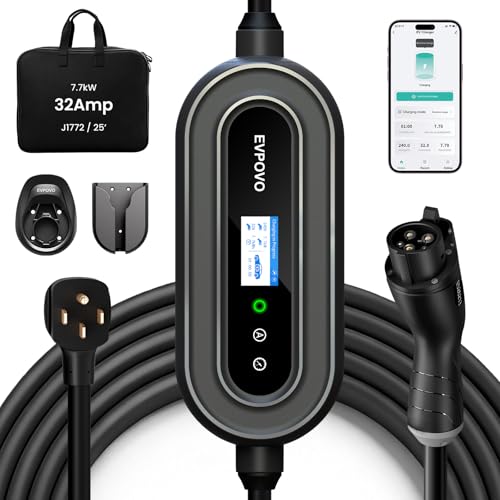
Pros
- Supports both Level 2 charging through a NEMA 14-50 connection and 120V emergency use
- Offers adjustable amperage settings for different breaker capacities
- Provides a long 25-foot cable and weatherproof NEMA Type 4 enclosure
- Lists compatibility with J1772 vehicles, including numerous Ford, Jeep, Toyota, Hyundai, Kia, Chevrolet, Volkswagen, Honda, Acura, BMW, and Rivian models
Cons
- The 120V 5-15 connector is described for emergency use rather than primary high-speed charging
- The source data does not identify a specific model number beyond the EVPOVO product name
Specifications
| Color | 32A Stone Blue J1772 |
|---|---|
| Dimensions | 15 x 10 x 6 inches |
| Product Group | Automotive Parts and Accessories |
Best For / Avoid If
Best for buyers prioritizing
- Supports both Level 2 charging through a NEMA 14-50 connection and 120V emergency use
- Offers adjustable amperage settings for different breaker capacities
- Provides a long 25-foot cable and weatherproof NEMA Type 4 enclosure
Consider another option if
- The 120V 5-15 connector is described for emergency use rather than primary high-speed charging
- The source data does not identify a specific model number beyond the EVPOVO product name

Pros
- Dual-voltage operation supports both 120V and 240V outlets
- Long 25-foot cable can reach vehicles in garages, driveways, and outdoor parking areas
- Adjustable current settings help match charging and electrical requirements
- Compatible with most North American J1772 EVs and PHEVs
Cons
- Tesla and other NACS-equipped vehicles require a compatible J1772 adapter
- The maximum 32A and 7.68kW charging specification applies to 240V NEMA 14-50 operation
- Charging controls use onboard buttons, with no Wi-Fi or mobile app specified
Specifications
| Color | black |
|---|---|
| Size | 32A |
| Weight | 10.3 Pounds |
| Product Group | Automotive Parts and Accessories |
| Binding | Tools & Home Improvement |
Best For / Avoid If
Best for buyers prioritizing
- Dual-voltage operation supports both 120V and 240V outlets
- Long 25-foot cable can reach vehicles in garages, driveways, and outdoor parking areas
- Adjustable current settings help match charging and electrical requirements
Consider another option if
- Tesla and other NACS-equipped vehicles require a compatible J1772 adapter
- The maximum 32A and 7.68kW charging specification applies to 240V NEMA 14-50 operation
- Charging controls use onboard buttons, with no Wi-Fi or mobile app specified

Pros
- Supports both Level 1 and Level 2 charging
- Includes connections for compatible 120V and 240V outlets
- Provides adjustable current and delayed-charging controls
- Offers J1772 compatibility for listed BEV and PHEV applications
- Includes ETL certification, FCC listing, and a stated two-year warranty
Cons
- Not compatible with Tesla vehicles or NACS connectors
Specifications
| Color | BLACK |
|---|---|
| Size | BLACK,SAE,J1772 |
| Dimensions | 2.2 x 3.03 x 9.17 inches |
| Weight | 7.7 Pounds |
| Product Group | Automotive Parts and Accessories |
Best For / Avoid If
Best for buyers prioritizing
- Supports both Level 1 and Level 2 charging
- Includes connections for compatible 120V and 240V outlets
- Provides adjustable current and delayed-charging controls
Consider another option if
- Not compatible with Tesla vehicles or NACS connectors
Related reading: How To Read An EV Charging Session Receipt and How to Inspect an EV Charging Cable Safely.
FAQ
Can I stop charging from the vehicle instead of the charger?
Often, yes, but the exact control depends on vehicle and charger. If the network started the session, its app or charger may also need to register the stop. Check that charging has ended at the vehicle and charger.
Should I unplug an EV while it is charging?
Use the normal stop procedure before disconnecting. Charging equipment and vehicle controls manage power transfer and connector locking; do not use force to remove a live or locked connector.
Why does my EV connector stay locked after charging stops?
The vehicle may require an unlock command, or the session may still be active. Check vehicle and charger status, then use the vehicle’s unlock control. If the connector remains stuck, contact the operator or vehicle service rather than forcing it.
Does reaching the battery’s charge limit stop the session?
Many vehicles can stop charging at a configured limit, but session behavior and network billing vary. Check the vehicle and charger displays to confirm the session ended.
Sources and further reading
- Charging Electric Vehicles at Home (Alternative Fuels Data Center): Explains home charging equipment and setup considerations.
- Procurement and Installation for EV Charging Infrastructure (Alternative Fuels Data Center): Covers EV charging infrastructure planning and installation.