Why an EV does not reach charger advertised speed usually comes down to limits in the vehicle, battery, charger, or electrical supply. The advertised figure is a maximum under specific conditions, not a promise that every charging session will hold that rate.
Start by checking whether the charger and vehicle use the same charging type, then compare the current rate with your vehicle’s limits and battery conditions. A short slowdown near a full battery can be normal; a low rate from the start may point to a setting, connection, site, or vehicle issue.
Key takeaways
- Charger power rating does not equal the rate every EV can accept.
- DC fast charging usually slows as the battery fills, especially near the upper end of the charge.
- Cold or hot battery conditions can reduce charging power until the battery reaches a suitable temperature.
- AC charging speed depends on the vehicle’s onboard charger and the available electrical supply.
- Compare charging power over time, not only one brief peak reading.
Why an EV does not reach charger advertised speed
Charging speed is governed by the lowest applicable limit in the charging chain. That chain includes the charging station, its power supply, the cable and connector, the vehicle’s charging hardware, and the battery’s current ability to accept energy.
For example, a high-rated DC station cannot make a vehicle accept more power than its charging system allows. A vehicle may also accept a strong rate briefly, then reduce it as battery conditions change. The exact limits vary by vehicle model and model year, battery version, software, and charging conditions.
Keep units in mind. Charger ratings are commonly shown in kilowatts (kW), which describe power. The vehicle’s screen may show kW, miles added per hour, or an estimated time to a target charge. Those figures describe different things, so a direct comparison may mislead.
Quick symptom-to-cause checklist
| What you notice | Possible reason | First safe check |
|---|---|---|
| Slow DC charging from the start | Battery is too cold or hot, vehicle has a lower power limit, or station output is constrained | Check vehicle charging guidance and station status |
| Fast start, then falling rate | Normal charging taper as the battery fills, or battery temperature changes | Compare rate with state of charge and session history |
| Low AC rate at home | Vehicle onboard charger limit, reduced current setting, or supply limit | Check vehicle and charger settings, then circuit information |
| One stall is slow, nearby stall works better | Station fault, shared power, or site-level limitation | Try another available stall if safe and practical |
| Charging repeatedly stops or faults | Connection, station, vehicle, or electrical fault | Stop repeated attempts if warnings persist; contact the operator or service provider |
Battery temperature and state of charge change the rate
A lithium-ion battery cannot accept maximum power in every condition. When the pack is cold, the vehicle may limit charging to protect it. Heat can also lead the vehicle to reduce power. Some EVs warm or cool the battery before a fast-charge stop, but availability and operation depend on model, software, settings, and route-planning system.
State of charge matters too. DC charging often follows a curve: power rises or peaks at lower charge levels, then tapers as the battery fills. The rate may drop well before the display reaches 100 percent. A station’s peak rating therefore does not describe the full session.
To judge whether a rate is plausible, note the battery percentage at plug-in, the temperature conditions, and how the rate changes. Compare those details with the vehicle maker’s charging guidance for your exact model and model year. A single reading cannot establish a fault.
Vehicle and charger limits are different
DC fast charging
For DC charging, the station supplies direct current to the vehicle’s battery system. The vehicle controls how much power it accepts. Its maximum may be below the station’s advertised peak, and that maximum may only apply within a limited range of battery conditions and charge levels.
Station output can also vary. Some sites share available power between charging stalls or reduce output because of equipment, site supply, or operating conditions. A charger screen or network app may show a stall fault or a reduced rate, but the details vary by provider.
AC charging
For AC charging, the vehicle’s onboard charger converts incoming alternating current for battery charging. The onboard charger’s limit can cap the rate even when a wall unit or public AC station has a higher rating. A lower supply setting or circuit limit can reduce it further.
Home charging depends on the vehicle, EVSE settings, installation, and electrical service. A portable charging cord and a permanently installed unit may offer different current settings. Do not change wiring, breakers, or current settings beyond instructions for the equipment and the home installation. For broader setup context, see our EV Charging & Automotive Power category.
Check these factors from easiest to most involved
- Confirm charging type and connector. Make sure the station is providing the type of charge your vehicle supports. Connector standards and adapter support vary by vehicle, model year, market, and charging network. An adapter does not raise the vehicle’s power limit.
- Check vehicle charge settings. Look for a reduced current limit, scheduled charging setting, battery-care setting, or charge target that affects the session. Menu names and available controls differ by vehicle and software version.
- Record state of charge and rate. Note the battery percentage when charging begins and whether the rate changes over the session. A falling DC rate at higher charge is often different from a low rate that stays low from the start.
- Consider battery temperature. Check the vehicle’s display or manual for battery conditioning information. Ambient temperature alone does not reveal the pack’s exact temperature.
- Check the station and session details. Look for an operator alert, connector fault, or site restriction. If another stall is open, a comparison can help separate a stall issue from a vehicle limit, but it does not prove which component is faulty.
- Compare with vehicle guidance. Use the manual or manufacturer support information for the exact model, battery, and model year. Similar-looking trims can have different charging hardware.
- Escalate recurring problems. Save session records and warning messages, then contact the charging network or vehicle service department. Avoid repeatedly forcing a session that stops with a fault.
Why charging apps and estimates can differ
A charger display, vehicle display, and network app may show different values because they can report different points in the charging process or update at different intervals. One may show station output while another reports power reaching the vehicle. Rounding, communication delays, and session interruptions can add more variation.
Estimated miles added per hour are not a direct measure of electrical power. The estimate depends on the vehicle’s energy use assumptions and may change with driving conditions, temperature, and vehicle settings. Use kW readings and session records when comparing charging rates, while remembering that even kW can fluctuate.
For home charging, our article on home EV charging setups covers setup considerations. The charger’s advertised output still needs to match both the vehicle’s AC charging capability and the available electrical supply.
Common mistakes
- Expecting the peak for the whole session. Peak power is not a sustained-rate guarantee, particularly during DC charging.
- Comparing unrelated vehicles. Battery size, chemistry, voltage architecture, and charging hardware vary by model and model year.
- Blaming the station after one session. Battery temperature, charge level, vehicle settings, and site conditions can each affect the result.
- Treating miles per hour as kW. Range estimates depend on vehicle energy use, so they cannot be converted into a fixed charging rate without more information.
- Assuming an adapter increases charging power. Adapters address connector compatibility within supported limits; they do not remove vehicle or station power limits.
- Changing electrical settings without checking equipment instructions. Home charging current and circuit limits affect safety. Use qualified electrical help when the installation or supply is uncertain.
When to get professional help
Contact the charging network when one station repeatedly delivers unusually low power, shows an error, or stops sessions while another station works normally. Share the station ID, stall number, time, charge level, displayed rate, and any error message.
Contact the vehicle service department if low rates recur across multiple known-working chargers, the vehicle reports a charging-system warning, the connector or charge port appears damaged, or sessions repeatedly stop. Do not touch damaged cables, exposed conductors, or equipment that is hot, wet, or visibly compromised. Follow vehicle and charger instructions and keep clear of unsafe equipment.
A diagnostic code or warning can help direct diagnosis, but it does not by itself prove which part has failed. A technician may need vehicle-specific procedures and charging equipment to identify the cause.
Gear that can help
If you need EV chargers for this job, these picks already appear in our EV chargers guides. Check the full guide for fit and who should skip each one.

Pros
- Supports both 240V Level 2 and 120V Level 1 charging
- Five selectable current settings provide charging flexibility
- Long 25-foot cable and delayed charging feature support home-use convenience
- Product description states that over-voltage, over-current, and short-circuit protection are included
Cons
- Full 240V charging requires a dedicated 240V circuit and NEMA 14-50 connection
- Tesla vehicles require an adapter
- The product does not support vehicles using proprietary charging protocols
Specifications
| Color | Black |
|---|---|
| Size | 25FT |
| Dimensions | 15.55 x 13 x 5.9 inches |
| Product Group | Automotive Parts and Accessories |
Best For / Avoid If
Best for buyers prioritizing
- Supports both 240V Level 2 and 120V Level 1 charging
- Five selectable current settings provide charging flexibility
- Long 25-foot cable and delayed charging feature support home-use convenience
Consider another option if
- Full 240V charging requires a dedicated 240V circuit and NEMA 14-50 connection
- Tesla vehicles require an adapter
- The product does not support vehicles using proprietary charging protocols

Pros
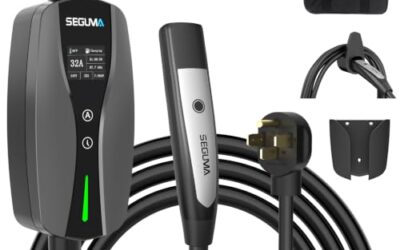
- Long 25-foot charging cable provides extended reach
- WiFi app supports charging control, scheduling, current adjustment, and energy tracking
- J1772 connector is compatible with North American EV and PHEV models
- Weatherproof IP66/NEMA-4 enclosure is suited to indoor or outdoor charging locations
Cons
- Requires a dedicated 50A circuit and a 4-prong NEMA 14-50 outlet
- Tesla charging requires a separate J1772-to-NACS adapter, which is not included
- Smart app features require a 2.4 GHz WiFi network with internet access
Specifications
| Color | Black |
|---|---|
| Size | 40 |
| Dimensions | 4.724409444 x 6.299212592 x 1.968503935 inches |
| Product Group | Automotive Parts and Accessories |
| Binding | Electronics |
Best For / Avoid If
Best for buyers prioritizing
- Long 25-foot charging cable provides extended reach
- WiFi app supports charging control, scheduling, current adjustment, and energy tracking
- J1772 connector is compatible with North American EV and PHEV models
Consider another option if
- Requires a dedicated 50A circuit and a 4-prong NEMA 14-50 outlet
- Tesla charging requires a separate J1772-to-NACS adapter, which is not included
- Smart app features require a 2.4 GHz WiFi network with internet access

Pros
- Offers both Level 1 and Level 2 charging options
- Includes NEMA 6-20 and NEMA 5-15 connection options
- Provides up to 3.84kW output in Level 2 mode
- Includes automatic temperature-related power reduction and charging resumption
Cons
- Level 2 charging requires a dedicated NEMA 6-20 outlet
- The NEMA 5-15 connection must be manually adjusted to 12A
- Charging an 87kWh battery is listed as approximately 22.4 hours at Level 2 and over 60 hours at Level 1; actual time depends on the vehicle and circuit
Specifications
| Color | Black |
|---|---|
| Size | 16A J1772 Connector |
| Dimensions | 12 x 16 x 5 inches |
| Product Group | Automotive Parts and Accessories |
| Binding | Electronics |
Best For / Avoid If
Best for buyers prioritizing
- Offers both Level 1 and Level 2 charging options
- Includes NEMA 6-20 and NEMA 5-15 connection options
- Provides up to 3.84kW output in Level 2 mode
Consider another option if
- Level 2 charging requires a dedicated NEMA 6-20 outlet
- The NEMA 5-15 connection must be manually adjusted to 12A
- Charging an 87kWh battery is listed as approximately 22.4 hours at Level 2 and over 60 hours at Level 1; actual time depends on the vehicle and circuit
Readers weighing these picks also look at Portable EV Charger Buying Guide and How To Find An EV Charger Compatible With Your Car.
FAQ
Does a 350 kW charger make every EV charge at 350 kW?
No. The vehicle, battery conditions, charge level, station output, and site limits can all keep the session below that figure. The rating describes station capability, not guaranteed vehicle intake.
Why does fast charging slow down near 80 percent?
Many EVs reduce DC charging power as the battery fills. The exact point and rate depend on the model, battery temperature, and charging curve. Check the guidance for the specific vehicle rather than treating 80 percent as a universal threshold.
Can cold weather lower EV charging speed?
Yes. A cold battery may accept less power until it warms. Battery preconditioning can help on supported vehicles, but its operation depends on model, software, and settings.
Could a home charger be faster than my EV allows?
Yes. The vehicle’s onboard AC charger can limit the rate below the EVSE’s rating. The electrical supply and configured current can also impose a lower limit.
Sources and further reading
- Charging Electric Vehicles at Home (Alternative Fuels Data Center): Explains home charging equipment and common charging levels.
- Procurement and Installation for EV Charging Infrastructure (Alternative Fuels Data Center): Covers considerations for planning and installing charging infrastructure.