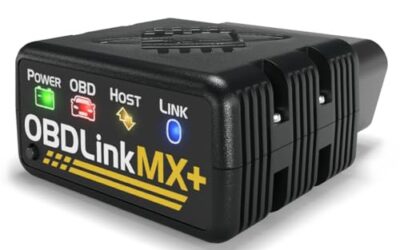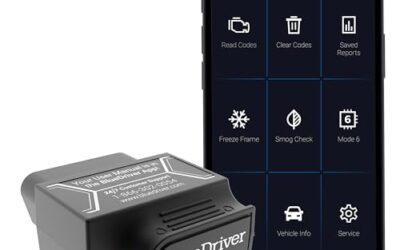

Finding the best OBD2 Bluetooth app setup depends on whether you want a seamless proprietary package or an open hardware adapter that pairs with powerful third-party software. For drivers seeking an all-in-one diagnostic ecosystem without recurring fees, the BlueDriver OBD2 Scanner Bluetooth stands out because its dedicated mobile application unlocks enhanced trouble codes (including ABS, SRS, and TPMS) and VIN-matched verified repair reports without requiring an ongoing paid subscription. Drivers who prioritize deep customization, advanced coding, or multi-network CAN diagnostics will find the OBDLink MX+ OBD2 Bluetooth Scanner for iPhone offers unmatched versatility across third-party applications like FORScan, Torque, and BimmerCode.
Pros
- Offers more system coverage than basic engine-code readers
- Includes repair reports with definitions, possible causes, and confirmed fixes
- Wireless design connects to the vehicle's OBDII port without a cable to the phone or tablet
- Supports a broad range of listed vehicle makes, including GM, Ford, Toyota, Honda, BMW, and VW
Cons
- The published compatibility information covers gas-powered vehicles only
- A compatible phone or tablet is required for wireless use
Specifications
| Size | Pro-S |
|---|---|
| Product Group | Automotive Parts and Accessories |
| Binding | Automotive |
Best For / Avoid If
Best for buyers prioritizing
- Offers more system coverage than basic engine-code readers
- Includes repair reports with definitions, possible causes, and confirmed fixes
- Wireless design connects to the vehicle's OBDII port without a cable to the phone or tablet
Consider another option if
- The published compatibility information covers gas-powered vehicles only
- A compatible phone or tablet is required for wireless use

Pros
- Provides more system-specific diagnostics than basic engine-code readers
- Wireless connection avoids the need for a cable between the scanner and phone or tablet
- Includes live data, freeze-frame information, smog readiness, and Mode 6 functions
- Free app updates and no subscription fees are included with the purchase
Cons
- A compatible phone or tablet is required for wireless operation
Specifications
| Color | Black |
|---|---|
| Size | Pro |
| Dimensions | 2.2 x 1.9 x 1 inches |
| Weight | 0.13 pounds |
| Product Group | Automotive Parts and Accessories |
| Binding | Automotive |
Best For / Avoid If
Best for buyers prioritizing
- Provides more system-specific diagnostics than basic engine-code readers
- Wireless connection avoids the need for a cable between the scanner and phone or tablet
- Includes live data, freeze-frame information, smog readiness, and Mode 6 functions
Consider another option if
- A compatible phone or tablet is required for wireless operation

Pros
- Supports iPhone, Android, and Windows devices
- Works with a range of named diagnostic applications
- Offers enhanced OEM support for several vehicle brands
- Includes protection against over-voltage and battery drain
Cons
- Vehicle compatibility and available features should be confirmed in the troubleshooting guide before purchase
Specifications
| Color | Black |
|---|---|
| Size | Small |
| Dimensions | 2.0078740137 x 0.9055118101 x 1.8110236202 Inches |
| Weight | 0.06172943336 Pounds |
| Product Group | Automotive Parts and Accessories |
| Binding | Automotive |
Best For / Avoid If
Best for buyers prioritizing
- Supports iPhone, Android, and Windows devices
- Works with a range of named diagnostic applications
- Offers enhanced OEM support for several vehicle brands
Consider another option if
- Vehicle compatibility and available features should be confirmed in the troubleshooting guide before purchase
Pros
- Offers multiple diagnostic and performance-monitoring functions
- Supports both iOS and Android devices through a dedicated app
- Includes chart-based data visualization and access to diagnostic reports
- Lists broad vehicle coverage and support for nine protocols
Cons
- The vehicle must be started and the phone's Bluetooth must be enabled for use
- The listing recommends unplugging the scanner after use to avoid consuming the vehicle battery
- Fault codes can only be cleared after the vehicle is repaired; the listing says an unrepaired fault may require clearing by a 4S shop computer
Specifications
| Color | black |
|---|---|
| Dimensions | 3.8 x 2.5 x 3.8 Inches |
| Product Group | Automotive Parts and Accessories |
| Binding | Automotive |
Best For / Avoid If
Best for buyers prioritizing
- Offers multiple diagnostic and performance-monitoring functions
- Supports both iOS and Android devices through a dedicated app
- Includes chart-based data visualization and access to diagnostic reports
Consider another option if
- The vehicle must be started and the phone's Bluetooth must be enabled for use
- The listing recommends unplugging the scanner after use to avoid consuming the vehicle battery
- Fault codes can only be cleared after the vehicle is repaired; the listing says an unrepaired fault may require clearing by a 4S shop computer

Pros
- Combines an OBD2 scanner and battery tester in one tool
- Provides live engine data and emissions-readiness status
- Includes oil reset functionality and access to RepairSolutions2 repair guidance
- Vehicle coverage includes many US, Asian, and European models from 1996 and newer
Cons
- ABS and other diagnostic features may vary by make, model, and year
- Compatibility should be verified with Innova's Coverage Checker before purchase
- Emission-readiness monitors reset after a battery disconnect or code clear and require a complete drive cycle to repopulate
Specifications
| Dimensions | 5.99 x 2.99 x 0.99 inches |
|---|---|
| Product Group | Automotive Parts and Accessories |
| Binding | Automotive |
Best For / Avoid If
Best for buyers prioritizing
- Combines an OBD2 scanner and battery tester in one tool
- Provides live engine data and emissions-readiness status
- Includes oil reset functionality and access to RepairSolutions2 repair guidance
Consider another option if
- ABS and other diagnostic features may vary by make, model, and year
- Compatibility should be verified with Innova's Coverage Checker before purchase
- Emission-readiness monitors reset after a battery disconnect or code clear and require a complete drive cycle to repopulate

Pros
- Supports common generic engine diagnostic functions
- Provides live sensor data for Android app-based monitoring
- Compatible with several popular Android diagnostic apps
- Works with most 1996+ US cars and light trucks
Cons
- Not compatible with iPhone or iPad
- Does not support advanced systems such as ABS, SRS, TPMS, transmission, or HVAC
- Requires a compatible third-party Android app and may not support Android car stereos or head units
Specifications
| Color | Blue |
|---|---|
| Size | Bluetooth 3.0 for Android ONLY |
| Dimensions | 1.89 x 0.98 x 1.26 inches |
| Weight | 0.07 Pounds |
| Product Group | Automotive Parts and Accessories |
| Binding | Automotive |
Best For / Avoid If
Best for buyers prioritizing
- Supports common generic engine diagnostic functions
- Provides live sensor data for Android app-based monitoring
- Compatible with several popular Android diagnostic apps
Consider another option if
- Not compatible with iPhone or iPad
- Does not support advanced systems such as ABS, SRS, TPMS, transmission, or HVAC
- Requires a compatible third-party Android app and may not support Android car stereos or head units

Pros
- Supports code scanning and code resets without requiring an expert
- Tracks vehicle-specific scans, mileage-based reminders, and shared results
- Compact 1.75 x 0.75 x 1.6-inch sensor is designed to stay under the dash
Cons
- Advanced features require an optional premium subscription after the 14-day trial
- Features may vary by vehicle make and model
Specifications
| Color | White |
|---|---|
| Size | 1 Pack |
| Dimensions | 1.75 x 0.75 x 1.6 inches |
| Weight | 0.06 pounds |
| Product Group | Automotive Parts and Accessories |
| Binding | Automotive |
Best For / Avoid If
Best for buyers prioritizing
- Supports code scanning and code resets without requiring an expert
- Tracks vehicle-specific scans, mileage-based reminders, and shared results
- Compact 1.75 x 0.75 x 1.6-inch sensor is designed to stay under the dash
Consider another option if
- Advanced features require an optional premium subscription after the 14-day trial
- Features may vary by vehicle make and model

Pros
- Supports BimmerCode coding for BMW and Mini vehicles
- Compatible with iOS and Android devices
- Includes sleep mode and overvoltage protection
- OBDLink app is included for diagnostics and live data
Cons
- BimmerCode app is not included and must be purchased separately
- Vehicle compatibility and available features should be confirmed through the troubleshooting guide and BimmerCode app
Specifications
| Dimensions | 1.8110236202 x 1.2992125971 x 0.9055118101 inches |
|---|---|
| Product Group | Automotive Parts and Accessories |
| Binding | Automotive |
Best For / Avoid If
Best for buyers prioritizing
- Supports BimmerCode coding for BMW and Mini vehicles
- Compatible with iOS and Android devices
- Includes sleep mode and overvoltage protection
Consider another option if
- BimmerCode app is not included and must be purchased separately
- Vehicle compatibility and available features should be confirmed through the troubleshooting guide and BimmerCode app

Pros
- Supports both iOS and Android devices
- Compatible with multiple popular OBD2 apps
- Compact design with low-power sleep mode
- Supports firmware upgrades
Cons
- Limited to standard OBD2 functions and does not support ABS, SRS, or TPMS diagnostics
- MS-CAN protocol is not supported
- Not suitable for 24V diesel vehicles, and auto-wake may not work on electric or hybrid vehicles
Specifications
| Color | ICAR PRO BLE4.0 - Android, iOS & Windows |
|---|---|
| Size | ICAR PRO BLE4.0 - iOS, Android & Windows |
| Dimensions | 1.85 x 0.94 x 1.06 inches |
| Weight | 0.1322773572 pounds |
| Product Group | Automotive Parts and Accessories |
| Binding | Automotive |
Best For / Avoid If
Best for buyers prioritizing
- Supports both iOS and Android devices
- Compatible with multiple popular OBD2 apps
- Compact design with low-power sleep mode
Consider another option if
- Limited to standard OBD2 functions and does not support ABS, SRS, or TPMS diagnostics
- MS-CAN protocol is not supported
- Not suitable for 24V diesel vehicles, and auto-wake may not work on electric or hybrid vehicles
Understanding OBD2 Bluetooth App Architecture: Proprietary vs. Open Platforms
Connecting your smartphone or tablet to an onboard diagnostic port requires two pieces of technology working in tandem: a wireless hardware adapter plugged into the 16-pin port under the dashboard and an application installed on your iOS or Android mobile device. Buyers often evaluate software interfaces without realizing that hardware design strictly dictates what an application can actually display.
The market divides into two distinct philosophies:
- Closed Ecosystems: Tools such as BlueDriver, FIXD, and Innova engineer dedicated hardware that pairs exclusively (or primarily) with their own proprietary mobile apps. These systems prioritize convenience, clean user interfaces, and automated troubleshooting workflows, but they rarely allow you to use alternative software.
- Open ELM327 and STN Architectures: Adapters from brands like OBDLink, Veepeak, and Vgate act as universal communication bridges. They allow users to connect to independent third-party diagnostic software, including Torque, Car Scanner ELM327, BimmerCode, Dr. Prius, and OBD Fusion. While open platforms offer incredible depth, the user is often responsible for configuring connection protocols and paying separate app store license fees.
Comparing Mobile Diagnostic Platforms and Hardware Compatibility
The table below summarizes verified manufacturer specifications across the nine featured wireless diagnostic units. Compatibility across mobile operating systems represents a critical baseline, as classic Bluetooth protocols differ fundamentally from Bluetooth Low Energy (BLE) standards on Apple hardware.
| Product Name | Brand | Supported Platforms | App Ecosystem |
|---|---|---|---|
| BlueDriver OBD2 Scanner Bluetooth (ASIN: B0GL9RL3XS) | BlueDriver | iOS, Android | Proprietary BlueDriver App |
| BlueDriver OBD2 Scanner Bluetooth (ASIN: B00652G4TS) | BlueDriver | iOS, Android | Proprietary BlueDriver App |
| OBDLink MX+ OBD2 Bluetooth Scanner for iPhone | OBDLink | iOS, Android, Windows | OBDLink App & Third-Party |
| OBD2 Scanner Diagnostic Tool | UMEIJA | iOS, Android | Proprietary OBD Home App |
| Innova 5210 OBD2 Scanner & Engine Code Reader | Innova | iOS, Android | RepairSolutions2 App |
| Veepeak Mini Bluetooth OBD2 Scanner Code Reader | Veepeak | Android Only | Third-Party Apps |
| FIXD Bluetooth OBD2 Scanner | FIXD | iOS, Android | Proprietary FIXD App |
| OBDLink CX Bimmercode Bluetooth 5.1 OBD2 Adapter | OBDLink | iOS, Android | BimmerCode & OBDLink App |
| Vgate iCar Pro Bluetooth 4.0 (BLE) | Vgate | iOS, Android | Third-Party Apps |
Detailed Reviews: The Best OBD2 Bluetooth App and Scanner Setups
BlueDriver OBD2 Scanner Bluetooth (ASIN: B0GL9RL3XS): Best Complete Diagnostic Ecosystem Without Subscriptions
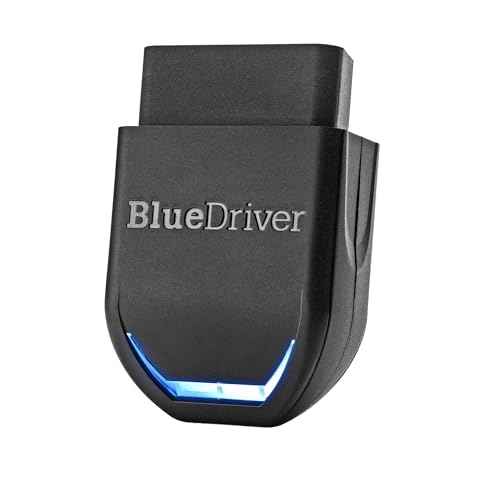
The BlueDriver OBD2 Scanner Bluetooth provides one of the most comprehensive out-of-the-box experiences available for everyday vehicle owners. Rather than forcing users to configure generic sensor strings or decipher ambiguous powertrain codes, the proprietary BlueDriver application connects seamlessly to the sensor to deliver vehicle-specific repair guidance. The manufacturer lists broad make and model coverage across major brands like GM, Ford, Stellantis, Toyota, Honda, Nissan, Mazda, Subaru, Hyundai, Mercedes-Benz, BMW, and VW for gas-powered vehicles made in 1996 or newer across North America.
Beyond generic powertrain trouble codes, the manufacturer claims the software accesses enhanced diagnostics for ABS, SRS airbags, TPMS, and transmission modules. One of the platform’s standout features is its database of technician-verified repair reports matched to your vehicle identification number (VIN), which detail confirmed fixes, potential causes, and freeze-frame sensor data. The app also monitors live vehicle data streams, checks emissions smog readiness, and displays Mode 6 diagnostic test routines. Crucially, the manufacturer confirms there are zero recurring subscription fees, no in-app purchases, and no user accounts required to access complete functionality.
Drawback: BlueDriver operates entirely as a walled garden. The hardware sensor cannot connect to popular third-party diagnostic software, coding utilities, or custom track logging applications like Torque or TrackAddict.
Avoid if: You plan to use specialized third-party community software, code BMW vehicle options, or manage Ford-specific service routines through FORScan.
BlueDriver OBD2 Scanner Bluetooth (ASIN: B00652G4TS): Premium Packaging of BlueDriver’s Proven Diagnostic Engine
The tool pairs wirelessly over Bluetooth with smartphones and tablets running iOS or Android, delivering cable-free diagnostics that replicate the utility of handheld scan tools.
Like its counterpart, it accesses enhanced OEM-level trouble codes across engine, transmission, ABS brakes, supplemental restraint airbags, and tire pressure monitoring systems on compatible passenger cars and light trucks. The accompanying app offers live graphing, freeze-frame inspection, emissions readiness inspection, and VIN-specific repair suggestions backed by certified technicians. It also retains the lifetime free-access promise, guaranteeing free application updates without ongoing membership charges.
Drawback: At its observed retail price point, it commands a noticeable premium over identical functional hardware within the same product family, representing a higher financial commitment for identical feature sets.
Avoid if: You can acquire the same BlueDriver hardware at a lower price point, or if you need an adapter compatible with cross-brand diagnostic utilities.
OBDLink MX+ OBD2 Bluetooth Scanner for iPhone: Best High-Performance Multi-App Adapter
The OBDLink MX+ OBD2 Bluetooth Scanner for iPhone is an industry-standard communication tool built for advanced diagnostic work. Operating across iOS, Android, and Windows systems, the adapter connects via high-speed Bluetooth to turn any compatible screen into a professional-grade automotive monitor. While it includes the fully featured OBDLink mobile app, its true value lies in its extensive third-party platform certification. The manufacturer explicitly recommends this adapter for heavyweight specialty apps including FORScan, Torque, BimmerCode, DashCommand, AlfaOBD, and Carista.
In addition to standard OBD2 engine codes, the MX+ offers enhanced OEM module support for Ford, GM, Mazda, Nissan, Infiniti, Toyota, Lexus, Scion, Honda, Hyundai, and Kia vehicles. This allows owners to read and clear ABS, airbag, and TPMS trouble codes while tracking proprietary live parameters that cheap ELM327 clones cannot see. The hardware includes integrated over-voltage and battery drain protection alongside upgradable firmware, allowing users to safely leave the unit plugged into the dashboard.
Avoid if: You want a low-cost, casual check-engine reader and do not plan to invest in advanced diagnostic or coding software.
OBD2 Scanner Diagnostic Tool by UMEIJA: Best Budget App and Scanner for First-Time DIYers
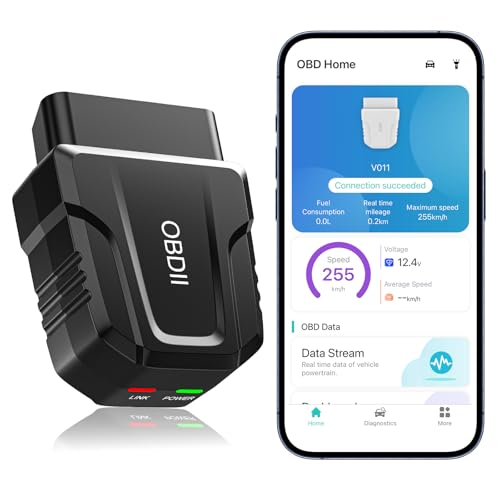
The device incorporates upgraded Bluetooth 5.4 wireless hardware, which the manufacturer states enables faster, highly stable connections to modern mobile devices. The unit is designed to communicate with an exclusive free application named OBD Home, accessible via a QR code printed directly on the scanner body.
The software suite allows users to read and clear generic diagnostic trouble codes (DTCs), turn off the check engine light, review freeze frame data, inspect I/M emissions readiness status, and retrieve VIN details across 9 standard protocols. The app displays real-time parameters such as engine coolant temperature, RPM, vehicle speed, and control module voltage through intuitive visual charts. The manufacturer lists broad compatibility with over 96% of vehicle makes from 1996 to the present, supporting brands from Toyota and Ford to BMW and Porsche.
Drawback: The manufacturer notes that this scanner is only suitable for the OBD Home app and does not support independent diagnostic platforms. Furthermore, the manufacturer explicitly recommends unplugging the device after each use to prevent vehicle battery drain.
Avoid if: You want an adapter you can leave plugged in permanently, or if you need to read proprietary ABS, SRS, or transmission modules.
Innova 5210 OBD2 Scanner & Engine Code Reader: Best Hybrid Handheld Scanner with RepairSolutions2 App
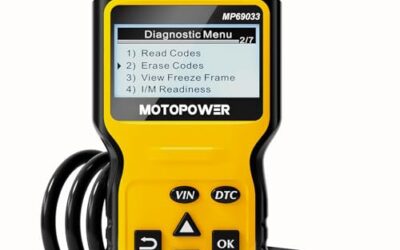
The Innova 5210 OBD2 Scanner & Engine Code Reader bridges the gap between traditional handheld diagnostic equipment and modern smartphone analysis. Unlike purely headless wireless dongles, the 5210 features its own physical display, buttons, and direct OBD2 port connector. However, its true power comes from its integrated Bluetooth compatibility with America’s top-rated automotive repair app: Innova’s RepairSolutions2 on iPhone and Android.
The tool reads and erases both standard check engine light codes and ABS brake codes across most 1996 and newer domestic, Asian, and European vehicles (coverage varies by model). It doubles as a battery and alternator charging system tester to evaluate electrical health. The RepairSolutions2 companion application requires no subscription fees and provides verified fixes derived from real-world repairs documented by ASE-certified mechanics, complete with suggested replacement parts and repair cost estimates. It also includes an oil maintenance light reset function and emissions drive-cycle readiness monitoring.
Drawback: Because it is a tethered handheld unit housing a screen and cord, it is noticeably bulkier to store and operate than minimalist wireless plug-in dongles.
Avoid if: You want an ultra-compact sensor that stays discreetly hidden behind trim panels or allows real-time smartphone gauge displays while driving.
Veepeak Mini Bluetooth OBD2 Scanner Code Reader: Best Budget Engine Reader for Android Devices
This compact hardware unit plugs into standard 12V OBD2 ports and operates via classic Bluetooth to turn Android smartphones and tablets into customized automotive dashboards. Because Veepeak does not bundle a proprietary application, users have the freedom to choose from renowned third-party software like Torque, Car Scanner ELM327, OBD Fusion, and Dr. Prius.
Through compatible Android apps, drivers can read and clear generic check engine trouble codes, inspect freeze-frame logs, verify emissions inspection readiness, and view dynamic live engine streams including mass air flow, coolant temperature, throttle position, and oxygen sensor data. It covers most 1996 and newer gas-powered cars and light trucks sold in the United States.
Drawback: The manufacturer explicitly notes that this model is NOT compatible with Apple iOS devices (iPhone or iPad) due to hardware reliance on classic Bluetooth. It also does not support advanced modules like ABS, SRS, TPMS, transmission, or oil service resets, nor does it work with coding software like BimmerCode.
Avoid if: You use an Apple iPhone or iPad, or require advanced multi-system diagnostics beyond generic powertrain codes.
FIXD Bluetooth OBD2 Scanner: Best Sensor for Automated Maintenance Reminders
The FIXD Bluetooth OBD2 Scanner is engineered specifically for everyday vehicle owners who prefer plain-English automotive feedback over technical jargon. It works with gasoline and hybrid vehicles from 1996 onward, as well as diesel vehicles manufactured since 2006.
The companion FIXD app translates complex fault codes into accessible summaries, detailing the severity of detected issues and notifying drivers if a problem requires immediate roadside attention. The application supports multi-vehicle management, allowing users to track mileage-based maintenance intervals, store historical scans, and share diagnostics with family members or mechanics. While the basic app offers unlimited scans and code clearing for free, FIXD includes an optional 14-day trial of its Premium subscription service for cost estimates and live mechanic support.
Drawback: Many of the software’s most helpful insights, including detailed repair cost estimates and direct mechanic guidance, are locked behind an optional recurring paid premium subscription.
Avoid if: You object to subscription-based service prompts, or if you prefer deep, manual parameter configurations over simplified driver alerts.
OBDLink CX Bimmercode Bluetooth 5.1 OBD2 Adapter: Best Specialized App Adapter for BMW and Mini Owners
Designed specifically to meet the strict technical standards of the BimmerCode coding platform, the OBDLink CX Bimmercode Bluetooth 5.1 OBD2 Adapter provides rock-solid data integrity for European vehicle tuning.
Coding vehicle control units demands exceptional transmission reliability. The OBDLink CX features Bluetooth 5.1 architecture engineered to eliminate dropped data packets and data corruption that could otherwise brick an electronic control unit (ECU). The hardware includes intelligent sleep mode and over-voltage safeguards, making it completely safe to leave permanently attached to the OBD2 port. In addition to vehicle coding, it includes the standard OBDLink diagnostic application for clearing engine fault codes and monitoring live engine parameters.
Drawback: The purchase price covers only the OBDLink CX hardware and base diagnostic utility; the specialized BimmerCode mobile app is sold separately as a paid download on mobile app stores.
Avoid if: You do not own a BMW or Mini vehicle, or if you only need general check engine light reading on domestic or Asian vehicles.
Vgate iCar Pro Bluetooth 4.0 (BLE): Best Value Low-Power Adapter for Multi-App Diagnostics
Thanks to its dual-mode Bluetooth Low Energy architecture, it connects seamlessly to both iOS devices (pairing directly inside compatible applications) and Android devices without consuming high electrical current. The manufacturer claims the adapter features an intelligent auto-sleep and auto-wake circuit that drops standby current draw to 3mA, helping preserve your 12V car battery.
The iCar Pro is built for third-party software versatility. It pairs with an array of popular diagnostic apps including Car Scanner ELM327, Torque, OBD Fusion, Dr. Prius, and OBD JScan. Integrated LED indicators display power, Bluetooth connection, and active ECU data transfer status. Furthermore, the unit supports user-upgradable firmware via official mobile and PC updater tools, ensuring long-term vehicle compatibility across standard 12V gasoline and light-duty diesel vehicles from 1996 onward.
Drawback: The manufacturer explicitly notes that the hardware does not support MS-CAN protocols or advanced manufacturer-specific networks like ABS, SRS, and TPMS without specialized third-party configurations. Additionally, the auto-wake feature may not trigger automatically on electric or hybrid models, requiring physical reinsertion.
Avoid if: You need out-of-the-box Ford MS-CAN network support, or expect advanced airbag and brake diagnostics from a free application.
Practical Comparison: Bluetooth OBD2 Apps and Features
When selecting your setup, understanding the practical differences between proprietary apps and open-source solutions will prevent buyer’s remorse:
- Repair Reports and Fix Databases: Proprietary apps like BlueDriver and Innova RepairSolutions2 shine by providing crowdsourced, verified repair solutions tied directly to specific trouble codes and VINs. Open-source apps like Torque or Car Scanner ELM327 provide raw data and sensor graphs but leave the mechanical interpretation entirely to you.
- Live Sensor Polling Speeds: High-bandwidth adapters like the OBDLink MX+ and OBDLink CX poll PID data significantly faster than entry-level budget scanners. This makes a noticeable difference when tracking rapid throttle fluctuations or misfire counters in real time.
- Battery Drain Safeguards: If you intend to leave your scanner plugged into the OBD port full-time for daily trip logging or digital gauge displays, you must prioritize devices with documented low-power sleep modes, such as the OBDLink MX+, OBDLink CX, or Vgate iCar Pro. Basic budget scanners draw continuous power from the port’s unswitched 12V pin, which can drain your vehicle’s starting battery over prolonged parking periods.
Who Should Not Buy an OBD2 Bluetooth App Setup?
While wireless smartphone scanners are ideal for general maintenance, roadside code clearing, and real-time dashboard telemetry, they are not universal solutions for every automotive task. You should not purchase any product in this guide if you require bidirectional control routines, such as forced diesel particulate filter (DPF) regeneration, electronic parking brake (EPB) service mode retraction, steering angle sensor calibration, or key transponder programming. Dedicated professional bi-directional tablet scan tools or factory-level diagnostic systems (such as dealer-specific J2534 passthrough interfaces) are required for these active actuation and coding procedures.
If you are still comparing options, see Best Android OBD2 App, OBD2 Scanner Buying Guide for Beginners and The Best OBD2 iPhone App and Adapter Combos for DIY Car Diagnostics.
Final Decision Framework: Choosing the Right Match for Your Vehicle
Selecting your ideal OBD2 Bluetooth app and scanner combination comes down to three clear paths:
- Choose BlueDriver OBD2 Scanner Bluetooth if you want an effortless, all-in-one diagnostic package with zero subscriptions, comprehensive ABS/SRS coverage, and proven repair reports on North American gas vehicles.
- Choose OBDLink MX+ OBD2 Bluetooth Scanner for iPhone if you want the highest level of hardware capability, fast data streaming, and full compatibility across advanced third-party apps like FORScan, Torque, and BimmerCode.
- Choose Vgate iCar Pro Bluetooth 4.0 (BLE) if you want an affordable, battery-safe bridge compatible with both iPhone and Android for use with popular apps like Car Scanner or Dr. Prius.