Choosing the best OBD2 app for iOS is only half the decision. Your iPhone also needs a compatible Bluetooth OBD2 adapter, and the right choice depends on the car systems you want to scan, the app you plan to use, and whether you need basic check-engine diagnostics or BMW coding. This guide compares the products covered using their listed iOS support, diagnostic features, connection requirements, limitations, and prices.
Affiliate disclosure: CarTechTalk may earn a commission from qualifying purchases made through links on this page, at no additional cost to you.
The Quick Answer
- Best for a dedicated iOS and Android experience: ANCEL BD200, with a manufacturer-listed companion app, live data, freeze-frame information, and battery-voltage monitoring.
- Best for third-party iOS apps: Panlong OBD2 Scanner, which lists support for Car Scanner, OBD Fusion, OBD Auto Doctor, Dr. Prius, and other apps.
- Best for BMW and Mini coding: OBDLink CX, specifically designed for BimmerCode and compatible with iOS and Android.
- Best for app-guided reports: UJS Rocco, whose manufacturer-listed features include AI-generated vehicle health reports and a full-vehicle scan.
The products below are based on listed manufacturer information rather than CarTechTalk laboratory or road evaluation. No product rating is shown because the listed review count for the product set is zero.

Pros
- Supports common generic engine diagnostic functions
- Provides live sensor data for Android app-based monitoring
- Compatible with several popular Android diagnostic apps
- Works with most 1996+ US cars and light trucks
Cons
- Not compatible with iPhone or iPad
- Does not support advanced systems such as ABS, SRS, TPMS, transmission, or HVAC
- Requires a compatible third-party Android app and may not support Android car stereos or head units
Specifications
| Color | Blue |
|---|---|
| Size | Bluetooth 3.0 for Android ONLY |
| Dimensions | 1.89 x 0.98 x 1.26 inches |
| Weight | 0.07 Pounds |
| Product Group | Automotive Parts and Accessories |
| Binding | Automotive |
Best For / Avoid If
Best for buyers prioritizing
- Supports common generic engine diagnostic functions
- Provides live sensor data for Android app-based monitoring
- Compatible with several popular Android diagnostic apps
Consider another option if
- Not compatible with iPhone or iPad
- Does not support advanced systems such as ABS, SRS, TPMS, transmission, or HVAC
- Requires a compatible third-party Android app and may not support Android car stereos or head units

Pros
- Supports BimmerCode coding for BMW and Mini vehicles
- Compatible with iOS and Android devices
- Includes sleep mode and overvoltage protection
- OBDLink app is included for diagnostics and live data
Cons
- BimmerCode app is not included and must be purchased separately
- Vehicle compatibility and available features should be confirmed through the troubleshooting guide and BimmerCode app
Specifications
| Dimensions | 1.8110236202 x 1.2992125971 x 0.9055118101 inches |
|---|---|
| Product Group | Automotive Parts and Accessories |
| Binding | Automotive |
Best For / Avoid If
Best for buyers prioritizing
- Supports BimmerCode coding for BMW and Mini vehicles
- Compatible with iOS and Android devices
- Includes sleep mode and overvoltage protection
Consider another option if
- BimmerCode app is not included and must be purchased separately
- Vehicle compatibility and available features should be confirmed through the troubleshooting guide and BimmerCode app

Pros
- Supports both iOS and Android devices
- Compatible with multiple popular OBD2 apps
- Compact design with low-power sleep mode
- Supports firmware upgrades
Cons
- Limited to standard OBD2 functions and does not support ABS, SRS, or TPMS diagnostics
- MS-CAN protocol is not supported
- Not suitable for 24V diesel vehicles, and auto-wake may not work on electric or hybrid vehicles
Specifications
| Color | ICAR PRO BLE4.0 - Android, iOS & Windows |
|---|---|
| Size | ICAR PRO BLE4.0 - iOS, Android & Windows |
| Dimensions | 1.85 x 0.94 x 1.06 inches |
| Weight | 0.1322773572 pounds |
| Product Group | Automotive Parts and Accessories |
| Binding | Automotive |
Best For / Avoid If
Best for buyers prioritizing
- Supports both iOS and Android devices
- Compatible with multiple popular OBD2 apps
- Compact design with low-power sleep mode
Consider another option if
- Limited to standard OBD2 functions and does not support ABS, SRS, or TPMS diagnostics
- MS-CAN protocol is not supported
- Not suitable for 24V diesel vehicles, and auto-wake may not work on electric or hybrid vehicles

Pros
- Offers multiple diagnostic and performance-monitoring functions
- Supports both iOS and Android devices through a dedicated app
- Includes chart-based data visualization and access to diagnostic reports
- Lists broad vehicle coverage and support for nine protocols
Cons
- The vehicle must be started and the phone's Bluetooth must be enabled for use
- The listing recommends unplugging the scanner after use to avoid consuming the vehicle battery
- Fault codes can only be cleared after the vehicle is repaired; the listing says an unrepaired fault may require clearing by a 4S shop computer
Specifications
| Color | black |
|---|---|
| Dimensions | 3.8 x 2.5 x 3.8 Inches |
| Product Group | Automotive Parts and Accessories |
| Binding | Automotive |
Best For / Avoid If
Best for buyers prioritizing
- Offers multiple diagnostic and performance-monitoring functions
- Supports both iOS and Android devices through a dedicated app
- Includes chart-based data visualization and access to diagnostic reports
Consider another option if
- The vehicle must be started and the phone's Bluetooth must be enabled for use
- The listing recommends unplugging the scanner after use to avoid consuming the vehicle battery
- Fault codes can only be cleared after the vehicle is repaired; the listing says an unrepaired fault may require clearing by a 4S shop computer
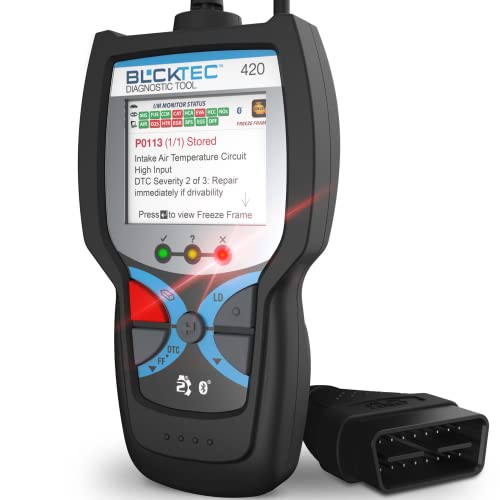
Pros
- Combines code reading and erasing with live data and battery or alternator tests
- Includes access to maintenance schedules, dealer recalls, technical service bulletins, and RepairPal
- Supports multiple languages and iOS or Android devices
- Uses a 1.8-inch screen and has compact listed dimensions of 4.72 x 2.41 x 0.89 inches
Best For / Avoid If
Best for buyers prioritizing
- Combines code reading and erasing with live data and battery or alternator tests
- Includes access to maintenance schedules, dealer recalls, technical service bulletins, and RepairPal
- Supports multiple languages and iOS or Android devices

Pros
- Supports both iOS and Android phones
- Offers multiple diagnostic functions, including code reading, code erasing, and real-time data
- Compatible with a range of third-party OBD2 apps
- The product listing states compatibility with 1996 US-based, 2000 EU-based and Asian, and newer OBDII 12V gas-powered and light-diesel vehicles
Cons
- Vehicle compatibility is limited to compatible OBDII vehicles and the listed 12V gas-powered or light-diesel categories
- The dedicated YMOBD app is required for the automatic connection process
Specifications
| Color | Light Blue for iOS Android |
|---|---|
| Product Group | Automotive Parts and Accessories |
| Binding | Automotive |
Best For / Avoid If
Best for buyers prioritizing
- Supports both iOS and Android phones
- Offers multiple diagnostic functions, including code reading, code erasing, and real-time data
- Compatible with a range of third-party OBD2 apps
Consider another option if
- Vehicle compatibility is limited to compatible OBDII vehicles and the listed 12V gas-powered or light-diesel categories
- The dedicated YMOBD app is required for the automatic connection process

Pros
- Supports multiple operating systems and diagnostic apps
- Offers live sensor data and battery-voltage readings
- Includes code reading, code erasing and check-engine-light functions
- Lists support for OBDII protocols including J1850 PWM, J1850 VPW, ISO9141-2, ISO14230-4 KWP and ISO15765-4 CAN-BUS
Cons
- Motorcycles, 24V diesel vehicles, new-energy vehicles, hybrid vehicles and vehicles that do not meet the OBDII agreement are not supported
- For iOS devices, the scanner must connect through a compatible app rather than the device's Bluetooth settings
- Available functions may vary by vehicle model, ECU and diagnostic app
Specifications
| Color | Black&Orange |
|---|---|
| Size | Bluetooth for iOS Android Windows |
| Dimensions | 2.9 x 1.65 x 0.75 inches |
| Product Group | Automotive Parts and Accessories |
| Binding | Automotive |
Best For / Avoid If
Best for buyers prioritizing
- Supports multiple operating systems and diagnostic apps
- Offers live sensor data and battery-voltage readings
- Includes code reading, code erasing and check-engine-light functions
Consider another option if
- Motorcycles, 24V diesel vehicles, new-energy vehicles, hybrid vehicles and vehicles that do not meet the OBDII agreement are not supported
- For iOS devices, the scanner must connect through a compatible app rather than the device's Bluetooth settings
- Available functions may vary by vehicle model, ECU and diagnostic app

Pros
- Supports multiple operating systems and third-party diagnostic apps
- Provides standard OBD2 functions such as code reading, code clearing and real-time data viewing
- Advertises compatibility with OBD2-compliant vehicles from 1996 onward
- Includes a one-year warranty and after-sales service
Cons
- Wireless wake-up is not supported for hybrid or electric cars
- Advanced functions such as ABS, airbag and manufacturer-specific data are available only on select vehicles through certain apps
- Some compatible app features or software may require an additional fee
Specifications
| Color | black |
|---|---|
| Size | iCar Pro 4.0-Android & iOS & Windows |
| Dimensions | 1.8503936989 x 0.9448818888 x 1.0629921249 inches |
| Product Group | Automotive Parts and Accessories |
Best For / Avoid If
Best for buyers prioritizing
- Supports multiple operating systems and third-party diagnostic apps
- Provides standard OBD2 functions such as code reading, code clearing and real-time data viewing
- Advertises compatibility with OBD2-compliant vehicles from 1996 onward
Consider another option if
- Wireless wake-up is not supported for hybrid or electric cars
- Advanced functions such as ABS, airbag and manufacturer-specific data are available only on select vehicles through certain apps
- Some compatible app features or software may require an additional fee

Pros
- Supports 1996 and newer vehicles according to the product title
- Provides live data, freeze-frame data, and engine code interpretation
- Offers app-based diagnostic reports that can be shared by email
- Includes performance, trip analysis, and voice alert features
Cons
- The battery function cannot perform charge tests, cranking tests, or battery resets
Specifications
| Color | Black+Red |
|---|---|
| Dimensions | 2.9527559025 x 1.1417322823 x 4.330708657 inches |
| Product Group | Automotive Parts and Accessories |
| Binding | Automotive |
Best For / Avoid If
Best for buyers prioritizing
- Supports 1996 and newer vehicles according to the product title
- Provides live data, freeze-frame data, and engine code interpretation
- Offers app-based diagnostic reports that can be shared by email
Consider another option if
- The battery function cannot perform charge tests, cranking tests, or battery resets
What Matters in OBD2 Scanners & Diagnostics
We evaluated the published specifications for iOS support, Bluetooth connection details, vehicle coverage, diagnostic functions, app compatibility, special functions, price, and stated limitations. We gave each recommendation a distinct use case instead of treating every adapter as an overall winner.
Our Picks
ANCEL BD200: Best for a Dedicated Companion App
The manufacturer lists the BD200 as an iOS and Android Bluetooth OBD2 scanner that works with 1996-and-newer vehicles. Its dedicated ANCEL app includes help guides and video tutorials, while the adapter reads and clears engine trouble codes, displays live data and freeze-frame information, and monitors values such as fuel pressure and engine load. It also lists real-time car battery-voltage testing with chart-based results.
Best for: iPhone owners who want a dedicated app with repair-oriented guidance and basic battery monitoring. Avoid if: you need manufacturer-specific systems such as ABS, SRS, transmission, or advanced coding, because those capabilities are not listed in the listing.
Panlong OBD2 Scanner: Best for Third-Party iOS App Choice
Panlong lists iOS and Android support, a free YMOBD app, and compatibility with third-party apps including Car Scanner ELM OBD2, OBD Fusion, OBD Auto Doctor, DashCommand, Torque, and Dr. Prius. Listed functions include reading and erasing codes, turning off the check-engine light, I/M readiness, O2 sensor and EVAP tests, freeze-frame data, and real-time sensor data.
Best for: Drivers who want to choose among several iPhone diagnostic apps. Avoid if: you want every app feature included at no extra cost; the listing states that some third-party apps have paid versions and that feature availability varies.
UJS Rocco: Best for App-Generated Health Reports
The manufacturer lists Bluetooth 5.4 connectivity, iOS and Android support, no subscription, and a companion experience that analyzes live data and freeze-frame information to generate vehicle health reports and repair advice. It also lists real-time graphs, a one-tap full-vehicle scan, and code clearing after repairs.
Best for: Beginners who prefer summarized reports over raw diagnostic data. Avoid if: you need clearly documented coverage for a specific manufacturer system; the listing does not identify every supported vehicle module or advanced reset function.
LJPXHHU Bluetooth OBD2 Scanner: Best Budget iOS Adapter
LJPXHHU lists compatibility with most 1996-and-newer OBDII vehicles and several free iOS apps, including Car Scanner, Mini OBD II, OBD Auto Doctor, DashCommand, inCarDoc, and OBD Fusion. Listed functions include reading trouble codes, resetting the check-engine light, checking smog-readiness status, and viewing live sensor data.
Best for: Buyers who need inexpensive generic engine diagnostics on an iPhone. Avoid if: you own a motorcycle, 24-volt diesel vehicle, unsupported hybrid or new-energy vehicle, or need advanced manufacturer-specific diagnostics.
Vgate iCar Pro Bluetooth 4.0: Best for Low-Power Everyday Use
This Vgate model lists iOS and Android compatibility, direct in-app iPhone connection, auto-sleep and auto-wake, and sleep-mode consumption as low as 3mA. It is listed for 12-volt gasoline vehicles built after 1996 and light-duty diesel vehicles up to 6.5 tons, but not 24-volt diesel vehicles. Auto-wake may not work on electric or hybrid vehicles.
Best for: Drivers who want a compact adapter designed to reduce battery load when left connected. Avoid if: you drive an electric or hybrid vehicle and require dependable automatic wake-up, since the listing covered identifies a limitation.
Vgate iCar Pro BT3.0/BLE4.0: Best for Broad App Compatibility
The manufacturer lists Bluetooth 3.0 and Bluetooth Low Energy 4.0, over-voltage, over-heat, and over-current protection, auto-sleep, and compatibility with apps such as Car Scanner, BimmerCode, Torque, JScan, Auto Doctor, and OBD Fusion. Its listed features include engine code reading and clearing, freeze-frame data, live sensor readings, I/M readiness, custom dashboards, and fuel-economy estimates.
Best for: iPhone users who want to select an app based on their vehicle and diagnostic goals. Avoid if: you expect all listed app features to be free; the manufacturer notes that some apps or functions require separate payment.
OBD2 Scanner Diagnostic Tool Bluetooth 5.4: Best for a Broad Basic Feature Set
UMEIJA lists Bluetooth 5.4, iOS and Android support, nine protocols, and functions including DTC reading and clearing, emission-readiness checks, monitor resets, VIN retrieval, freeze-frame data, onboard monitoring, live data streaming, sensor data, and diagnostic reports.
Best for: iPhone owners seeking a low-priced adapter with a long list of generic OBD2 functions. Avoid if: you need a confirmed vehicle-specific feature list; the listing does not identify exact makes, models, or modules.
BLCKTEC 420: Best for Guided Repair Information
BLCKTEC lists iOS and Android support, a premium app, live data, battery and alternator tests, code-severity information, firmware updates, maintenance schedules, recalls, technical service bulletins, and RepairPal access. The published description also says the app provides verified fixes by ASE-certified technicians.
Best for: DIY owners who want diagnostic codes combined with maintenance and repair-reference information. Avoid if: you only want a simple adapter and do not need the additional app-based information.
OBDLink CX: Best for BMW and Mini BimmerCode Users
OBDLink CX is specifically made for BimmerCode and is listed as compatible with iOS and Android. It supports BimmerCode functions across the vehicles, protocols, and advanced features supported by that app. BimmerCode is sold separately. The included OBDLink app lists live-parameter monitoring, diagnostics, and check-engine-light clearing, while the adapter includes an advanced sleep mode and overvoltage protection.
Best for: BMW and Mini owners who need iPhone-based coding through BimmerCode. Avoid if: you only need generic check-engine code reading or do not own a compatible BMW or Mini; the price is substantially higher than the basic adapters in this guide.
What to Verify Before You Buy
| Product | iOS support | Connection or app detail | Key limitation |
|---|---|---|---|
| ANCEL BD200 | Yes | Bluetooth; dedicated ANCEL app | Advanced systems not listed |
| UMEIJA Bluetooth 5.4 | Yes | Bluetooth 5.4; companion app | Exact vehicle coverage not listed |
| Panlong | Yes | YMOBD and third-party apps | Some app versions and functions are paid |
| Vgate iCar Pro BT3.0/BLE4.0 | Yes | Third-party apps including Car Scanner and BimmerCode | Some app functions require payment |
| Veepeak Mini | No | Classic Bluetooth for Android only | Not compatible with iPhone or iPad |
| UJS Rocco | Yes | Bluetooth 5.4; app with health reports | Detailed vehicle-module coverage not listed |
| OBDLink CX | Yes | Bluetooth 5.1; BimmerCode and OBDLink apps | BimmerCode sold separately; BMW/Mini focus |
| LJPXHHU | Yes | Bluetooth; several iOS apps listed | Not for 24V diesel, motorcycles, or some hybrids |
| BLCKTEC 420 | Yes | Bluetooth; premium app | App scope beyond listed features not listed |
| Vgate iCar Pro Bluetooth 4.0 | Yes | Bluetooth 4.0; direct iOS app connection | Auto-wake limitation on electric and hybrid vehicles |
The Veepeak Mini is the one published product that should not be purchased for an iPhone or iPad. Its manufacturer explicitly lists Android-only Classic Bluetooth support and directs iOS buyers to another model. It may be suitable for Android generic engine diagnostics, but it is not an iOS pick.
Choosing the Best OBD2 App iOS Setup
Confirm the vehicle connection standard
Most products here list support for 1996-and-newer OBDII vehicles, but that does not guarantee access to every module. Generic OBD2 commonly focuses on engine and emissions data. ABS, airbag, transmission, body-control, service resets, coding, and other manufacturer-specific functions may require a compatible app and adapter.
Match the adapter to the iPhone app
Some adapters include a dedicated app, while others are designed for third-party software. Panlong and the two Vgate products list several compatible apps. OBDLink CX is the specialized choice for BimmerCode. Before buying, check whether the app supports your exact vehicle and whether the desired functions are included in its free or paid version.
Check power and vehicle limitations
Adapters intended to remain plugged in should be selected with sleep-mode and wake-up behavior in mind. The Vgate listings specifically mention low-power sleep features, while the older Vgate model notes an auto-wake limitation for electric and hybrid vehicles.
Choose between simple codes and guided diagnosis
For reading and clearing a check-engine code, a basic adapter such as LJPXHHU may be sufficient if the car and app are supported. Buyers who want tutorials, reports, severity information, maintenance schedules, or repair references should consider ANCEL, UJS Rocco, or BLCKTEC 420 based on the features listed for each app.
Buyer Questions Answered
What is the best OBD2 app for iPhone?
There is no single best app for every vehicle. The listed adapters support different app ecosystems. Panlong and the Vgate adapters offer broad third-party app compatibility, ANCEL provides a dedicated app with tutorials, UJS Rocco focuses on health reports, and OBDLink CX is the specialized option for BMW and Mini coding through BimmerCode.
Can any Bluetooth OBD2 scanner work with iOS?
No. Bluetooth implementation matters. The Veepeak Mini explicitly supports Android only through Classic Bluetooth and is not compatible with iPhone or iPad. Confirm iOS support before buying and follow the adapter’s in-app connection method.
Can an iPhone OBD2 adapter clear a check-engine light?
Many products in this guide list code clearing and check-engine-light reset functions. Clearing a code does not repair the underlying fault, and available functions depend on the vehicle, adapter, and app.
Do OBD2 apps provide advanced diagnostics?
Some may, but compatibility is vehicle- and app-dependent. The published data confirms generic engine and emissions functions for several products, while advanced functions are specifically documented for OBDLink CX through BimmerCode. Do not assume that a generic adapter can scan ABS, SRS, transmission, or other systems.
Which One to Buy
For most iPhone owners, the best OBD2 app iOS setup is the adapter-app combination that matches the vehicle and the required diagnostic depth. Choose ANCEL BD200 for a dedicated, tutorial-oriented experience; Panlong or a Vgate iCar Pro for third-party app flexibility; LJPXHHU for the lowest listed price; UJS Rocco for app-generated reports; and OBDLink CX when BMW or Mini coding is the priority. Exclude the Veepeak Mini from an iOS purchase because its published specifications explicitly state that it does not support iPhone or iPad.
Readers weighing these picks also look at OBD2 Scanner Buying Guide for Beginners, Best Rated OBD2 Scanner and Best OBD2 Bluetooth Adapter for Your Phone, Car, and Budget.