For related guidance on this topic, see OBD2 Scanner Buying Guide for Beginners, Best Scan Tool and Best Rated OBD2 Scanner.
Quick Verdict: Finding the Right Ford Diagnostic Tool
Modern Ford vehicles—from the F-150 and Super Duty series to the Explorer, Mustang, and Maverick—rely on complex electronic network architectures. Selecting the best Ford scan tool comes down to whether you require deep, brand-specific control or straightforward diagnostic readout. For dedicated Ford, Lincoln, and Mercury owners needing bidirectional actuation and advanced configuration, the Launch X431 Creader Elite 2.0 for Ford OBD2 delivers OEM-level module diagnostics and active component testing on an integrated touchscreen handheld. If you prefer a wireless mobile workflow that supports dealer-level pass-thru protocols, the VDIAGTOOL D502 OBD2 Scanner Bluetooth fits provides 37+ specialized service routines alongside J2534 passthrough compatibility.
For owners seeking a reliable smartphone scanner without ongoing subscription costs, the BlueDriver OBD2 Scanner Bluetooth handles core systems, enhanced Ford codes, and verified repair tips across multi-vehicle households. Meanwhile, budget-conscious mechanics requiring bidirectional testing can look to the GEARWRENCH Professional Bi-Directional Diagnostic, and diesel or commercial fleet operators running heavy-duty Class 4–8 Ford platforms benefit from the dual-protocol ANCEL New HD601 Heavy Duty Truck Scanner. If your diagnostic needs are strictly basic powertrain emissions, the ANCEL AD310 Classic Enhanced Universal OBD II offers rapid code reading under $30, while the FOXWELL Car Scanner NT604 Elite OBD2 Scanner ABS covers standard 4-system diagnostics across multiple car brands.

Pros
- Provides diagnostics for four major vehicle systems
- Includes useful functions such as live data and I/M readiness
- Supports automatic VIN retrieval and manual vehicle selection
- Lifetime updates and a protective case are included
Cons
- Does not support oil reset, battery registration, ABS bleeding, throttle body relearn, or ABS relearn
- SRS crash or collision data cannot be cleared
- Vehicle compatibility varies by make, model, and year, and AUTOVIN may not work on some older vehicles or brands
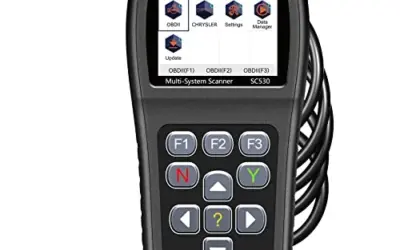
The FOXWELL NT604 Elite is an OBD2 diagnostic scanner with specialized support for Engine, ABS, SRS, and Transmission control modules. It connects to a vehicle's OBDII port using the included OBDII cable and is described as ready to use without initial software downloading.
- Functions include live data, I/M readiness, a built-in DTC library, data playback, and printing.
- The AUTOVIN menu can retrieve the vehicle identification number and vehicle information automatically; manual VIN entry or vehicle selection is available if AUTOVIN fails.
- The scanner supports more than 60 vehicle brands from America, Asia, and Europe and includes lifetime updates with no extra software fee.
- It can read and clear common SRS fault codes not caused by a crash, but crash or collision data cannot be cleared.
- It does not support oil reset, battery registration, ABS bleeding, throttle body relearn, or ABS relearn.
- Compatibility varies by vehicle make, model, and year. The listed color is red, and dimensions are 7.68 x 3.54 x 1.18 inches.
Specifications
| Color | red |
|---|---|
| Dimensions | 7.68 x 3.54 x 1.18 inches |
| Product Group | Automotive Parts and Accessories |
| Binding | Automotive |
Verify the current product variation before purchase; specifications may change.
Detailed Review
What stands out in the currently available product data:
- Scans engine, ABS, SRS, and transmission systems
- Works out of the box with the included OBDII cable
- Includes live data, I/M readiness, data playback, and printing
- AUTOVIN can retrieve vehicle identification information automatically
- Supports more than 60 vehicle brands from America, Asia, and Europe
- Includes lifetime software updates with no extra software fee
Best For / Avoid If
Best for buyers prioritizing
- Provides diagnostics for four major vehicle systems
- Includes useful functions such as live data and I/M readiness
- Supports automatic VIN retrieval and manual vehicle selection
Consider another option if
- Does not support oil reset, battery registration, ABS bleeding, throttle body relearn, or ABS relearn
- SRS crash or collision data cannot be cleared
- Vehicle compatibility varies by make, model, and year, and AUTOVIN may not work on some older vehicles or brands

Pros
- Provides more system-specific diagnostics than basic engine-code readers
- Wireless connection avoids the need for a cable between the scanner and phone or tablet
- Includes live data, freeze-frame information, smog readiness, and Mode 6 functions
- Free app updates and no subscription fees are included with the purchase
Cons
- The published data does not provide iOS or Android operating-system requirements
- The stated compatibility covers gas-powered vehicles from 1996 and newer in North America; compatibility with diesel vehicles is not provided
- A compatible phone or tablet is required for wireless operation
The BlueDriver Pro is a black Bluetooth OBD2 scanner that plugs into a vehicle's OBDII port and connects wirelessly to a phone or tablet. It can read and clear enhanced diagnostic codes for Check Engine, ABS, SRS, airbag, TPMS, and transmission systems.
- Vehicle coverage: Gas-powered vehicles from 1996 and newer sold in the U.S., Canada, and Mexico
- Diagnostic features: VIN-matched repair reports, live data, freeze frames, smog readiness checks, and Mode 6 test results
- Connection: Bluetooth
- Subscription: No subscription fees or add-ons; free app updates are included
- Dimensions: 2.2 x 1.9 x 1 inches
- Weight: 0.13 pounds
Specifications
| Color | Black |
|---|---|
| Size | Pro |
| Dimensions | 2.2 x 1.9 x 1 inches |
| Weight | 0.13 pounds |
| Product Group | Automotive Parts and Accessories |
| Binding | Automotive |
Verify the current product variation before purchase; specifications may change.
Detailed Review
What stands out in the currently available product data:
- Reads and clears enhanced codes for Check Engine, ABS, SRS, airbag, TPMS, and transmission systems
- Provides VIN-matched repair reports with code definitions, possible causes, and verified fixes
- Supports live vehicle data, freeze frames, smog readiness checks, and Mode 6 test results
- Connects wirelessly to a phone or tablet through Bluetooth
- Compatible with gas-powered vehicles from 1996 and newer sold in the U.S., Canada, and Mexico
- Includes full feature access without subscription fees or add-ons
Best For / Avoid If
Best for buyers prioritizing
- Provides more system-specific diagnostics than basic engine-code readers
- Wireless connection avoids the need for a cable between the scanner and phone or tablet
- Includes live data, freeze-frame information, smog readiness, and Mode 6 functions
Consider another option if
- The published data does not provide iOS or Android operating-system requirements
- The stated compatibility covers gas-powered vehicles from 1996 and newer in North America; compatibility with diesel vehicles is not provided
- A compatible phone or tablet is required for wireless operation

Pros
- Supports multiple common OBDII protocols, including CAN
- Provides more than basic code reading with live data, freeze-frame, and readiness information
- Powered through the vehicle, so no separate battery or charger is required
- Compact design and 12-ounce weight support portability
Cons
- Limited to emission-related diagnostics
- Requires a vehicle with an OBDII interface and does not diagnose OBDI vehicles, even with an adapter
- Vehicle compatibility should be confirmed before purchase
The ANCEL AD310 is an OBD II code reader for compatible 1996 and newer vehicles. It can read and clear emission-related diagnostic trouble codes and display live data, hard memory data, freeze-frame information, I/M monitor readiness, and vehicle information.
The scanner supports KWP2000, J1850 VPW, ISO9141, J1850 PWM, and CAN protocols. It connects through the vehicle's OBDII data link connector and receives power from the vehicle, so batteries and a charger are not required. The unit has a 2.5-foot cable, weighs 12 ounces, and is described as compact and portable.
Compatibility is listed for 1996 US-based vehicles, 2000 EU-based and Asian vehicles, light trucks, SUVs, and newer OBD2 and CAN vehicles. The AD310 supports emission-related diagnostics only and requires an OBDII interface.
Specifications
| Color | Black |
|---|---|
| Dimensions | 4.9212598375 x 2.755905509 x 0.8661417314 inches |
| Product Group | Automotive Parts and Accessories |
| Binding | Automotive |
Verify the current product variation before purchase; specifications may change.
Detailed Review
What stands out in the currently available product data:
- Reads and clears emission-related diagnostic trouble codes
- Supports KWP2000, J1850 VPW, ISO9141, J1850 PWM, and CAN protocols
- Displays live data, hard memory data, freeze-frame information, and I/M monitor readiness
- Draws power directly from the vehicle's OBDII data link connector
- Uses a 2.5-foot cable with a compact, lightweight design
- Supports compatible 1996 and newer US-based vehicles, plus 2000 and newer EU-based and Asian vehicles
Best For / Avoid If
Best for buyers prioritizing
- Supports multiple common OBDII protocols, including CAN
- Provides more than basic code reading with live data, freeze-frame, and readiness information
- Powered through the vehicle, so no separate battery or charger is required
Consider another option if
- Limited to emission-related diagnostics
- Requires a vehicle with an OBDII interface and does not diagnose OBDI vehicles, even with an adapter
- Vehicle compatibility should be confirmed before purchase

Pros
- Bi-directional control supports live actuation tests
- Includes 23 listed reset and relearn functions
- Free software updates are listed without subscriptions or fees
Cons
- Vehicle compatibility details are not provided
- Operating-system requirements for the smart device are not provided
- Connector type and supported protocols are not provided
The GEARWRENCH GWSMARTBT is a professional bi-directional diagnostic scan tool in the Code Readers & Scan Tools category. Its listed features include OE-level diagnostics through a smart device, full bi-directional control, live actuation testing, live data mapping, and freeze-frame capture.
- Supports 23 vehicle reset and relearn functions
- Includes throttle matching, ABS bleeding, and TPMS reset
- Free software updates with no subscriptions or fees listed
- Dimensions: 3.4 x 2.1 x 0.9 inches
- Weight: 0.2425084882 pounds
Specifications
| Dimensions | 3.4 x 2.1 x 0.9 inches |
|---|---|
| Weight | 0.2425084882 pounds |
| Product Group | Automotive Parts and Accessories |
| Binding | Automotive |
Verify the current product variation before purchase; specifications may change.
Detailed Review
What stands out in the currently available product data:
- Provides OE-level diagnostics through a smart device
- Offers full bi-directional control and live actuation testing
- Supports 23 vehicle reset and relearn functions
- Includes functions such as throttle matching, ABS bleeding, and TPMS reset
- Provides live data mapping
- Supports freeze-frame data capture
Best For / Avoid If
Best for buyers prioritizing
- Bi-directional control supports live actuation tests
- Includes 23 listed reset and relearn functions
- Free software updates are listed without subscriptions or fees
Consider another option if
- Vehicle compatibility details are not provided
- Operating-system requirements for the smart device are not provided
- Connector type and supported protocols are not provided

Pros
- Covers a range of 12V and 24V heavy-duty trucks, including Freightliner, Peterbilt, Kenworth, International, Volvo and Western Star
- Provides full-system heavy-duty diagnostics rather than engine-only scanning
- Includes DTC, SPN and FMI lookup features for identifying possible fault areas
- Supports multiple connector types and HDOBD protocols
- Lifetime free updates are included
Cons
- Vehicle coverage may vary by model year, system and configuration
- Compatible light-duty vehicles support OBD2 diagnostics only
- Operating-system requirements are not provided
The ANCEL HD601 is a 2-in-1 diagnostic scan tool for heavy-duty trucks and compatible light-duty vehicles. It supports 12V and 24V commercial vehicles, including trucks, semi-trucks and buses, with compatibility listed for brands such as Freightliner, Peterbilt, Kenworth, International, Volvo and Western Star, plus diesel engines from Cummins, Detroit and PACCAR.
For heavy-duty vehicles, the scanner supports full-system diagnostics for systems including Engine, Transmission and ABS. Functions include Quick Scan, Full Scan, live data, freeze-frame data, fault-code reading and clearing, and a built-in DTC library with manual SPN and FMI code lookup. Supported HDOBD protocols include J1939 and J1587/J1708.
The scanner includes 6-pin, 9-pin and 16-pin connectors and supports OBD2 diagnostics on compatible light-duty vehicles. Vehicle coverage may vary by model year, system and configuration. Lifetime free updates and technical support are included. Operating-system requirements are not provided.
Specifications
| Color | orange |
|---|---|
| Product Group | Automotive Parts and Accessories |
Verify the current product variation before purchase; specifications may change.
Detailed Review
What stands out in the currently available product data:
- Supports 12V and 24V heavy-duty trucks across major North American truck brands
- Provides full-system diagnostics for heavy-duty truck systems including Engine, Transmission and ABS
- Supports both HDOBD and OBD2 diagnostics in one scan tool
- Includes Quick Scan, Full Scan, live data, freeze-frame data, and fault-code reading and clearing
- Supports J1939 and J1587/J1708 heavy-duty communication protocols
- Includes 6-pin, 9-pin and 16-pin connectors for common vehicle interfaces
Best For / Avoid If
Best for buyers prioritizing
- Covers a range of 12V and 24V heavy-duty trucks, including Freightliner, Peterbilt, Kenworth, International, Volvo and Western Star
- Provides full-system heavy-duty diagnostics rather than engine-only scanning
- Includes DTC, SPN and FMI lookup features for identifying possible fault areas
Consider another option if
- Vehicle coverage may vary by model year, system and configuration
- Compatible light-duty vehicles support OBD2 diagnostics only
- Operating-system requirements are not provided

Pros
- Combines full-system diagnosis with bi-directional active testing
- Includes multiple service and reset functions for supported vehicles
- Lifetime software updates are listed without an ongoing subscription fee
- Supports 11 languages, including English, Spanish, French, and Portuguese
Cons
- Vehicle and function compatibility should be confirmed before purchase
- The listed service functions may vary by vehicle make and model
- Use with brands other than Ford, Lincoln, Mercury, and Mazda requires an additional purchase through the service mall
The LAUNCH X431 Creader Elite 2.0 is an OBD2 diagnostic scan tool designed for Ford, Lincoln, Mercury, and Mazda vehicles. It runs Android 8.1 on a four-core 1.3 GHz processor with 2GB RAM and 16GB storage, and includes a 4-inch touchscreen, 3,000mAh battery, and 2.4 GHz Wi-Fi connection.
Diagnostic features include full-system scanning, fault-code reading and clearing, live data, freeze-frame data, vehicle information, data recording and playback, and bi-directional active tests for supported systems and components. Listed service functions include ABS bleeding, SAS reset, battery registration, oil reset, crankshaft sensor relearn, transmission adaptation, TPMS reset, injector coding, and suspension-related functions.
Compatibility and available functions may vary by vehicle. The product listing states that software updates are provided for the supported brands for the lifetime of the tool without a subscription fee. Additional brand coverage requires a separate purchase.
Specifications
| Product Group | Automotive Parts and Accessories |
|---|---|
| Binding | Automotive |
Verify the current product variation before purchase; specifications may change.
Detailed Review
What stands out in the currently available product data:
- Supports Ford, Lincoln, Mercury, and Mazda vehicles
- Provides bi-directional controls and active tests for supported components
- Performs full-system scans with fault-code reading and clearing
- Displays live data, freeze-frame data, and vehicle information
- Includes listed service functions such as ABS bleeding, SAS reset, battery registration, and oil reset
- Offers lifetime software updates without a subscription fee
Best For / Avoid If
Best for buyers prioritizing
- Combines full-system diagnosis with bi-directional active testing
- Includes multiple service and reset functions for supported vehicles
- Lifetime software updates are listed without an ongoing subscription fee
Consider another option if
- Vehicle and function compatibility should be confirmed before purchase
- The listed service functions may vary by vehicle make and model
- Use with brands other than Ford, Lincoln, Mercury, and Mazda requires an additional purchase through the service mall

Pros
- Ford-focused coverage for vehicles from 1996 to present
- Supports bidirectional diagnostics and multiple Ford-specific service functions
- J2534 hardware interface capability is included
- Also supports generic OBD2 code reading, live data, I/M readiness, battery-voltage testing, and VIN retrieval
Cons
- Official Ford OEM software and subscriptions for J2534 use must be purchased separately
- Supported functions may vary by vehicle model, year, and engine configuration
- Specific iOS and Android operating-system requirements are not provided
The VDIAGTOOL D502 is a Bluetooth OBD2 scanner for Ford vehicles from 1996 to present. It supports full-system diagnostics for engine, ABS, SRS, transmission, HVAC, and 4WD systems, along with up to 37+ Ford-specific service functions such as throttle relearn, oil reset, EPB maintenance, BMS battery registration, ABS bleeding, SAS calibration, and injector coding.
The scanner supports iOS and Android devices and can function as a J2534 pass-through interface for official Ford diagnostic software. The software and required subscriptions are not included. It also supports generic OBD2 functions on vehicles with 16-pin ports, including reading and erasing generic codes, I/M readiness checks, live data, battery-voltage testing, and VIN retrieval. Supported functions vary by vehicle model, year, and engine configuration.
Specifications
| Color | Black |
|---|---|
| Dimensions | 2 x 1 x 1 inches |
| Product Group | Automotive Parts and Accessories |
Verify the current product variation before purchase; specifications may change.
Detailed Review
What stands out in the currently available product data:
- Supports full-system diagnostics for Ford engine, ABS, SRS, transmission, HVAC, and 4WD systems
- Includes up to 37+ Ford-specific service functions, including throttle relearn, oil reset, EPB maintenance, BMS registration, ABS bleeding, SAS calibration, and injector coding
- Provides J2534 pass-through support for use with official Ford diagnostic software
- Works as a generic OBD2 scanner for all OBD2-compliant vehicles with 16-pin ports
- Connects to iOS and Android devices through Bluetooth
- Includes lifetime free updates according to the published product data
Best For / Avoid If
Best for buyers prioritizing
- Ford-focused coverage for vehicles from 1996 to present
- Supports bidirectional diagnostics and multiple Ford-specific service functions
- J2534 hardware interface capability is included
Consider another option if
- Official Ford OEM software and subscriptions for J2534 use must be purchased separately
- Supported functions may vary by vehicle model, year, and engine configuration
- Specific iOS and Android operating-system requirements are not provided
How We Evaluated the Scanners
To evaluate the best Ford scan tool options on the market, our editorial team assessed technical documentation, protocol support, hardware architecture, and maintenance reset capabilities across 7 diagnostic devices. Rather than relying on laboratory road testing or subjective scores, our evaluation focuses on manufacturer-documented specifications, real-world protocol matching, and software support tiers.
We analyzed each tool based on four practical ownership criteria:
- Protocol and System Depth: Can the device communicate exclusively with standard OBD2 powertrain parameters, or does it access Ford-specific modules including the Body Control Module (BCM), Anti-lock Braking System (ABS), Supplemental Restraint System (SRS), Transmission Control Module (TCM), and 4WD modules?
- Bidirectional Testing and Service Functions: Does the scanner merely read DTCs, or can it initiate active tests (cycling cooling fans, testing window actuators, commanding fuel pumps) and execute service resets like ABS bleeding, BMS battery registration, and throttle relearns?
- Platform Architecture: Handheld all-in-one touchscreens versus wireless Bluetooth dongles paired to iOS or Android devices, evaluating portability and hardware longevity.
- Long-Term Software Costs: Total cost of ownership, distinguishing tools that provide lifetime free updates from those requiring recurring annual subscriptions.
Ford Scan Tool Comparison Table
| Model | Form Factor | Ford System Coverage | Bidirectional / Actuation | Notable Special Functions | Current Price |
|---|---|---|---|---|---|
| Launch X431 Creader Elite 2.0 for Ford OBD2 | Handheld Touchscreen | All Vehicle Systems (ECU Level) | Yes | ABS Bleed, BMS, SAS, Crank Relearn | $189.00 |
| VDIAGTOOL D502 OBD2 Scanner Bluetooth fits | Wireless Bluetooth | All Vehicle Systems + J2534 Hardware | Yes | 37+ Resets, BMS, Throttle Relearn | $199.99 |
| BlueDriver OBD2 Scanner Bluetooth | Wireless Bluetooth | Engine, ABS, SRS, TPMS, Trans | No | Verified Fix Reports, Smog Readiness | $139.95 |
| GEARWRENCH Professional Bi-Directional Diagnostic | Wireless Bluetooth | Comprehensive Diagnostic Systems | Yes | 23 Resets, ABS Bleed, Throttle Match | $99.99 |
| FOXWELL Car Scanner NT604 Elite OBD2 Scanner ABS | Handheld (Buttons) | Engine, Transmission, ABS, SRS | No | AutoVIN, Freeze Frame (No Resets) | $144.99 |
| ANCEL New HD601 Heavy Duty Truck Scanner | Handheld (Commercial) | HDOBD Full System + Standard OBD2 | No | SPN/FMI DTC Library, 6/9/16-pin | $135.99 |
| ANCEL AD310 Classic Enhanced Universal OBD II | Handheld (Compact) | Emissions / Engine Powertrain Only | No | I/M Readiness, Freeze Frame | $29.99 |
Ford Compatibility and Buying Advice
Ford Motor Company uses specialized diagnostic protocols across its vehicle lineup. Understanding how these interact with diagnostic hardware prevents purchasing a scanner that leaves critical control modules invisible.
1. MS-CAN vs. HS-CAN Bus Architecture
Unlike basic universal cars that route essential diagnostic data exclusively over high-speed CAN (HS-CAN), modern Ford, Lincoln, and Mercury vehicles split data communication between two distinct buses: HS-CAN (handling engine, transmission, ABS) and MS-CAN (Medium-Speed CAN, controlling body modules, HVAC, power accessories, instrument cluster, and lighting). Basic OBD2 code readers, such as the ANCEL AD310, communicate solely across standard pins and cannot see the MS-CAN network. If you need to diagnose door lock actuators, climate control blending doors, or lighting modules, select a Ford-specialized tool such as the Launch X431 Creader Elite 2.0 or VDIAGTOOL D502.
2. The Necessity of Battery Management System (BMS) Reset
Most modern Ford vehicles (equipped with EcoBoost engines, auto start-stop, and AGM batteries) feature an integrated Battery Monitoring Sensor. When installing a replacement 12V battery, the vehicle’s engine control module must be updated via a BMS Reset to recalibrate the charging curve. Failing to perform this reset can cause the alternator to overcharge or undercharge the new battery, resulting in reduced lifespan and disabled electronic features. If you perform your own battery maintenance on late-model Fords, ensure your selected scanner supports BMS battery registration.
3. Repair vs. Diagnostic Clarification
A diagnostic scanner can read, display, and clear trouble codes, but it cannot repair mechanical or electrical faults. If an ABS wheel speed sensor has failed, an airbag harness is severed, or an engine misfire is occurring due to a bad ignition coil, erasing the diagnostic trouble code (DTC) will not solve the underlying issue. The code and warning indicator will return as soon as the vehicle’s onboard diagnostics perform their self-check cycle. The fault must be physically repaired before clearing the code.
How to Choose the Best Ford Scan Tool for Your Needs
- Determine Your Diagnostic Scope: If you only need to determine why a Check Engine light is illuminated prior to a state smog inspection, a standard universal tool like the ANCEL AD310 or BlueDriver provides plenty of insight. If you need to bleed brakes, code fuel injectors, or reset steering angle sensors, choose a scanner that explicitly lists Ford-specific service functions.
- Consider Bidirectional Active Testing: If you are troubleshooting intermittent component failures (e.g., verifying whether a cooling fan relay or an electric fuel pump is receiving an activation signal), bidirectional actuation allows you to toggle the component directly from your scanner screen, cutting troubleshooting time in half. Both the Launch X431 Creader Elite 2.0 and GEARWRENCH GWSMARTBT support active testing.
- Pick Your Hardware Form Factor: Wireless Bluetooth dongles keep your vehicle dashboard tidy and provide massive screen space on a phone or tablet, but they rely on device battery life and reliable Bluetooth pairing. Standalone wired handhelds remain durable garage workhorses that draw power directly from the OBD2 port, ensuring they are always ready to operate.
- Verify Heavy-Duty Protocol Requirements: If you maintain commercial chassis cabs (such as Ford F-650/F-750 medium-duty trucks or mixed fleet diesel equipment), standard OBD2 passenger tools will fail to communicate with commercial ECUs. Ensure you select a scanner equipped with J1939 and J1708 commercial support like the ANCEL HD601.
Frequently Asked Questions
Will a universal OBD2 scanner clear an airbag or ABS light on my Ford?
Generally, no. Basic universal code readers are programmed solely to retrieve generic SAE emissions-related trouble codes (P0xxx codes) governed by standard federal OBD2 regulations. ABS, SRS airbag, and body control codes are manufacturer-specific enhanced codes. You will need a scanner with extended module support—such as the BlueDriver, FOXWELL NT604 Elite, Launch X431 Creader Elite 2.0, or VDIAGTOOL D502—to read and erase chassis and safety system codes.
Do I have to pay an annual subscription to keep my Ford scan tool working?
None of the seven scanners featured in this guide require an ongoing mandatory subscription for their standard diagnostic capabilities. The Launch X431 Creader Elite 2.0 includes lifetime free software updates for Ford/Lincoln/Mercury/Mazda. The BlueDriver, ANCEL, FOXWELL, GEARWRENCH, and VDIAGTOOL models also provide free lifetime update policies for their built-in software suites.
What is J2534 pass-thru and do I need it for regular Ford maintenance?
J2534 is an SAE standard interface specification that allows a hardware tool to act as a diagnostic bridge between a PC running official OEM software (like Ford FDRS or FJDS) and the vehicle’s communication bus. For routine DIY tasks like reading trouble codes, bleeding ABS brakes, and registering batteries, you do not need J2534 functionality. However, if you plan to reflash or program blank replacement modules using official Ford dealer software subscriptions, a J2534-compliant hardware interface like the VDIAGTOOL D502 is necessary.
Final Verdict
Choosing the best Ford scan tool depends strictly on the level of technical control your maintenance routine demands. For true Ford enthusiasts and home mechanics who demand bidirectional active component testing, module adaptation, and comprehensive service functions on a dedicated standalone handheld, the Launch X431 Creader Elite 2.0 for Ford OBD2 represents the most complete standalone package. If you prefer utilizing your smartphone or tablet with the option for advanced J2534 OEM pass-thru capabilities, the VDIAGTOOL D502 OBD2 Scanner Bluetooth fits delivers an expansive 37+ service repertoire. For everyday vehicle owners who simply want reliable enhanced wireless code reading and verified repair guidance without complexity, the BlueDriver OBD2 Scanner Bluetooth remains a dependable diagnostic partner for your garage.