Searching for the best computer OBD 2 scanners USB usually means you want a wired interface that connects a vehicle’s OBD-II port to a Windows computer, rather than a phone-only Bluetooth reader or a handheld code reader. The important differences are software support, protocol coverage, connection type, and whether the device is a complete scanner or only an extension cable.
This guide compares all seven listings covered, but only three are direct recommendations for computer-based USB diagnostics: the KEVWR OBDII USB V1.5 adapter, the CERRXIAN ELM327 USB adapter, and the OBDLink EX for FORScan. The other listings are included for scope clarity but are not USB computer-scanner picks because their published descriptions identify them as a cable, a Bluetooth adapter, or a standalone handheld scanner.
Affiliate disclosure: CarTechTalk may earn a commission from qualifying purchases made through retailer links. Product details and prices below are based only on the listing covered information.
Pros
- FORScan-focused design with recommendation from the FORScan Team
- Supports Ford protocols, modules, and advanced diagnostic features
- Electronic switching enables simultaneous CAN-bus access
- Advertised to provide higher throughput than toggle-switch adapters
Cons
- Specific vehicle compatibility details are not provided beyond FORScan compatibility
- Operating-system requirements are not provided
- The published specifications list does not include connector or voltage details
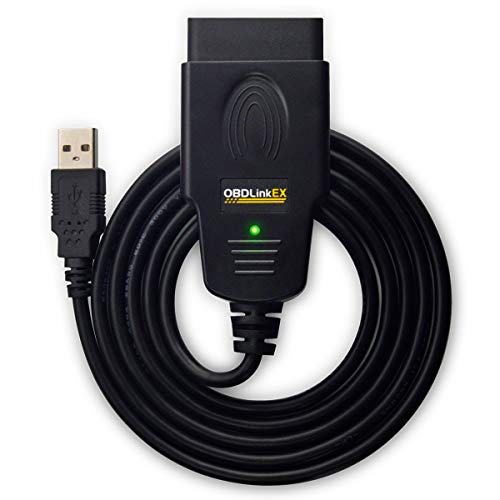
The OBDLink EX is an OBD adapter designed for use with FORScan. It works with all FORScan-compatible vehicles and is recommended by the FORScan Team. The adapter supports all Ford protocols, modules, and advanced FORScan features.
An electronic switch allows FORScan to access all CAN buses simultaneously and enables advanced functions not possible with toggle-switch adapters. The published product information states throughput of up to 20 times faster than toggle-switch adapters and describes the connection as resistant to data corruption and dropped packets.
Listed dimensions are 3.5 x 1 x 1.8 inches. Operating-system requirements, connector type, and voltage are not provided in the published data.
Detailed Review
What stands out in the currently available product data:
- Designed specifically for use with FORScan
- Works with all FORScan-compatible vehicles
- Supports all Ford protocols, modules, and advanced FORScan features
- Electronic switch provides access to all CAN buses simultaneously
- Enables advanced functions not possible with toggle-switch adapters
- Advertised throughput is up to 20 times faster than toggle-switch adapters
Best For / Avoid If
Best for buyers prioritizing
- FORScan-focused design with recommendation from the FORScan Team
- Supports Ford protocols, modules, and advanced diagnostic features
- Electronic switching enables simultaneous CAN-bus access
Consider another option if
- Specific vehicle compatibility details are not provided beyond FORScan compatibility
- Operating-system requirements are not provided
- The published specifications list does not include connector or voltage details

Pros
- Supports multiple common OBDII protocols, including CAN
- Provides more than basic code reading with live data, freeze-frame, and readiness information
- Powered through the vehicle, so no separate battery or charger is required
- Compact design and 12-ounce weight support portability
Cons
- Limited to emission-related diagnostics
- Requires a vehicle with an OBDII interface and does not diagnose OBDI vehicles, even with an adapter
- Vehicle compatibility should be confirmed before purchase
The ANCEL AD310 is an OBD II code reader for compatible 1996 and newer vehicles. It can read and clear emission-related diagnostic trouble codes and display live data, hard memory data, freeze-frame information, I/M monitor readiness, and vehicle information.
The scanner supports KWP2000, J1850 VPW, ISO9141, J1850 PWM, and CAN protocols. It connects through the vehicle's OBDII data link connector and receives power from the vehicle, so batteries and a charger are not required. The unit has a 2.5-foot cable, weighs 12 ounces, and is described as compact and portable.
Compatibility is listed for 1996 US-based vehicles, 2000 EU-based and Asian vehicles, light trucks, SUVs, and newer OBD2 and CAN vehicles. The AD310 supports emission-related diagnostics only and requires an OBDII interface.
Specifications
| Color | Black |
|---|---|
| Dimensions | 4.9212598375 x 2.755905509 x 0.8661417314 inches |
| Product Group | Automotive Parts and Accessories |
| Binding | Automotive |
Verify the current product variation before purchase; specifications may change.
Detailed Review
What stands out in the currently available product data:
- Reads and clears emission-related diagnostic trouble codes
- Supports KWP2000, J1850 VPW, ISO9141, J1850 PWM, and CAN protocols
- Displays live data, hard memory data, freeze-frame information, and I/M monitor readiness
- Draws power directly from the vehicle's OBDII data link connector
- Uses a 2.5-foot cable with a compact, lightweight design
- Supports compatible 1996 and newer US-based vehicles, plus 2000 and newer EU-based and Asian vehicles
Best For / Avoid If
Best for buyers prioritizing
- Supports multiple common OBDII protocols, including CAN
- Provides more than basic code reading with live data, freeze-frame, and readiness information
- Powered through the vehicle, so no separate battery or charger is required
Consider another option if
- Limited to emission-related diagnostics
- Requires a vehicle with an OBDII interface and does not diagnose OBDI vehicles, even with an adapter
- Vehicle compatibility should be confirmed before purchase

Pros
- Broad basic OBD2 diagnostic function set
- Built-in code definitions can help explain fault codes
- Supports major protocols including CAN, ISO9141, KWP2000, J1850 VPW and J1850 PWM
- Color display, multilingual support and on-screen code definitions
Cons
- Limited to engine and emission-related codes
- Does not support ABS, SRS, transmission, bidirectional control or service reset functions
- Vehicle compatibility should be checked before purchase
The ANCEL AD410 is an OBD2 code reader designed for engine and emission-related diagnostics. It can read and clear fault codes, show code definitions, display live data, provide freeze-frame information, check I/M readiness, and perform O2 sensor and EVAP tests.
The scanner is powered through the vehicle's 16-pin OBD2 port and includes a 2.4-inch color display. It supports CAN, ISO9141, KWP2000, J1850 VPW and J1850 PWM protocols. Compatibility is listed for most 1996 and newer U.S.-based OBD2 cars, SUVs and light trucks, as well as many 2000 and newer EU and Asian OBD2 vehicles.
The AD410 does not support ABS, SRS, transmission, bidirectional control or service reset functions. Product dimensions are 9 x 6.3 x 1.6 inches, and listed weight is 0.66 pounds.
Specifications
| Color | yellow |
|---|---|
| Dimensions | 9 x 6.3 x 1.6 inches |
| Weight | 0.66 Pounds |
| Product Group | Automotive Parts and Accessories |
| Binding | Automotive |
Verify the current product variation before purchase; specifications may change.
Detailed Review
What stands out in the currently available product data:
- Reads and clears engine-related fault codes
- Includes more than 42,000 built-in DTC definitions
- Displays available live data such as RPM, coolant temperature, fuel trim and oxygen sensor readings
- Provides I/M readiness information for emissions inspection preparation
- Supports freeze frame, O2 sensor, EVAP and vehicle information functions
- Works with most 1996 and newer U.S.-based OBD2 cars, SUVs and light trucks, plus many 2000 and newer EU and Asian OBD2 vehicles
Best For / Avoid If
Best for buyers prioritizing
- Broad basic OBD2 diagnostic function set
- Built-in code definitions can help explain fault codes
- Supports major protocols including CAN, ISO9141, KWP2000, J1850 VPW and J1850 PWM
Consider another option if
- Limited to engine and emission-related codes
- Does not support ABS, SRS, transmission, bidirectional control or service reset functions
- Vehicle compatibility should be checked before purchase

Pros
- Broad protocol support for the listed OBDII standards
- Provides multiple diagnostic functions and live sensor-data displays
- Includes data graphing, logging, and freeze-frame capabilities
- USB connection supports DOS and Windows according to the published product data
Cons
- Compatibility requirements for iOS and Android are not provided
- The published data does not identify included software by name
- The product is described for 12V fuel vehicles, with no additional vehicle-compatibility details provided
The CERRXIAN ELM327 OBD2 USB Adapter is an OBDII diagnostic cable for connecting a vehicle's OBD2 port to a computer. It supports ISO15765-4 (CAN), ISO14230-4 (KWP2000), ISO9141-2, SAE J1850 PWM at 41.6 kbaud, and SAE J1850 VPW at 10.4 kbaud protocols.
Listed functions include reading and clearing diagnostic trouble codes, turning off the MIL (Check Engine light), displaying current sensor data, viewing freeze-frame data, and data graphing and logging. Supported data includes engine RPM, calculated load value, timing advance, intake air temperature, air flow rate, coolant temperature, and fuel system status.
- Connection: OBD2 to USB
- Cable length: 1.5M/5FT
- Operating systems: DOS and Windows
- Included: CD-ROM
- Color: Black
- Vehicle description: Listed for 12V fuel vehicles
Specifications
| Color | black |
|---|---|
| Product Group | Automotive Parts and Accessories |
Verify the current product variation before purchase; specifications may change.
Detailed Review
What stands out in the currently available product data:
- Supports ISO15765-4 (CAN), ISO14230-4 (KWP2000), ISO9141-2, SAE J1850 PWM, and SAE J1850 VPW protocols
- Reads and clears diagnostic trouble codes
- Can turn off the MIL (Check Engine light)
- Displays current sensor data, including engine RPM, coolant temperature, and intake air temperature
- Supports data graphing, logging, and freeze-frame data
- Includes a CD-ROM and supports DOS and Windows
Best For / Avoid If
Best for buyers prioritizing
- Broad protocol support for the listed OBDII standards
- Provides multiple diagnostic functions and live sensor-data displays
- Includes data graphing, logging, and freeze-frame capabilities
Consider another option if
- Compatibility requirements for iOS and Android are not provided
- The published data does not identify included software by name
- The product is described for 12V fuel vehicles, with no additional vehicle-compatibility details provided

Pros
- Covers nine listed OBD-II protocol configurations
- Provides code reading, code clearing, and current sensor data functions
- Uses a USB connector for connection to a Windows computer
- Includes a stated 9-16V operating range
Cons
- Software support is listed only for Windows XP and Windows 7-8
- iOS and Android compatibility is not provided
- Specific vehicle-year compatibility beyond multi-brand OBD-II support is not specified
The KEVWR OBDII USB V1.5 Scanner is a multi-brand OBD-II diagnostic cable that connects to a laptop through USB. Listed functions include reading and clearing diagnostic trouble codes, turning off the MIL, displaying current sensor data, viewing data flow, resetting monitors, and helping check engine-light issues.
Supported protocols include SAE J1850 PWM, SAE J1850 VPW, ISO9141-2, ISO14230-4 KWP with 5 baud initialization, ISO14230-4 KWP with fast initialization, and ISO15765-4 CAN configurations using 11-bit or 29-bit IDs at 250 or 500 Kbaud. Listed software support includes ScanMaster, ScanTool.net, and PCMSCAN on Windows XP and Windows 7-8. The listed operating range is 9-16V.
Specifications
| Dimensions | 0.1 x 0.1 x 0.1 Inches |
|---|---|
| Product Group | Automotive Parts and Accessories |
Verify the current product variation before purchase; specifications may change.
Detailed Review
What stands out in the currently available product data:
- Supports SAE J1850, ISO9141-2, ISO14230-4 KWP, and ISO15765-4 CAN protocols
- Reads and clears diagnostic trouble codes
- Can turn off the malfunction indicator lamp
- Displays current sensor data
- USB connection lets a laptop access vehicle computer information
- Supports Windows XP and Windows 7-8
Best For / Avoid If
Best for buyers prioritizing
- Covers nine listed OBD-II protocol configurations
- Provides code reading, code clearing, and current sensor data functions
- Uses a USB connector for connection to a Windows computer
Consider another option if
- Software support is listed only for Windows XP and Windows 7-8
- iOS and Android compatibility is not provided
- Specific vehicle-year compatibility beyond multi-brand OBD-II support is not specified

Pros
- Supports both iOS and Android through Bluetooth LE
- Provides several standard OBD-II diagnostic functions
- Compatible with multiple generic and vehicle-specific third-party apps
- Compact listed dimensions of 1.61417 x 1.9685 x 0.86614 inches
Cons
- Requires a compatible third-party app, and some apps or features may require separate purchases
- Does not support special functions such as injector coding, EPB reset, ABS bleeding, oil light or service resets, and relearns
- Advanced diagnostics and EV or hybrid support depend on the vehicle and app
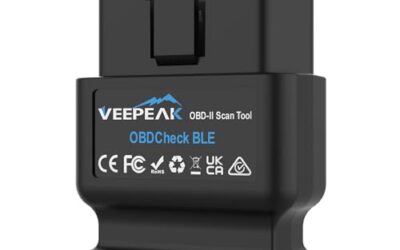
The Veepeak OBDCheck BLE is a Bluetooth LE OBD-II scanner designed for iOS and Android devices. It requires a compatible third-party app and is intended primarily for standard OBD-II diagnostics, including reading and clearing check-engine trouble codes, viewing freeze-frame data, checking I/M readiness, and monitoring live sensor data.
For generic OBD-II functions, it works with most 1996 and newer cars and light trucks in the US. App compatibility includes Car Scanner ELM OBD2, Torque for Android, OBD Fusion, BimmerCode, BimmerLink, OBD JScan, and Dr. Prius, although some apps and in-app features require separate purchases. Advanced diagnostics, manufacturer-specific data, and EV or hybrid support depend on the vehicle and app.
The device does not support special functions such as injector coding, EPB reset, ABS bleeding, oil light or service resets, and relearns. It is not compatible with Carly, MHD, xHP, ProTool, or bootmod3. Listed dimensions are 1.61417 x 1.9685 x 0.86614 inches.
Specifications
| Dimensions | 1.61417 x 1.9685 x 0.86614 inches |
|---|---|
| Product Group | Automotive Parts and Accessories |
| Binding | Automotive |
Verify the current product variation before purchase; specifications may change.
Detailed Review
What stands out in the currently available product data:
- Supports Bluetooth LE connections with iOS and Android devices
- Reads and clears generic check-engine trouble codes
- Displays freeze-frame data and live sensor data
- Checks I/M readiness for emissions-related diagnostics
- Works with most 1996 and newer cars and light trucks in the US for generic OBD-II functions
- Compatible with apps including Car Scanner ELM OBD2, Torque, and OBD Fusion
Best For / Avoid If
Best for buyers prioritizing
- Supports both iOS and Android through Bluetooth LE
- Provides several standard OBD-II diagnostic functions
- Compatible with multiple generic and vehicle-specific third-party apps
Consider another option if
- Requires a compatible third-party app, and some apps or features may require separate purchases
- Does not support special functions such as injector coding, EPB reset, ABS bleeding, oil light or service resets, and relearns
- Advanced diagnostics and EV or hybrid support depend on the vehicle and app
Top Picks at a Glance
- Best for Ford and advanced FORScan work: OBDLink EX FORScan OBD Adapter. The manufacturer lists support for all FORScan-compatible vehicles, Ford protocols, modules, and advanced features.
- Best budget Windows USB adapter: KEVWR OBDII USB V1.5 Scanner. Its published specifications list Windows support, multiple OBD-II protocols, and basic code and live-data functions.
- Best for USB data analysis and logging: CERRXIAN ELM327 OBD2 USB Adapter. The manufacturer lists Windows and DOS support, graphing, logging, freeze-frame data, and multiple standard protocols.
Choosing Factors for OBD2 Scanners & Diagnostics
We evaluated the published product specifications against the search intent: a computer-connected OBD-II scanner using USB. The editorial review focused on listed operating systems, connection format, supported protocols, software requirements, vehicle voltage information, and diagnostic functions. Products without a directly stated USB computer-scanner use were not selected as recommendations.
No first-hand testing evidence, customer review excerpts, or usable product rating data was provided. Accordingly, this is a specification-led buying guide, not a laboratory or road test. The displayed prices are the listed observed prices and may change.
Recommended Models
KEVWR OBDII USB V1.5 Scanner: Best Budget Windows USB Adapter
Listed price: $11.89
ASIN: B0BXKM42QW
The KEVWR is the clearest low-cost match for buyers who want to connect a vehicle to a Windows laptop for basic OBD-II diagnosis. The manufacturer lists Windows XP and Windows 7-8 support, along with compatibility with ScanMaster, ScanTool.net, and PCMSCAN. It also lists coverage for SAE J1850 PWM, SAE J1850 VPW, ISO9141-2, ISO14230-4 KWP, and ISO15765-4 CAN variants.
Listed functions include reading and deleting fault codes, viewing data flow, checking monitors, resetting monitors, and turning off the engine light. The published description says the unit is dispatched with compatible programs, but it also begins an installation instruction that says to extract files, so buyers should expect some software setup rather than a completely plug-and-play experience.
Buy it if: you need the lowest-priced direct USB-to-Windows option and want broad legacy protocol coverage on a compatible vehicle.
Avoid it if: you need a modern phone app, a standalone screen, advanced module coding, or clearly documented support beyond the listed Windows versions.
CERRXIAN ELM327 OBD2 USB Adapter: Best for Windows Data Logging
Listed price: $13.99
ASIN: B0D75PQ6TV
CERRXIAN is a strong fit for computer users who want more than simple code clearing. Its published specifications list DOS and Windows support, a USB connection, and compatibility with ISO15765-4 CAN, ISO14230-4 KWP2000, ISO9141-2, SAE J1850 PWM, and SAE J1850 VPW.
The listed software functions include reading and clearing diagnostic trouble codes, turning off the malfunction indicator light, displaying live engine data, viewing freeze-frame information, graphing, and data logging. Examples of available data include engine RPM, calculated load, timing advance, intake air temperature, airflow rate, coolant temperature, and fuel-system status.
The manufacturer says to install the program software from the included CD-ROM before connecting the car. It also describes the adapter as intended for 12V fuel vehicles. That makes the voltage and vehicle-use wording important: do not assume it is suitable for every vehicle or every computer operating system.
Buy it if: you want an inexpensive wired interface for Windows-based live-data viewing, graphing, and logging.
Avoid it if: you do not have a computer with compatible software or you want a current mobile-app experience without installing programs from a CD-ROM.
OBDLink EX FORScan OBD Adapter: Best for Advanced Ford FORScan Diagnostics
Listed price: $69.95
ASIN: B081VQVD3F
The OBDLink EX is the specialist choice in this group. The manufacturer lists it as custom-designed for FORScan and says it works with all FORScan-compatible vehicles. It is also listed as supporting all Ford protocols, modules, and advanced FORScan features.
Its electronic switch is designed to let FORScan access all CAN buses simultaneously, enabling advanced functions that the manufacturer says are not possible with toggle-switch adapters. OBDLink also lists throughput of up to 20 times faster than toggle-switch adapters and describes the connection as resistant to data corruption and dropped packets.
The published information does not state a general operating-system list or explicitly identify the computer connector as USB, so buyers should confirm the connection and FORScan requirements before ordering. Its intended use is much narrower than the two general-purpose USB adapters above.
Buy it if: you specifically need FORScan access for a compatible Ford vehicle and value simultaneous CAN-bus access.
Avoid it if: you only need generic check-engine-light code reading or your vehicle and software are not confirmed as FORScan-compatible.
Compatibility and Buying Guidance
USB connection does not guarantee software compatibility
A USB cable or adapter only establishes the physical connection between the vehicle and computer. The diagnostic program still needs to communicate with the interface and understand the vehicle’s protocol. KEVWR lists Windows XP and Windows 7-8 plus named software packages. CERRXIAN lists DOS and Windows but does not provide a detailed version list in the published information. OBDLink EX is specifically centered on FORScan.
Check the vehicle protocol
The KEVWR and CERRXIAN descriptions list several older OBD-II standards as well as CAN. This is useful when a vehicle may use ISO9141-2, ISO14230-4, SAE J1850, or ISO15765-4 CAN. Protocol coverage on a product page is not the same as confirmation that every diagnostic function will work on every vehicle.
Understand generic OBD-II limits
Basic OBD-II access is generally aimed at emissions-related engine diagnostics, such as reading trouble codes, viewing live data, and checking readiness monitors. Advanced body, transmission, ABS, airbag, service-reset, or manufacturer-specific functions require vehicle-specific software and hardware support. The listing covered for the OBDLink EX is the only one in this group that specifically emphasizes advanced Ford module access through FORScan.
Plan for installation
KEVWR lists compatible programs and an extraction step. CERRXIAN says to install software from the included CD-ROM before connecting the vehicle. Those details suggest that setup is part of the purchase decision. Confirm that the computer has a suitable USB port and can run the required software before buying.
Matching One to Your Vehicle
- Choose the connection type first. For this keyword, prioritize a directly listed USB computer connection. A Bluetooth adapter or handheld scanner may be useful, but it does not match the same workflow.
- Match the software. Select KEVWR for its listed Windows software compatibility, CERRXIAN for listed Windows and DOS functions including logging, or OBDLink EX when FORScan is the intended platform.
- Match the diagnostic depth. Code reading and clearing is different from live-data analysis, graphing, logging, or advanced module access. Buy according to the function you actually need.
- Verify voltage and vehicle type. KEVWR lists manual 9-16V support, while CERRXIAN describes use with 12V fuel vehicles. Do not extend those claims to vehicles or power systems not covered by the published data.
- Separate accessories from scanners. The ZIWIMEGO listing is an OBD2 16-pin extension cable, not a complete computer diagnostic interface. It may solve a reach problem, but it does not replace a scanner.
Full Model Comparison
| Product | Listed price | Listed connection or intended use | Computer or software details |
|---|---|---|---|
| OBDLink EX FORScan OBD Adapter | $69.95 | FORScan adapter; advanced Ford diagnostics | FORScan; computer connector not provided |
| ANCEL AD310 | $29.99 | Standalone OBD-II scanner | Built-in screen; computer software not provided |
| ANCEL AD410 | $39.99 | Standalone OBD-II scanner | Built-in screen; computer software not provided |
| CERRXIAN ELM327 USB Adapter | $13.99 | OBD2-to-USB adapter | DOS and Windows; CD-ROM software |
| ZIWIMEGO 16-Pin Cable | $9.99 | OBD2 extension and power-supply cable | Windows laptop data transfer stated; scanner not provided |
| KEVWR OBDII USB V1.5 | $11.89 | OBDII USB scanner adapter | Windows XP, Windows 7-8; ScanMaster, ScanTool.net, PCMSCAN |
| Veepeak OBDCheck BLE | $31.98 | Bluetooth LE adapter | iOS and Android apps; not USB |
Common Buying Questions
What is the best computer OBD 2 scanner USB for basic Windows diagnostics?
Based on the published specifications, the KEVWR is the most direct budget match. It lists a USB output, Windows support, several OBD-II protocols, and basic code and live-data functions.
Which option is best for data logging?
CERRXIAN is the clearest choice because its listing covered specifically includes graphing and data logging, along with live data and freeze-frame information.
Is the OBDLink EX a generic USB scanner?
The published information presents it primarily as a FORScan adapter for compatible Ford vehicles. It is not the first choice for someone seeking only generic check-engine-light diagnostics, and the computer connector is not specified in the listed details.
Can the ZIWIMEGO cable scan a car by itself?
Not according to the published description. It is identified as a 16-pin extension cable and power-supply cable. A separate compatible diagnostic interface and software would still be required.
Are the Veepeak, ANCEL AD310, and ANCEL AD410 USB computer scanners?
Not based on the published descriptions. Veepeak is a Bluetooth LE adapter for iOS and Android, while the ANCEL products are standalone scanners with their own displays. They may suit different diagnostic workflows, but they do not match this USB computer-focused selection.
Closing Recommendation
For the lowest-cost Windows USB route, choose the KEVWR if its listed operating-system and software requirements fit your computer. Choose CERRXIAN if live-data graphing and logging matter more than the absolute lowest price. For compatible Ford vehicles using FORScan, OBDLink EX is the specialized option because its manufacturer-listed features focus on all Ford protocols, modules, and simultaneous CAN-bus access.
Before ordering, confirm the vehicle’s OBD-II compatibility, required protocol, computer operating system, and diagnostic software. The published product set also includes a cable, a Bluetooth adapter, and handheld scanners, but those should not be confused with direct USB computer interfaces.
For related guidance on this topic, see OBD2 Scanner Buying Guide for Beginners, Best Bluetooth OBD2 Scanners for Clearer DIY Diagnostics and Best Bluetooth OBD2 Scanners for Smarter DIY Diagnostics.