Yes, a car inverter can power a laptop safely if its output matches the laptop charger and its connection stays within your vehicle’s limits. Check the charger’s wattage, the inverter’s continuous rating, and the vehicle manual before plugging in.
- Match inverter output to the laptop charger’s input needs, including any higher demand during startup or heavy use.
- Use the vehicle’s 12-volt outlet only if its manual and outlet rating support the inverter’s input current.
- Use a direct battery connection only when the inverter instructions and vehicle maker allow it.
- Do not run the engine in a closed or partly enclosed space. Exhaust can cause carbon monoxide poisoning.
Can a car inverter power a laptop safely?
For many laptops, yes. An inverter converts the vehicle’s DC power into AC power that a standard laptop charger can use. Safe operation depends on a suitable inverter, a sound connection, and enough available power from the vehicle.
Check the laptop adapter label for its AC input and output ratings. The adapter’s output wattage is a useful starting point for choosing inverter capacity. If the laptop uses a high-wattage charger, or draws more power during demanding tasks, a small inverter may shut down or overheat. Select an inverter with a continuous rating above the charger’s stated wattage, following the inverter maker’s guidance.
Inverter ratings can include continuous and peak power. Continuous power is the rating that matters for a laptop running over time. Peak power describes short-term output and should not be treated as the inverter’s everyday capacity.
How to check laptop and inverter compatibility
Compare the laptop charger’s input requirements with the inverter’s AC output. Most laptop power bricks accept household-style AC, but check the label rather than assuming. The inverter must also have the correct outlet and supply enough continuous power.
A pure sine wave inverter produces AC closer to household power. Some laptop chargers may work with other inverter waveforms, but compatibility can vary. If the charger maker or inverter maker does not confirm compatibility, a pure sine wave model is the safer choice for sensitive electronics.
Consider the DC side too. An inverter rated for high AC output can draw substantial current from a vehicle’s 12-volt system. As a rough illustration, a 65-watt laptop load at 12 volts and 85% inverter efficiency would draw about 6.4 amps. This is a hypothetical calculation, not a rating for a specific inverter or vehicle. Actual draw varies with voltage, efficiency, and laptop workload.
| Check | What to compare | Why it matters |
|---|---|---|
| Laptop charger | Input voltage and frequency; output watts | Shows what AC supply the charger accepts and its rated power. |
| Inverter | AC output, waveform, continuous watts, outlet type | Determines whether charger fits and can run reliably. |
| Vehicle connection | Outlet or accessory circuit rating; inverter input current | Prevents overload at the plug, wiring, or fuse. |
| Vehicle use | Engine-off limits and accessory-power instructions | Helps avoid a discharged battery or unsupported connection. |
12-volt outlet or direct battery connection?
A 12-volt accessory outlet is convenient, but it may be limited by its fuse, wiring, or vehicle control system. The inverter’s advertised output does not mean the outlet can deliver that much power. Check the vehicle manual and inverter instructions. Stop if the manual does not support the planned load.
Higher-power inverters may require a direct battery connection with suitable cables and fuse protection. That setup carries more risk if connected incorrectly. Follow the inverter maker’s instructions and vehicle-specific service guidance; do not improvise cable size, fuse placement, or connection points.
Vehicle model year and power system matter. Some newer vehicles manage accessory outlets electronically or switch them off after a set period. Hybrid and electric vehicles use a low-voltage system supported by a DC-to-DC converter, but that does not mean every inverter connection is approved. Never connect an inverter to high-voltage traction battery wiring. Use only connections and loads allowed by the vehicle maker.
Can you use a car inverter with the engine off?
Often, an inverter can draw power with the engine off, but the laptop and inverter then draw energy from the vehicle’s low-voltage battery. A laptop session can leave the battery too weak to start the vehicle, especially if other accessories are running or the battery is already aged or undercharged.
Some vehicles switch accessory power off automatically; others keep an outlet live. Behavior varies by model and year. Read the owner’s manual for outlet operation and battery-protection instructions. Do not rely on a general run-time estimate because battery condition, load, temperature, and vehicle controls change the result.
With the engine running, the charging system may supply some of the load, but idling has fuel and exhaust risks. Never idle in a garage, carport, or other enclosed or partly enclosed area. If the vehicle warns about battery or charging-system faults, disconnect the inverter and address the warning before continuing.
Safer setup steps
- Read both manuals. Check the laptop adapter, inverter, and vehicle instructions for power and connection limits.
- Match the ratings. Confirm inverter continuous output exceeds the charger’s rated demand and that its AC output suits the adapter.
- Check the DC connection. Confirm the outlet can supply the required current. Do not use an outlet or cable that gets hot, feels loose, or shows damage.
- Place the inverter in open air. Keep its vents clear and keep it away from liquids, loose metal, and hot surfaces. Inverters can become warm during use.
- Start with a brief check. Connect the charger, watch for fault lights or shutdown, and feel for unusual heat without touching exposed electrical contacts.
- Stop if anything seems wrong. Disconnect power if there is a burning smell, sparking, a hot plug, repeated shutdown, or a vehicle warning.
For broader power planning, see our guide to matching an inverter to a power setup. Its load-matching principles also help explain why an inverter’s continuous rating matters.
Common mistakes
- Choosing by peak watts. Peak output is not the same as sustained output. Compare continuous watts with the charger’s demand.
- Assuming every outlet supports every inverter. A vehicle outlet can have a lower limit than the inverter rating. The fuse alone does not establish a safe continuous load.
- Ignoring the charger label. Laptop models differ, including within one product family. Use the label on the actual adapter.
- Leaving the setup unattended. A loose plug, blocked vent, or overload can cause heat or shutdown. Keep the inverter accessible while it runs.
- Running the laptop until the car battery is depleted. Engine-off use can prevent the vehicle from starting. Follow vehicle battery-protection guidance.
- Using a damaged adapter or cable. Cracked insulation, bent plugs, or exposed wire call for replacement, not an inverter workaround.
When to get professional help
Ask a qualified automotive technician or auto electrician if the inverter needs a direct battery connection, the vehicle manual does not cover the proposed load, or a fuse repeatedly opens. Repeated fuse failure can point to overload, wiring damage, or another fault. Do not install a larger fuse to stop it from opening.
Get the laptop adapter checked or replaced if it sparks, smells burnt, has damaged insulation, or becomes unusually hot. Stop using the inverter if it trips repeatedly or its cables heat up. These symptoms need diagnosis, not repeated resets.
Gear that can help
If you need power inverters for this job, these picks already appear in our power inverters guides. Check the full guide for fit and who should skip each one.

Pros
- Multiple AC and USB charging options support simultaneous device charging
- 30W PD USB-C port is specified for fast charging compatible phones and some laptops
- Dedicated AC control can help avoid leaving the AC outlets powered when they are not needed
- Supports a range of stated use cases including road trips, camping, outdoor work, and emergency backup
Cons
- The stated 400W output limits use to devices within that power level
Specifications
| Color | Black |
|---|---|
| Size | 400W-PD30BK |
| Product Group | Lawn & Patio |
| Binding | Electronics |
Best For / Avoid If
Best for buyers prioritizing
- Multiple AC and USB charging options support simultaneous device charging
- 30W PD USB-C port is specified for fast charging compatible phones and some laptops
- Dedicated AC control can help avoid leaving the AC outlets powered when they are not needed
Consider another option if
- The stated 400W output limits use to devices within that power level

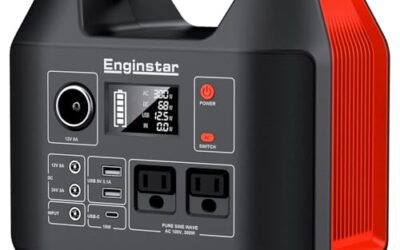
Pros
- Pure sine wave output is specified for devices requiring careful protection
- Offers both AC outlets and USB charging ports
- Includes a built-in 40-amp fuse and multiple protection functions
- The listing identifies compatibility with Tesla and other new energy vehicles
Cons
- Continuous output is limited to 300W, with 700W available only as peak power
- The listing lists the input range as 12-17V in the title and 11-17V in the feature copy
Specifications
| Color | Black |
|---|---|
| Size | 300W Pure Sine Wave Power Inverter |
| Dimensions | 8.1 x 5.3 x 2.6 inches |
| Weight | 1.4 pounds |
| Product Group | Automotive Parts and Accessories |
| Binding | Electronics |
Best For / Avoid If
Best for buyers prioritizing
- Pure sine wave output is specified for devices requiring careful protection
- Offers both AC outlets and USB charging ports
- Includes a built-in 40-amp fuse and multiple protection functions
Consider another option if
- Continuous output is limited to 300W, with 700W available only as peak power
- The listing lists the input range as 12-17V in the title and 11-17V in the feature copy

Pros
- Pure sine wave output is specified for devices requiring careful protection.
- Offers both AC outlets and USB charging connections.
- Includes multiple stated electrical and thermal protection features.
- The listing states compatibility with Tesla and other new-energy vehicles.
Cons
- The listing covered gives conflicting USB-C PD maximums of 20W and 30W.
Specifications
| Color | Black + Red |
|---|---|
| Dimensions | 7 x 5 x 2 Inches |
| Product Group | Automotive Parts and Accessories |
| Binding | Electronics |
Best For / Avoid If
Best for buyers prioritizing
- Pure sine wave output is specified for devices requiring careful protection.
- Offers both AC outlets and USB charging connections.
- Includes multiple stated electrical and thermal protection features.
Consider another option if
- The listing covered gives conflicting USB-C PD maximums of 20W and 30W.
Frequently asked questions
Will a 150-watt car inverter run a laptop?
It may, if the laptop charger’s rated demand stays below the inverter’s continuous output and the vehicle connection can supply the required DC current. The number alone does not establish outlet compatibility.
Can I charge a laptop from a 12-volt car outlet without an inverter?
Some laptops support a vehicle-specific DC charger or USB-C power input. Use one only if its output matches the laptop’s charging requirements and the vehicle outlet supports its input draw. USB-C charging limits can vary by laptop and charger.
Does a car inverter damage laptop batteries?
A suitable inverter and working laptop charger should provide the power the charger is built to accept. Damage risk rises with incompatible output, faulty equipment, poor connections, or excessive heat. Check the laptop and charger instructions for approved charging conditions.
Can I leave a laptop plugged into an inverter overnight?
That is not a good plan unless the vehicle maker explicitly supports the load and the battery has a suitable power source. With the engine off, the setup can drain the low-voltage battery. With the engine running, unattended idling creates exhaust and safety risks.