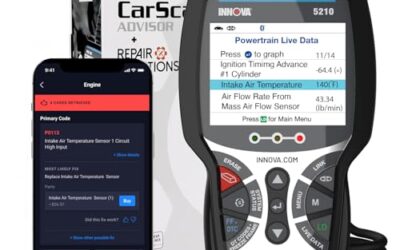
The Innova 5610 review points to a mid-priced bidirectional scan tool for drivers who need more than check-engine codes. Its strongest use case is a home mechanic with a supported vehicle, because it combines ABS, SRS, transmission, and engine live data with active commands and selected relearn functions. Coverage varies by make, model, and year, so compatibility should decide the purchase before price.

Pros
- Offers bidirectional controls in addition to standard diagnostic functions.
- Provides access to enhanced live data for several vehicle systems.
- Includes free updates without subscription fees.
- Has phone and email support from an American support team.
Cons
- Compatibility and available functions vary by vehicle, so Innova's coverage checker is required.
- The tool is not universal across all makes and models.
The Innova 5610 is a bidirectional OBD2 scan tool for diagnosing and verifying repairs on select vehicles. Its Enhanced Data Stream provides live data for select ABS, SRS, transmission, and engine systems, while its Special Reset Function supports select re-learn procedures.
The tool can send bidirectional commands for functions such as fuel pump testing and electronic parking brake retraction. It supports most 1996–2023 OBD2 vehicles, but compatibility and available features vary by make, model, and year. Use Innova's coverage checker before purchase.
- Dimensions: 7 x 3.75 x 1 inches
- Languages: English, Spanish, and French
- Updates: Free updates with no subscription fees
- App: RepairSolutions2
- Support: ASE-certified support with phone and email assistance
Specifications
| Size | 1 Count(Pack of 1) |
|---|---|
| Dimensions | 7 x 3.75 x 1 inches |
| Product Group | Automotive Parts and Accessories |
| Binding | Automotive |
Detailed Review
Key features:
- Bidirectional controls can test functions such as fuel pump operation and electronic parking brake retraction.
- Enhanced Data Stream provides live data for select ABS, SRS, transmission, and engine systems.
- Special Reset Function supports select dealership-level re-learn procedures.
- Supports most 1996–2023 OBD2 vehicles, subject to make, model, and year coverage.
- Works with the RepairSolutions2 app and includes free updates with no subscription fees.
- Supports English, Spanish, and French operation.
Best For / Avoid If
Best for buyers prioritizing
- Offers bidirectional controls in addition to standard diagnostic functions.
- Provides access to enhanced live data for several vehicle systems.
- Includes free updates without subscription fees.
Consider another option if
- Compatibility and available functions vary by vehicle, so Innova's coverage checker is required.
- The tool is not universal across all makes and models.
What the Innova 5610 does
Innova 5610 OBD2 Bidirectional Scan Tool targets repairs that basic code readers cannot handle. A basic reader may show a stored fault code. This scanner goes further by showing live data and sending commands to selected vehicle systems.
Bidirectional control means the tool can command a vehicle component to operate. The listing gives fuel pump on and off control as one example. It also names electronic parking brake retraction. These functions can help a repairer separate a wiring, control, or component problem from a simple stored code.
That capability does not make every vehicle function available. The listing says compatibility is selective, not universal. A command available on one supported model may be absent on another. Innova’s coverage checker matters more than the broad phrase “for all cars.”
The scanner also provides Enhanced Data Stream access for engine, ABS, SRS, and transmission systems. This gives a repairer more information than generic powertrain data alone. It can matter when an engine code appears alongside a wheel-speed, airbag, or transmission fault.
Where this scanner fits in a home garage
The Innova 5610 makes sense for someone who performs repairs and wants diagnostic information before replacing parts. Live data can show sensor values or system states while a fault is present. Bidirectional commands can add another step to a diagnosis, provided the vehicle supports that function.
It also suits a driver who works on more than one vehicle. The stated coverage includes most 1996 through 2023 OBD2 vehicles, with 2024 coverage described as coming soon. That range gives the tool broad model-year reach, but it does not promise equal access to every manufacturer system.
English, Spanish, and French support may help households or shops with different language needs. The listing also connects the tool with RepairSolutions2 and describes wireless app support. Free updates and no subscription fees lower recurring ownership cost compared with tools that tie core access to a monthly plan.
ASE-Certified support and a US-based support team add value when setup or coverage questions appear. Support hours are listed as Monday through Friday, 6 AM to 6 PM PST. Phone support is available at +1 (800) 544-4124, and email support is available at [email protected].
Innova 5610 review: strongest reasons to buy
Bidirectional controls add a repair step
The main reason to choose this model is active control. A code reader reports what the vehicle computer saw. A bidirectional tool can command selected components and help observe the result.
Fuel pump control can help a repairer investigate whether a pump responds to a direct command. Electronic parking brake retraction can support certain brake service procedures. These features can reduce guesswork, but they do not replace safe service practice or the vehicle repair manual.
Commands can also carry risk if used on the wrong system or during the wrong repair step. Use them only when the vehicle procedure supports them. A scanner cannot make an unsupported command safe or available.
System coverage goes beyond engine codes
ABS, SRS, and transmission access gives this scanner more reach than an engine-only reader. ABS data can matter during wheel-speed or stability-control diagnosis. SRS access can help identify airbag-system faults that a generic powertrain reader may never display.
Transmission data can help identify operating conditions around a shift or pressure-related fault. Engine live data remains useful for fuel, ignition, emissions, and sensor diagnosis. The benefit comes from seeing system information before buying parts.
Relearn functions may reduce tool swapping
The Special Reset Function supports selected dealership-level relearn procedures, according to the listing. Relearn work can appear after component replacement, battery service, brake work, or other repairs. The exact procedure depends on vehicle software and system design.
This feature can save a trip to a repair shop when the vehicle supports it. It should not be treated as universal programming access. Relearn, reset, coding, and programming are different functions, and the listing only supports a narrower claim about selected relearn procedures.
Compatibility decides whether it is worth buying
OBD2 support gives the scanner a broad starting point, not a complete feature promise. The listing covers most 1996 through 2023 OBD2 vehicles and says 2024 coverage is coming soon. System access and special functions still vary by make, model, and year.
Check four items before purchase:
- Vehicle make, model, and year.
- Desired system, such as ABS, SRS, transmission, or engine.
- Desired function, such as fuel pump control, parking brake retraction, or a relearn procedure.
- Coverage for the exact vehicle configuration through Innova’s coverage checker.
Do not treat “OBD2 vehicle” as proof that every feature will work. OBD2 establishes a diagnostic baseline. Manufacturer-level access depends on software coverage and vehicle design.
Coverage also matters for mixed households. A tool may perform well for one supported vehicle and offer fewer functions on another. If the main reason for purchase is one repair, check that repair function first. If the goal is general ownership, check each vehicle separately.
What the Innova 5610 cannot replace
This scanner does not turn a home garage into a dealership service bay. Its listed bidirectional commands and relearn functions are selective. There is no basis to treat it as a universal programming, coding, or module-replacement tool.
Diagnostic information also needs interpretation. A sensor code does not always mean the sensor itself failed. Wiring, power, ground, connectors, software, and related components can create similar symptoms. Live data narrows a diagnosis, but it does not remove the need for circuit checks and service information.
Repair safety remains separate from scanner capability. SRS work can involve airbags and stored energy. Electronic parking brake service can affect brake operation. Follow vehicle-specific instructions, support the vehicle correctly, and use professional help where the repair exceeds your training.
App connectivity may appeal to drivers who want wireless access through RepairSolutions2. The tool’s advanced functions still depend on the scanner, vehicle coverage, and supported procedure. An app connection does not expand a function beyond what the vehicle software allows.
Innova 5610 versus a basic code reader
| Feature | Innova 5610 OBD2 Bidirectional Scan Tool |
|---|---|
| Primary use | Advanced diagnostics, live data, selected active commands, and selected relearn functions |
| System access | Engine, ABS, SRS, and transmission data, subject to vehicle coverage |
| Active controls | Examples include fuel pump on or off and electronic parking brake retraction, subject to coverage |
| Vehicle range | Most 1996 through 2023 OBD2 vehicles, with 2024 coverage coming soon |
| Languages | English, Spanish, and French |
| Updates | Free updates, with no subscription fees stated in the listing |
| Support | US-based support, with ASE-Certified support described by the manufacturer |
A basic reader may cost less and suit a driver who only wants to clear or read engine fault codes. The Innova 5610 earns its higher position through system access and active controls. Those features matter only when the vehicle supports them and the owner will use them.
Ownership costs and learning curve
The stated price places this scanner in a mid-priced range for home diagnostic equipment. Free updates and no subscription fees improve its long-term value. A lower purchase price is not always cheaper if a tool lacks the system access needed for one repair.
Ownership still includes time. The buyer must learn code interpretation, live-data use, active-control risks, and coverage limits. A scanner can show more information than a basic reader, but more information can also lead to wrong part decisions without a repair plan.
RepairSolutions2 adds a connected information path for supported use. Its value depends on the owner’s preference for app-based guidance and wireless access. Drivers who want a small, simple code reader may find this tool’s extra functions unnecessary.
Support can reduce setup friction. Contact details and hours give buyers a route for coverage questions. Call before purchase if a particular relearn or active command determines the decision.
Who should buy the Innova 5610
Best for: Home mechanics, advanced DIY owners, and small repair operations working on supported vehicles. The fit is strongest when ABS, SRS, transmission, or engine live data matters, and when an active command or relearn procedure could prevent a shop visit.
The tool also fits a driver maintaining several vehicles across model years. Broad OBD2 coverage can reduce the need for separate readers, while multilingual operation helps shared households and small teams.
Skip it if: You only need occasional check-engine code reading. A simpler reader may serve that job with less cost and less complexity. Skip it as well if Innova’s coverage checker does not list the exact system or function needed for your vehicle.
Readers who need manufacturer programming, broad module coding, or a guaranteed function across mixed brands should look for a tool whose coverage explicitly names those capabilities. This guide has no product that supports that broader claim.
Alternatives inside the same diagnostic category
CarTechTalk’s guide to OBD2 scanners and diagnostic tools for home mechanics and drivers can help readers compare simpler and more advanced tool types. A reader focused on real-time sensor information can also review the best live data scan tool.
Professional users may need a wider set of workshop functions than this product listing supports. For that buyer, the professional automotive diagnostic tool guide offers a better starting point. Choose based on required vehicle coverage, not on the number of features printed on a box.
Final verdict
The Innova 5610 is a sensible pick for supported vehicles when active controls, multi-system live data, and selected relearn functions matter. Its free updates, no subscription fees, multilingual interface, RepairSolutions2 connection, and US-based support strengthen its ownership case.
Its main limitation is coverage dependence. The scanner is not a universal key for every make, model, system, or service procedure. Check exact vehicle support before buying, especially when ABS, SRS, electronic parking brake, transmission, or a specific relearn function drives the decision.
Buy it for advanced DIY diagnosis on supported vehicles. Choose a simpler code reader for occasional engine-code checks. Choose a more specialized professional platform when the repair requires broader programming or module coverage.