
The best usb-c car charger for charging laptops in this lineup is the 130W 3-Port USB C Car Charger, because it combines USB-C PD support, a bundled 240W USB-C cable, and 12V to 24V vehicle compatibility. It fits drivers who need laptop power plus charging for phones or tablets from one car outlet.

Pros
- Combines three charging ports in one car adapter
- Supports PPS, PD, and QC charging protocols
- Includes real-time voltage monitoring through an LED display
- Includes a 240W-rated USB-C to USB-C cable
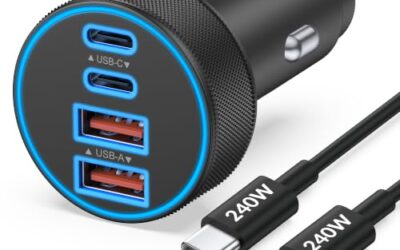
The JUNVANG 130W 3-port car charger includes two USB-C ports and one USB-A port for charging up to three devices simultaneously. The listing identifies PPS, PD, and QC charging support and states compatibility with 12V–24V cars, trucks, SUVs, RVs, and other vehicles in that range.
An LED digital display shows vehicle voltage in real time. The listing also describes protection features for overcharge, overheating, and short circuits. Included in the package are one car charger power adapter and one 3-foot 240W USB-C to USB-C cable with an E-Marker chip.
Specifications
| Color | Black |
|---|---|
| Product Group | Wireless |
Detailed Review
Key features:
- Three charging ports include two USB-C ports and one USB-A port
- Listed 130W charging output with PPS, PD, and QC support
- Can charge up to three devices simultaneously
- LED digital display monitors vehicle voltage in real time
- Includes a 3-foot 240W USB-C to USB-C cable with an E-Marker chip
- Compatible with listed Samsung Galaxy, iPhone, iPad, MacBook, Pixel, LG, and Motorola devices
Best For / Avoid If
Best for buyers prioritizing
- Combines three charging ports in one car adapter
- Supports PPS, PD, and QC charging protocols
- Includes real-time voltage monitoring through an LED display
JUNVANG 130W 3-Port USB C Car Charger suits the most common road-use setup: one laptop, one phone, and perhaps a tablet or driving recorder. Its two USB-C ports handle newer devices, while its USB-A port keeps older cables useful. The listing describes support for USB-C PD, PPS, and QC charging, with automatic power distribution across connected devices.
This is a manufacturer-listed feature set, not a CarTechTalk performance score. Actual laptop charging speed depends on laptop power requirements, cable quality, battery state, and how much power other connected devices receive.
CarTechTalk may earn a commission from qualifying purchases. That does not change product selection or the conditions attached to this recommendation.
Best for mixed laptop and device charging
The 130W 3-Port USB C Car Charger is the only pick here, but its use case stays specific: drivers who want one compact adapter for a USB-C laptop and smaller electronics. Two USB-C ports help avoid carrying a USB-A adapter for every newer device. The third port supports older accessories such as many phones, tablets, or driving recorders.
The product listing names MacBook Pro, MacBook Air, iPad Pro, iPad Air, iPad Mini, Samsung Galaxy devices, Pixel phones, LG devices, Motorola phones, GPS navigation units, and tablets among compatible products. Compatibility claims cover device families, not every model’s charging behavior. A laptop still needs a USB-C charging port and a power requirement within the charger’s available output.
The included 3-foot USB-C to USB-C cable supports USB PD 3.0 and PD 3.1 standards, according to the listing. Its E-Marker chip identifies cable capability to compatible equipment. That cable removes one common buying mistake: pairing a high-output charger with a cable that cannot carry its intended power. The cable alone does not make every laptop accept 130W.
Skip this charger if your laptop uses a barrel connector, a proprietary charging plug, or a USB-C port that supports data only. Skip it also if your laptop needs more power than the charger can deliver from the vehicle outlet. A home AC adapter or a vehicle power inverter may fit those needs better, depending on laptop requirements and vehicle limits.
What 130W Means for Laptop Charging in a Car
A 130W label describes total charger capacity, not a guaranteed 130W supply to one laptop port. This distinction matters when three devices share the adapter. The charger’s internal power distribution can shift output as devices connect, disconnect, or change charging demand.
For one laptop, available power may be more useful than for a three-device load. Add a phone and tablet, however, and total output divides among ports. The listing does not give a fixed per-port allocation, so buyers should avoid assuming that either USB-C port always supplies the full headline wattage.
USB-C Power Delivery negotiates voltage and current between charger and device. The laptop requests a supported charging profile, and the charger supplies a matching profile when both sides support it. PPS can make finer power adjustments for compatible devices. QC support helps compatible phones, but QC branding does not replace USB PD for laptop charging.
Charging also changes with laptop use. A computer running demanding software may consume power nearly as fast as the car charger supplies it. A sleeping or lightly used laptop usually places less demand on the adapter. This guide does not assign charging times because the needed variables include laptop model, battery size, workload, port behavior, and shared-device load.
Use the laptop’s original USB-C charger as a reference. Its output label shows what the computer expects. If that adapter lists 65W, a compatible 130W vehicle charger has more stated total capacity than that requirement, but shared charging and port allocation still matter. If the laptop adapter lists 100W or more, leave less headroom for other devices.
Vehicle Compatibility and Installation
The charger fits vehicles with 12V to 24V electrical systems, according to the product listing. That range covers many cars, trucks, SUVs, and RVs. It connects through an existing vehicle power socket, so installation does not require wiring, fuse tapping, or permanent mounting.
Vehicle outlets differ in placement and operating behavior. Some switch off with ignition. Others remain powered after the vehicle is parked. A live outlet can keep connected devices drawing power after shutdown, which may affect a vehicle battery over time. Unplug the charger when the vehicle’s outlet stays live and the car will sit unused.
The fit also depends on socket depth and surrounding trim. The listing confirms vehicle voltage range, but it does not establish fit in every dashboard, console, or accessory socket. Keep the adapter clear of loose objects and avoid routing the cable where it can interfere with pedals, steering, shifter movement, or airbag paths.
RVs and trucks can benefit from the 24V compatibility claim, but vehicle outlet ratings still matter. A charger rated for a voltage range does not raise the socket’s own current limit. Follow vehicle documentation for accessory outlet capacity, especially when charging a high-demand laptop and other devices at once.
Voltage Display: Useful Information, Limited Diagnosis
The front display shows vehicle voltage in real time, according to the listing. This can give a driver a quick view of changing electrical conditions while the vehicle runs or while accessories draw power.
Voltage is only one signal. A display on a plug-in charger is not a full battery-health analyzer, alternator diagnostic tool, or replacement for a dedicated battery tester. Temperature, battery age, charging state, engine speed, and electrical load can change readings. Treat an unusual reading as a reason to investigate, not as a final diagnosis.
Drivers who need deeper battery checks should use equipment made for that task. CarTechTalk’s guide to battery testers with load testing covers a different job. A USB-C vehicle charger can power devices and show voltage, but it cannot replace a proper test procedure or vehicle service information.
The display may also add visual distraction at night. Position the charger so its light does not pull attention from the road. Set up cables and devices before driving. Charging equipment should support the trip, not become another screen competing with navigation.
Ports, Cable Choice, and Shared Charging
Two USB-C ports make this charger better suited to current laptops and phones than a single USB-C adapter. The USB-A port helps with older charging cables and accessories. Three ports also reduce the need for a second adapter during long drives.
Port count does not equal three full-power outputs. The listing says the adapter can charge up to three devices at once and automatically adjusts output. It does not give a fixed wattage chart for each combination. For the highest laptop priority, connect the laptop first, then add smaller devices while watching charging behavior.
The included cable is USB-C to USB-C, so it fits laptops and devices with USB-C charging ports. It does not solve charging for a laptop with a dedicated barrel connector. It also does not turn USB-A equipment into USB-C equipment without a suitable cable.
Cable length affects cabin use. The included cable measures 3 feet, which may suit a center console or front passenger area. Rear-seat use may require a longer cable, depending on outlet location. Do not stretch the cable across walking paths or allow it to hang near controls.
Protect charging performance by keeping connector ends clean and dry. Stop using a cable or adapter that becomes unusually hot, smells burned, shows damage, or disconnects repeatedly. The listing mentions protection against overcharge, overheating, and short circuits, but built-in protection does not make damaged wiring safe.
Long-Term Ownership Tradeoffs
This charger reduces gear count because one adapter handles laptop, phone, tablet, and USB-A accessories. The included cable also lowers the chance of buying a separate high-power USB-C cable immediately.
Its main ownership tradeoff is shared output. A driver who regularly charges one high-demand laptop may prefer a single-port laptop charger with a clearly stated per-port output. That setup gives simpler power planning, though it may require another adapter for passengers or accessories.
The voltage display adds information but also adds another illuminated component in the cabin. Drivers who want a quiet, minimal adapter may prefer a smaller single-port model without a screen. Drivers who want a quick glance at vehicle voltage may consider the display worthwhile.
Power needs can change after purchase. A new laptop, a second monitor, a gaming workload, or several passengers may push beyond comfortable shared charging. Check laptop adapter wattage before buying, then consider how many devices will charge at the same time. A charger that fits today’s phone and laptop setup may not fit tomorrow’s higher-power computer.
For drivers who need a dedicated charging system rather than a plug-in accessory, vehicle power options differ. CarTechTalk’s EV charging and automotive power guide covers a broader category, not a direct substitute for this 12V to 24V adapter.
Who Should Buy This Charger
- Buy it for laptop road work: You need USB-C charging in a car, truck, SUV, or RV with a compatible 12V to 24V socket.
- Buy it for shared cabin charging: You want two USB-C ports plus one USB-A port for several devices.
- Buy it for cable convenience: You need a USB-C to USB-C cable included with the adapter.
- Buy it for quick voltage awareness: You want a visible vehicle-voltage reading while using the outlet.
Who Should Skip It
Do not buy anything in this guide if your laptop cannot charge through USB-C, needs a proprietary power adapter, or requires output above the charger’s available capacity. Look for a compatible AC inverter, a dedicated vehicle power system, or a charger matched to your laptop’s original connector and wattage.
Skip this specific charger if you need a guaranteed fixed output for one high-power laptop while other ports remain heavily loaded. The listing describes automatic distribution but does not give a port-by-port power table. Choose a product with a published single-port profile when that detail controls your work setup.
Readers weighing these picks also look at Best USB-C Car Charger for Samsung Phones and Best USB-C Car Charger with Multiple Ports.
Verdict
JUNVANG 130W 3-Port USB C Car Charger is the strongest fit for drivers who want laptop charging plus multi-device support from one vehicle outlet. Its USB-C PD, PPS, and QC claims cover common modern charging needs, while the included 240W USB-C cable supports a high-power cable connection. The 12V to 24V range suits many cars, trucks, SUVs, and RVs.
Buy it with realistic expectations: 130W is total advertised charger capacity, not a promise of 130W at every port. Laptop connector type, laptop power demand, vehicle outlet behavior, and shared-device load determine the result. For a USB-C laptop used on normal road trips, this charger offers the most useful combination of ports, cable support, and vehicle information in this guide.