An OBD2 drive cycle is a set of operating conditions that allows the vehicle to run diagnostic self-tests. The required conditions vary by vehicle and monitor. Use the applicable service information; a generic drive-cycle recipe is not a guarantee of readiness.
A completed drive cycle can change a monitor from “Not Ready” to “Ready.” It cannot repair a fault, erase a stored diagnostic trouble code, or guarantee that every monitor will run during one trip.
Key takeaways
- Drive cycles help OBD2 readiness monitors test emissions systems.
- Battery disconnection or code clearing can reset monitors to “Not Ready.”
- One drive cycle may not run every monitor.
- Vehicle service information gives the most accurate procedure.
- Use a scan tool to check monitor status before an emissions inspection.
- A failed monitor or returning code points to a repair need, not another drive cycle.
How an OBD2 drive cycle works
Modern vehicles use the engine control module, or ECM, to watch emissions-related systems. The ECM compares sensor readings with expected values. It also checks whether systems such as the oxygen sensors, catalytic converter, evaporative emissions system, exhaust gas recirculation system, and misfire controls operate within set limits.
Each check has enabling conditions. The engine may need to start cold. Coolant temperature may need to reach a target range. Fuel level may need to sit within a certain range for an evaporative emissions test. Vehicle speed, engine load, outside temperature, and time since startup can also affect a monitor.
A drive cycle supplies those conditions. The ECM then runs available tests in the background. A scan tool reports the result as “Ready,” “Not Ready,” or, on some tools, “Complete” or “Incomplete.”
OBD2 does not treat every trip as one complete test. A short trip may meet conditions for a misfire check but never allow the evaporative emissions monitor to run. A long highway trip may help some monitors while still missing a cold-start requirement.
OBD2 drive cycle versus normal driving
Normal driving can complete monitors, but it may not include the full range of conditions. A vehicle used only for short city trips may never reach steady cruise speed. A vehicle used only on the highway may not experience enough stop-and-go operation for certain tests.
A manufacturer-specific drive cycle gives a more repeatable path. It may specify a cold soak, idle time, low-speed driving, steady cruising, closed-throttle deceleration, and another stop. Generic procedures can help, but they cannot replace instructions for a specific vehicle.
| Term | What it means | What it does not mean |
|---|---|---|
| Drive cycle | Driving conditions that allow onboard tests to run | A repair procedure |
| Readiness monitor | A status showing whether an emissions test has run | Proof that the vehicle will pass inspection |
| Not Ready | The monitor has not completed since its last reset | Proof that a component has failed |
| Pending code | A fault detected once or not yet confirmed | A harmless condition |
| Stored code | A confirmed fault recorded by the control module | A problem fixed by clearing the code |
When does a vehicle need an OBD2 drive cycle?
A drive cycle often matters after the battery loses power, the ECM is reset, diagnostic trouble codes are cleared, or emissions-related repairs are completed. Those events can reset readiness monitors.
Some vehicles also reset monitors after certain software updates or control-module replacement. The effect depends on the vehicle’s electronics and service procedure.
Before an emissions inspection, use an OBD2 scanner to check readiness. A scanner must support emissions readiness data. A basic code reader may show codes but lack live data or monitor-status details.
Inspection rules vary by state and may allow only a limited number of monitors to remain incomplete. Some vehicles receive different treatment because of model year, fuel type, or inspection program. Check the local inspection agency for current requirements.
How to complete a generic OBD2 drive cycle
Use this sequence as a general framework, not a universal vehicle procedure. The owner’s manual, factory service information, or inspection guidance may require different conditions.
- Check the vehicle first. Confirm that the check engine light is off or identify any active codes. Fix known faults before trying to complete monitors.
- Check fuel level. Keep fuel within the range required by the vehicle procedure. An almost empty or completely full tank can prevent some evaporative emissions tests.
- Let the vehicle cool. Many monitors need a cold start. The required soak time varies, so follow vehicle-specific instructions when available.
- Start without pressing the accelerator. Allow the engine to idle as directed. Do not rev the engine unless the procedure calls for it.
- Drive gently at low speed. Use smooth acceleration and avoid heavy traffic when possible. Sudden throttle changes can interrupt test conditions.
- Reach steady cruising speed. Hold a stable speed where legal and safe. The required speed and duration differ among vehicles.
- Decelerate without hard braking. Some tests need closed-throttle deceleration. Keep traffic, road grade, and safety ahead of monitor completion.
- Repeat mixed driving. Include stops, moderate acceleration, and steady cruising if the procedure requires them.
- Scan readiness status. Park safely, connect the scanner, and check each monitor. Do not assume completion because the warning light stays off.
Do not watch the scanner while driving. A passenger can monitor data, or the driver can check after parking. Follow speed limits and avoid unsafe maneuvers.
Why readiness monitors stay incomplete
The vehicle lacks required conditions
The ECM may need a cold engine, a certain fuel level, stable battery voltage, or a specific outside temperature. Weather and parking conditions can therefore change results.
A fault blocks the test
An active code can prevent one or more monitors from running. For example, an air-fuel sensor fault may affect tests that depend on accurate exhaust readings. Another drive cycle will not bypass that fault.
The battery voltage is unstable
Low voltage during starting or charging problems can interrupt self-tests. Hybrid and start-stop vehicles may use different voltage-control strategies than conventional vehicles. Diagnose battery and charging conditions before repeating cycles.
The procedure does not match the vehicle
Vehicle model-year differences can matter even within one model name. Engine choice, transmission type, emissions package, drive system, and regional calibration can change the required sequence.
The monitor needs several trips
Some monitors run only after multiple qualifying events. The ECM may need to see a fault or pass condition more than once before it changes status.
What a scan tool can show
A compatible OBD2 scanner can display current and pending codes, readiness status, freeze-frame data, live sensor readings, and sometimes manufacturer-specific information. Basic access normally depends on the vehicle supporting standard OBD2 data through its diagnostic connector.
Connector fit alone does not guarantee full coverage. A tool may read generic powertrain codes but lack access to ABS, airbag, body, hybrid, or manufacturer-specific systems. Vehicle model year, protocol, scanner firmware, and phone operating system can affect wireless scanner compatibility.
For scanner selection, see CarTechTalk’s guide to OBD2 scanners with live data and fuel-trim information. Advanced module access may require a different class of tool, as explained in the guide to professional car diagnostic tools.
Common mistakes
- Clearing codes before inspection. Clearing codes also resets readiness monitors on many vehicles. The warning light may go off while monitors remain incomplete.
- Replacing parts without diagnosis. A drive cycle cannot prove that a sensor, catalytic converter, or purge valve needs replacement.
- Using one generic sequence for every vehicle. Manufacturer procedures differ by model year and powertrain.
- Ignoring a returning code. If a code returns after a complete monitor test, diagnose the underlying system.
- Assuming “Not Ready” means failure. The monitor may simply lack its required conditions.
- Driving unsafely to satisfy a test. Monitor completion never outweighs traffic, weather, or road safety.
- Disconnecting the battery to turn off the light. This can erase useful diagnostic information and reset monitors.
When to get professional help
Seek qualified diagnostic help when the check engine light flashes, the vehicle runs poorly, stalls, overheats, loses power, or shows a fuel odor. A flashing light can indicate a misfire that may damage the catalytic converter.
Professional diagnosis also makes sense when monitors remain incomplete after the correct procedure, a code returns, battery voltage is unstable, or inspection timing matters. A technician can use factory data, bidirectional controls, smoke testing, and system-specific procedures that generic scanners may not support.
Do not clear codes merely to pass an inspection. An inspection station may see incomplete monitors, and the fault may return. Repair the cause, then follow the correct monitor procedure.
Gear that can help
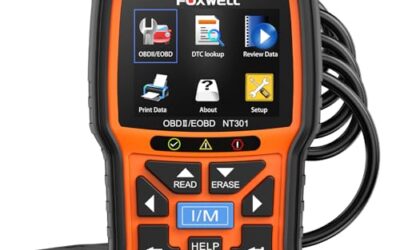
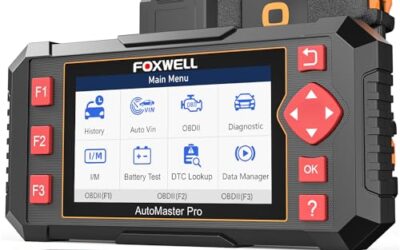
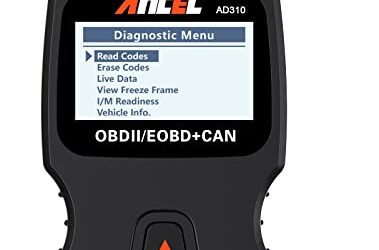
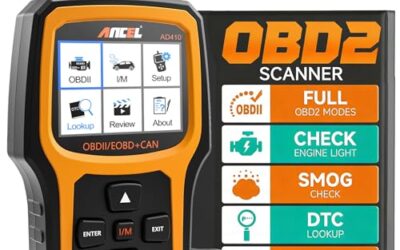
If you need OBD2 scanners for this job, these picks already appear in our OBD2 scanners guides. Check the full guide for fit and who should skip each one.

Pros
- Supports multiple diagnostic functions beyond basic code reading
- No batteries are needed for operation
- Offers seven language options, including English, French, and Spanish
- Designed with a plug-and-play interface for end users and DIYers
Cons
- The listing does not identify all seven supported languages
Specifications
| Color | OBD2 Scanner |
|---|---|
| Size | AL319 |
| Dimensions | 4.61 x 2.83 x 0.71 inches |
| Weight | 0.39021820374 Pounds |
| Product Group | Automotive Parts and Accessories |
| Binding | Automotive |
Best For / Avoid If
Best for buyers prioritizing
- Supports multiple diagnostic functions beyond basic code reading
- No batteries are needed for operation
- Offers seven language options, including English, French, and Spanish
Consider another option if
- The listing does not identify all seven supported languages

Pros
- Supports code scanning and code resets without requiring an expert
- Tracks vehicle-specific scans, mileage-based reminders, and shared results
- Compact 1.75 x 0.75 x 1.6-inch sensor is designed to stay under the dash
Cons
- Advanced features require an optional premium subscription after the 14-day trial
- Features may vary by vehicle make and model
Specifications
| Color | White |
|---|---|
| Size | 1 Pack |
| Dimensions | 1.75 x 0.75 x 1.6 inches |
| Weight | 0.06 pounds |
| Product Group | Automotive Parts and Accessories |
| Binding | Automotive |
Best For / Avoid If
Best for buyers prioritizing
- Supports code scanning and code resets without requiring an expert
- Tracks vehicle-specific scans, mileage-based reminders, and shared results
- Compact 1.75 x 0.75 x 1.6-inch sensor is designed to stay under the dash
Consider another option if
- Advanced features require an optional premium subscription after the 14-day trial
- Features may vary by vehicle make and model

Pros
- Provides diagnostics for four major vehicle systems
- Includes useful functions such as live data and I/M readiness
- Supports automatic VIN retrieval and manual vehicle selection
- Lifetime updates and a protective case are included
Cons
- Does not support oil reset, battery registration, ABS bleeding, throttle body relearn, or ABS relearn
- SRS crash or collision data cannot be cleared
- Vehicle compatibility varies by make, model, and year, and AUTOVIN may not work on some older vehicles or brands
Specifications
| Color | red |
|---|---|
| Dimensions | 7.68 x 3.54 x 1.18 inches |
| Product Group | Automotive Parts and Accessories |
| Binding | Automotive |
Best For / Avoid If
Best for buyers prioritizing
- Provides diagnostics for four major vehicle systems
- Includes useful functions such as live data and I/M readiness
- Supports automatic VIN retrieval and manual vehicle selection
Consider another option if
- Does not support oil reset, battery registration, ABS bleeding, throttle body relearn, or ABS relearn
- SRS crash or collision data cannot be cleared
- Vehicle compatibility varies by make, model, and year, and AUTOVIN may not work on some older vehicles or brands
Frequently asked questions
How long does an OBD2 drive cycle take?
There is no single duration. Some monitors can run during one trip, while others need several trips and specific cold-start conditions. Vehicle-specific instructions control.
Can I complete a drive cycle on the highway?
Highway driving may help steady-cruise and catalyst-related tests, but it may not provide every cold-start, idle, stop, or evaporative condition. Mix conditions only when the procedure and road conditions allow.
Does a drive cycle turn off the check engine light?
It can allow a monitor to pass, but it does not repair a fault. The light may turn off only after the ECM sees enough successful trips without detecting the fault.
How many monitors can be Not Ready?
Inspection limits vary by state, model year, fuel type, and program. The vehicle may pass in one jurisdiction and fail in another with the same monitor status.
Will an OBD2 scanner complete the drive cycle?
A scanner can report readiness and, on some vehicles, run special tests. It usually cannot replace the driving conditions required for normal monitor operation.
Sources and further reading
- J1962 Diagnostic Connector standard (SAE International): Connector and electrical interface information for vehicle diagnostic equipment.
- J1979 E/E Diagnostic Test Modes standard (SAE International): Standard diagnostic data modes used by OBD systems.
- Vehicle Emissions Inspection and Maintenance (I/M) (US EPA): State inspection program and emissions readiness background.