

To choose a CarPlay adapter as a gift, first confirm that the recipient’s car already supports wired Apple CarPlay and identify how the phone connects. Then match adapter type, USB connector, phone use, wireless behavior, and vehicle compatibility to that specific setup.
Key takeaways
- Most CarPlay adapters convert wired CarPlay into wireless CarPlay. They do not add CarPlay to every vehicle.
- The vehicle must usually support wired Apple CarPlay before an adapter can work.
- USB connector shape matters. USB-A and USB-C are not interchangeable without the right cable or adapter.
- Phone model, iOS version, vehicle model year, head-unit firmware, and regional equipment can change compatibility.
- Wireless adapters need power and may not work well with aftermarket stereos, split USB ports, or vehicles with unusual startup behavior.
- Check the recipient’s manual or vehicle settings before opening the package.
How to choose a CarPlay adapter as a gift
1. Confirm the vehicle already has wired Apple CarPlay
Start with the vehicle, not the adapter. Most wireless CarPlay adapters act as a bridge between an iPhone and a factory or aftermarket system that already supports wired CarPlay.
Ask whether the recipient connects an iPhone to the vehicle with a USB cable and sees Apple CarPlay on the dashboard screen. This is the strongest practical sign that a wireless adapter may fit.
Bluetooth audio, USB music playback, and a touchscreen do not prove CarPlay support. Some vehicles support only Bluetooth calls and music. Others support Android Auto but not Apple CarPlay. An adapter cannot normally add missing CarPlay software to those systems.
Vehicle model year matters. A trim level may have different infotainment equipment from another trim in the same model year. Regional versions can also differ. Use Apple’s CarPlay available models list as a starting point, then check the owner’s manual or vehicle settings.
2. Learn whether the connection uses USB-A or USB-C
Look at the port used for wired CarPlay. Older vehicles often use USB-A, the larger rectangular connector. Newer vehicles may use USB-C, the smaller oval connector. Some vehicles have both, but only one port may carry CarPlay data.
This matters because a charging-only port cannot carry CarPlay. A USB-C port may provide power but no data. A front console port may support CarPlay while a rear passenger port may support charging only.
Ask the recipient which port they use today. If that feels too obvious, check the vehicle manual or take a discreet photo of the port. A short USB cable may be needed if the adapter includes a different connector.
Do not treat a passive plug shape converter as a data solution. Some adapters change connector shape but do not fix incompatible wiring, power limits, or data standards.
3. Pick the right adapter type
| Adapter type | What it does | Who should receive it | Limit |
|---|---|---|---|
| Wireless CarPlay adapter | Connects to wired CarPlay through the vehicle USB port, then links the iPhone wirelessly. | Drivers who use wired CarPlay and want fewer cables. | Cannot usually add CarPlay to a system that lacks wired CarPlay. |
| Wired CarPlay adapter or cable | Provides a direct wired connection between iPhone and vehicle. | Drivers who value stable connection and phone charging. | Leaves a cable across the console and requires the right connector. |
| Aftermarket CarPlay receiver | Replaces or upgrades the vehicle’s stereo system. | Owners of vehicles without factory CarPlay. | Needs vehicle-specific installation, wiring, dash fit, and steering-wheel control checks. |
| Android-to-CarPlay adapter | Attempts to connect an Android phone to a CarPlay-only system or perform another platform conversion. | Only buyers with a clearly supported phone and vehicle combination. | Compatibility varies sharply by phone, adapter firmware, and vehicle. |
For most gifts, a wireless CarPlay adapter is the relevant category when the recipient already uses wired CarPlay. An aftermarket receiver is not a simple plug-in gift. It may require dash parts, wiring harnesses, antenna adapters, steering-wheel interfaces, and professional installation.
4. Check iPhone and iOS compatibility
CarPlay uses an iPhone, not an Android phone. The recipient needs an iPhone model and iOS version supported by both the vehicle and adapter. Older phones may lack current wireless features or receive fewer software updates.
Ask which iPhone the recipient uses and whether it runs a current iOS release. Avoid guessing from the phone’s appearance. Similar-looking iPhone models can have different ports, wireless hardware, and software support.
Wireless CarPlay normally uses Bluetooth for the initial handshake and Wi-Fi for the main connection. The phone must support the required wireless features, and wireless settings must remain available. Restrictions, managed-device settings, or an outdated iOS release can affect setup.
If the recipient regularly switches between personal and work iPhones, check multi-phone behavior. Some adapters reconnect to the last phone used. Others show a selection screen or favor the first phone detected. This can affect a shared vehicle more than raw connection speed.
5. Consider driving habits
Wireless CarPlay helps drivers who enter the vehicle often and dislike plugging in. It also lets the phone stay in a pocket or charging pad. The tradeoff is extra wireless activity and a separate powered device on the console.
A wired connection may suit drivers who take long trips, need steady phone charging, or prefer fewer wireless variables. A cable can provide a more direct link and may reduce setup problems. It still needs correct port support and a good data cable.
Drivers who use navigation for hours should consider phone heat and charging. Wireless CarPlay can use Wi-Fi while the phone charges wirelessly, which may create more heat in some vehicles. Heat depends on phone model, case, sunlight, charging hardware, and navigation use.
Shared vehicles need special attention. A gift recipient who carries several iPhones may value quick switching more than a driver with one phone. Ask how many phones connect before choosing an adapter.
6. Check power and startup behavior
The adapter draws power from the vehicle USB port. Most vehicles supply enough power for a small adapter, but startup timing and power management differ.
Some USB ports shut down after the ignition turns off. Others remain powered for a period or stay active until the vehicle locks. An adapter connected to an always-on port may continue drawing power after parking. That can affect convenience and, in unusual cases, battery drain.
Startup time also varies. The adapter may need to boot, pair with the phone, and open CarPlay after the vehicle starts. A vehicle with a slow head unit may take longer than a newer system. This is normal system behavior, not proof of a defective adapter.
Check whether the vehicle uses a USB hub, extension cable, or center-console media module. These parts can affect data quality and power delivery. Use the vehicle’s primary CarPlay port when possible.
7. Review firmware and update support
Adapter firmware controls phone pairing, vehicle handshakes, startup behavior, and bug fixes. Some adapters update through an app, a web page, or a connected phone. Others use a browser setup screen.
Update methods matter for gift recipients who do not enjoy technical setup. A device that needs repeated manual updates may frustrate someone who expects a plug-in accessory. Keep the setup instructions with the gift.
Firmware updates can change behavior, but they cannot fix every vehicle limit. A software update cannot turn a charging-only USB port into a CarPlay data port. It also cannot add factory CarPlay to a head unit that lacks required hardware.
8. Account for aftermarket stereos and unusual systems
Aftermarket receivers may support wired CarPlay but handle wireless adapters differently from factory systems. USB extensions, hubs, custom firmware, and steering-wheel interfaces can affect connection behavior.
Some vehicles use a captive USB port, media box, or proprietary cable. The adapter may need to connect after that module, not directly to a standard dashboard port. Other systems display CarPlay only after selecting a source manually.
Ask for the stereo brand and model if the vehicle has been modified. The receiver’s manual is more useful than the vehicle’s original manual in this case.
A practical gift decision tree
- Does the vehicle display Apple CarPlay when an iPhone connects by USB? If no, do not buy a basic wireless adapter. Consider an aftermarket receiver only after checking installation needs.
- If yes, identify the active USB port. Confirm that it carries data and CarPlay, not charging only.
- Check the connector. Match USB-A or USB-C, or include the correct data cable.
- Ask whether the recipient wants wireless use. If yes, choose a wireless CarPlay adapter. If no, a quality wired cable may be the better gift.
- Check iPhone model, iOS version, shared-phone needs, and update comfort.
- Review return terms. Compatibility can depend on vehicle trim, firmware, and port layout even when the vehicle appears on a general support list.
Common mistakes
- Buying an adapter for a vehicle with no CarPlay. A wireless bridge usually needs wired CarPlay first.
- Using the wrong USB port. The port may charge a phone but lack data support.
- Confusing Bluetooth with CarPlay. Bluetooth calls and music do not create CarPlay navigation, messaging, or app access.
- Assuming Android compatibility. CarPlay is Apple’s platform. Android Auto uses a separate system and support path.
- Ignoring vehicle trim. Two vehicles with the same model and year may have different head units.
- Using a charge-only cable. The phone may charge while CarPlay fails to appear.
- Expecting every adapter to support multiple phones equally. Pairing priority and switching controls vary.
- Skipping return protection. A vehicle can meet broad model guidance but still use a different port, media module, or firmware version.
When to get professional help
Get help from an installer or dealer when the vehicle has an aftermarket stereo, intermittent USB power, a damaged port, or a replaced media module. Professional help also makes sense when the gift requires a new head unit, dash modification, wiring changes, or steering-wheel control integration.
Stop troubleshooting if the USB port is loose, hot, burned, or physically damaged. Do not force a connector. Electrical repairs can create damage beyond the infotainment system.
If CarPlay fails after a correct setup, test the original wired connection first. Remove hubs and extensions, use a known-good data cable, restart the iPhone, and check CarPlay permissions. Do not reset vehicle modules or install unofficial firmware without instructions for that exact system.
Related reading: Wireless CarPlay Adapter Buying Guide and Best Wireless CarPlay Adapter Under $50.
Gear that can help
If you need wireless CarPlay adapters for this job, these picks already appear in our wireless CarPlay adapters guides. Check the full guide for fit and who should skip each one.

Pros
- Combines wireless CarPlay and Android Auto in one device
- Supports automatic reconnection after initial Bluetooth pairing
- Includes both USB-A and USB-C connection options
- Retains listed factory control functions, including touchscreen and steering-wheel controls
Cons
- Only compatible with vehicles that already support factory wired CarPlay or wired Android Auto
- Android compatibility requires Android 11 or above
Specifications
| Color | Silver |
|---|---|
| Size | Extra Mini |
| Dimensions | 1 x 0.4 x 1 inches |
| Product Group | Wireless |
| Binding | Electronics |
Best For / Avoid If
Best for buyers prioritizing
- Combines wireless CarPlay and Android Auto in one device
- Supports automatic reconnection after initial Bluetooth pairing
- Includes both USB-A and USB-C connection options
Consider another option if
- Only compatible with vehicles that already support factory wired CarPlay or wired Android Auto
- Android compatibility requires Android 11 or above
Pros
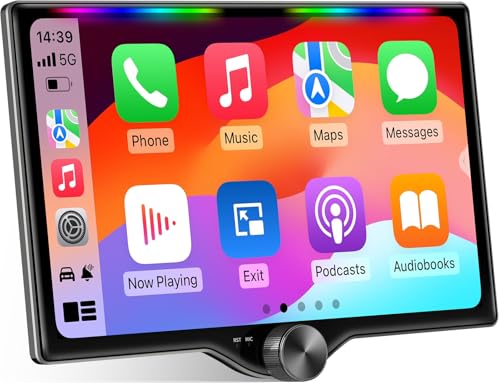
- Combines wireless and wired CarPlay and Android Auto support
- Offers audio customization through built-in DSP and a 10-band EQ
- Includes dual subwoofer output and a listed 4×60W peak-power specification
- Provides steering-wheel-control integration and Bluetooth hands-free functionality
Cons
- A dash kit, wiring harness adapter, or radio antenna adapter may be required and is not included
- Mirror Link and wired CarPlay or Android Auto connections require the rear USB1 port; the Type-C port supports fast charging only
- Vehicle fit, installation, and required steering-wheel-control interface must be confirmed before purchase
Specifications
| Product Group | Wireless |
|---|
Best For / Avoid If
Best for buyers prioritizing
- Combines wireless and wired CarPlay and Android Auto support
- Offers audio customization through built-in DSP and a 10-band EQ
- Includes dual subwoofer output and a listed 4×60W peak-power specification
Consider another option if
- A dash kit, wiring harness adapter, or radio antenna adapter may be required and is not included
- Mirror Link and wired CarPlay or Android Auto connections require the rear USB1 port; the Type-C port supports fast charging only
- Vehicle fit, installation, and required steering-wheel-control interface must be confirmed before purchase
Pros
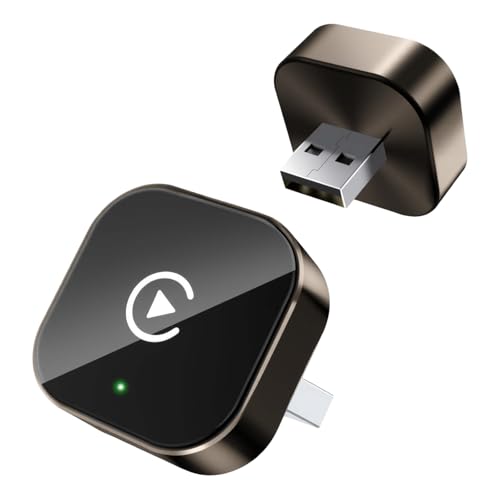
- Designed for compatible factory-installed wired CarPlay systems
- Supports automatic reconnection after initial pairing
- Compact construction is intended to save space in the car
Cons
- Only compatible with vehicles that have factory-wired CarPlay
Specifications
| Color | Brown |
|---|---|
| Size | Square |
| Dimensions | 1 x 0.4 x 1 inches |
| Product Group | Wireless |
| Binding | Electronics |
Best For / Avoid If
Best for buyers prioritizing
- Designed for compatible factory-installed wired CarPlay systems
- Supports automatic reconnection after initial pairing
- Compact construction is intended to save space in the car
Consider another option if
- Only compatible with vehicles that have factory-wired CarPlay
FAQ
Can a CarPlay adapter add CarPlay to any car?
No. Most wireless adapters need factory or aftermarket wired Apple CarPlay already working. A vehicle with only Bluetooth audio usually needs a compatible stereo upgrade.
Does a wireless CarPlay adapter charge the iPhone?
The adapter normally uses the vehicle USB port for its own power. The iPhone may need a separate wireless charger or USB charging connection, depending on the vehicle and adapter setup.
Will one adapter work with several iPhones?
Often, but switching behavior varies. Some adapters reconnect to the last paired iPhone. Shared-vehicle users should check pairing controls and supported phone limits.
Does Android Auto work through a CarPlay adapter?
Not automatically. Some products support both platforms, while others support Apple CarPlay only. Check exact phone and vehicle support before purchase.
What should I include with the gift?
Include the correct data cable if the adapter needs one, plus a short note asking for the vehicle model year, trim, stereo type, iPhone model, and active CarPlay USB port.
Sources and further reading
- CarPlay Available Models (Apple): Check vehicle models and systems that support Apple CarPlay.
For related driver gifts, see gifts for new car owners and automotive tools and accessories. The CarPlay and Android Auto category covers more vehicle connectivity topics.