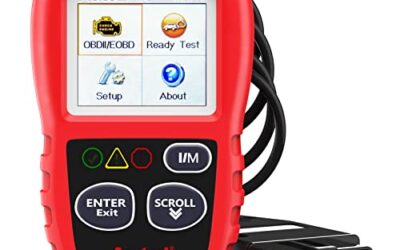
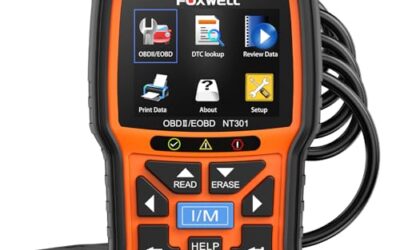
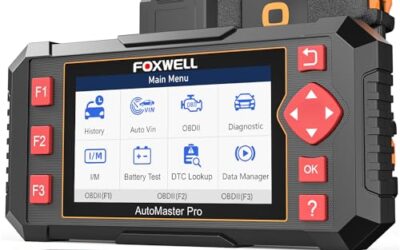
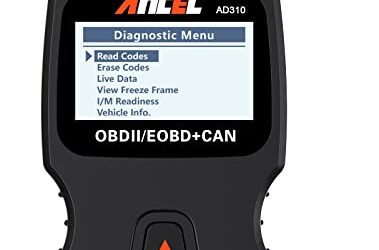
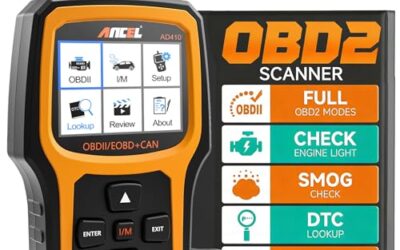
Can a basic obd2 scanner read airbag codes? Usually no, because basic tools normally access the engine control module and emissions data, not the airbag control module.
An airbag warning light points to the supplemental restraint system, often called SRS. Reading its fault requires a scanner with SRS or body-module access, plus coverage for the vehicle’s make, model, and model year. Clearing the warning does not repair the fault, and careless work near airbag wiring can create a serious safety risk.
Key takeaways
- Basic code readers usually read powertrain codes linked to the check engine light.
- Airbag faults live in the SRS, restraint, or body control system.
- Some advanced scanners read SRS codes through the OBD2 connector, but coverage varies by vehicle.
- A lit airbag warning can mean reduced crash protection.
- Disconnecting a battery may not erase a stored SRS fault.
- Do not probe yellow airbag connectors or replace restraint parts without following service procedures.
Why basic OBD2 scanners miss airbag codes
Federal OBD2 rules focus mainly on emissions-related systems. A low-cost code reader usually communicates with the powertrain control module because that is the module tied to emissions testing and the check engine light.
The airbag system uses a separate control module. Depending on vehicle design, it may be called the SRS module, airbag control unit, restraint control module, or occupant safety controller. This module monitors crash sensors, seat-belt pretensioners, seat occupancy sensors, steering-wheel circuits, wiring, and its own power supply.
A scanner can plug into the same 16-pin diagnostic connector while still lacking access to those systems. The connector provides a physical gateway. Software, communication protocols, security access, and manufacturer coverage decide which modules the tool can actually read.
That difference explains a common result: the scanner reports no engine codes while the airbag light stays on. The tool may have checked only the powertrain module. It did not prove that the SRS module had no fault.
What scanner reads airbag codes?
A scanner needs explicit SRS, airbag, restraint, or all-system diagnostic support. Product names vary, so check the tool’s coverage list and menu before purchase. “OBD2” alone does not prove airbag access.
Some advanced handheld scanners support several vehicle modules. Others use a phone app and Bluetooth adapter. A phone-based tool also depends on the phone OS, app version, adapter firmware, and vehicle coverage. An Android app may support different functions from its iPhone version.
Vehicle age matters. A tool may read SRS codes on one model year but offer only engine diagnostics on another. Regional versions can also differ. A North American vehicle may use different module coverage from a similar vehicle sold in Europe or Asia.
Older vehicles can add more limits. Some use manufacturer-specific communication systems, while newer vehicles may require gateway access or security authorization. A scan tool can list the SRS module yet fail to communicate if its software lacks the correct protocol or access level.
Basic OBD2 scanner versus SRS-capable scan tool
| Tool type | Usually reads | Airbag access | What this means |
|---|---|---|---|
| Basic code reader | Powertrain fault codes and emissions data | Usually unavailable | Useful for many check engine light problems, but not a reliable choice for an airbag warning. |
| Enhanced single-brand scanner | Powertrain plus selected manufacturer systems | Possible | Can work well for supported vehicles, but model-year coverage needs checking. |
| Multi-system scan tool | Powertrain, SRS, ABS, body, and other modules | Often available | Useful for broader diagnosis, with coverage and security limits still possible. |
| Dealer-level equipment | Manufacturer modules and special functions | Usually strongest coverage | May access guided tests, calibration, coding, and procedures that general tools cannot. |
How to check whether your scanner can read SRS codes
- Identify the vehicle. Record make, model, model year, engine, market region, and trim. Some tools separate coverage by year or control-module version.
- Read the tool description carefully. Look for “SRS,” “airbag,” “restraint,” “all systems,” or “all modules.” “Full OBD2” often means full emissions functions, not every vehicle module.
- Check the coverage list. Confirm that your exact vehicle supports SRS reading. A general statement about brand coverage is weaker than a model-year function list.
- Check required hardware. A Bluetooth adapter may need a specific app. A wired scanner may need firmware updates. Some vehicles require a security gateway connection or an approved access process.
- Connect with the vehicle parked safely. Follow the scanner and vehicle manual. Keep the battery voltage stable, since low voltage can interrupt communication or create additional faults.
- Select the SRS or airbag module. Do not assume an engine scan includes it. The menu may place SRS under body, safety, chassis, or manufacturer-specific systems.
- Save the code and status. Record the exact code, description, module name, and whether the fault is current, pending, or stored. Avoid clearing it before diagnosis.
What an airbag code can point to
An SRS code identifies a circuit or system condition, not always a failed part. A code related to a seat-belt pretensioner can involve the pretensioner, connector, wiring, power supply, or control module. The code description alone may not identify the failed component.
Common causes include a weak vehicle battery, a disconnected seat connector, damaged wiring, a failed clock spring, a seat occupancy sensor fault, a pretensioner problem, or crash data stored after a collision. A recent seat removal or interior repair can disturb an SRS connector.
Low voltage deserves attention, but it does not explain every warning. A discharged battery can set communication or voltage codes. If the warning returns after battery repair, the SRS system needs further testing.
The clock spring sits behind the steering wheel and carries circuits through wheel rotation. A fault there can affect the driver airbag, horn, or steering-wheel controls. Diagnosis and replacement require correct procedures because the steering-wheel airbag is an explosive restraint device.
Can clearing an airbag code turn off the light?
A scanner may erase a stored code, but clearing only removes diagnostic memory. It does not repair an open circuit, failed sensor, damaged wire, low-voltage condition, or deployed restraint.
If the fault remains, the light usually returns during the next self-test or after the module sees the problem again. Some systems refuse to clear an active fault. Others turn the light off briefly and restore it later.
Crash data creates another limit. After a collision, the SRS module may store deployment or event data that needs a manufacturer-approved replacement, reset, or programming procedure. A generic clear command may not remove it.
Safe checks before professional diagnosis
Start with the owner’s manual. It may explain the warning light, battery requirements, fuse locations, and service restrictions. Keep occupants away from an airbag deployment path while checking the vehicle.
- Confirm whether the light stays on after the normal startup self-test.
- Note whether the warning appeared after a dead battery, jump-start, seat movement, collision, or interior work.
- Check visible wiring for damage without pulling, probing, or disconnecting airbag connectors.
- Inspect ordinary battery terminals for looseness or corrosion, if the vehicle manual permits that check.
- Check recalls by vehicle identification number through the NHTSA recall search.
- Record other warning lights, such as ABS, traction control, or seat-belt alerts.
Many vehicles use yellow connectors for restraint circuits, but color alone is not a safe work guide. Do not test an airbag squib with a multimeter or apply external power to restraint wiring. Follow the factory service procedure for battery disconnection, wait times, connector handling, and module replacement.
Why an airbag light needs prompt attention
The SRS warning light can indicate that one part of the restraint system is unavailable. Depending on the fault, the vehicle may disable an airbag, pretensioner, passenger classification function, or more than one circuit.
The vehicle can still start and drive with an SRS fault. That does not show that crash protection works normally. Treat the warning as a safety-system fault, not as a routine check engine light.
Do not place a rear-facing child seat in a front passenger position with an active airbag unless the vehicle and child-seat instructions specifically allow that arrangement. Follow the vehicle manual and child-restraint instructions for seating position and airbag status.
Common mistakes
Assuming every OBD2 port provides every system
The connector standard does not mean every scanner can access every module. The tool and vehicle must support the same communication path and diagnostic functions.
Buying by connector shape alone
Nearly all modern US-market vehicles use a familiar diagnostic connector, but connector fit does not promise SRS coverage. Software support matters more than physical fit.
Clearing the code before recording it
Erase first, and useful freeze-frame or fault-status details may disappear. Save the code and module information before clearing anything.
Replacing parts from a code description
“Passenger sensor fault” can involve the sensor, wiring, connector, power, calibration, or module. Test the circuit before buying a part.
Disconnecting the battery as a repair
Battery disconnection can reset some vehicle settings and may not erase an SRS fault. It also does not repair damaged restraint hardware.
When to get professional help
Use a qualified repair facility when the airbag light follows a collision, the vehicle has deployed restraints, the scanner cannot communicate with the SRS module, or the fault returns after basic voltage and connection checks.
Professional diagnosis is also wise when the vehicle needs occupant sensor calibration, steering-wheel removal, pretensioner replacement, module programming, or crash-data handling. These tasks can affect deployment timing and passenger protection.
Ask which module the shop scanned, what code it found, and whether the repair includes calibration or programming. A clear explanation should connect the code to a tested circuit or confirmed component, not only to a guess.
For broader scan-tool selection, see CarTechTalk’s guide to professional car diagnostic tools. Drivers comparing advanced module coverage can also use the guide to OBD2 scanners for advanced use.
Gear that can help
If you need OBD2 scanners for this job, these picks already appear in our OBD2 scanners guides. Check the full guide for fit and who should skip each one.

Pros
- Supports check-engine code reading and clearing
- Provides live data features including engine speed, vehicle speed, coolant temperature, and calculated load value
- Includes a 2.5-foot cable and six-button control layout
- Compact 6.02 x 2.75 x 0.91-inch design
Cons
- Does not support ABS, airbag, oil service light, or other non-OBDII systems
- Vehicle compatibility is described as supporting most applicable vehicles rather than every vehicle
- Requires connection to a vehicle’s OBDII port for power
Specifications
| Color | Yellow |
|---|---|
| Size | Portable |
| Dimensions | 6.02 x 2.75 x 0.91 inches |
| Weight | 0.6375 Pounds |
| Product Group | Automotive Parts and Accessories |
| Binding | Automotive |
Best For / Avoid If
Best for buyers prioritizing
- Supports check-engine code reading and clearing
- Provides live data features including engine speed, vehicle speed, coolant temperature, and calculated load value
- Includes a 2.5-foot cable and six-button control layout
Consider another option if
- Does not support ABS, airbag, oil service light, or other non-OBDII systems
- Vehicle compatibility is described as supporting most applicable vehicles rather than every vehicle
- Requires connection to a vehicle’s OBDII port for power

Pros
- Includes code reading, code clearing, live data, freeze-frame, I/M readiness, and vehicle information functions
- Supports VIN, Calibration ID, and Calibration Verification Number retrieval
- Lists compatibility with post-1996 US-based, post-2006 EU-based, and post-2009 Asian-based OBDII vehicles
- Offers a built-in DTC definition database and support for six languages
- Includes a stated five-year warranty
Cons
- The display is described as a two-line LCD screen, which may provide less viewing space than larger scan-tool displays
Specifications
| Color | Blue |
|---|---|
| Dimensions | 9.79921258843 x 6.692913379 x 1.57874015587 inches |
| Product Group | Automotive Parts and Accessories |
| Binding | Unknown Binding |
Best For / Avoid If
Best for buyers prioritizing
- Includes code reading, code clearing, live data, freeze-frame, I/M readiness, and vehicle information functions
- Supports VIN, Calibration ID, and Calibration Verification Number retrieval
- Lists compatibility with post-1996 US-based, post-2006 EU-based, and post-2009 Asian-based OBDII vehicles
Consider another option if
- The display is described as a two-line LCD screen, which may provide less viewing space than larger scan-tool displays

Pros
- Supports iPhone, Android, and Windows devices
- Works with a range of named diagnostic applications
- Offers enhanced OEM support for several vehicle brands
- Includes protection against over-voltage and battery drain
Cons
- Vehicle compatibility and available features should be confirmed in the troubleshooting guide before purchase
Specifications
| Color | Black |
|---|---|
| Size | Small |
| Dimensions | 2.0078740137 x 0.9055118101 x 1.8110236202 Inches |
| Weight | 0.06172943336 pounds |
| Product Group | Automotive Parts and Accessories |
| Binding | Automotive |
Best For / Avoid If
Best for buyers prioritizing
- Supports iPhone, Android, and Windows devices
- Works with a range of named diagnostic applications
- Offers enhanced OEM support for several vehicle brands
Consider another option if
- Vehicle compatibility and available features should be confirmed in the troubleshooting guide before purchase
FAQ
Can a cheap OBD2 scanner read ABS and airbag codes?
Usually not. Basic tools commonly focus on powertrain and emissions codes. ABS and SRS access needs enhanced or multi-system coverage.
Will a check engine scanner show an airbag code?
Usually no. The check engine scanner may read the powertrain module while leaving the SRS module unchecked.
Can a phone app read SRS codes?
Some can, but the adapter, app, phone OS, firmware, vehicle model year, and regional coverage all matter. Bluetooth connection alone does not prove SRS support.
Why does the airbag light stay on after battery replacement?
The battery may have caused one fault, but the warning can remain if the SRS module stored a code or another circuit still has a problem.
Is it safe to drive with the airbag light on?
The vehicle may drive normally, but crash protection may be reduced or partly disabled. Arrange diagnosis promptly and follow the vehicle manual.
Sources and further reading
- J1962 Diagnostic Connector standard (SAE International): Connector design and diagnostic access context.
- J1979 E/E Diagnostic Test Modes standard (SAE International): Standardized emissions diagnostic functions and test modes.
- Check for Recalls (NHTSA): Vehicle identification number recall searches for safety campaigns.