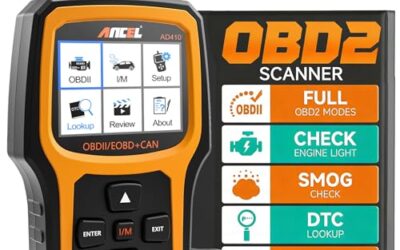
Finding best odb2 app require matching mobile operating system, wireless scan tool hardware, vehicle communication protocol. Most smartphone scan tools read standardized emissions diagnostic trouble codes across vehicles sold in United States after 1996. Advanced functions like bi-directional control, live sensor graphing, proprietary module access require software built specifically for vehicle make.
- Software depends on hardware: Diagnostic app rely entirely on microcontroller chip inside OBD-II adapter. Cheap clone adapters fail high-speed polling.
- Generic versus enhanced data: Standard OBD-II cover mandated emissions PIDs. Body control modules, transmission control modules, ABS require enhanced diagnostics.
- Platform connection rules: iOS require Bluetooth Low Energy (BLE) or Wi-Fi. Android support Bluetooth Classic (Serial Port Profile) alongside BLE.
- Code clear caution: Clearing diagnostic trouble code erase freeze-frame engine data without fixing mechanical defect.
Understanding Vehicle Diagnostics: Phone, Adapter, ECU Architecture
Modern mobile diagnostic setup split scan tool functionality into three discrete layers: vehicle electronic control unit (ECU), wireless hardware interface adapter, diagnostic software running on mobile device.
Vehicle communicate across controller area network (CAN bus) or legacy protocols like ISO 9141-2, KWP2000, SAE J1850. Data port supply constant 12-volt vehicle battery power on Pin 16, ground on Pins 4 and 5, bus communications on designated protocol pins. Wireless adapter plug into 16-pin data link connector (DLC). Microcontroller inside adapter translate raw vehicle bus voltages into standard serial command strings, historically based on ELM327 command set or modern STN/OBDLink instruction sets.
Mobile diagnostic app send requests via AT or ST commands across local wireless link (Bluetooth or Wi-Fi). App interpret hexadecimal byte replies returned from ECU, convert raw values through standardized mathematical formulas, display diagnostic trouble codes (DTCs), sensor measurements, readiness monitors on screen.
What Determines the Best ODB2 App for Your Needs?
Evaluation of diagnostic software depend on scope of repair work. Motorists needing check engine light verification have different requirements than technicians diagnosing intermittent cylinder misfires.
Generic OBD-II vs. Manufacturer-Specific Enhanced Diagnostics
United States federal law mandate standard SAE J1979 protocol across passenger vehicles sold after January 1, 1996. Standard regulate generic OBD-II modes:
- Mode $01: Request current powertrain diagnostic data. Access live parameters (PIDs) like engine RPM, coolant temperature, vehicle speed, oxygen sensor voltages, fuel trim percentages.
- Mode $02: Request freeze frame data. Store snapshot of critical engine operating parameters recorded exact moment emissions fault occurred.
- Mode $03: Request confirmed powertrain diagnostic trouble codes (emissions-related PIDs starting with P0).
- Mode $04: Clear diagnostic trouble codes, freeze-frame records, readiness monitor test results.
- Mode $06: Request on-board monitoring test results for specific monitored systems like catalyst efficiency, evaporative system integrity, misfire counters per cylinder.
- Mode $07: Request pending diagnostic trouble codes detected during current or last driving cycle.
- Mode $09: Request vehicle information, including vehicle identification number (VIN), calibration IDs (CALID), calibration verification numbers (CVN).
- Mode $0A: Request permanent diagnostic trouble codes. Codes remain stored in non-volatile memory until vehicle ECU verify fault absent during multiple operating drive cycles.
Generic apps read only these standardized functions. Manufacturer-specific enhanced diagnostics access proprietary networks: medium-speed CAN (MS-CAN), single-wire CAN, localized sub-networks. Enhanced software communicate with supplementary control units: Anti-lock Braking Systems (ABS), Supplemental Restraint Systems (SRS airbag), Transmission Control Modules (TCM), Body Control Modules (BCM), Power Steering Control Modules (PSCM). Generic tools cannot query proprietary manufacturer PIDs without custom decoding profiles.
Communication Protocols and Adapter Hardware Compatibility
Software capability limit exist at physical adapter interface. Market contain thousands of low-cost wireless diagnostic dongles claiming ELM327 version 2.1 compliance. Many use bootleg microcontrollers missing internal buffer memory, dropping packet frames during high-speed CAN transmission. When app request rapid PID polling for real-time graphing, counterfeit adapters freeze, report communication dropouts, return corrupted checksum bytes.
High-tier diagnostic applications require authentic hardware controllers like STN11xx, STN22xx, proprietary OBDLink chipsets. Advanced chipsets support data throughput up to several megabaud, handle non-standard frame lengths, switch between physical CAN pins to support dual-channel architectures used by manufacturers like Ford, General Motors, Stellantis.
Mobile Operating System Limits: iOS vs. Android
Physical communication channel between phone and wireless scanner depend strictly on phone operating system design rules.
| Technical Parameter | Apple iOS (iPhone / iPad) | Google Android |
|---|---|---|
| Bluetooth Classic (SPP) | Not supported without Apple MFi chip certification | Fully supported across native RFCOMM sockets |
| Bluetooth Low Energy (BLE) | Native support via CoreBluetooth framework | Native support (Android 4.3+) |
| Wi-Fi Direct / Ad-Hoc | Supported; require manual network join | Supported; require network route assignment |
| Background Data Logging | Strictly limited by iOS power management policies | Permissive with foreground service foreground notification |
| PID Polling Frequency | Constrained by BLE transmission interval ceilings | Fast across high-baud Bluetooth Classic RFCOMM channels |
Users operating iOS hardware must select diagnostic adapters using Bluetooth 4.0+ BLE or Wi-Fi. Attempting to pair standard legacy Bluetooth 2.0/3.0 dongle with iPhone fail because Apple require proprietary MFi cryptographic authentication chip for classic Serial Port Profile connections. Android support classic Bluetooth SPP, BLE, Wi-Fi connections.
Diagnostic Capabilities and Software Categories
Diagnostic applications divide into distinct categories based on functional architecture:
- Universal Diagnostic Readers: Focus on standardized SAE J1979 compliance. Display Mode $01 sensor data, clear Mode $03/07 DTCs, verify Mode $01 emissions I/M readiness status. Examples include OBD Fusion, Torque Pro, Car Scanner ELM OBD2. Highly versatile across all OBD-II compliant vehicles, but limited to powertrain emissions systems.
- Real-Time Telemetry and Virtual Gauges: Optimized for high-frequency PID polling, track performance, auxiliary gauge cluster replacement. Prioritize custom dashboard layouts, fuel economy calculation algorithms, CSV sensor logging over deep system configuration. Torque Pro, RealDash represent primary examples.
- Vehicle-Specific Configuration and Adaptation Tools: Contain pre-loaded proprietary database definitions for single manufacturer ecosystem. Access sub-modules across proprietary network lines. Read manufacturer-specific DTCs (P1xxx, Bxxxx, Cxxxx, Uxxxx). Execute bi-directional component activations, module codings, sensor calibrations, adaptations. Examples include FORScan (Ford/Lincoln/Mazda), BimmerCode/BimmerLink (BMW/Mini), VAG DPF/OBDeleven (Volkswagen Auto Group).
Step-by-Step Diagnostic Connection Sequence
Follow this multi-step ordered sequence to establish a stable diagnostic connection without creating communication faults on the vehicle network:
- Verify vehicle ignition switch is in OFF position before inserting hardware.
- Locate vehicle 16-pin Data Link Connector (DLC), typically found beneath driver-side dashboard within 18 inches of steering column.
- Inspect DLC port for dirt, terminal corrosion, bent pins, or foreign material.
- Insert wireless OBD-II adapter firmly into DLC port until fully seated. Confirm power indicator LED illuminates.
- Turn vehicle ignition switch to ON position (engine OFF, electrical accessories active). Do not crank starter motor yet.
- Open mobile device Settings menu. If using Bluetooth Low Energy (BLE), do not pair through system Bluetooth settings; pair directly within diagnostic app interface. If using Android Bluetooth Classic, pair adapter through system Bluetooth settings using device PIN (typically 1234 or 0000).
- Launch diagnostic application. Access application connection settings, select correct hardware type (Bluetooth SPP, BLE, or Wi-Fi), choose adapter name.
- Initiate connection sequence within app. Wait for successful protocol handshake confirming automatic detection of vehicle bus (for example, ISO 15765-4 CAN 11-bit 500kbps).
- Read diagnostic trouble codes and capture freeze frame data before starting engine or clearing any fault records.
- Start engine if live operational sensor verification (fuel trim, idle RPM, mass air flow) is required.
Critical Safety Warnings and Diagnostic Limitations
Working around motor vehicles during active diagnostics presents electrical, mechanical, and safety hazards. Read and observe all warnings:
SAFETY WARNING: Do not operate, configure, or focus on diagnostic screens while driving. Distracted driving causes severe injury or death. Secure mobile devices in compliant mounts. Utilize automated background data logging features to record driving parameters, then analyze data log files only after vehicle is parked safely.
MECHANICAL AND DIAGNOSTIC LIMITATION: Clearing diagnostic trouble codes does NOT repair mechanical, electrical, or software defects. Clearing codes resets ECU readiness monitors to “Not Ready,” causes loss of critical freeze-frame fault evidence, and temporarily extinguishes Malfunction Indicator Lamp (MIL). Fault codes will return as soon as ECU drive cycle conditions execute and fail again. Never clear codes immediately prior to an emissions test; vehicle will automatically fail inspection until drive cycles complete.
NETWORK INTEGRITY WARNING: Low-quality, uncertified OBD-II adapters can pull down high-speed CAN bus lines. Corrupt bus traffic can trigger instrument cluster warning lamps, cause transmission shift faults, disable ABS/stability control, or cause sudden engine stalling while running.
Common Mistakes When Using Mobile Diagnostic Software
Avoid regular operational errors that compromise diagnostic accuracy:
- Ignoring Freeze Frame Data: Clearing trouble codes before saving freeze frame report erase engine conditions (engine load, fuel pressure, operating temperature, intake air mass) present when fault triggered. Troubleshooting intermittent fault without freeze frame becomes blind trial and error.
- Relying Exclusively on Fault Code Definitions: Diagnostic trouble code indicate circuit or subsystem fault condition; code never confirm component hardware failure. For example, code P0171 (System Too Lean Bank 1) often caused by vacuum hose split, dirty mass air flow sensor wire, weak fuel pump, or leaking intake manifold gasket. Replacing oxygen sensor without verification wastes money.
- Misunderstanding Long-Term vs Short-Term Fuel Trim: Reading absolute O2 sensor voltage without evaluating total fuel trim percentage lead to inaccurate air-fuel mixture diagnoses. Short-term fuel trim adjust immediately; long-term fuel trim compensate for systemic drift over time. Sum of short-term and long-term trims exceeding plus or minus ten percent indicate unmetered air or fueling delivery issues.
- Interpreting Mode $06 Data Incorrectly: Mode $06 display raw hexadecimal test values compared against manufacturer threshold limits. Misidentifying Component ID (CID) or Test ID (TID) create false positive assumptions regarding misfire counters or catalytic converter deterioration.
- Leaving Unswitched Adapters Plugged In Continuously: Many standard diagnostic dongles draw power continuously from Pin 16, regardless of vehicle ignition key state. Left connected for multiple days on parked vehicle, unswitched dongles drain 12-volt starter batteries below crank threshold.
When to Seek Professional Automotive Diagnostics
Mobile applications serve effectively for initial triage, fault scanning, live sensor monitoring. Specific diagnostic hurdles require certified shop intervention:
- Intermittent High-Speed CAN Communication Drops: Loss of communication DTCs (U-codes such as U0100, U0121) indicate broken physical wiring, water ingress inside harness connectors, loose ground points, or corrupted module transceivers. Resolving bus faults require breakout boxes, specialized digital storage oscilloscopes (DSO), wiring schematics.
- ECU Reprogramming and Flashing: Updating module calibration software (TSB fixes) require Society of Automotive Engineers J2534 pass-thru hardware interface, stable clean-power battery maintainer, official OEM flash software subscriptions. Low-end wireless adapters cannot flash safety-critical microprocessors safely.
- Advanced Bi-Directional Actuation and Calibrations: Tasks like electronic parking brake retraction for brake pad replacement, diesel particulate filter (DPF) forced service regeneration, steering angle sensor calibration, ADAS radar camera alignment require advanced workshop diagnostic systems.
Frequently Asked Questions
Can a mobile diagnostic app damage my car?
Software itself cannot damage vehicle, but physical adapter hardware can. Defective or cheaply cloned wireless scan tools with poor electrical isolation can short CAN bus high and low lines (Pins 6 and 14), backfeed voltage into data lines, or crash module communications while engine operates. Always buy verified adapters using established controller chipsets.
Why does my app connect to the adapter but not the car?
This condition occur when mobile device establishes wireless connection to scan tool microcontroller, but microcontroller cannot initialize bus communication with vehicle engine control module. Typical causes include vehicle ignition switch being in OFF position, blown DLC fuse (often shared with 12V auxiliary cigarette lighter socket circuit), incompatible vehicle communication protocol, or unseated adapter pins.
Will an OBD-II app tell me exactly what part to replace?
No. Diagnostic applications read fault codes and sensor parameters reported by vehicle microcontrollers. Code define test failure within electrical circuit or operating parameter envelope; code cannot distinguish between broken copper wire, corroded terminal connector, dirty sensor, or complete mechanical component failure. Component level testing using multimeters and vacuum gauges remain necessary.
What is the difference between a pending code and a confirmed code?
Powertrain diagnostic rules typically require fault detection across two consecutive drive cycles before turning on Malfunction Indicator Lamp (MIL) and saving confirmed trouble code (Mode $03). If fault detect during single drive cycle, ECU store record as pending trouble code (Mode $07). If fault do not recur on subsequent trip, pending status clear automatically.
Why does my scanner show readiness monitors as incomplete?
Readiness monitors reset to “Incomplete” or “Not Ready” whenever diagnostic trouble codes cleared using diagnostic app or 12-volt battery disconnected. Vehicle must undergo specific driving sequences known as OBD-II drive cycles (encompassing steady cruise, deceleration, idle phases) before internal ECU self-tests complete monitoring catalytic converter, evaporative purge valves, oxygen sensor heaters.

Pros
- Provides 2K 3-channel video coverage
- Includes an OBD II power cable for 24/7 surveillance
- Supports Wi-Fi file sharing and GPS capability
- Includes a 16GB microSD card
Cons
- The included microSD card capacity is limited to 16GB
The myGEKOgear Scout Pro 2K 3-Channel Dash Cam Surveillance Edition is an on-dash camera with 2K resolution and three-channel recording. It supports 24/7 surveillance through the included OBD II power cable, along with Wi-Fi for instant file sharing and GPS capability. A 16GB microSD card is included. The camera is listed in black and measures 3.6 x 1.4 x 2.1 inches.
Specifications
| Color | Black |
|---|---|
| Dimensions | 3.6 x 1.4 x 2.1 inches |
| Weight | 1.5 Pounds |
| Product Group | Wireless |
| Binding | Electronics |
Detailed Review
Key features:
- 2K 3-channel dash cam
- 24/7 surveillance with an OBD II power cable
- Wi-Fi for instant file sharing
- GPS capability
- 16GB microSD card included
- Compact 3.6 x 1.4 x 2.1-inch dimensions
Best For / Avoid If
Best for buyers prioritizing
- Provides 2K 3-channel video coverage
- Includes an OBD II power cable for 24/7 surveillance
- Supports Wi-Fi file sharing and GPS capability
Consider another option if
- The included microSD card capacity is limited to 16GB