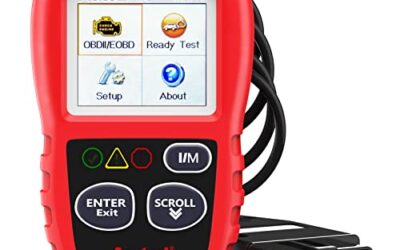
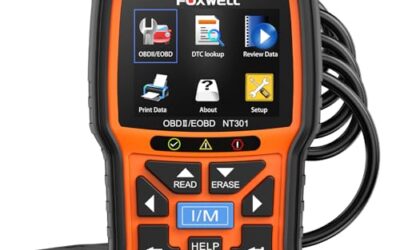
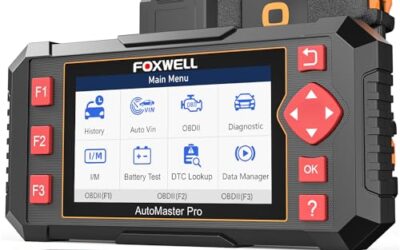
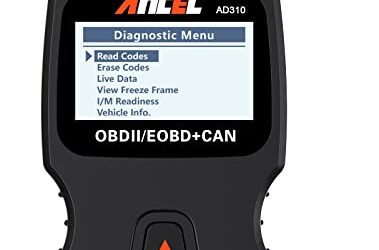
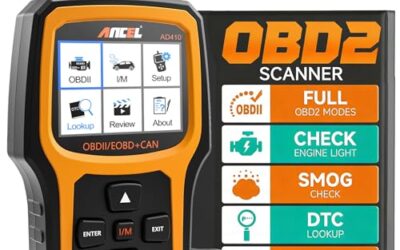
What is OBD2 VIN auto detection? OBD2 VIN auto detection is a scanner feature that reads a vehicle identification number through the OBD2 diagnostic port, then uses that identity to select vehicle data, software, or test functions. It can reduce manual vehicle selection, but it does not make every scanner work with every car or unlock every module.
The feature mainly helps with vehicle identification. It does not diagnose a fault by itself, repair a problem, or guarantee access to manufacturer-level systems. Results depend on model year, market, connector wiring, diagnostic protocol, scanner firmware, and vehicle software.
Key takeaways
- VIN auto detection reads vehicle identity through the OBD2 connection.
- The scanner may use VIN data to choose make, model, engine, year, or diagnostic software.
- Many vehicles support OBD2 emissions data without supporting automatic VIN reading.
- Some VINs return only partial data or fail to return at all.
- VIN detection does not prove that a scanner supports ABS, airbag, transmission, body, or coding functions.
- Manual vehicle selection remains useful when automatic detection fails.
How OBD2 VIN auto detection works
A scanner connects to the vehicle through its 16-pin OBD2 connector. The scanner sends a request over the vehicle network. An electronic control unit, usually the engine or powertrain control module, may answer with the VIN or related identification data.
The scanner then compares that response with its internal software database. Depending on the tool, it may select the vehicle manufacturer, model family, model year, engine, communication protocol, or available test menu. Some tools use the VIN only to identify the car. Others use it to load a vehicle-specific diagnostic path.
VIN data normally contains 17 characters on modern vehicles built for markets using the standard format. It identifies the manufacturer, vehicle attributes, production sequence, and other coded information. The VIN itself does not contain every detail required for diagnosis. A scanner still needs the right software and communication support for each control module.
VIN reading versus vehicle selection
These functions overlap but are not identical.
- VIN reading: The scanner displays identification characters returned by the vehicle.
- Vehicle selection: The user or scanner chooses make, model, year, engine, and system.
- Auto detection: The scanner reads available identity data and uses it to guide vehicle selection.
A scanner can read a VIN but still require manual selection for advanced tests. A tool can also identify a vehicle from network data without displaying the complete VIN to the user.
Why scanners use VIN auto detection
Modern vehicles can have many engine options, network layouts, and control modules. Selecting the wrong variant can produce missing menus, communication errors, or incorrect test instructions. Auto detection gives the scanner a starting point based on data from the vehicle.
This feature can save time during repeated service work. It can also reduce errors caused by choosing the wrong engine or model year. A repair shop may use the VIN to load a vehicle record, identify an earlier scan, or support service documentation.
For home users, the main benefit is simpler setup. The scanner may skip several menu screens before opening the correct diagnostic menu. That convenience has limits because the scanner still needs vehicle-specific coverage.
What vehicles support OBD2 VIN auto detection?
Support varies by vehicle and region. In the United States, most light-duty vehicles built for the OBD2 era support standardized emissions diagnostics. That does not mean every vehicle supports VIN requests through the same method.
Model year matters. Early OBD2 vehicles may support basic powertrain codes but return limited identification data. Later vehicles often use multiple network protocols and may expose more vehicle information. A newer vehicle can still block or restrict certain data outside its standard emissions functions.
Regional version matters too. A vehicle sold in North America may use different software, engine options, emissions systems, or network settings than a similar model sold in Europe or Asia. A scanner database may support one regional version and miss another.
Connector presence also matters. A 16-pin connector does not prove full OBD2 compliance. Some vehicles use a connector for manufacturer functions, accessory systems, or limited diagnostics. Older vehicles may require an adapter, and an adapter may not carry every needed circuit.
OBD2 VIN auto detection limits
Basic OBD2 does not equal full-system coverage
Standard OBD2 focuses on emissions-related diagnostics. Depending on vehicle and tool, this can include powertrain trouble codes, live data, freeze-frame data, oxygen sensor information, readiness monitors, and other standardized tests.
ABS, airbag, transmission, body, parking brake, tire pressure, and driver-assistance systems often use separate diagnostic functions. VIN auto detection may identify the car while the scanner still lacks access to those systems.
Some vehicles do not return VIN data
The control module may reject a VIN request, return incomplete characters, or use a communication method the scanner does not support. A weak vehicle battery, ignition state, gateway fault, damaged connector, or network problem can also interrupt communication.
Software coverage controls the result
VIN reading happens through hardware and vehicle communication. Correct diagnosis also requires software coverage. A scanner with broad make and model support may still need a current firmware package for newer vehicles.
Firmware affects more than new model coverage. Updates can change communication routines, vehicle menus, bug fixes, security access, and supported functions. Phone-based scanners also depend on app versions and phone operating systems.
Security gateways can restrict access
Some vehicles place a security gateway between the diagnostic connector and control modules. The gateway can limit active tests, coding, adaptations, or fault clearing until the tool completes an approved authentication process.
VIN auto detection may work before gateway authentication. That does not mean the scanner can access every protected module. Subscription rules, account setup, regional limits, and vehicle network design can affect access.
What happens when VIN auto detection fails?
Failure usually means the scanner could not obtain usable identity data. It does not prove that the vehicle has no VIN or that the diagnostic connector is defective.
| Symptom | Possible cause | Practical next step |
|---|---|---|
| Scanner asks for manual selection | Vehicle does not return VIN data, or tool lacks auto-detection support | Enter model year, make, engine, and system manually |
| Partial or incorrect vehicle details | Database mismatch, regional variant, or incomplete response | Compare displayed details with the VIN label and vehicle documents |
| No communication | Low battery voltage, ignition off, poor connection, fuse issue, or protocol mismatch | Turn ignition on without starting, inspect the connector, and check battery condition |
| Powertrain works but ABS or airbag does not | Scanner lacks that system’s coverage, or gateway access is restricted | Check system coverage and required security access |
| VIN works but advanced tests are missing | Identification support exceeds functional coverage | Review the scanner’s vehicle and system coverage |
How to use VIN auto detection safely
- Park the vehicle safely and switch off accessories that can drain the battery.
- Locate the OBD2 connector. Do not force the plug into place.
- Connect the scanner with the ignition off unless its instructions say otherwise.
- Switch the ignition to the on position. Do not start the engine unless the scanner requests running data.
- Start the scanner or app and choose automatic vehicle identification.
- Compare the returned vehicle details with the VIN label, registration, or service record.
- Choose the correct system, such as engine, transmission, ABS, or airbag.
- Read and record codes and data before clearing anything.
- Follow the scanner instructions for any active test. Do not run a test near moving parts or traffic.
Battery voltage matters during communication. A low battery can cause dropped sessions or incomplete module responses. A battery charger may help during long diagnostic sessions, but its voltage and connection must suit the vehicle and charger instructions.
Never use a scan tool while driving unless its instructions specifically support that use and the task can be performed safely. Keep attention on the vehicle, not the phone screen.
Common mistakes
Assuming VIN detection means full diagnostics
Identification and system access are separate features. Check whether the scanner supports the exact module and function needed. A tool may read engine codes but lack airbag, ABS, transmission, or body coverage.
Clearing codes before recording them
Clearing a code erases stored diagnostic information and can reset readiness monitors. It does not repair the condition that caused the code. Record codes, freeze-frame data, and relevant live data first.
Trusting the detected year without checking the vehicle
Manufacturers can release one model year across different production periods and markets. A scanner may identify a family but still need the correct engine or body configuration.
Blaming the scanner for every failed connection
Vehicle battery voltage, connector damage, blown diagnostic fuses, aftermarket wiring, gateway security, and network faults can all block communication. Test the simplest conditions first.
Using a phone app without checking OS support
Bluetooth and Wi-Fi adapters rely on app support, phone operating system compatibility, and firmware. An adapter that works with one phone may not work with another phone or tablet.
When to get professional help
Get professional help when the vehicle will not communicate after basic power and connection checks, or when safety systems show faults. ABS and airbag faults can affect vehicle control or occupant protection. Do not disconnect safety-system wiring or probe connectors unless the service procedure permits it.
Professional equipment may provide wiring data, manufacturer tests, security access, bidirectional controls, and module programming. Those functions require correct procedures. A failed programming session can leave a control module unusable.
Seek help when a code returns after clearing, when several modules report communication faults, or when the vehicle has water damage, collision damage, or aftermarket electrical work. These signs can point to network or power faults rather than one simple sensor problem.
Related OBD2 reading
For live data work, see OBD2 scanners for live data and fuel trim diagnosis. Advanced repairs may need the coverage discussed in OBD2 scanners for advanced vehicle use. For higher-level shop functions, review professional car diagnostic tools.
Gear that can help
If you need OBD2 scanners for this job, these picks already appear in our OBD2 scanners guides. Check the full guide for fit and who should skip each one.

Pros
- Supports multiple diagnostic functions beyond basic code reading
- No batteries are needed for operation
- Offers seven language options, including English, French, and Spanish
- Designed with a plug-and-play interface for end users and DIYers
Cons
- The listing does not identify all seven supported languages
Specifications
| Color | OBD2 Scanner |
|---|---|
| Size | AL319 |
| Dimensions | 4.61 x 2.83 x 0.71 inches |
| Weight | 0.39021820374 Pounds |
| Product Group | Automotive Parts and Accessories |
| Binding | Automotive |
Best For / Avoid If
Best for buyers prioritizing
- Supports multiple diagnostic functions beyond basic code reading
- No batteries are needed for operation
- Offers seven language options, including English, French, and Spanish
Consider another option if
- The listing does not identify all seven supported languages

Pros
- Supports code scanning and code resets without requiring an expert
- Tracks vehicle-specific scans, mileage-based reminders, and shared results
- Compact 1.75 x 0.75 x 1.6-inch sensor is designed to stay under the dash
Cons
- Advanced features require an optional premium subscription after the 14-day trial
- Features may vary by vehicle make and model
Specifications
| Color | White |
|---|---|
| Size | 1 Pack |
| Dimensions | 1.75 x 0.75 x 1.6 inches |
| Weight | 0.06 pounds |
| Product Group | Automotive Parts and Accessories |
| Binding | Automotive |
Best For / Avoid If
Best for buyers prioritizing
- Supports code scanning and code resets without requiring an expert
- Tracks vehicle-specific scans, mileage-based reminders, and shared results
- Compact 1.75 x 0.75 x 1.6-inch sensor is designed to stay under the dash
Consider another option if
- Advanced features require an optional premium subscription after the 14-day trial
- Features may vary by vehicle make and model

Pros
- Provides diagnostics for four major vehicle systems
- Includes useful functions such as live data and I/M readiness
- Supports automatic VIN retrieval and manual vehicle selection
- Lifetime updates and a protective case are included
Cons
- Does not support oil reset, battery registration, ABS bleeding, throttle body relearn, or ABS relearn
- SRS crash or collision data cannot be cleared
- Vehicle compatibility varies by make, model, and year, and AUTOVIN may not work on some older vehicles or brands
Specifications
| Color | red |
|---|---|
| Dimensions | 7.68 x 3.54 x 1.18 inches |
| Product Group | Automotive Parts and Accessories |
| Binding | Automotive |
Best For / Avoid If
Best for buyers prioritizing
- Provides diagnostics for four major vehicle systems
- Includes useful functions such as live data and I/M readiness
- Supports automatic VIN retrieval and manual vehicle selection
Consider another option if
- Does not support oil reset, battery registration, ABS bleeding, throttle body relearn, or ABS relearn
- SRS crash or collision data cannot be cleared
- Vehicle compatibility varies by make, model, and year, and AUTOVIN may not work on some older vehicles or brands
FAQ
Does OBD2 VIN auto detection read the VIN from every car?
No. Support depends on vehicle model year, region, protocol, module response, connector wiring, scanner software, and security controls.
Can VIN auto detection identify a vehicle with a check engine light?
Often, yes. The check engine light does not normally prevent VIN reading. A network, battery, connector, or control-module fault can still block communication.
Does VIN detection clear diagnostic codes?
No. VIN detection identifies the vehicle. Code reading, code clearing, and diagnosis are separate functions.
Does a VIN-reading scanner support ABS and airbag codes?
Not automatically. ABS and airbag access depends on the scanner’s system coverage, vehicle support, and possible security gateway requirements.
What should I do when automatic detection selects the wrong vehicle?
Stop before running tests. Check the VIN and vehicle details, then use manual selection. Wrong vehicle data can produce incorrect menus or test instructions.
Sources and further reading
- J1962 Diagnostic Connector standard (SAE International): Connector requirements used for standardized vehicle diagnostic connections.
- J1979 E/E Diagnostic Test Modes standard (SAE International): Standardized diagnostic test modes and emissions-related data.