How to choose car gadgets for a new driver starts with the driver, vehicle, and likely problem, not the gadget shelf. Pick equipment that supports attention, emergency readiness, vehicle care, or simple daily comfort without adding controls that distract from driving.
Before buying, identify the vehicle model year, phone OS, available ports, and the driver’s experience. A device that works in one vehicle may fail in another because of connector type, voltage, software support, or mounting limits.
Key takeaways
- Buy for one clear use, such as tire checks, phone charging, visibility, or emergency power.
- Prioritize tools that work while parked or require little driver interaction.
- Check model-year fit, 12-volt socket limits, USB connector type, phone OS, and app support.
- A dash cam, tire gauge, phone mount, and emergency light serve different needs. Do not treat them as interchangeable safety equipment.
- Teach the new driver how to install, test, store, and use each gadget before the first trip.
Start with the new driver’s actual needs
New drivers often benefit more from simple tools than from feature-heavy electronics. Ask where the driver travels, what weather they face, and which tasks cause trouble now.
- Short city trips: A secure phone mount, charging cable, and tire pressure gauge may cover daily needs.
- Long commutes: Add a reliable charging setup, dash cam if appropriate, and a compact emergency kit.
- Cold or severe weather: Consider a flashlight, warm blanket, gloves, and a power source matched to the vehicle battery.
- Older vehicle: An OBD2 scanner may help read basic fault information, but it cannot repair a fault.
- Electric vehicle: Check charging connector type, charging speed, route needs, and home electrical limits before choosing charging equipment.
Do not buy a gadget because it looks technical. A new driver may ignore a complex device, mount it poorly, or use it while moving. A simple tool that gets used correctly has more value.
How to choose car gadgets for a new driver by function
1. Choose safety support before convenience
Start with equipment that helps the driver see, communicate, or handle a stopped vehicle. A flashlight, reflective warning device, first-aid kit, tire gauge, and properly stored emergency supplies can help during a roadside problem.
A gadget does not replace safe driving habits. The driver should pull off the road when possible, turn on hazard lights when appropriate, and avoid standing near traffic. Roadside equipment must stay secured so it does not become a projectile during hard braking.
Check whether local rules affect windshield-mounted devices, warning lights, or camera placement. Laws differ by state and location. The driver must keep clear sight lines and avoid blocking airbags.
2. Match phone accessories to the phone and vehicle
Phone mounts should hold the device without blocking the windshield, instrument display, controls, or airbag deployment area. Vent mounts can affect airflow and may not fit every vent design. Dash and windshield mounts can create visibility or temperature concerns.
Check phone size, case thickness, charging connector, and wireless charging support. Apple and Android phones may use different cable or software requirements. Wireless charging may work only with certain phone models, cases, or vehicle systems.
Apple CarPlay and Android Auto can reduce phone handling, but compatibility depends on vehicle model year, factory head unit, cable, phone OS, and software version. Use the vehicle manual and current phone instructions before buying an adapter. See CarPlay and Android Auto guidance for related setup questions.
3. Treat charging as an electrical fit problem
USB ports do not all provide the same charging rate. A vehicle port may support data, charging, or both. A 12-volt adapter may provide more power, but its output must fit the vehicle socket and the connected device.
Check USB-A versus USB-C connectors, output ratings, cable length, and heat. Avoid loose adapters that fall out or cables that cross the steering wheel, shifter, pedals, or airbag path.
Do not leave high-load accessories connected without understanding the vehicle’s power behavior. Some sockets turn off with the ignition. Others remain active and can drain the battery if a device stays connected.
4. Add tire equipment that teaches correct care
A digital tire pressure gauge can help a new driver compare pressure with the vehicle placard. The correct pressure usually appears on the driver-door jamb label or in the owner’s manual, not on the tire sidewall.
Choose a gauge with a readable display, a valve connection that fits the tire, and a pressure range suitable for the vehicle. A gauge with memory may store a previous reading, but that does not make the reading current. Check all tires when cold unless the vehicle instructions say otherwise.
Tire pressure monitoring systems may warn about pressure loss, but the warning does not replace a gauge check. A TPMS warning can also involve a sensor, temperature change, or system fault. Read the manual before resetting anything. More tire guidance appears in digital tire pressure gauge guidance.
5. Consider a dash cam with privacy and placement in mind
A dash cam records driving scenes, but it does not prevent crashes or prove fault by itself. Image quality, night exposure, lens position, storage method, parking mode, and date accuracy affect its usefulness.
Check windshield placement, cable routing, power behavior, and memory card requirements. Some vehicles keep accessory power active after shutdown. That can drain the battery if parking recording stays enabled.
Tell the new driver how recording starts, how files lock, and how to remove footage without using the camera while driving. Audio recording can raise privacy concerns. State rules and passenger expectations may differ, so review local requirements before enabling it. CarTechTalk’s dash cam and vehicle camera coverage covers related choices.
6. Use OBD2 tools for information, not repair
An OBD2 scanner connects to a diagnostic port, often under the dashboard. Basic models may read and clear certain powertrain codes. Advanced tools may access more systems, but coverage varies by vehicle model year, manufacturer, software, and subscription.
A code points toward a system or condition. It does not identify every failed part. Clearing a code does not repair the fault, and the warning may return. Clearing codes can also reset emissions readiness monitors, which may matter before an emissions inspection.
Choose a scanner only after checking the vehicle’s connector and the tool’s supported systems. Bluetooth models also require compatible phone OS versions and an app. Do not let a new driver diagnose a warning light while moving. Stop safely, read the vehicle manual, and seek qualified help for serious warnings.
Use this compatibility checklist
| Check | Why it matters |
|---|---|
| Vehicle model year | Head units, diagnostic systems, charging ports, and power behavior can change between years. |
| Connector type | USB-A, USB-C, 12-volt, OBD2, and charging connectors serve different jobs. |
| Phone OS | Apps, Bluetooth tools, CarPlay, and Android Auto may require specific software versions. |
| Power demand | High-load devices can overheat an adapter or drain a battery when parked. |
| Mounting area | A device must not block sight lines, controls, vents, or airbags. |
| Firmware and app support | Some electronics need updates for setup or vehicle communication. |
| Weather and storage | Heat, cold, moisture, and sunlight can damage electronics left in a vehicle. |
Build a simple decision path
- Name the problem. Choose charging, visibility, tire checks, emergency readiness, or vehicle information.
- Check the vehicle. Record model year, ports, power sockets, factory infotainment, and dashboard layout.
- Check the driver. Consider phone model, comfort with apps, driving routes, and ability to use the tool while parked.
- Remove unsafe options. Reject anything that blocks vision, creates loose cables, or demands interaction while driving.
- Read setup limits. Check connector, voltage, OS, firmware, storage, and subscription requirements.
- Practice before travel. Install the item, test it while parked, and explain what each warning means.
Common mistakes
- Buying for features instead of need: Extra screens and modes can distract or confuse a beginner.
- Ignoring the vehicle manual: Power sockets, warning lights, lifting points, and charging behavior vary by model.
- Routing cables across controls: A cable near pedals or the steering wheel creates a direct hazard.
- Leaving electronics in heat: High cabin temperatures can shorten battery and memory-card life.
- Assuming one scanner covers every system: OBD2 access and manufacturer functions differ widely.
- Using a tire warning as a complete diagnosis: Check pressure and inspect the tire. A warning can signal a leak or sensor issue.
- Testing only during an emergency: Dead batteries, missing cables, and forgotten instructions make emergency gear less useful.
When to get professional help
Ask a qualified technician or installer for help when a device requires permanent wiring, trim removal, airbag-area work, or changes to factory safety systems. Poor wiring can damage electronics or interfere with restraint systems.
Get vehicle help for a flashing check engine light, brake warning, airbag warning, overheating, smoke, fuel odor, damaged tire, or charging fault. A gadget may provide information, but it cannot replace diagnosis or repair.
Use a professional installer for hardwired dash cams or accessories when cable routing crosses trim near airbags. Ask the installer how the device manages parked power and how to remove it without damaging factory wiring.
Gear that can help
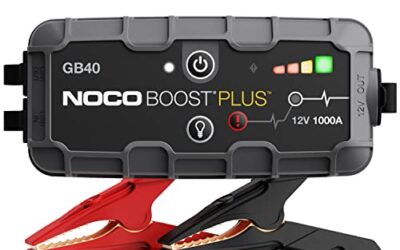
If you need jump starters or dash cams or tire inflators for this job, these picks already appear in our jump starters guides. Check the full guide for fit and who should skip each one.

Pros
- High listed 7000A peak-current output
- Supports the stated range of gas and 12.0L diesel engines
- Includes forced-start functionality for fully drained batteries
- Combines jump-starting, USB charging, and emergency lighting in one portable unit
- Uses metal clamps and lists 14 safety protections
Cons
- The source data does not identify a separate wall charger or its specifications
Best For / Avoid If
Best for buyers prioritizing
- High listed 7000A peak-current output
- Supports the stated range of gas and 12.0L diesel engines
- Includes forced-start functionality for fully drained batteries
Consider another option if
- The source data does not identify a separate wall charger or its specifications

Pros
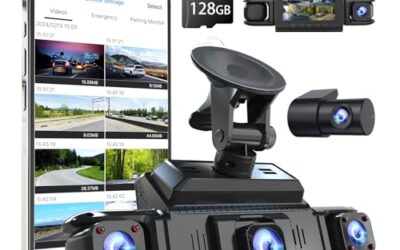
- 4K front and 2.5K rear recording
- Built-in GPS and 5GHz WiFi connectivity
- 64GB SD card included
- G-sensor helps preserve impact-related footage
Cons
- Parking monitoring requires a separately sold hardwire kit
- Some Viidure app features, including video speed adjustment and cloud uploads, require membership
Specifications
| Color | Black |
|---|---|
| Size | A13-WiFi+GPS |
| Dimensions | 19.49999998011 x 6.49999999337 x 10.49999998929 Inches |
| Product Group | Wireless |
Best For / Avoid If
Best for buyers prioritizing
- 4K front and 2.5K rear recording
- Built-in GPS and 5GHz WiFi connectivity
- 64GB SD card included
Consider another option if
- Parking monitoring requires a separately sold hardwire kit
- Some Viidure app features, including video speed adjustment and cloud uploads, require membership
Pros
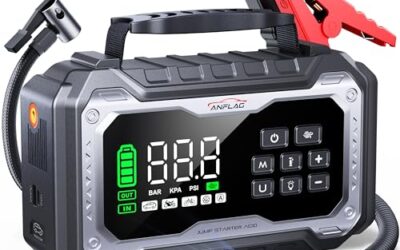
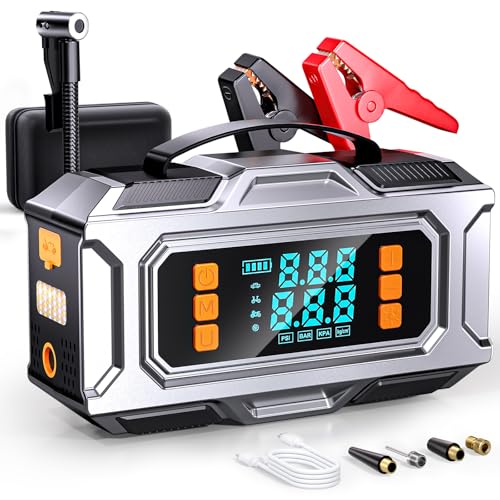
- Combines jump starting, tire inflation, device charging, and 12V accessory power in one unit
- Supports both gas and diesel vehicles within the stated engine-size limits
- Auto-shutoff inflator can be set using PSI, BAR, KPA, or KG/CM² units
- Includes a storage box, USB-C charging cable, air hose, nozzles, and user manual
Cons
- The manufacturer advises waiting two minutes between jump-start attempts and limiting attempts to three consecutively
- The compressor should cool for five minutes after 20 minutes of continuous inflation
- The unit should be recharged every two to three months during storage
Specifications
| Color | Black Silver |
|---|---|
| Dimensions | 4.3 x 7.6 x 2.5 inches |
| Weight | 2.5 Pounds |
| Product Group | Automotive Parts and Accessories |
Best For / Avoid If
Best for buyers prioritizing
- Combines jump starting, tire inflation, device charging, and 12V accessory power in one unit
- Supports both gas and diesel vehicles within the stated engine-size limits
- Auto-shutoff inflator can be set using PSI, BAR, KPA, or KG/CM² units
Consider another option if
- The manufacturer advises waiting two minutes between jump-start attempts and limiting attempts to three consecutively
- The compressor should cool for five minutes after 20 minutes of continuous inflation
- The unit should be recharged every two to three months during storage
FAQ
What is the first gadget a new driver should get?
Start with the tool that solves the driver’s most likely problem. For many drivers, that means a secure phone mount, suitable charging cable, and tire pressure gauge. Emergency equipment may matter more in rural or severe-weather travel.
Are car gadgets safe for teenagers?
They can be safe when installed outside sight lines and used while parked. Avoid devices that invite screen interaction during travel. Explain setup, storage, and emergency use before handing over the keys.
Will any OBD2 scanner work with any vehicle?
No. Connector access, protocol support, vehicle system coverage, phone OS, app support, and model year can limit compatibility. A scanner may read engine codes but lack airbag, transmission, or manufacturer-specific functions.
Can a dash cam replace a phone for emergencies?
No. A dash cam records video. It may not provide a reliable call function, location service, or two-way communication. Keep a charged phone and a safe stopping plan.
Should a new driver receive several gadgets at once?
Usually no. Add one tool at a time, install it correctly, and practice its use. Fewer devices reduce clutter and make each function easier to understand.
Sources and further reading
- Check for Recalls (NHTSA): Use this page to check open safety recalls by vehicle identification number.
- Tire Safety (NHTSA): Review tire pressure, inspection, and safety information.
- J1979 E/E Diagnostic Test Modes standard (SAE International): Learn about standardized diagnostic test functions.