To choose car tech gifts for an older driver, match one clear driving need with simple controls, vehicle compatibility, and support the recipient can use. Start with the driver, then check the vehicle model year, power source, connector type, phone OS, and setup steps.
A useful gift can reduce distraction, make vehicle information easier to see, or help with routine checks. A poorly matched device can add charging tasks, app problems, glare, or confusion. The right choice depends less on the number of features and more on whether the driver will use it without help.
Key takeaways
- Choose one problem to solve, such as low visibility, difficult charging, tire checks, or phone integration.
- Check vehicle model year, 12-volt socket type, USB connector, dashboard space, and phone compatibility.
- Prefer large controls, readable displays, voice support, and clear status signals.
- Avoid gifts that require frequent app updates, account sharing, or complex installation.
- Do not treat cameras, sensors, or driver aids as replacements for attention and safe driving.
How to choose car tech gifts for an older driver
1. Start with the driving problem
Ask what makes driving, parking, or basic vehicle care harder. The answer points toward the right gift category.
| Driver need | Useful gift category | Check before purchase |
|---|---|---|
| Hard-to-see phone or navigation information | Phone mount, larger display, or compatible infotainment accessory | Dashboard space, mounting position, phone size, and vehicle support |
| Difficulty checking tire pressure | Digital tire pressure gauge or inflator | Pressure range, valve access, display size, battery type, and tire specification |
| Worry about a dead battery | Battery maintainer or jump starter | Battery voltage, storage needs, cable length, and safe operating instructions |
| Harder parking visibility | Parking camera or sensor system | Vehicle wiring, screen location, weather exposure, and installation skill |
| Frequent check-engine light concerns | OBD2 diagnostic scanner | Vehicle model year, diagnostic functions, connector access, and phone support |
| Long trips or emergency concerns | Dash camera, emergency light, or roadside power device | Mounting, memory storage, power draw, and local rules |
Do not buy a diagnostic scanner merely because its box lists many systems. A basic OBD2 reader may display emissions-related trouble codes but lack access to airbag, ABS, body, or manufacturer-specific systems. Code clearing does not repair the fault.
2. Match controls to the driver
Older drivers do not all have the same vision, hearing, hand strength, or comfort with phones. Ask about those needs without treating age as a technical specification.
Large physical buttons often work better than small touch targets. A high-contrast screen helps in changing light. Raised controls help users operate a device by touch. Spoken alerts can help, but voice features depend on language support, microphone placement, phone permissions, and cabin noise.
Look for controls that show their state clearly. A charger should show whether power flows. A tire inflator should show pressure in a readable unit. A camera should show whether recording is active. Avoid devices that use only a small light or a phone app to report important status.
Consider glasses, gloves, and nighttime use. A glossy screen may reflect sunlight. Bright warning lights may distract after dark. Small labels can remain difficult to read even when the product has many useful functions.
3. Check vehicle compatibility before buying
Vehicle fit can change by model year, trim, factory options, and region. Record the exact vehicle year, make, model, engine or powertrain, and existing equipment.
For plug-in accessories, check the 12-volt socket location and rating. Some sockets lose power when the ignition turns off. Others stay live and can drain the battery if a device remains connected. A device that uses a USB-C plug may not work with an older USB-A port without the correct cable or adapter.
OBD2 equipment needs more than a matching connector. In the United States, most gasoline vehicles from the relevant modern model years use an OBD2 diagnostic connection, but supported systems and functions vary. Some vehicles place the connector behind a panel. Others restrict access when aftermarket equipment remains connected. A scanner may need an app, subscription, firmware update, or internet connection.
Camera and parking products need closer inspection. A factory screen may accept only certain video inputs. A replacement display may need a suitable mount and power connection. Wireless systems can suffer from interference, pairing problems, or delay. Installation may require removing trim or connecting to reverse-light wiring.
For battery products, identify whether the vehicle uses a conventional 12-volt battery, a start-stop system, or another arrangement. Electric vehicles have a high-voltage traction battery and a separate low-voltage system. A typical 12-volt jump starter does not charge an EV traction battery.
4. Check phone and software requirements
Phone-based car tech needs more than Bluetooth. Check whether the device supports the driver’s iPhone or Android phone, operating system version, required app, and connection method.
Apple CarPlay and Android Auto availability depends on the vehicle, head unit, connection type, and model year. Wired support does not always mean wireless support. A phone may need a compatible cable even when the vehicle has Bluetooth for calls.
Apps can require an account, location access, Bluetooth permission, cellular service, or recurring updates. These tasks may be acceptable for a driver who already manages apps. They may be a poor fit for someone who wants a device that works without a phone.
Check who will handle setup. If a family member installs the app, decide who owns the account and receives alerts. Avoid shared passwords when the device stores location data, driving clips, or vehicle information.
For related phone integration guidance, see CarTechTalk’s CarPlay and Android Auto coverage.
5. Choose installation level carefully
Plug-in gifts usually create fewer fit problems than hardwired accessories. A tire gauge, USB charger, or portable jump starter can travel between vehicles. A camera, tracker, or parking sensor may require permanent wiring and careful placement.
Ask whether the recipient can install the device safely. A mount must not block the windshield, mirrors, instrument panel, airbag paths, or driver controls. A cable must not cross the steering wheel, pedals, or gear selector. A dash camera should not obstruct the driver’s view.
Hardwired equipment can affect warranty service, trim clips, fuse circuits, or battery drain. Follow vehicle and device instructions. Professional installation makes more sense when wiring passes through airbags, roof trim, tailgates, or factory screens.
6. Pick practical categories
Phone mounts and charging accessories
These gifts help when the driver struggles to see or reach a phone. Choose a stable mount that leaves controls visible and does not block the windshield. Confirm phone size, case thickness, charging connector, and vehicle vent strength.
Wireless charging depends on phone support and coil alignment. Thick cases, metal plates, heat, and poor placement can interrupt charging. A wired charger may offer simpler operation and broader compatibility.
Tire gauges and inflators
A digital gauge can make pressure checks easier when its display uses large numbers and a familiar unit. An inflator adds power but also adds hose handling, noise, storage space, and battery charging.
The correct pressure comes from the vehicle placard or owner’s manual, not the maximum pressure printed on the tire sidewall. Pressure needs can differ between front and rear tires, load conditions, and spare tires. CarTechTalk’s guide to digital tire pressure gauges with memory explains what stored readings can and cannot do.
Battery chargers and jump starters
A maintainer helps a vehicle that sits for long periods, but it needs a suitable outlet and correct battery mode. A jump starter helps with a discharged 12-volt battery, but it cannot fix a failed battery, damaged cable, or charging-system fault.
Check voltage selection, clamp design, storage temperature, recharge method, and cable reach. Never connect equipment in a way that conflicts with the vehicle or battery manual. Keep sparks, flames, and smoking materials away from batteries.
OBD2 scanners
A scanner can help a driver read trouble codes before contacting a repair shop. It cannot prove which part failed, and it cannot repair a mechanical or electrical problem. Some tools show code definitions without live data or system tests.
Choose a screen-based scanner for a driver who wants no phone app. Choose a Bluetooth scanner only when the driver can manage pairing, app permissions, updates, and phone charging. Check whether the tool supports the vehicle’s model year and the systems the driver cares about.
Dash cameras and parking cameras
A dash camera records video during driving and may help document an incident. Storage cards, loop recording, parking mode, heat exposure, and power cutoff settings affect daily use. A parking camera can improve rear visibility, but it does not replace mirror checks or a direct look around the vehicle.
Camera installation must preserve the driver’s view and airbag operation. Regional privacy and recording rules can differ. Check local requirements before enabling audio recording or sharing footage.
7. Make setup part of the gift
Many car tech gifts fail during setup, not use. Include the right cable, batteries, memory card, mount, or adapter when the device requires one. Label cables by purpose. Save the manual and warranty details in one place.
- Test the device in the parked vehicle.
- Set readable units, alert volume, screen brightness, and language.
- Pair the phone or connect the cable.
- Explain one normal task and one fault message.
- Show how to charge, clean, store, or reset the device.
- Remove packaging and disable features the driver will not use.
Do not leave installation until the first trip. A parked setup reveals blocked controls, poor screen angle, weak cables, and confusing alerts.
Decision tree for choosing the gift
- Needs easier phone access: choose a stable mount or simple charger after checking phone and dashboard fit.
- Checks tires often: choose a large-display gauge. Add an inflator only if storage, noise, and charging are acceptable.
- Vehicle sits for weeks: consider a battery maintainer after identifying battery type and outlet access.
- Wants basic fault information: choose an OBD2 scanner with controls the driver can use without a phone, unless app use is comfortable.
- Has parking visibility concerns: consider a camera or sensor system, with professional installation if wiring is complex.
- Cannot describe a clear need: ask before buying. A gift card or setup help may fit better than unused hardware.
Common mistakes
- Buying for age instead of a stated driving problem.
- Assuming every USB port supports charging, data, or CarPlay.
- Assuming every OBD2 scanner accesses ABS, airbag, or transmission systems.
- Leaving a live accessory connected and draining the 12-volt battery.
- Mounting a phone or camera where it blocks sight lines or controls.
- Ignoring phone OS, app, firmware, or subscription requirements.
- Using tire sidewall maximum pressure as the normal vehicle setting.
- Believing a cleared trouble code means the vehicle is fixed.
- Giving a device without explaining setup, charging, storage, and basic warnings.
When to get professional help
Use professional help when installation involves airbags, fuse panels, factory infotainment wiring, reverse-light circuits, or hidden trim. Ask for help when the vehicle has warning lights, battery damage, melted wiring, repeated power loss, or an unknown electrical fault.
A scanner can provide useful information for a technician, but it cannot replace diagnosis. Stop using a device if it becomes hot, smells burned, loses insulation, or causes vehicle systems to behave strangely.
Safety equipment also deserves extra care. Check vehicle recalls through NHTSA’s recall lookup before treating an accessory as a fix for a factory safety issue.
Gear that can help
If you need jump starters or dash cams or tire inflators for this job, these picks already appear in our jump starters guides. Check the full guide for fit and who should skip each one.
Pros
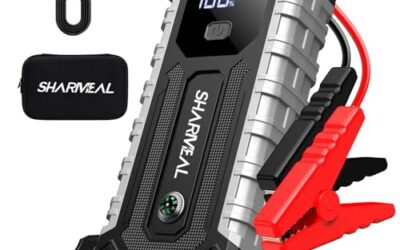
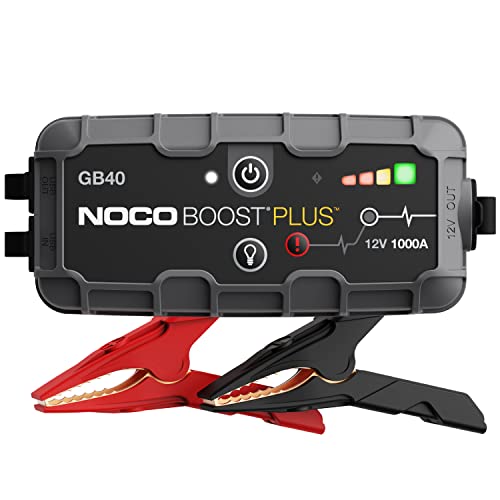
- High 1000-amp peak rating for a compact 2.5-pound jump starter
- Stated compatibility with 12V vehicles and engines up to 6.0L gas or 3.0L diesel
- Built-in spark-proof and reverse-polarity protection
- Adds power-bank and flashlight functionality for emergency use
Cons
- The stated engine compatibility is limited to up to 6.0L gas and 3.0L diesel
- The listed warranty period is one year
Specifications
| Color | Gray |
|---|---|
| Size | 1000 Amps |
| Dimensions | 6.5748031429 x 3.149606296 x 7.7165354252 Inches |
| Weight | 2.4 Pounds |
| Product Group | Automotive Parts and Accessories |
| Binding | Automotive |
Best For / Avoid If
Best for buyers prioritizing
- High 1000-amp peak rating for a compact 2.5-pound jump starter
- Stated compatibility with 12V vehicles and engines up to 6.0L gas or 3.0L diesel
- Built-in spark-proof and reverse-polarity protection
Consider another option if
- The stated engine compatibility is limited to up to 6.0L gas and 3.0L diesel
- The listed warranty period is one year

Pros
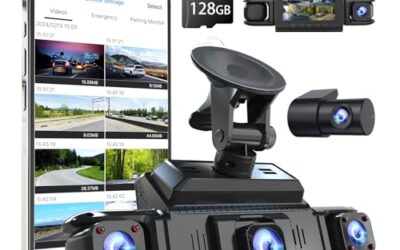
- High-resolution 4K front and 1080P rear recording
- Multiple control options, including voice commands, touchscreen, and physical buttons
- Built-in GPS and wireless smartphone connectivity
- Includes a 128GB card and supports automatic loop recording
- Includes an 18-month guarantee and 24/7 customer support
Cons
- Parking monitoring requires a separate hardwire kit
- Rear camera resolution is limited to 1080P compared with the 4K front camera
Specifications
| Color | Black |
|---|---|
| Dimensions | 2.362204722 x 1.2598425184 x 3.8188976339 inches |
| Weight | 0.25 pounds |
| Product Group | Wireless |
| Binding | Electronics |
Best For / Avoid If
Best for buyers prioritizing
- High-resolution 4K front and 1080P rear recording
- Multiple control options, including voice commands, touchscreen, and physical buttons
- Built-in GPS and wireless smartphone connectivity
Consider another option if
- Parking monitoring requires a separate hardwire kit
- Rear camera resolution is limited to 1080P compared with the 4K front camera
Pros
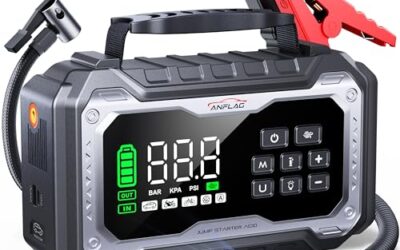
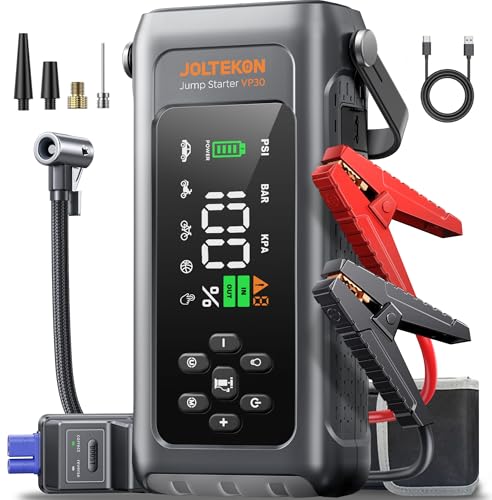
- Combines jump starting, tire inflation, lighting, and portable charging in one device
- Force-start function is specified for completely drained or low-voltage batteries
- Automatic shutoff helps prevent over-inflation
- Operating temperature is listed as -4°F to 140°F
Cons
- The product listing advises charging the unit every 2–3 months during extended storage
- Users are instructed to ensure the battery level exceeds 50% before vehicle startup
Specifications
| Dimensions | 7.88 x 1.97 x 3.78 inches |
|---|---|
| Weight | 2.645547144 pounds |
| Product Group | Automotive Parts and Accessories |
Best For / Avoid If
Best for buyers prioritizing
- Combines jump starting, tire inflation, lighting, and portable charging in one device
- Force-start function is specified for completely drained or low-voltage batteries
- Automatic shutoff helps prevent over-inflation
Consider another option if
- The product listing advises charging the unit every 2–3 months during extended storage
- Users are instructed to ensure the battery level exceeds 50% before vehicle startup
For a closer look at a related choice, see How To Compare Car Tech Warranties Before Buying A Gift.
FAQ
What is the easiest car tech gift for an older driver?
A simple, large-display device that solves a known problem is often easiest. A tire gauge, phone mount, or basic charger may require less setup than an app-connected camera or scanner.
Should I buy a Bluetooth OBD2 scanner?
Buy one when the driver uses a compatible phone and can manage pairing, app permissions, and updates. Choose a standalone scanner when phone setup would create friction.
Are wireless chargers compatible with every phone?
No. Phone model, case thickness, charging standard, coil alignment, and vehicle power output affect operation. Wired charging may work better for older phones or thick cases.
Can a jump starter fix an old car battery?
No. It may provide temporary starting power for a discharged 12-volt battery. It does not repair a failed battery, alternator, cable, or starter.
Should I install a dash camera myself?
Portable plug-in installation may suit some drivers. Hardwiring needs care around airbags, fuse circuits, battery drain, and camera placement, so professional installation can be safer.
Sources and further reading
- Tire Safety (NHTSA): Tire pressure, inspection, and safe tire-use guidance.
- J1962 Diagnostic Connector standard (SAE International): Connector information related to vehicle diagnostic equipment.
- J1979 E/E Diagnostic Test Modes standard (SAE International): Diagnostic test modes used by compatible vehicle scan tools.