OBDLink MX+ vs Veepeak comes down to diagnostic depth: OBDLink MX+ is the stronger choice for drivers who need broader vehicle system access, while Veepeak OBDCheck BLE is the better budget pick for basic check engine work. Both use a phone or computer as the display, but app support, vehicle coverage, and price position separate them.

Pros
- Supports iPhone, Android, and Windows devices
- Works with a range of named diagnostic applications
- Offers enhanced OEM support for several vehicle brands
- Includes protection against over-voltage and battery drain
Cons
- Vehicle compatibility and available features should be confirmed in the troubleshooting guide before purchase
Specifications
| Color | Black |
|---|---|
| Size | Small |
| Dimensions | 2.0078740137 x 0.9055118101 x 1.8110236202 Inches |
| Weight | 0.06172943336 pounds |
| Product Group | Automotive Parts and Accessories |
| Binding | Automotive |
Best For / Avoid If
Best for buyers prioritizing
- Supports iPhone, Android, and Windows devices
- Works with a range of named diagnostic applications
- Offers enhanced OEM support for several vehicle brands
Consider another option if
- Vehicle compatibility and available features should be confirmed in the troubleshooting guide before purchase

Pros
- Supports both iOS and Android through Bluetooth LE
- Provides several standard OBD-II diagnostic functions
- Compatible with multiple generic and vehicle-specific third-party apps
- Compact listed dimensions of 1.61417 x 1.9685 x 0.86614 inches
Cons
- Requires a compatible third-party app, and some apps or features may require separate purchases
- Does not support special functions such as injector coding, EPB reset, ABS bleeding, oil light or service resets, and relearns
- Advanced diagnostics and EV or hybrid support depend on the vehicle and app
Specifications
| Dimensions | 1.61417 x 1.9685 x 0.86614 inches |
|---|---|
| Product Group | Automotive Parts and Accessories |
| Binding | Automotive |
Best For / Avoid If
Best for buyers prioritizing
- Supports both iOS and Android through Bluetooth LE
- Provides several standard OBD-II diagnostic functions
- Compatible with multiple generic and vehicle-specific third-party apps
Consider another option if
- Requires a compatible third-party app, and some apps or features may require separate purchases
- Does not support special functions such as injector coding, EPB reset, ABS bleeding, oil light or service resets, and relearns
- Advanced diagnostics and EV or hybrid support depend on the vehicle and app
These scanners target different ownership needs. Veepeak focuses on generic OBD II functions through a compatible third party app. OBDLink MX+ costs more, but its listing points to wider manufacturer support and access to additional vehicle systems.
Affiliate disclosure: CarTechTalk may earn a commission from qualifying purchases through product links. This does not change product selection or reader cost.
| Feature | OBDLink MX+ OBD2 Bluetooth Scanner for iPhone | Veepeak OBDCheck BLE Bluetooth OBD II Scanner |
|---|---|---|
| Phone and computer support | iPhone, Android, Windows PC | iOS and Android |
| Connection | Bluetooth | Bluetooth LE |
| Generic OBD II functions | Check engine light clearing and live parameters | Read and clear codes, freeze frame data, I/M readiness, live sensor data |
| Vehicle coverage statement | Enhanced OEM support for Ford, GM, Mazda, Nissan and Infiniti, Toyota, Lexus and Scion, Honda, Hyundai, and Kia | Most 1996 and newer cars and light trucks in the United States for generic OBD II functions |
| Advanced system access | Listing mentions ABS, SRS, and TPMS parameters | Make and model dependent through specific apps |
| App examples | FORScan, Torque, BimmerCode, DashCommand, AlfaOBD, Carista | Car Scanner ELM OBD2, Torque, OBD Fusion, BimmerCode, BimmerLink, OBD JScan, Dr. Prius |
| Protection and updates | Over voltage protection, battery drain protection, included firmware updates |
OBDLink MX+ Is Better for Broader Vehicle Diagnostics
OBDLink MX+ OBD2 Bluetooth Scanner for iPhone fits owners who want more than a basic engine code reader. Its listing names iPhone, Android, and Windows PC support, so it can serve drivers who switch between mobile apps and a computer based tool.
The main advantage is wider system coverage. The manufacturer lists support for enhanced OEM functions across several major brands, including Ford, GM, Mazda, Nissan and Infiniti, Toyota, Lexus and Scion, Honda, Hyundai, and Kia. The listing also mentions live parameters from ABS, SRS, and TPMS systems. That gives this adapter a broader role than a scanner limited to generic powertrain codes.
App choice still controls the experience. FORScan may appeal to Ford users, while AlfaOBD targets certain manufacturer functions and BimmerCode serves supported BMW coding tasks. Compatibility depends on the vehicle, app, and function. The scanner itself does not turn every phone app into a full factory scan tool.
Best fit for OBDLink MX+
Choose it for a multi vehicle household, a driver who works with manufacturer specific apps, or an owner who wants a single adapter for phone and Windows use. It also makes more sense for someone who may need ABS, SRS, or TPMS information rather than only engine data.
Over voltage protection and battery drain protection address two practical ownership concerns. Included firmware updates can also reduce the chance that an old adapter becomes the weak link as app support changes. These features do not replace safe vehicle service practices or app specific instructions.
Where OBDLink MX+ falls short
OBDLink MX+ sits in the premium price position, so it is difficult to justify for a driver who only wants to clear a check engine code and view a few engine sensors. Advanced functions still depend on vehicle and app compatibility. Skip it if your needs stop at generic OBD II data and you do not plan to use supported OEM focused apps.
Veepeak OBDCheck BLE Is Better for Basic OBD II Work
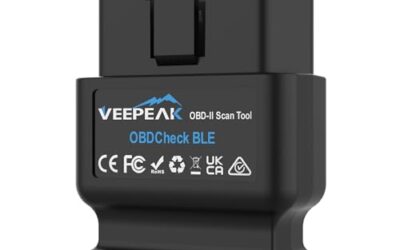
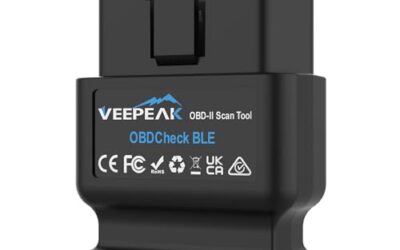
Veepeak OBDCheck BLE Bluetooth OBD II Scanner targets the lower cost end of this matchup. It reads and clears generic trouble codes, shows freeze frame data, reports I/M readiness, and displays live sensor data through a compatible app.
That feature set covers common driveway tasks. A driver can retrieve a check engine code before visiting a repair shop, see whether emissions readiness monitors are complete, and review sensor information while diagnosing an engine concern. The scanner does not diagnose every fault by itself. Code meaning, repair priority, and vehicle specific data still require technical judgment.
Veepeak states that the adapter works with most 1996 and newer cars and light trucks in the United States for generic OBD II functions. Hybrid and electric vehicle support depends on the selected app. This makes the model year statement useful, but not enough for advanced work on every vehicle.
Best fit for Veepeak OBDCheck BLE
Pick Veepeak for an owner who wants affordable access to generic engine codes and live data on iOS or Android. It suits occasional use, pre purchase code checks, readiness checks, and basic fault investigation.
App support is broad enough for several common choices. Car Scanner ELM OBD2, Torque, and OBD Fusion cover general functions, while BimmerCode, BimmerLink, OBD JScan, and Dr. Prius target certain vehicles and tasks. Some apps or app features require separate payment from their developers.
Where Veepeak OBDCheck BLE falls short
The scanner requires a compatible third party app, and advanced access varies by make, model, and software. It does not support special functions such as injector coding, electronic parking brake reset, ABS bleeding, oil or service resets, and relearns. The listing also excludes ABS and SRS as standard functions, even though some vehicle specific apps may expose selected data.
Connection setup can trip up new users. Veepeak uses Bluetooth LE rather than Wi Fi, and its instructions say to connect from inside the app instead of pairing through the phone Bluetooth menu, especially on iOS. Android head units may not work. Skip Veepeak if you need a confirmed path to manufacturer level service functions or want Windows PC support from this adapter.
App Compatibility Changes the Buying Decision
Bluetooth hardware is only one part of this purchase. The app supplies menus, vehicle definitions, live data labels, and special functions. A scanner that works well with one app may offer fewer functions in another.
Veepeak lists compatibility with generic apps and several vehicle specific apps, but it also names exclusions. It is not compatible with Carly, MHD, xHP, ProTool, or bootmod3. FORScan and AlfaOBD users should note that MS CAN is not supported with Veepeak. BimmerCode and BimmerLink have further limits for vehicles built before 2008, and BimmerCode excludes G and U series vehicles according to the listing.
OBDLink MX+ is listed as a recommended adapter for FORScan, Torque, BimmerCode, DashCommand, AlfaOBD, Carista, and other apps. That does not guarantee every menu or procedure on every vehicle. App developers control their own functions, while vehicle modules determine what data and commands are available.
Before buying, name the exact app and task. “Read engine codes” is a broad match for Veepeak. “Scan airbag modules,” “view tire pressure data,” or “perform a manufacturer specific service function” points toward OBDLink MX+, but vehicle fitment still matters.
Generic Codes Versus Manufacturer Specific Data
Generic OBD II functions focus mainly on emissions related powertrain information. They can help identify why a check engine light appeared and show whether readiness monitors have completed. Freeze frame data records operating conditions linked to a stored code, while live data helps compare sensor readings over time.
Manufacturer specific diagnostics reach beyond that common layer. ABS, SRS, TPMS, body modules, transmission data, coding, and resets depend on vehicle software and adapter support. A product page may name a system, but the actual menu can vary across model years and trims.
Veepeak is the practical choice when generic information solves the problem. OBDLink MX+ earns its higher price when wider module access could prevent repeated purchases of separate adapters. Neither product should replace a professional diagnosis for faults involving braking, airbags, steering, or other safety systems.
Vehicle and Phone Compatibility Checks
Both products connect wirelessly, but their setup paths differ. OBDLink MX+ supports iPhone, Android, and Windows PC. Veepeak supports iOS and Android, with Bluetooth LE connection handled inside the app.
For a United States car or light truck from 1996 onward, Veepeak covers the common generic OBD II use case according to its listing. That statement does not promise advanced hybrid, electric vehicle, or manufacturer specific functions. Owners of hybrids and EVs should use the selected app’s vehicle support information before purchase.
Older vehicles, imported models, modified vehicles, and vehicles with unusual diagnostic requirements need extra care. The connector may look familiar while the available data remains limited. OBDLink MX+ also directs buyers to its troubleshooting guide for vehicle compatibility and feature checks.
Which Scanner Should You Buy?
Choose OBDLink MX+ if you need broader coverage
OBDLink MX+ is the stronger pick for drivers who want one adapter across several vehicles, use Windows as well as mobile devices, or plan to work with FORScan, AlfaOBD, BimmerCode, Carista, and similar apps. Its listed OEM support and references to ABS, SRS, and TPMS data justify its premium position for the right vehicle.
Buy it only when those extra capabilities matter. A premium adapter brings little benefit to an owner who needs one generic engine scan every few years.
Choose Veepeak if generic OBD II is enough
Veepeak OBDCheck BLE is the value choice for check engine codes, freeze frame data, readiness monitors, and live engine sensors. It keeps the hardware purchase simpler, though the separate app decision remains part of ownership.
Buy it for basic diagnostics on a supported iOS or Android phone. Skip it if your repair plan includes coding, resets, dedicated ABS or SRS access, Windows PC use, or an app excluded by its compatibility notes.
Who Should Buy Neither?
Neither scanner fits a buyer who wants a standalone screen, guided repair instructions, guaranteed access to every control module, or a confirmed service procedure across all vehicle brands. These are wireless adapters that rely on external software. A standalone professional scanner or a shop diagnosis is a better path for complex electrical faults, safety system warnings, programming, and service functions.
Drivers who only need a one time code reading may spend less by asking a repair shop or parts retailer for a scan, where that service is available. Drivers who work on several makes should compare a professional scan tool’s confirmed module coverage, update policy, service functions, and support terms rather than choosing by Bluetooth connection alone.
If you are still comparing options, see BlueDriver vs OBDLink MX+.
Final Verdict: OBDLink MX+ vs Veepeak
OBDLink MX+ wins this matchup for broader diagnostic ambitions. Its support for iPhone, Android, and Windows PC, listed OEM coverage, named app compatibility, and references to ABS, SRS, and TPMS data give it the better fit for advanced ownership needs.
Veepeak OBDCheck BLE wins on simplicity of purpose and budget position. Generic code reading, freeze frame data, readiness checks, and live sensors cover many routine driver questions. Its limits become decisive once the job moves into manufacturer specific modules, service resets, coding, or unsupported apps.
Match the adapter to one exact vehicle and one exact task before buying. Choose Veepeak for generic OBD II work. Choose OBDLink MX+ when wider app, computer, and module support can reduce future tool purchases.
For broader scanner criteria, see best OBD2 scanners and diagnostic tools for home mechanics and drivers. Readers focused on live sensor information can also review best live data scan tool.