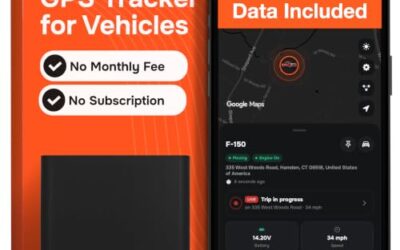
A GPS tracker uses data to transmit location information from your vehicle to a monitoring device or app. The amount of data consumed depends on several factors including update frequency and additional features. Typically, a basic GPS tracker might use between 1 to 5 megabytes of data per month, but this can vary widely based on settings and usage.
Understanding your GPS tracker’s data usage is essential for managing cellular costs and ensuring the device runs efficiently without unnecessary battery drain. This article explains the key factors affecting data consumption, how to calculate it for your needs, and ways to optimize usage while maintaining effective vehicle tracking.
- Basic monthly data usage often falls between 1MB and 5MB
- Update frequency is the primary driver of data consumption
- Additional features like alerts increase data packets sent
- Network type and coverage can impact successful data transmission
- Adjustable settings allow for significant data savings
Understanding GPS Tracker Data Usage
GPS trackers operate by combining global positioning system technology with cellular communication to send data packets containing the vehicle’s location, speed, and other relevant information. This data is crucial for real-time monitoring, which supports applications such as stolen vehicle recovery, fleet management, and personal security.
The data transmission process involves the tracker calculating its position using satellite signals and then sending this information over a cellular network to a server or directly to a smartphone app. Each data packet is relatively small, but frequent transmissions can add up over time.
It’s important to recognize that data usage is not a one-size-fits-all metric. It varies depending on the specific GPS tracker model, the configuration chosen during setup, and the features enabled. For example, a tracker designed for basic location reporting will use less data than one with advanced analytics or multiple alert types.
Factors Affecting Data Consumption
Update Frequency
The interval between location updates is a major determinant of data usage. More frequent updates provide real-time tracking but consume more data. Conversely, less frequent updates save data but may reduce the responsiveness of the monitoring system.
Consider a scenario where the tracker updates every 10 seconds. In a 24-hour period, this results in 8,640 updates. Assuming each update packet is 200 bytes, the daily data usage would be approximately 1.73 MB, or about 52 MB per month. This high frequency is suitable for high-security applications but may not be necessary for standard tracking.
On the other end of the spectrum, setting updates to every 15 minutes reduces daily usage to about 0.3 MB or 9 MB monthly. This is often sufficient for most users who do not require minute-by-minute tracking.
Location Accuracy
Location accuracy settings influence the amount of data sent. Higher precision requires more detailed information in each packet, potentially increasing data usage slightly. However, most consumer GPS trackers use standard accuracy levels of 5-20 meters, which does not significantly impact data consumption.
In challenging environments like urban canyons or indoors, accuracy might degrade, but this affects tracking reliability more than data volume directly.
Additional Features
Features such as geofencing, speed alerts, and battery monitoring add extra data packets. A geofence alert, for instance, might include the event type, location, and timestamp, adding around 150-250 bytes per notification.
If your tracker sends multiple alerts per day, these can quickly increase total data usage. For example, 10 geofence events per month could add 2-3 MB to the baseline usage.
Network Type and Coverage
The type of cellular network used affects data transmission efficiency. 4G and 5G networks can transmit data faster and with less overhead compared to older 2G networks. Poor network coverage may cause the tracker to retransmit data, further increasing consumption until successful delivery.
Always ensure the GPS tracker is compatible with your vehicle’s voltage system, typically 12V or 24V, and that the installation does not interfere with the vehicle’s electrical components.
Calculating Data Usage for Your GPS Tracker
Calculating your expected data usage is straightforward and helps in selecting an appropriate data plan. The basic formula is:
Daily data (in bytes) = Updates per day × Bytes per update
Monthly data (in MB) = (Daily data × 30) / 1,000,000
Here is a useful table to estimate your data consumption based on different update frequencies and packet sizes:
| Update Frequency | Bytes per Update | Daily Data (KB) | Monthly Data (MB) |
|---|---|---|---|
| Every 10 seconds | 150 | 129.6 | 3.89 |
| Every 1 minute | 150 | 9 | 0.27 |
| Every 5 minutes | 150 | 1.8 | 0.054 |
| Every 15 minutes | 150 | 0.6 | 0.018 |
| Every 30 minutes | 150 | 0.3 | 0.009 |
These calculations assume a basic tracking scenario without additional features. Adding geofencing or other alerts can increase the bytes per update to 200-300 bytes, adjusting the figures accordingly. Always account for network overhead, which can add 10-20% to the total data used.
It’s worth noting that data usage can also be affected by the specific vehicle model year. For vehicles from 1996 onward, most GPS trackers are compatible, but ensure proper voltage matching to prevent power-related issues that might affect data transmission.
Optimizing Data Usage on Your GPS Tracker
Optimizing your GPS tracker’s data usage involves adjusting settings to match your tracking needs. Here are practical steps:
- Review and adjust the update interval: Start with a moderate frequency like every 5 minutes and increase it if data is a concern.
- Disable or limit alert features: Only enable geofencing or speed alerts for specific routes or high-risk periods.
- Utilize data-saving modes: Some trackers offer low-data modes that reduce update frequency or compress data.
- Monitor usage regularly: Use the tracking platform’s dashboard to track actual data consumption and make informed adjustments.
- Choose an appropriate data plan: Opt for unlimited data plans to eliminate concerns about overages, especially for users with multiple vehicles.
By implementing these optimizations, users can reduce data usage by 50% or more without significantly compromising tracking effectiveness. This is particularly beneficial for those on limited data plans or concerned about cellular costs.
Common Mistakes When Managing GPS Tracker Data
A frequent mistake is leaving the update frequency at its default high setting without considering data implications. This can lead to unexpectedly high data bills and faster battery depletion.
Another common error is not accounting for the cumulative effect of multiple features. For instance, enabling several alert types simultaneously can multiply data usage beyond initial estimates.
Some users also fail to update the GPS tracker’s firmware, which might include improvements in data efficiency or bug fixes related to data transmission.
Additionally, assuming that all GPS trackers have similar data usage is incorrect. Always check the specifications for your specific model to understand its data requirements.
When to Get Professional Help
If your GPS tracker is consistently using more data than expected or experiencing connectivity problems, it may indicate an issue requiring professional attention. This could include hardware malfunction, incompatible SIM card, or the need for a different communication method like satellite tracking.
Professional installation and setup can ensure proper compatibility with your vehicle’s electrical system, including voltage requirements that vary by model year. Experts can also help configure settings to minimize data usage while maximizing tracking benefits.
Do not attempt to modify the device yourself if you are unsure about the installation process, as improper setup might lead to data transmission failures or vehicle system interference.
Data Plans and Providers for GPS Trackers
When selecting a data plan for your GPS tracker, consider the expected data usage calculated earlier. Providers often offer plans tailored for IoT devices, which may have lower costs for minimal data usage.
It’s advisable to choose a plan that includes international roaming if the vehicle travels across borders, as this can affect data transmission in different regions. Always read the terms regarding data caps and overage fees to avoid unexpected charges.
Some providers offer family or multi-device plans, which can be cost-effective for fleet operators managing several GPS trackers.
FAQ
How much data does a GPS tracker use per month?
Most GPS trackers use between 1MB and 5MB of data per month for basic location tracking. This can increase to 10MB or more with frequent updates and additional features enabled.
What affects GPS tracker data usage?
Data usage is primarily affected by update frequency, additional features such as alerts, location accuracy settings, and the type of cellular network available.
Can I reduce data usage on my GPS tracker?
Yes, you can reduce data usage by increasing the update interval, disabling unnecessary alerts, and selecting a data plan that suits your needs. These adjustments can lower consumption significantly.
What type of data plan is best for GPS trackers?
An unlimited data plan is often the best choice to avoid overage charges. However, some trackers support low-data modes that work well with metered plans.
Is satellite tracking more data intensive than cellular?
Satellite tracking can be more data intensive due to the need for global coverage, but it depends on the specific plan and update frequency. Cellular tracking is generally more efficient for areas with good network coverage.