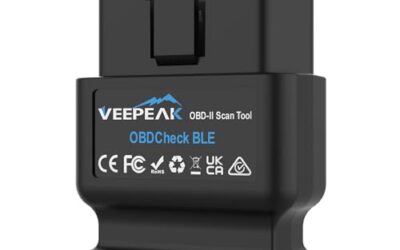
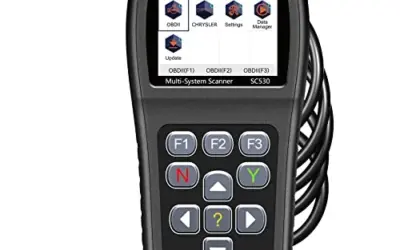
Diagnosing modern vehicles using a personal computer offers significant advantages over small-screen handheld tools. Laptop-based diagnostic setups provide expansive screens for graphing real-time sensor parameters, multi-channel live data streams, in-depth protocol compatibility, and the ability to export or log maintenance reports. However, finding the best scan tool software with live data for laptops requires separating dedicated vehicle communication interfaces and diagnostic software from standalone handhelds and unrelated computer utilities.
In this guide, we evaluate 10 catalog entries spanning commercial diesel diagnostic bundles, dedicated marine interfaces, handheld OBD2 units, and general PC utilities. We assess each product’s stated vehicle compatibility, operating system requirements, live telemetry capabilities, and physical connectivity to identify which tools genuinely deliver real-time automotive data to a PC screen.
For related guidance on this topic, see Automotive Multimeter Buying Guide, OBD2 Scanner Buying Guide for Beginners and Best Bluetooth Scan Tool.
Quick Verdict
For technicians and fleet managers seeking a complete, turnkey laptop diagnostic system with full live telemetry, the Heavy Duty Truck Diagnostic Scanner for 2024 V3 is the most comprehensive package because it includes both the DLA+ 2.0 interface and a pre-configured laptop loaded with J-PRO diagnostic software. If you already own a Windows laptop and require commercial vehicle diagnostics with live sensor data and broad adapter support, the Nexiq USB-Link 3 Wired – Full-Chip Diesel Scanner and NEXIQ USB-Link 3 Heavy Duty Truck Diagnostic provide multi-protocol multiplexing via USB and Bluetooth. For specialized marine technicians running Detroit DDEC powerplants, the Diesel Laptops Nexiq Detroit DDEC Marine 6 Pin includes genuine Nexiq cabling and Diesel Explorer PC software designed specifically to stream live marine engine health reports to a PC.

Pros
- Includes live-data graphing and logging for supported OBD2 vehicles
- Offers emissions-readiness, O-2 sensor, and EVAP monitoring functions
- Supports common OBD2 protocols and many 1996-plus US gasoline vehicles
- Does not require a separate charging setup
Cons
- Does not scan ABS, SRS, EPB, A/C, battery, or other non-engine systems
- Does not provide bidirectional control, calibration, or advanced reset functions
- Compatibility and available functions vary by vehicle year, make, model, and VIN
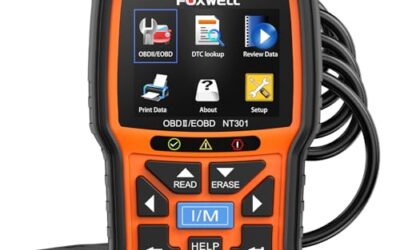
The FOXWELL NT301 is a wired OBD2 code reader for compatible gasoline vehicles, light trucks, SUVs, and 12V diesel vehicles equipped with OBD2. The listed compatibility includes most 1996-plus gasoline vehicles sold in the United States, as well as many 2000-plus European and Asian models. Compatibility and functions vary by vehicle year, make, model, and VIN.
- Functions: Reads and clears diagnostic trouble codes, displays live data, retrieves VIN information, checks I/M readiness, and supports O-2 sensor and EVAP tests.
- Supported protocols: KWP2000, J1850 VPW, ISO9141, J1850 PWM, and CAN.
- Limitations: Does not support ABS, SRS, EPB, A/C, battery diagnostics, bidirectional control, calibration, or advanced reset functions.
- Interface and display: 16-pin DLC connection and 2.8-inch color screen.
- Dimensions and weight: 8.66 x 3.15 x 6.69 inches; 0.3527396192 pounds.
- Updates and assurance: Listed with lifetime updates and 1-year seller assurance.
Specifications
| Color | NT301 OBD2 Scanner |
|---|---|
| Size | NT301 Code Reader |
| Dimensions | 8.66 x 3.15 x 6.69 inches |
| Weight | 0.3527396192 Pounds |
| Product Group | Automotive Parts and Accessories |
| Binding | Automotive |
Verify the current product variation before purchase; specifications may change.
Detailed Review
What stands out in the currently available product data:
- Reads and clears diagnostic trouble codes when the vehicle is compatible and the ignition is on
- Displays and graphs live data including oxygen sensors, fuel trims, coolant temperature, and RPM
- Provides I/M readiness checks with dedicated hotkeys and red-yellow-green LED indicators
- Supports O-2 sensor tests and EVAP system leak monitoring
- Retrieves the vehicle identification number and supports KWP2000, J1850 VPW, ISO9141, J1850 PWM, and CAN protocols
- Uses a 2.8-inch color screen and connects through a 16-pin DLC without requiring a separate battery or charging setup
Best For / Avoid If
Best for buyers prioritizing
- Includes live-data graphing and logging for supported OBD2 vehicles
- Offers emissions-readiness, O-2 sensor, and EVAP monitoring functions
- Supports common OBD2 protocols and many 1996-plus US gasoline vehicles
Consider another option if
- Does not scan ABS, SRS, EPB, A/C, battery, or other non-engine systems
- Does not provide bidirectional control, calibration, or advanced reset functions
- Compatibility and available functions vary by vehicle year, make, model, and VIN

Pros
- Supports multiple listed data-sanitization tools
- Designed for personal use and IT professionals
- Listed for use before selling, recycling, or disposing of old computers
- Supports both BIOS and UEFI-based systems
Cons
- Storage capacity is not provided
- The product brand is listed as Generic
- Detailed operating requirements and erasure instructions are not provided
This Generic secure data wipe USB drive is a bootable USB flash drive marketed for permanently erasing data from PCs, laptops, hard disk drives, and solid-state drives. The listing states that no installation is needed and identifies DBAN, ShredOS (Nwipe), and Secure Erase as included data-sanitization tools.
Compatibility is listed for Windows, Linux, BIOS, and UEFI-based PCs and laptops. The listing does not provide storage capacity or detailed operating requirements.
Specifications
| Color | blue |
|---|---|
| Product Group | Personal Computer |
| Binding | Electronics |
Verify the current product variation before purchase; specifications may change.
Detailed Review
What stands out in the currently available product data:
- Bootable USB drive with preloaded data-erasure software
- Designed for hard drive and SSD data removal
- Listed for use with Windows and Linux systems
- Compatible with BIOS- and UEFI-based PCs and laptops
- Includes DBAN, ShredOS (Nwipe), and Secure Erase tools
- No installation is required according to the product listing
Best For / Avoid If
Best for buyers prioritizing
- Supports multiple listed data-sanitization tools
- Designed for personal use and IT professionals
- Listed for use before selling, recycling, or disposing of old computers
Consider another option if
- Storage capacity is not provided
- The product brand is listed as Generic
- Detailed operating requirements and erasure instructions are not provided
Pros
- No installation is required on the Windows computer
- Supports a broad range of file types and FAT or NTFS storage devices
- Compatible with Windows Vista, 7, 8, 10, and 11
Cons
- The published compatibility information covers Windows systems only
- A media reader is required for microSD cards and some mass storage devices
- The product information does not specify recovery success rates, scan times, or supported storage capacities
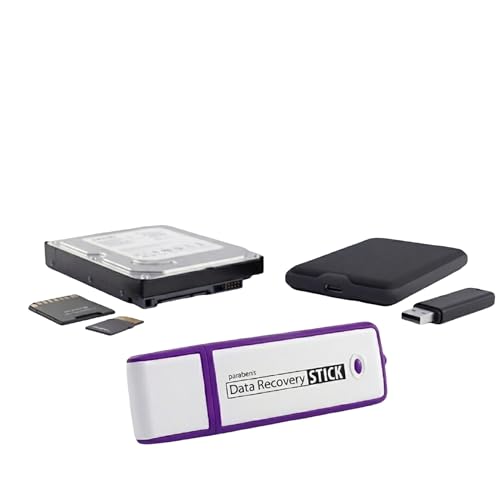
The Paraben Data Recovery Stick is USB-based data recovery software for Windows computers. It runs directly from the USB drive without installation and is designed to scan for and recover lost files after accidental deletion.
Supported file types include JPG, BMP, PNG, TIFF, Microsoft Word, Excel, PowerPoint, Publisher, Access, Open Office files, MP3 music files, PDFs, RTF documents, AutoCAD files, and HTML web pages. The software works with hard drives, USB drives, SD cards, memory sticks, and other storage formats using FAT or NTFS file systems.
Supported operating systems are Windows Vista, 7, 8, 10, and 11. A media reader is required for microSD cards and some mass storage devices. The product can be used on multiple computers, and recovered data must be cleared between uses to free storage space.
Specifications
| Color | White |
|---|---|
| Product Group | Personal Computer |
| Binding | Personal Computers |
Verify the current product variation before purchase; specifications may change.
Detailed Review
What stands out in the currently available product data:
- Runs directly from the USB drive without software installation
- Supports Windows Vista, 7, 8, 10, and 11
- Recovers photos, Microsoft Office files, PDFs, MP3s, AutoCAD files, HTML pages, and other listed formats
- Works with hard drives, USB drives, SD cards, memory sticks, and other FAT or NTFS storage
- Designed for use without technical skills according to the published product information
- Can be used on multiple computers, with recovered data cleared between uses
Best For / Avoid If
Best for buyers prioritizing
- No installation is required on the Windows computer
- Supports a broad range of file types and FAT or NTFS storage devices
- Compatible with Windows Vista, 7, 8, 10, and 11
Consider another option if
- The published compatibility information covers Windows systems only
- A media reader is required for microSD cards and some mass storage devices
- The product information does not specify recovery success rates, scan times, or supported storage capacities

Pros
- Includes a broad selection of vehicle diagnostic adapters
- Provides both USB and Bluetooth connection options
- Supports diagnosis of several critical vehicle systems
- Portable design is described as lightweight and suitable for desktop or laptop use
Cons
- Does not support software updates, and forced upgrades may damage the multiplexer
- Volvo, Hino, Perkins, CAT, and Nissan-related software requires Windows XP
- Other listed software requires Windows 7 32-bit, and antivirus software must be disabled during installation
The KVTNCB NEXIQ USB-Link 3 is a heavy-duty truck diagnostic tool for diagnosing and testing systems including the engine, ABS, and instrument panel. It supports USB direct connection and Bluetooth connection modes, multiple communication protocols, and use with desktop or laptop computers.
Listed operating-system requirements vary by software. Volvo, Hino, Perkins, CAT, and Nissan-related software is compatible with Windows XP, while other software is compatible with Windows 7 32-bit. The source data states that software updates are not supported and that antivirus software should be disabled during installation.
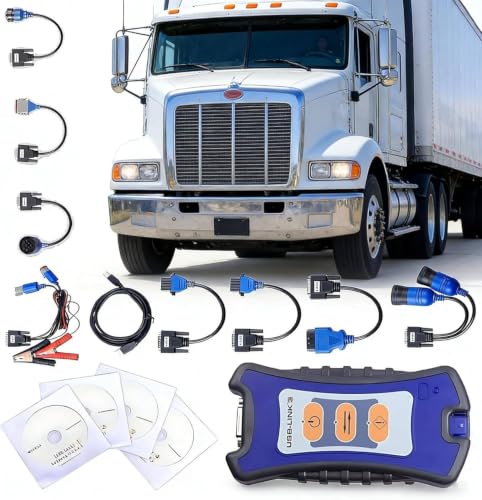
The package includes the NEXIQ-3 USB-Link main interface, OBD II adapter 441013, J1962 OBD II adapter 444009, 6-pin and 9-pin Deutsch adapters 402048, Volvo 14-pin adapter 442022, Volvo 8-pin adapter 442020, Komatsu 12-pin adapter 442021, CAT 9-pin adapter 448015, 3-pin Deutsch male and female adapter 441033, a USB data cable, and an installation CD.
Specifications
| Color | Multicolor |
|---|---|
| Size | One Size |
| Product Group | Automotive Parts and Accessories |
Verify the current product variation before purchase; specifications may change.
Detailed Review
What stands out in the currently available product data:
- Supports diagnosis and testing for engine, ABS, and instrument-panel systems
- Offers USB direct connection and Bluetooth connection modes
- Compatible with multiple commercial vehicle brands
- Supports multiple communication protocols
- Includes adapters for OBD II, J1962, Deutsch, Volvo, Komatsu, and CAT connections
- Designed for use with desktop or laptop computers
Best For / Avoid If
Best for buyers prioritizing
- Includes a broad selection of vehicle diagnostic adapters
- Provides both USB and Bluetooth connection options
- Supports diagnosis of several critical vehicle systems
Consider another option if
- Does not support software updates, and forced upgrades may damage the multiplexer
- Volvo, Hino, Perkins, CAT, and Nissan-related software requires Windows XP
- Other listed software requires Windows 7 32-bit, and antivirus software must be disabled during installation
Pros
- Broad system coverage includes engine, ABS, and dashboard diagnostics
- USB and Bluetooth connectivity options are listed
- Package includes a wide range of vehicle adapters
Cons
- Software updates are not supported, and forced upgrade attempts may damage the multiplexer
- Volvo, Hino, Perkins, Caterpillar, and Nissan software requires Windows XP
- Other listed vehicle software is compatible with Windows 7 32-bit
The Nexiq USB-Link 3 Wired listing describes a commercial vehicle diagnostic tool for testing systems such as the engine, ABS, and dashboard. It lists USB Direct and Bluetooth connectivity and compatibility with a variety of commercial vehicle brands.
Operating-system requirements vary by software. Volvo, Hino, Perkins, Caterpillar, and Nissan software is listed as compatible only with Windows XP, while other software is listed for Windows 7 32-bit. The listing states that software updates are not supported and that forced upgrade attempts may damage the multiplexer.
The package includes the Nexiq-3 USB main interface, OBD II (441013), J1962 OBD II (444009), Deutsche 6-pin and 9-pin adapters (402048), Volvo 14-pin (442022), Volvo 8-pin (442020), Komatsu 1-pin and 2-pin adapters (442021), 9-pin Caterpillar (448015), Deutsche 3-pin male/female (441033), a USB data cable, and an installation CD.
Specifications
| Color | Multicolor |
|---|---|
| Size | One Size |
| Product Group | Home |
Verify the current product variation before purchase; specifications may change.
Detailed Review
What stands out in the currently available product data:
- Diagnoses and tests engine, ABS, dashboard, and other vehicle systems
- Compatible with a variety of commercial vehicle brands
- Offers USB Direct and Bluetooth connectivity
- Includes multiple adapters for OBD II, Deutsche, Volvo, Komatsu, Caterpillar, and other interfaces
- Supports use with desktop and laptop computers
- Portable design for flexible vehicle connection
Best For / Avoid If
Best for buyers prioritizing
- Broad system coverage includes engine, ABS, and dashboard diagnostics
- USB and Bluetooth connectivity options are listed
- Package includes a wide range of vehicle adapters
Consider another option if
- Software updates are not supported, and forced upgrade attempts may damage the multiplexer
- Volvo, Hino, Perkins, Caterpillar, and Nissan software requires Windows XP
- Other listed vehicle software is compatible with Windows 7 32-bit
![WavePad Professional Audio Editing Software with VST Plugin Support [Download]](https://m.media-amazon.com/images/I/B1fcLEGCs6S._SL500_.png "WavePad Professional Audio Editing Software with VST Plugin Support [Download]")
Pros
- Supports recording and editing for music, voice, and other audio
- Includes a broad selection of editing functions and audio effects
- Supports multiple popular audio formats
- Offers integrated VST plugin support
Cons
- Operating-system requirements are not provided
- Licensing details are not provided
- The product is listed as a software download, with no physical format specified
WavePad Audio Editing Software from NCH Software is a digital download for recording and editing music, voice, and other audio recordings. Its tools include cut, copy, paste, delete, insert, silence, and auto-trim, along with effects such as echo, amplification, noise reduction, normalize, equalizer, envelope, reverb, and reverse.
The software supports WAV, MP3, VOX, GSM, WMA, RealAudio, AU, AIF, FLAC, OGG, and other audio formats. Integrated VST plugin support provides access to additional tools and effects. Operating-system requirements and licensing details are not provided in the published product data.
Specifications
| Formats | Download |
|---|---|
| Product Group | Digital Software |
| Binding | Software Download |
Verify the current product variation before purchase; specifications may change.
Detailed Review
What stands out in the currently available product data:
- Records and edits music, voice, and other audio recordings
- Includes tools such as cut, copy, paste, delete, insert, silence, and auto-trim
- Offers effects including echo, amplification, noise reduction, normalize, equalizer, envelope, reverb, and reverse
- Supports WAV, MP3, VOX, GSM, WMA, RealAudio, AU, AIF, FLAC, OGG, and other formats
- Integrated VST plugin support provides access to additional tools and effects
- Provided as a digital software download
Best For / Avoid If
Best for buyers prioritizing
- Supports recording and editing for music, voice, and other audio
- Includes a broad selection of editing functions and audio effects
- Supports multiple popular audio formats
Consider another option if
- Operating-system requirements are not provided
- Licensing details are not provided
- The product is listed as a software download, with no physical format specified

Pros
- Supports Detroit DDEC Marine applications
- Works with both Nexiq USB Link 2 and Link 3
- Includes software for fault-code access, live data, and health reports
- Provides multiple listed diagnostic functions through Diesel Explorer
Cons
- Operating-system requirements for Diesel Explorer are not provided
- Compatibility outside Detroit DDEC Marine applications and Nexiq USB Link 2 or Link 3 is not provided
The Diesel Laptops Nexiq Detroit DDEC Marine 6-Pin Cable is designed for Detroit DDEC Marine applications and works with Nexiq USB Link 2 and Link 3 devices. The package includes Diesel Explorer, a diagnostic PC software program that supports viewing and clearing fault codes, viewing live vehicle data, downloading health reports, and more.
The published specifications list the product group as Automotive Parts and Accessories. Operating-system requirements and additional compatibility details are not provided.
Detailed Review
What stands out in the currently available product data:
- Genuine Nexiq cable
- Designed for Detroit DDEC Marine applications
- Compatible with Nexiq USB Link 2
- Compatible with Nexiq USB Link 3
- Includes Diesel Explorer diagnostic PC software
- Supports viewing and clearing fault codes
Best For / Avoid If
Best for buyers prioritizing
- Supports Detroit DDEC Marine applications
- Works with both Nexiq USB Link 2 and Link 3
- Includes software for fault-code access, live data, and health reports
Consider another option if
- Operating-system requirements for Diesel Explorer are not provided
- Compatibility outside Detroit DDEC Marine applications and Nexiq USB Link 2 or Link 3 is not provided

Pros
- Combines two USB adapters with software and physical accessories in one kit
- Offers head diagnostics and read-speed testing per head
- Includes tools for diagnosing common Seagate firmware-related issues
Cons
- Listed operating-system support is limited to Windows XP, Vista, and Windows 7, with Windows XP suggested
- The described recovery capabilities apply to common firmware issues that do not require component replacement
- Compatibility is described for Seagate HDDs rather than a broader range of drive brands
The CS Labs DfS and FW-FXR kit is a Seagate HDD data recovery tool and software package. It includes one DfS USB adapter, one FW-FXR USB adapter, two HDA connector masks, two USB flash sticks containing drivers, software, and instructions, two screwdrivers, and two container boxes. The adapter color may differ from the product image.
Listed functions include checking head condition, checking bad or reallocated sectors per head, viewing Seagate terminal boot-up messages, addressing the 7200.11 busy bug, correcting the zero-capacity error, retrieving drive firmware and temperature information, and testing read speed per head.
The software and instructions are listed for Windows XP, Windows Vista, and Windows 7, with Windows XP suggested. The product is described as addressing common Seagate firmware issues that do not require component replacement and helping identify other drive issues for further recovery decisions.
- Brand: CS Labs
- Color: Black
- Dimensions: 6.1023621985 x 2.362204722 x 0.787401574 inches
- Weight: 0.22 pounds
- Product group: Personal Computer
- Amazon rating: 4.5 from 0 reviews
Specifications
| Color | Black |
|---|---|
| Dimensions | 6.1023621985 x 2.362204722 x 0.787401574 inches |
| Weight | 0.22 pounds |
| Product Group | Personal Computer |
| Binding | Unknown Binding |
Verify the current product variation before purchase; specifications may change.
Detailed Review
What stands out in the currently available product data:
- Includes DfS and FW-FXR USB adapters for connecting Seagate HDDs to a computer
- Provides dedicated software, drivers, and step-by-step instructions
- Supports checking head condition and bad or reallocated sectors per head
- Displays Seagate terminal boot-up messages and drive firmware and temperature information
- Includes functions for addressing the 7200.11 busy bug and zero-capacity error
- Includes HDA connector masks, screwdrivers, USB flash sticks, and storage boxes
Best For / Avoid If
Best for buyers prioritizing
- Combines two USB adapters with software and physical accessories in one kit
- Offers head diagnostics and read-speed testing per head
- Includes tools for diagnosing common Seagate firmware-related issues
Consider another option if
- Listed operating-system support is limited to Windows XP, Vista, and Windows 7, with Windows XP suggested
- The described recovery capabilities apply to common firmware issues that do not require component replacement
- Compatibility is described for Seagate HDDs rather than a broader range of drive brands

Pros
- Provides a conventional FTP client interface
- Combines FTP site maintenance with automation and synchronization
- Available as a Windows PC download
Cons
- Detailed system requirements are not provided
- Supported FTP protocols and transfer limitations are not specified
- No product description or customer review excerpts are provided
Free Fling File Transfer Software is a digital software download from NCH Software for Windows PCs. The listing describes an intuitive interface similar to a conventional FTP client, along with FTP site maintenance, automation, and synchronization features.
- Product group: Digital Software
- Format: Download
- Binding: Software Download
Specifications
| Formats | Download |
|---|---|
| Product Group | Digital Software |
| Binding | Software Download |
Verify the current product variation before purchase; specifications may change.
Detailed Review
What stands out in the currently available product data:
- Designed for Windows PC download
- Uses an intuitive interface modeled on a conventional FTP client
- Supports FTP site maintenance
- Includes FTP automation features
- Includes FTP synchronization features
- Available as a digital software download
Best For / Avoid If
Best for buyers prioritizing
- Provides a conventional FTP client interface
- Combines FTP site maintenance with automation and synchronization
- Available as a Windows PC download
Consider another option if
- Detailed system requirements are not provided
- Supported FTP protocols and transfer limitations are not specified
- No product description or customer review excerpts are provided
How We Chose
Our editorial evaluation examined all 10 products provided in this category dataset. Because hands-on laboratory testing was not performed and public customer review excerpts were not available in the source data, our analysis relies strictly on manufacturer specifications, documented vehicle communication protocols, supported operating systems, and interface architecture.
To identify the best scan tool software with live data for laptops, we prioritized the following evaluation criteria:
- Laptop Software Integration: The product must include or natively drive PC-based diagnostic software capable of processing vehicle telemetry, rather than relying solely on a built-in handheld screen.
- Live Data Capabilities: The software and multiplexer must support continuous live data streaming, real-time sensor monitoring (such as coolant temperature, RPM, fuel trims, and pressures), and diagnostic trouble code (DTC) reading and clearing.
- Protocol and Vehicle Coverage: We reviewed supported automotive and commercial protocols, including SAE J1939, SAE J1708, standard OBDII (ISO 9141, KWP2000, J1850, CAN), and proprietary heavy-duty standards.
- Operating System Constraints: PC diagnostic software often carries rigid operating system prerequisites. We scrutinized compatibility across Windows XP, Windows 7 (32-bit), Windows 10, and Windows 11.
- Relevance and Power Source: In accordance with our editorial standards, products without automotive diagnostic functionality (such as generic IT file utilities or disk management software) were audited and disqualified from our vehicle diagnostic recommendations.
Specifications Comparison Table
The following table compares documented specifications across all 10 products evaluated in our dataset, illustrating their functional classification and vehicle live data compatibility:
| Product Name | Observed Price | Hardware / Product Type | Laptop Diagnostic Software | Vehicle Live Data Telemetry |
|---|---|---|---|---|
| Heavy Duty Truck Diagnostic Scanner for 2024 V3 | $749.00 | DLA+ 2.0 Adapter & Laptop Kit | Yes (J-PRO 2024 V3 included) | Yes (J1939 / J1708 live commands & telemetry) |
| Nexiq USB-Link 3 Wired – Full-Chip Diesel Scanner | $289.99 | Heavy-Duty Multiplexer Interface | Yes (Installation CD included) | Yes (Engine, ABS, cluster data streams) |
| NEXIQ USB-Link 3 Heavy Duty Truck Diagnostic | $259.99 | Heavy-Duty Multiplexer Interface | Yes (Installation CD included) | Yes (Multi-protocol commercial live data) |
| Diesel Laptops Nexiq Detroit DDEC Marine 6 Pin | $175.00 | Nexiq Cable & Software Package | Yes (Diesel Explorer included) | Yes (Live DDEC marine engine telemetry) |
| FOXWELL NT301 OBD2 Scanner Live Data | $55.96 | Standalone Handheld OBD2 Reader | No (Operates via 2.8-inch color screen) | Yes (On-screen live sensor graphing) |
| CS LABS Data Recovery tool & software compatible | $329.00 | HDD Firmware Repair Kit | No (Computer HDD utility) | No |
| Data Recovery Stick for Windows Data Recovery | $49.99 | USB File Recovery Tool | No (Computer file utility) | No |
| Secure Data Wipe USB – Permanent Hard Drive Erase | $24.99 | Bootable Erasure Drive | No (Storage sanitization tool) | No |
| Free Fling File Transfer Software for Windows [PC | $0.00 | FTP Client Software | No (Network file transfer) | No |
| WavePad Audio Editing Software | $69.99 | Digital Audio Workstation | No (Audio editing program) | No |
Compatibility and Buying Advice
Choosing laptop-based diagnostic software requires careful attention to three core architectural elements: operating system compatibility, communication multiplexers, and protocol standards.
1. Operating System Compatibility and Legacy Requirements
Unlike consumer applications, automotive and heavy-duty diagnostic software frequently depends on legacy drivers and virtual environments. For example, the software suites accompanying the Nexiq USB-Link 3 clones listed above mandate Windows XP for specific vehicle brands (such as Volvo, Hino, Caterpillar, and Nissan) and Windows 7 32-bit for others. Installing these tools on modern 64-bit Windows 10 or Windows 11 systems often results in driver handshake failures unless run in specialized virtual machines. If you do not possess the technical capability or dedicated hardware to maintain legacy Windows operating systems, consider a pre-configured bundle like the J-PRO kit or a standalone handheld scanner.
2. Hardware Multiplexers vs. Standalone Tools
A laptop cannot read vehicle data with software alone; it requires a physical vehicle communication interface (VCI) or multiplexer to convert automotive bus signals into USB or Bluetooth data packets. Products like the Nexiq USB-Link 3 and DLA+ 2.0 serve as this critical hardware bridge. When purchasing a laptop setup, verify whether the software license includes the hardware interface, or if you must purchase the multiplexer separately.
3. Firmware Updates and Clone Multiplexer Risks
Manufacturer documentation for third-party commercial vehicle adapters often includes explicit warnings against performing online firmware or software updates. Modifying or updating the internal multiplexer firmware on clone units can permanently brick the device. Technicians requiring official software support and ongoing software patches must invest in genuine OEM interfaces and licensed subscription software.
How to Choose Scan Tool Software for Laptops
Follow this decision framework to ensure you select the appropriate diagnostic setup for your workflow:
- Determine Your Vehicle Class: Light-duty passenger cars utilize standard OBDII protocols (12-volt systems with CAN, ISO 9141, or KWP2000). Commercial vehicles (Class 4–8 trucks, transit buses, and heavy machinery) require 24-volt compatible multiplexers that decode SAE J1939 and SAE J1708 networks.
- Evaluate Data Logging Requirements: If your diagnostic process involves diagnosing intermittent misfires, monitoring fuel rail pressure spikes, or analyzing turbo boost curves during road tests, verify that the PC software supports multi-PID live graphing and CSV export capabilities.
- Check Connection Methods: USB direct connections offer the most reliable data transfer speeds and eliminate dropouts during critical parameter viewing. Bluetooth offers greater mobility around the service bay but can introduce latency into live data streams.
- Confirm Included Hardware: Ensure the package contains the exact pin adapter required for your diagnostic port—whether standard 16-pin OBDII, 9-pin Deutsch green, 6-pin Deutsch, or brand-specific connectors.
Frequently Asked Questions
Can I run automotive scan tool software on a modern Windows 11 laptop?
It depends on the software. While modern diagnostic platforms like current OEM software and newer commercial releases support Windows 10 and 11, many affordable heavy-duty diagnostic packages bundled on installation CDs require Windows 7 32-bit or Windows XP. Always check the manufacturer’s specific operating system requirements before purchasing.
Why do some commercial truck diagnostic tools warn against disabling antivirus software?
Certain third-party diagnostic software packages utilize custom driver wrappers and key files that standard antivirus programs flag as false positives. Manufacturers frequently instruct users to temporarily disable antivirus protection during installation to prevent critical driver components from being quarantined.
What is the difference between a standalone scanner and laptop diagnostic software?
A standalone scanner, such as the Foxwell NT301, is a self-contained device with a built-in screen and processor powered directly from the vehicle’s OBDII port. Laptop diagnostic software uses the laptop’s display and processing power, connecting to the vehicle via an external interface. Laptop systems typically offer larger viewing areas, advanced data graphing, deeper system diagnostics, and easier report generation.
Final Verdict
Selecting the best scan tool software with live data for laptops comes down to your operating system readiness and vehicle application. For heavy-duty commercial fleet troubleshooting, the Heavy Duty Truck Diagnostic Scanner for 2024 V3 is the premier turnkey option, eliminating software configuration headaches by pairing J-PRO live diagnostic software with a dedicated laptop and DLA+ 2.0 adapter. For marine technicians working with Detroit DDEC engines, the Diesel Laptops Nexiq Detroit DDEC Marine 6 Pin delivers essential PC live data monitoring via Diesel Explorer. If you prefer a simple, portable live data reader for passenger cars without involving a computer, the standalone FOXWELL NT301 OBD2 Scanner Live Data remains a practical alternative.