Radar detectors can be a useful tool for staying ahead of speed traps, but false alerts are a common frustration. This article explains why your radar detector might be giving false alerts and how to troubleshoot and reduce them.
By understanding the causes, you can improve your detector’s performance and enjoy safer drives without unnecessary alerts.
Key Takeaways
- Identify the source of false alerts to pinpoint the issue
- Adjust detector settings for better accuracy
- Check for environmental factors
- Consider detector type and placement
- Understand the difference between real threats and false alarms
Understanding Radar Detectors
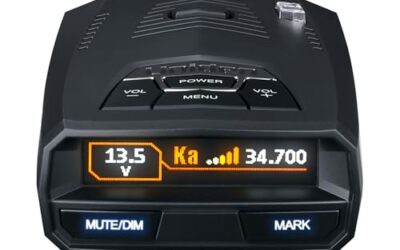
Radar detectors are electronic devices designed to detect radar signals used by law enforcement to monitor vehicle speeds. They scan for specific frequency bands such as X-band, K-band, and Ka-band radar. When a signal is detected, the detector emits an audible or visual alert to warn the driver.
Some detectors also include laser detection capabilities, which are even harder to detect but can be triggered by other sources. It’s important to understand how these devices work to better diagnose why they might be giving false alerts. Radar detectors operate by continuously scanning the radio spectrum for specific frequencies associated with police radar guns. X-band was the original frequency used but has largely been phased out due to its lower effectiveness and higher chance of being jammed. K-band and Ka-band are more commonly used today and are more sensitive to environmental interference.
Common Causes of False Alerts
Weather Conditions
Weather can significantly affect radar detector performance. Heavy rain, snow, or fog can cause false radar detections because water droplets can reflect radar signals, mimicking the effect of a police radar gun. This is particularly common with Ka-band detectors, which are more sensitive to these conditions.
For laser detectors, bright sunlight or intense light sources can trigger false alerts by overwhelming the sensor. Drivers in areas with frequent bad weather should be aware of this limitation and perhaps use the detector only when conditions are clear. The reflection of radar waves off precipitation particles creates a false positive reading that the detector interprets as a threat, prompting an alert even though no enforcement radar is present.
Other Radar Detectors
One of the most common sources of false alerts is other radar detectors in the vicinity. If multiple drivers have detectors, they can interfere with each other. When one detector is triggered by a real radar signal, nearby detectors may pick up the signal and alert as well, even if there’s no threat to them.
This is known as “detector to detector” false alerts. To minimize this, drivers can try to space out or use different detector types that have varying sensitivity levels. The phenomenon occurs because detectors are designed to be sensitive to radar signals, and when multiple units are in close proximity, their alerts can cascade. This issue is well documented in automotive safety communities and highlights the shared nature of the technology on public roads.
Vehicle Electronics and Systems
Some modern vehicles have advanced safety systems that use radar or lidar technology for adaptive cruise control or collision avoidance. These systems can emit signals that aftermarket detectors might interpret as threats, leading to false alerts.
Additionally, certain vehicle malfunctions or faulty sensors can cause interference. For example, a faulty speed sensor or other electronic component might emit signals that the detector mistakes for radar. Vehicle model years play a role here, as newer models with more sophisticated electronics are more likely to have such interactions. Always consider your specific vehicle year when troubleshooting, as compatibility with aftermarket devices can vary based on the electrical architecture.
Detector Sensitivity and Settings
Detectors set to high sensitivity can pick up weak signals that aren’t actual radar guns. Many detectors have adjustable sensitivity settings, and lowering them can reduce false alerts. However, this must be done carefully to avoid missing real threats. Sensitivity adjustments allow users to balance detection range with false positive reduction, but over-adjusting can lead to missed real alerts in critical situations.
It’s important to note that some detectors have “POP” (Pulse On Protection) modes that can be triggered by certain types of radar, but these are usually legitimate. POP mode detects short bursts of radar that law enforcement uses for instant-on enforcement, which is a real threat rather than a false alarm. Understanding these modes helps distinguish between actual issues and normal detector behavior.
Placement and Installation Issues
Improper placement of the radar detector can cause false alerts. For example, mounting it too close to the windshield or in direct sunlight can lead to overheating or sensor interference. Ensure the detector is installed in a position that allows for proper airflow and doesn’t block the driver’s view. Installation factors such as antenna orientation and cable routing can also influence performance and contribute to false readings if not done correctly.
How to Reduce False Alerts
Reducing false alerts involves a combination of understanding your detector’s capabilities and making adjustments to your driving habits and installation.
Adjusting Sensitivity Settings
Start by reviewing your detector’s manual for recommended settings. Many users find that setting the sensitivity to medium or low reduces false alerts without compromising safety. Test in different conditions to find the optimal setting. Sensitivity tuning is a key step because it directly impacts how the device processes incoming signals, filtering out noise while maintaining responsiveness to real threats.
Proper Placement
Install your detector in the optimal location, typically on the windshield in the driver’s line of sight but not obstructing the view. Avoid placing it in areas exposed to direct sunlight or extreme temperatures. Proper placement ensures the sensor receives clear signals and minimizes interference from external light or heat sources that could cause erratic behavior.
Using the Right Detector for Your Needs
Choose a detector type that matches your driving conditions. For example, if you frequently encounter bad weather, a radar-only detector might be less prone to false alerts than a laser detector. Different detector types have varying strengths and weaknesses regarding false alert proneness, so selecting the appropriate one based on your typical routes and local conditions is essential for optimal performance.
Regular Maintenance
Keep your detector clean and ensure all connections are secure. Dust or dirt can affect sensor performance. Regular cleaning and maintenance help maintain accurate readings and reduce the likelihood of false alerts due to buildup or loose parts.
Common Mistakes
One common mistake is not adjusting the sensitivity settings, assuming the detector is faulty when it’s just too sensitive. This leads to unnecessary alerts and can make drivers overly cautious or miss real threats if settings are ignored.
Another mistake is ignoring the presence of other radar detectors on the road, leading to repeated false alerts. Many drivers attribute persistent alerts solely to their own device without considering the shared environment of multiple units.
Some drivers also fail to consider weather conditions, expecting the detector to work flawlessly in all situations. Weather interference is a known limitation that requires awareness and adaptation rather than device replacement.
When to Get Professional Help
If false alerts persist after trying various adjustments and checks, it may be time to consult a professional. This could indicate a hardware issue with the detector or an incompatibility with your vehicle’s electronics. Professional diagnosis can identify underlying problems that DIY adjustments cannot resolve, ensuring continued safety and reliability on the road.
Professional help can include checking for firmware updates or replacing the detector if it is no longer reliable. Vehicle-specific factors such as year, voltage, and connector type should be considered when seeking expert advice to ensure compatibility with any recommended solutions.
FAQ
What causes false alerts on a radar detector?
False alerts can be caused by weather conditions, other radar detectors, vehicle electronics, and detector settings. Identifying the specific cause is key to reducing them. Each cause requires targeted troubleshooting to address effectively.
How can I reduce false alerts from my radar detector?
Adjust sensitivity settings, ensure proper placement, and be aware of environmental factors. Testing in various conditions can help find the best setup. Systematic adjustments tailored to your driving environment yield the best results.
Why does my radar detector detect radar from other sources?
Detectors can pick up signals from other radar devices or legitimate radar guns. This is common and often not a fault but a limitation of the technology. Understanding this shared spectrum helps manage expectations and reduce frustration.
Can weather cause false alerts on radar detectors?
Yes, heavy rain, snow, and fog can cause false radar detections by reflecting signals. Laser detectors may also be triggered by bright lights. Awareness of these conditions allows for better management of detector use.
How do I know if my radar detector is faulty?
If false alerts continue despite adjustments and checks, it might be faulty. Consider professional diagnosis or replacement. Persistent issues beyond user control warrant expert evaluation to restore full functionality.