What Is Geofencing On A Gps Tracker
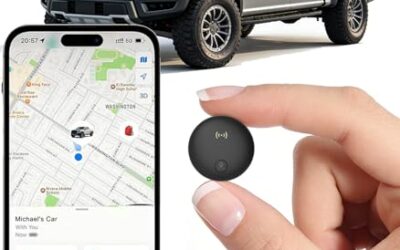
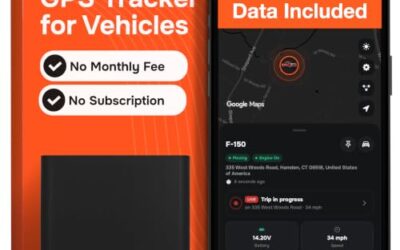
Geofencing on a GPS tracker refers to the ability to create virtual boundaries on a map that trigger alerts when the tracked vehicle or asset crosses them. This technology uses GPS data to monitor location in real time and send notifications via apps or email. It is particularly useful in automotive safety and fleet management for preventing theft and ensuring compliance.
Key takeaways
- Geofencing sets up virtual perimeters for automated alerts.
- It combines GPS positioning with cellular communication.
- Applications include vehicle security and asset protection.
- Benefits include theft deterrence and operational efficiency.
- Limitations involve signal accuracy and device compatibility.
How Geofencing Works
GPS trackers rely on a network of satellites to pinpoint locations with high precision. Users define geofences using mapping tools in the tracking software. The system then monitors the device’s position against these boundaries at regular intervals or in real time.
When a boundary is crossed, the server or app generates an alert. This can be configured for entry, exit, or both. The process requires stable internet connection for data transmission from the tracker to the cloud. The backend processes location updates using algorithms that calculate distance from the geofence edges.
Step by Step Setup
- Install the GPS tracker on the vehicle or asset.
- Access the tracking platform via web or mobile app.
- Draw the geofence on the map interface using coordinates or shapes.
- Set alert preferences and notification methods such as push notifications or email.
- Test the geofence by moving the tracked object across the boundary.
- Monitor performance and adjust settings as needed.
Applications in Vehicle Tracking and Safety
Geofencing is applied in various vehicle scenarios. For example, parents can set geofences around home and school to track children’s locations. In commercial fleets, it ensures drivers operate within assigned areas or avoid restricted zones like construction sites.
It integrates with safety features like emergency calls if the vehicle is in a geofence during an incident. Fleet managers use it to track delivery routes and prevent unauthorized detours. In personal vehicles, it helps monitor for unauthorized movement or to confirm safe arrival at destinations.
Benefits of Geofencing
The main advantages are enhanced security, reduced insurance costs, and better resource management. Users report fewer thefts due to quick response times to alerts. It also aids in compliance with local regulations for vehicle operation in certain areas.
Additional benefits include peace of mind for family members tracking vehicles and cost savings by reducing unnecessary patrols for fleet operators. Geofencing can be combined with other tracking features to create comprehensive monitoring systems.
Limitations and Compatibility Considerations
Geofencing requires a strong GPS signal, which may be limited in certain environments such as urban canyons or dense foliage. Not all GPS trackers support this feature; check the device’s specifications for app integration and firmware requirements. Compatibility with phone OS is generally good for iOS and Android, but older devices may have issues with data processing.
Accuracy depends on factors like satellite geometry and device placement. Regional laws in the US vary, so users should verify local regulations before using tracking devices. Subscription plans for cloud services are often required for advanced features like geofencing.
Types of Geofences
Geofences come in different forms, each suited for specific applications.
| Type | Description | Typical Use |
|---|---|---|
| Circular | Radius around a central point | Home or office boundaries |
| Polygon | Custom shaped area | Complex property perimeters |
| Linear | Line segments between points | Route monitoring |
Choose the type based on the area you want to monitor. Circular geofences are simple for point-based locations while polygon shapes allow for irregular boundaries.
Common Mistakes
Users often forget to update geofences after changing vehicle locations. Another mistake is relying solely on geofencing without combining it with other alerts like speed limits. Inaccurate setup can lead to false positives or missed notifications. Failing to consider battery life of the tracker can also result in lost data.
When to Get Professional Help
If geofencing setup fails due to technical problems, consult the manufacturer or a professional installer. For complex vehicle integrations, automotive technicians can provide expert guidance on diagnostics and compatibility. Professional help is recommended when dealing with custom integrations or when troubleshooting persistent alert issues.
History of Geofencing
Geofencing technology emerged in the late 1990s with the advent of GPS. It became more accessible in the 2000s with the rise of smartphone apps and affordable trackers. Today, it is a standard feature in many tracking devices used in automotive and logistics industries.
Technical Details
The backend system uses algorithms to calculate position changes. Geofences can be circular, polygonal, or linear. Data is processed using cloud servers that handle millions of location updates daily. Accuracy is affected by factors like satellite geometry and multipath signals in urban areas. The system typically polls the tracker every few seconds to minutes depending on the plan.
Real World Examples
Delivery companies use geofencing to alert when packages are delivered to the correct zone. Insurance companies offer discounts for vehicles that comply with geofence rules. In personal use, it helps monitor vehicles during travel. Parents use it for teen tracking while fleet operators ensure route adherence.
Integrating Geofencing with Other Features
Combine geofencing with idle alerts to detect if a vehicle is parked too long in a restricted area. Or pair with low battery warnings for comprehensive monitoring. Integration with vehicle diagnostics can provide additional context like engine status when alerts trigger.
Troubleshooting Geofencing
Check if the tracker is powered on and has signal. Ensure the app is updated. Verify geofence coordinates are correct. If alerts don’t arrive, test with a different device or contact support. Common issues include weak GPS signals or subscription expirations.
FAQ
What is the difference between geofencing and geofence alerts?
Geofencing is the underlying technology, while geofence alerts are the notifications that result from it.
Can geofencing be used for personal vehicles?
Yes, it is commonly used for personal cars to enhance security and monitoring.
How accurate is GPS geofencing?
Accuracy typically ranges from 5 to 50 meters, depending on environmental conditions.
What devices support geofencing?
Modern GPS trackers with cellular connectivity and compatible apps support geofencing.
Is geofencing legal in the US?
It is legal in most states, but some require consent or disclosure when tracking others’ vehicles.
By understanding geofencing on a GPS tracker, users can make informed decisions about vehicle tracking and safety technology. Consider the specific needs of your use case and consult the manufacturer for the latest compatibility details.