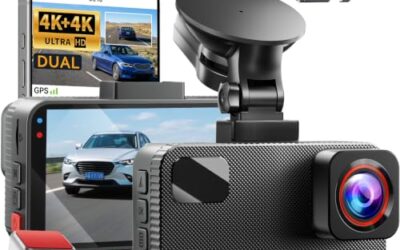
A dash cam memory-card error means the camera cannot use the card as expected for recording or playback. Possible causes include an incompatible card, file-system problems or card wear. Preserve important footage before formatting, then follow that camera’s card requirements and troubleshooting instructions.
Key takeaways include understanding the common causes, following troubleshooting steps from easiest to hardest, and ensuring compatibility with your vehicle’s electrical system.
- Memory card errors are often caused by formatting issues or card damage rather than hardware failure.
- Always format the card to FAT32 or exFAT before use, depending on the dash cam’s requirements.
- Check for compatibility between your dash cam model and the SD card’s speed rating and capacity.
- Power supply problems can trigger errors, so ensure stable 12V power from your vehicle.
- Regular maintenance and proper card handling can prevent most errors.
Understanding Dash Cam Memory Card Errors
The memory card error in a dash cam occurs when the camera’s internal controller cannot properly read or write to the SD card. Dash cams use SD cards to store continuous video recordings, so any issue with the card’s file system or physical integrity can trigger this alert. The error message appears on the dash cam’s display or through an app notification, indicating that the device has failed to initialize or access the card.
How it works: Dash cams typically use a specific file system like FAT32 or exFAT. The card must be formatted correctly before use. The device’s firmware handles the low-level communication with the SD card controller, which manages data storage in sectors. This process ensures that video data is written sequentially to prevent gaps in recording.
Limitations include the fact that not all dash cams support the same card types. Capacity limits are often 128GB or 256GB for many models. Speed ratings matter for high-res recording. In vehicles with 24V electrical systems, voltage fluctuations can exacerbate the issue, as the dash cam may not receive stable power to write data. Model-year compatibility is important because older dash cams from before 2015 may only support FAT32, while newer models may support exFAT for larger cards.
Common misconceptions include thinking that the error always means the card is defective, when it could be the dash cam’s firmware or the vehicle’s power supply. Another misconception is that the error is permanent until the card is replaced, but many cases are resolved by reformatting or replacing the card with a compatible one.
Common Causes of Memory Card Errors
Card Not Formatted Correctly
One of the most frequent causes is that the SD card has not been formatted for the dash cam. This can happen if the card was used in another device or if it was formatted in a different file system. The error message appears because the dash cam cannot locate the proper boot sector or file allocation table on the card. For example, if the card is formatted in NTFS, which is common on Windows computers, the dash cam will reject it because it does not support that file system.
Vehicle model-year compatibility plays a role here. Older dash cams from before 2015 may only support FAT32, while newer models may support exFAT for larger cards. Always check the manual for your specific model to determine the required format.
Card is Full or Nearly Full
When the card reaches its capacity, the dash cam may stop recording and display an error. Even if there is some space left, if the card is full, it will not work. This limitation is built into the device’s firmware to prevent data corruption during overwrites. In high-speed driving scenarios, the dash cam may need to overwrite old files, but if the card is full, it cannot do so, leading to the error.
Connector issues can also play a role. If the power connector is loose or the hardwire kit is not properly installed, voltage drops can occur, mimicking a card error.
Damaged or Corrupted Card
Physical damage from bending, dropping, or exposure to extreme temperatures can corrupt the card’s file system, triggering an error. Over time, repeated insertions and removals can also wear down the card’s contacts, leading to intermittent read failures. In some cases, the card may have been exposed to moisture or high temperatures in the glove compartment.
Regional compatibility: In some countries, there may be different standards for SD cards, but generally, the issue is the same.
Incompatible Card Speed or Capacity
Some dash cams have minimum speed requirements, such as U3 or V30 for 1080p or 4K recording. Using a slower card can cause errors, especially during high-speed driving or when recording in high resolution. The device may fail to write frames quickly enough, resulting in dropped data and error notifications. Capacity should not exceed the model’s limit to avoid write errors.
Power Supply Issues
Insufficient power from the vehicle’s cigarette lighter or hardwired kit can cause the dash cam to fail to write data, leading to errors. Voltage drops below 10V or spikes can also be problematic. These electrical inconsistencies confuse the card’s controller, mimicking a memory card fault. Always use a hardwire kit designed for your vehicle model-year to ensure stable 12V or 24V power.
Firmware or Software Bugs
Outdated firmware in the dash cam can cause compatibility issues with certain cards. Updating the firmware may resolve the problem by addressing known bugs in card handling routines. Some models have companion apps that allow firmware updates through a phone connected via USB or WiFi.
Troubleshooting Steps for Dash Cam Memory Card Error
Start with the easiest and safest steps before moving to more involved methods. Always power off the dash cam before inserting or removing the card to avoid damaging the slot or card contacts.
- Power cycle the device: Turn off the dash cam completely, remove the card, wait 30 seconds, reinsert it, and turn it back on. This resets any temporary glitches in the communication between the device and card.
- Check the card for damage: Inspect the card for physical signs of wear or corruption. Look for bent pins or discoloration on the contacts.
- Format the card: Use the dash cam’s menu to format the card or a computer with the correct format. Select FAT32 for most models or exFAT for larger cards to match the device’s supported file systems.
- Verify card capacity: Ensure the card is not full. Delete old files if necessary to free up space before reattempting use.
- Test with another card: If possible, try a different compatible card to isolate the issue. This helps determine if the problem is with the card or the dash cam.
If the error persists after these steps, consider checking for firmware updates from the manufacturer. These updates often include fixes for card-related bugs. For models with app control, ensure the latest firmware is installed through the companion software.
Choosing the Right Memory Card for Your Dash Cam
Selecting the correct SD card is essential for preventing memory card errors. The card must match the dash cam’s requirements for file system, capacity, and speed. For example, many dash cams recommend cards with at least 90MB/s write speed for smooth recording.
Here is a comparison table of common file systems:
| File System | Max Capacity | Supported Models | Notes |
|---|---|---|---|
| FAT32 | 32GB | Most entry-level | Compatible with older models |
| exFAT | 2TB | Higher-end models | Supports larger cards |
Always format the card on the dash cam itself rather than on a computer to ensure it is set up correctly for the device.
Common Mistakes
One common mistake is formatting the card on a computer using NTFS or other file systems not supported by the dash cam. Another is using a card that is too slow for the recording resolution. People also forget to check the power supply, assuming the issue is with the card when it’s actually the vehicle’s electrical system.
When to Get Professional Help
If the troubleshooting steps do not resolve the memory card error, it may indicate a hardware issue with the dash cam or the card. In such cases, contact the manufacturer for warranty service or consider professional automotive diagnostics if the dash cam is part of a larger vehicle electronics system. Do not attempt to open the dash cam unless instructed, as this can void the warranty.
FAQ
Can I use any SD card in my dash cam?
No, the card must be formatted in the correct file system and meet the speed and capacity requirements of your specific model. Using an incompatible card can lead to errors.
How do I format the SD card for my dash cam?
Most dash cams have a format option in the menu. Alternatively, use a computer with the appropriate software for FAT32 or exFAT formatting.
What if the error persists after formatting?
Try a different card or check for firmware updates. If it continues, the issue may be with the dash cam’s hardware.
Does the vehicle’s voltage affect the error?
Yes, in 24V vehicles, voltage fluctuations can cause similar errors. Ensure proper hardwiring for stable power.
Is the error permanent?
No, in most cases, it can be resolved by reformatting the card or replacing it with a compatible one.