Running diagnostics from a personal computer transforms routine troubleshooting into dealer-grade analysis. While handheld code readers and smartphone apps handle basic fault codes, pairing a dedicated Windows machine with specialized diagnostic programs unlocks deep module access, bi-directional actuator testing, live sensor graphing, and parameter configuration. Choosing the best OBD2 software for laptop setups depends heavily on the specific vehicle make you service, the required communication bus, and whether you prefer an open-source USB adapter or an all-inclusive ruggedized field kit.
Diagnostic software for personal computers spans two primary categories: universal scan platforms utilizing standard ELM327 or J2534 pass-through protocols, and specialized dealer-level toolchains designed for specific passenger vehicle lineups or industrial diesel powerplants. Below, we evaluate eight distinct hardware-and-software packages, ranging from budget DIY cables to turnkey workstation systems, analyzing bus compatibility, operating system requirements, and practical software setup considerations.
CarTechTalk participates in affiliate programs. When you purchase diagnostic hardware or software packages through links on our site, we may earn an affiliate commission at no additional cost to you. Observed retail prices are listed for comparison and may fluctuate based on seller promotions and inventory.
Pros
- Provides both engine monitoring and MUT-III diagnostic functions
- Includes ECU programming and fault-code management functions
- Supports multiple software languages, including English
- Offers interactive diagnosis and freeze-frame data functions
Cons
- Software is limited to Windows 7 or Windows 10 Professional computers and laptops
- The listing states that this version is for excavators and is not suitable for trucks or cars
- The seller states that a second software installation may incur a fee regardless of the reason
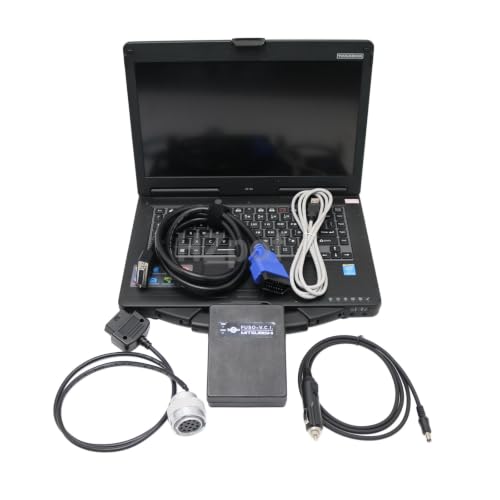
The HZpof MUT-III scanner is listed for Mitsubishi excavators and supports diagnosis and ECU programming. The package description references Engine SCOPE V12.1 and MUT-III software.
- Engine SCOPE V12.1: Supports engine data monitoring, fault-code viewing, error-log display, and fuel injector replacement functions. Languages: Chinese, English, and Japanese.
- MUT-III: Supports ECU information viewing, resetting, driving recorder, automatic diagnosis, interactive diagnosis, confirmation, storage and clearing of fault codes, and freeze-frame data. Languages: Chinese and English.
- Operating-system requirement: The software can be installed only on Windows 7 or Windows 10 Professional computers and laptops.
- Compatibility limitation: The listing covered states that this version is for excavators and is not suitable for trucks or cars.
- Installation policy: The seller states that the software will be installed successfully once at no charge and that subsequent installation requests may incur fees.
Specifications
| Product Group | Automotive Parts and Accessories |
|---|
Verify the current product variation before purchase; specifications may change.
Detailed Review
What stands out in the currently available product data:
- Supports diagnosis and ECU programming for Mitsubishi excavators
- Includes Engine SCOPE V12.1 software for monitoring engine data and viewing fault codes
- Engine SCOPE can display error logs and support fuel injector replacement functions
- MUT-III software supports ECU information, resets, driving recorder, and automatic diagnosis
- MUT-III can confirm, store, and clear fault codes and display freeze-frame data
- Engine SCOPE languages are Chinese, English, and Japanese
Best For / Avoid If
Best for buyers prioritizing
- Provides both engine monitoring and MUT-III diagnostic functions
- Includes ECU programming and fault-code management functions
- Supports multiple software languages, including English
Consider another option if
- Software is limited to Windows 7 or Windows 10 Professional computers and laptops
- The listing states that this version is for excavators and is not suitable for trucks or cars
- The seller states that a second software installation may incur a fee regardless of the reason

Pros
- USB connection supports use with a Windows PC or laptop
- HS-CAN and MS-CAN switching supports additional vehicle protocols
- Offers vehicle diagnostics plus manufacturer-specific programming functions for select Ford, Lincoln, Mercury and Mazda models
- Product data states that tutorials and programming files may be provided by email
Cons
- Programming functions are limited to Ford, Lincoln, Mercury and Mazda vehicles
- FORScan is listed as supporting x86/x64 Windows, while AMD CPU support is not provided
- iOS and Android compatibility is not provided
The ULTRAOBD USB ELM327 OBD2 scanner is designed for use with Windows PCs and laptops to diagnose supported 12V vehicles manufactured after 1996. It can analyze fault codes, display real-time sensor data and provide other vehicle performance metrics.
The interface includes an HS-CAN (UP) and MS-CAN (DOWN) switch. Diagnostic functions are listed for a wide range of 12V petrol and diesel vehicles, while programming functions are specifically listed for Ford, Lincoln, Mercury and Mazda vehicles.
Supported software includes FORScan, FoCCCus, FF2, Elmconfig, ScanMaster, ProScan, ScanTool and PCMScan. Listed operating systems include Windows XP, Vista, 2000, 7, 8, 8.1 and 10. The product data states that FORScan supports x86/x64 Windows and does not support AMD CPUs.
Specifications
| Dimensions | 3.5 x 1.8 x 1 Inches |
|---|---|
| Product Group | Automotive Parts and Accessories |
| Binding | Automotive |
Verify the current product variation before purchase; specifications may change.
Detailed Review
What stands out in the currently available product data:
- Supports diagnostic functions for 12V cars, pickups, SUVs and light trucks manufactured after 1996
- Includes HS-CAN (UP) and MS-CAN (DOWN) switching
- Provides programming functions for Ford, Lincoln, Mercury and Mazda vehicles
- Works with Windows PCs and laptops running Windows XP, Vista, 2000, 7, 8, 8.1 or 10
- Can display vehicle fault codes, real-time sensor data and other performance metrics
- Compatible with software including FORScan, FoCCCus, FF2, Elmconfig, ScanMaster, ProScan, ScanTool and PCMScan
Best For / Avoid If
Best for buyers prioritizing
- USB connection supports use with a Windows PC or laptop
- HS-CAN and MS-CAN switching supports additional vehicle protocols
- Offers vehicle diagnostics plus manufacturer-specific programming functions for select Ford, Lincoln, Mercury and Mazda models
Consider another option if
- Programming functions are limited to Ford, Lincoln, Mercury and Mazda vehicles
- FORScan is listed as supporting x86/x64 Windows, while AMD CPU support is not provided
- iOS and Android compatibility is not provided

Pros
- Broad protocol support covering SAE J1850, ISO 9141-2, ISO 14230-4, and ISO 15765-4 CAN variants
- AutoVIN and AutoScan can reduce manual vehicle-entry steps
- Supports real-time data retrieval and multiple diagnostic information types
- No recurring software subscription fees are stated
Cons
- EV compatibility is partial and depends on the vehicle's supported protocol
- iOS and Android operating-system requirements are not provided
- The source data does not specify support for manufacturer-specific or advanced vehicle systems beyond the listed functions
The ZHIKIT Bluetooth OBD2 scanner is a vehicle diagnostic adapter for cars made after 1996, with partial, protocol-dependent compatibility for electric vehicles. It supports nine protocols: SAE J1850 PWM, SAE J1850 VPW, ISO 9141-2, two ISO 14230-4 KWP variants, and four ISO 15765-4 CAN variants.
- Diagnostic functions: Reads diagnostic trouble codes, retrieves real-time data, accesses VIN, freeze frames, sensor data, data streams, diagnostic reports, fuel pressure, and battery remaining information.
- Vehicle recognition: AutoVIN identifies the vehicle's make, model, year, and engine type, while AutoScan checks systems and retrieves DTCs.
- App support: Compatible with CarScanner and Torque third-party applications. The source data states support for 26 languages and lifetime software updates without subscription fees.
- Connectivity: Uses Bluetooth 5.1 BLE and enters sleep mode after 10 minutes without a connection.
- Dimensions: 1.9 x 1.8 x 0.6 inches.
Specifications
| Dimensions | 1.9 x 1.8 x 0.6 inches |
|---|---|
| Product Group | Automotive Parts and Accessories |
Verify the current product variation before purchase; specifications may change.
Detailed Review
What stands out in the currently available product data:
- Supports nine SAE and ISO diagnostic protocols
- Provides AutoVIN and AutoScan functions for vehicle identification and system scanning
- Reads and clears diagnostic trouble codes after repairs
- Accesses VIN, freeze frames, sensor data, data streams, diagnostic reports, and fuel pressure information
- Works with CarScanner and Torque third-party applications
- Offers Bluetooth 5.1 BLE connectivity with automatic sleep mode after 10 minutes of inactivity
Best For / Avoid If
Best for buyers prioritizing
- Broad protocol support covering SAE J1850, ISO 9141-2, ISO 14230-4, and ISO 15765-4 CAN variants
- AutoVIN and AutoScan can reduce manual vehicle-entry steps
- Supports real-time data retrieval and multiple diagnostic information types
Consider another option if
- EV compatibility is partial and depends on the vehicle's supported protocol
- iOS and Android operating-system requirements are not provided
- The source data does not specify support for manufacturer-specific or advanced vehicle systems beyond the listed functions

Pros
- DoIP support adds Ethernet-based communication capability
- Broad protocol support includes K-line, CAN BUS, and UDS
- Package includes an OBDII 16-pin cable, 38-pin cable, 14-pin cable, 8-pin cable, and LAN cable
- The listing includes software installation technical support and after-sales service
Cons
- The included CF53 laptop is identified as used
- Exact vehicle-model compatibility and operating-system requirements are not provided
- The listed Amazon data lists a 4.2 rating from 0 reviews
The UZRTDRS MB Star C4 Plus DoIP is listed as a diagnostic tool for MB vehicles, with support for Ethernet communication through DoIP, wireless diagnostics, K-line, CAN BUS, and UDS protocols. The listing states compatibility with vehicles from after 2000.
Listed functions include diagnosis, programming, simulation learning, maintenance information, car maintenance, technical service bulletins, updating, programming, and setting code. The package includes one multiplexer, an OBDII 16-pin cable, 38-pin cable, 14-pin cable, 8-pin cable, LAN cable, and a used CF53 laptop. The listed software is 2026 Xentry, DAS, and EPC.
Supported languages are English, Croatian, Czech, Danish, Dutch, Finnish, French, German, Greek, Hungarian, Italian, Japanese, Korean, Polish, Portuguese, Romanian, Russian, Spanish, Swedish, Turkish, and Chinese. The listing also states that software installation technical support and after-sales service are provided.
Specifications
| Product Group | Automotive Parts and Accessories |
|---|
Verify the current product variation before purchase; specifications may change.
Detailed Review
What stands out in the currently available product data:
- Supports Ethernet communication through DoIP
- Supports wireless diagnostics, K-line, CAN BUS, and UDS protocols
- Listed for vehicles from after 2000
- Includes 2026 Xentry, DAS, and EPC software
- Includes a used CF53 laptop and multiple vehicle cables
- Lists functions including diagnosis, programming, simulation learning, and maintenance information
Best For / Avoid If
Best for buyers prioritizing
- DoIP support adds Ethernet-based communication capability
- Broad protocol support includes K-line, CAN BUS, and UDS
- Package includes an OBDII 16-pin cable, 38-pin cable, 14-pin cable, 8-pin cable, and LAN cable
Consider another option if
- The included CF53 laptop is identified as used
- Exact vehicle-model compatibility and operating-system requirements are not provided
- The listed Amazon data lists a 4.2 rating from 0 reviews

Pros
- Supports both conventional serial communication and CAN bus
- Includes diagnostic features for automatic vehicle detection, data recording, and troubleshooting guidance
- Comes with a CF53 laptop and Diagmaster software
- Software compatible with Kubota and Takeuchi is installed by default
Cons
- Hino-compatible software requires additional purchase and installation
- Software installation is provided remotely through a link and is described as a one-time installation
- Compatibility details beyond the listed Kubota, Takeuchi, and Hino software are not provided
The VROLVA Original Denso Interface Diagnostic Tool Kit is listed for Kubota DST-i, Takeuchi, and Hino heavy-duty engine diagnostics. The kit includes a DST-i interface, Diagmaster software, and a CF53 laptop.
Diagmaster communicates with vehicle ECUs through conventional serial communication and the CAN bus protocol. Listed features include Automatic Vehicle Detection, Data Recording, and Trouble Shooting Guidance. Kubota- and Takeuchi-compatible software is installed by default. Hino-compatible software requires additional purchase and installation, and the seller states that software installation is performed remotely after contacting customer service.
Specifications
| Product Group | Automotive Parts and Accessories |
|---|
Verify the current product variation before purchase; specifications may change.
Detailed Review
What stands out in the currently available product data:
- Includes a Denso DST-i interface and CF53 laptop
- Diagmaster software supports conventional serial communication
- Supports the modern CAN bus protocol
- Includes Automatic Vehicle Detection
- Provides Data Recording and Trouble Shooting Guidance features
- Kubota and Takeuchi software is installed by default
Best For / Avoid If
Best for buyers prioritizing
- Supports both conventional serial communication and CAN bus
- Includes diagnostic features for automatic vehicle detection, data recording, and troubleshooting guidance
- Comes with a CF53 laptop and Diagmaster software
Consider another option if
- Hino-compatible software requires additional purchase and installation
- Software installation is provided remotely through a link and is described as a one-time installation
- Compatibility details beyond the listed Kubota, Takeuchi, and Hino software are not provided

Pros
- Combines diagnostic software, interface hardware, laptop, and SSD in one package
- Includes programming and repair-information functions in addition to diagnostics
- Technical support and laptop license activation are stated as available after receipt
Cons
- The listing says vehicles from before 2005, including models 208, 210, and 163, need the V2016.5 software version
- The listing specifies V2023.9 for the 2020 Unimog U4000 and recommends MB Star C3 for older vehicles
- The listing states that online-account programming is unavailable
The UZRTDRS V2016.5 MB SD Connect C4 package includes a CF19 laptop, SSD storage, engineering software, and DoIP support. The listing describes functions for diagnosing, programming, simulation studying, repair information, automotive maintenance, and technical service bulletins.
Compatibility is listed for vehicles after 2000. For vehicles from before 2005, including models 208, 210, and 163, the listing specifies the V2016.5 software version. It also specifies V2023.9 for the 2020 Unimog U4000 and recommends MB Star C3 for older vehicles. License activation and technical support are stated as available after receipt.
Supported languages include English, Chinese, Czech, Danish, German, Greek, Spanish, Finnish, French, Hungarian, Italian, Japanese, Korean, Dutch, Polish, Portuguese, Romanian, Russian, Serbian, Slovak, Slovenian, Swedish, and Turkish.
Specifications
| Product Group | Automotive Parts and Accessories |
|---|
Verify the current product variation before purchase; specifications may change.
Detailed Review
What stands out in the currently available product data:
- Includes MB SD Connect C4 diagnostic equipment with CF19 laptop and SSD
- Supports DoIP
- Provides vehicle diagnosing, programming, simulation studying, and repair information
- Includes automotive maintenance information and technical service bulletins
- Supports vehicles from after 2000 according to the listing
- Offers support for multiple languages, including English, Chinese, German, French, Italian, Japanese, Korean, Portuguese, Russian, Spanish, and Turkish
Best For / Avoid If
Best for buyers prioritizing
- Combines diagnostic software, interface hardware, laptop, and SSD in one package
- Includes programming and repair-information functions in addition to diagnostics
- Technical support and laptop license activation are stated as available after receipt
Consider another option if
- The listing says vehicles from before 2005, including models 208, 210, and 163, need the V2016.5 software version
- The listing specifies V2023.9 for the 2020 Unimog U4000 and recommends MB Star C3 for older vehicles
- The listing states that online-account programming is unavailable

Pros
- Provides both Engine SCOPE and MUT-III software functions
- Includes ECU programming and diagnostic capabilities
- Supports multiple diagnostic functions, including fault-code storage, clearing, and freezing frame data
- Offers multilingual software support
Cons
- Specified for excavators and not suitable for trucks or cars
- Software can only be installed on Windows 7 or Windows 10 Professional computers and laptops
- The seller states that only the first software installation is free and that later installations may incur fees
The HZpof MUT-III scanner is described as a diagnostic and ECU programming tool for Mitsubishi excavators. The package includes Engine SCOPE V12.1 software and MUT-III software.
- Engine SCOPE V12.1: Supports engine data monitoring, fault-code viewing, error-log display, and fuel-injector replacement. Languages: Chinese, English, and Japanese.
- MUT-III software: Supports ECU information viewing, resetting, driving recorder functions, automatic diagnosis, interactive diagnosis, fault-code confirmation, storage and clearing, and freezing frame data. Languages: Chinese and English.
- Compatibility: The listing states that the Engine SCOPE version is for excavators and is not suitable for trucks or cars.
- Installation: Software can only be installed on computers and laptops running Windows 7 or Windows 10 Professional.
Specifications
| Product Group | Automotive Parts and Accessories |
|---|
Verify the current product variation before purchase; specifications may change.
Detailed Review
What stands out in the currently available product data:
- Supports diagnosis and ECU programming
- Engine SCOPE V12.1 supports engine data monitoring and fault-code viewing
- Engine SCOPE can display error logs and replace fuel injectors
- MUT-III software supports ECU information viewing, resetting, and automatic diagnosis
- Supports interactive diagnosis, driving recorder functions, and freezing frame data
- Supports confirming, storing, and clearing fault codes
Best For / Avoid If
Best for buyers prioritizing
- Provides both Engine SCOPE and MUT-III software functions
- Includes ECU programming and diagnostic capabilities
- Supports multiple diagnostic functions, including fault-code storage, clearing, and freezing frame data
Consider another option if
- Specified for excavators and not suitable for trucks or cars
- Software can only be installed on Windows 7 or Windows 10 Professional computers and laptops
- The seller states that only the first software installation is free and that later installations may incur fees
For related guidance on this topic, see OBD2 Scanner Buying Guide for Beginners, Best Rated OBD2 Scanner and Best Windows OBD2 Software.
Quick Verdict: Finding the Right Laptop Diagnostic Solution
For Ford, Lincoln, and Mazda owners seeking advanced configuration, module programming, and comprehensive live sensor streaming, the USB OBD2 ELM327 Scanner Reader for Windows delivers exceptional utility when paired with programs like FORScan and Elmconfig. If your focus is Toyota or Lexus factory-level active testing and health checks, the Mini Vci J2534 TIS OBD2 Techstream with Latest provides a direct pathway into Techstream software at minimal cost.
Professional European vehicle specialists and fleet operators needing zero-setup turnkey hardware will find comprehensive DoIP support in the MB Star C4 Plus DOIP New Function Tester, which bundles pre-configured Xentry software on a Panasonic CF53 laptop. For off-highway industrial machinery, specialized platforms like the VROLVA Original Denso Interface Diagnostic Tool and the MUT-Ⅲ Scanner Tool for Mitsubishi obd2 Excavators provide dedicated Engine Scope and Diagmaster configurations built specifically for heavy diesel engine management.
How We Chose These Laptop OBD2 Packages
Our editorial evaluation examined published manufacturer specifications, protocol coverage, operating system requirements, and interface stability across eight market options. Rather than relying on laboratory road testing, CarTechTalk systematically evaluated hardware-software combinations against practical automotive diagnostic benchmarks:
- Bus and Protocol Support: We prioritized interfaces supporting dual-bus architectures (such as High-Speed CAN and Medium-Speed CAN via physical toggles), modern Diagnostics over Internet Protocol (DoIP), and legacy K-Line communications.
- Operating System Compatibility: Laptop diagnostics frequently encounter driver conflicts. We verified manufacturer documentation regarding Windows 7, 10, and 11 support, including 32-bit versus 64-bit architecture constraints and AMD versus Intel processor limitations.
- Software Utility and Scope: We analyzed whether an interface functions with established third-party PC suites (such as FORScan, FoCCCus, ScanMaster, and CarScanner) or includes dedicated dealer-level software (Techstream, Xentry/DAS, Diagmaster, or MUT-III).
- Turnkey vs. DIY Deployment: Diagnostic installations often involve complex driver configurations, COM port adjustments, and virtual security exemptions. We distinguished ready-to-run laptop bundles from standalone cables requiring manual setup.
Laptop OBD2 Diagnostics: Specifications Comparison
The table below summarizes the key hardware specifications, primary software environments, connection interfaces, and operating system platforms across the eight evaluated options:
| Product Name | Observed Price | Connection Interface | Primary Software Ecosystem | Supported Operating System | Target Vehicle / Equipment Scope |
|---|---|---|---|---|---|
| USB OBD2 ELM327 Scanner Reader for Windows | $19.99 | USB (HS/MS-CAN Switch) | FORScan, FoCCCus, Elmconfig, Generic OBD | Windows XP, Vista, 7, 8, 10 (Intel x86/x64) | Ford, Lincoln, Mazda (Advanced); 12V Universal (Basic) |
| Mini Vci J2534 TIS OBD2 Techstream with Latest | $56.00 | USB Type-A | Techstream V18.00.008 | Windows 7, 8, 10, 11 (32-bit & 64-bit) | Toyota, Lexus, Scion (12V OBD2) |
| MB Star C4 Plus DOIP New Function Tester | $1058.00 | DoIP Ethernet, LAN, Wireless | 2026 Xentry, DAS, EPC | Windows (Pre-installed on CF53 Laptop) | Mercedes-Benz (Post-2000 Passenger & Commercial) |
| V2016.5 MB SD Connect C4 Star Diagnosis Plus CF19 | $1058.00 | LAN, Wireless, Multi-Pin Cables | V2016.5 DAS, Xentry, EPC, WIS | Windows (Pre-installed on CF19 Toughbook) | Mercedes-Benz (2000–2015 Chassis focus) |
| VROLVA Original Denso Interface Diagnostic Tool | $1718.88 | Denso DST-i Heavy-Duty Link | Diagmaster | Windows (Pre-installed on CF53 Laptop) | Kubota & Takeuchi Machinery (Hino Optional) |
| MUT-Ⅲ Scanner Tool for Mitsubishi obd2 Excavators (Bundle) | $1120.00 | Heavy-Duty Industrial Cable | Engine Scope V12.1, MUT-III | Windows 7/10 Pro (Pre-installed on Laptop) | Mitsubishi Heavy Excavators (Not for cars/trucks) |
| MUT-Ⅲ Scanner Tool for Mitsubishi obd2 Excavators (Tool Only) | $692.60 | Heavy-Duty Industrial Cable | Engine Scope V12.1, MUT-III | Windows 7 Pro or Windows 10 Pro (BYO Laptop) | Mitsubishi Heavy Excavators (Not for cars/trucks) |
| ZHIKIT OBD2 Scanner Bluetooth | $9.99 | Bluetooth 5.1 BLE Wireless | CarScanner, Torque, Generic BLE Apps | iOS, Android (Laptop via BT BLE software) | Universal 12V Passenger Vehicles (Post-1996) |
Compatibility and Buying Advice: Laptop Diagnostics vs. Standalone Tools
Using a Windows PC for diagnostics delivers several clear advantages over handheld scanners and mobile apps, but it introduces distinct operational challenges that buyers must consider.
High-Speed CAN vs. Medium-Speed CAN Architectures
Modern passenger vehicles partition control modules across multiple networks. Engine, transmission, and braking systems generally communicate across the High-Speed CAN (HS-CAN) bus at 500 kbps, while climate control, infotainment, lighting, and door modules frequently reside on a Medium-Speed CAN (MS-CAN) or LIN bus operating at lower baud rates (such as 125 kbps). Basic OBD2 dongles lack the physical circuitry to poll the MS-CAN network. As demonstrated by the USB OBD2 ELM327 Scanner Reader for Windows, hardware equipped with a manual or electronic bus switch allows PC software like FORScan to query interior modules that handheld tools miss entirely.
The Role of J2534 Pass-Through Hardware
The Society of Automotive Engineers established SAE J2534 as a standardized gateway interface enabling personal computers to reprogram vehicle control modules without proprietary dealership scan tools. Low-cost pass-through cables like the Mini Vci J2534 TIS OBD2 Techstream with Latest implement a tailored J2534 DLL that channels OEM software commands (such as Toyota Techstream) across the vehicle’s K-Line and CAN lines. While budget pass-through cables excel at diagnostic readouts, health reports, and key registration, complex ECU reflashing carries risks if latency spikes occur; critical control module flashing demands robust power supplies and certified, high-end pass-through hardware.
Diagnostics over Internet Protocol (DoIP)
As vehicle data bandwidth requirements surged, automotive manufacturers introduced ISO 13400 (DoIP), which replaces CAN-based diagnostic communication with high-speed Ethernet routing. Tools like the MB Star C4 Plus DOIP New Function Tester incorporate direct Ethernet transceivers. Without DoIP capability, diagnostics on modern infotainment systems, digital instrument clusters, and driver assistance cameras become severely bottle-necked or entirely unsupported.
How to Choose: Evaluating Diagnostic Software Requirements
Before purchasing hardware or software for your laptop, evaluate these critical factors to ensure compatibility:
- Operating System and Architecture: Older diagnostic platforms (like early versions of Techstream and DAS) were developed around 32-bit (x86) Windows XP or Windows 7. Installing them on modern 64-bit Windows 11 systems frequently requires driver patching or running a virtual machine. Confirm whether the vendor’s software functions natively on your operating system version.
- Processor Limitations: Pay close attention to CPU architecture. Certain diagnostic programs and modified USB drivers—such as specific FORScan revisions running on ELM interfaces—explicitly conflict with AMD processors. Verify that your host PC utilizes a compatible Intel processor when required.
- Antivirus and Security Quarantines: Many vehicle software distributions rely on custom driver libraries, dynamic patch loaders, or third-party wrappers. Operating system protections like Windows Defender frequently identify these files as false-positive threats. If you maintain sensitive data on your primary laptop, dedicate a separate, isolated laptop to workshop diagnostics.
- Turnkey Convenience vs. Manual Configuration: If you are comfortable managing FTDI driver installations, setting virtual COM port latency timers to 1 ms, and adjusting firewall rules, purchasing a standalone cable (like the Mini VCI or ELM327) saves substantial money. If you prefer immediate diagnostic functionality without driver troubleshooting, an all-inclusive bundle containing a pre-configured Panasonic Toughbook provides a ready-to-run alternative.
Frequently Asked Questions
Can I run OBD2 software on an Apple Mac or MacBook?
The vast majority of professional automotive diagnostic software suites—including Techstream, FORScan, Xentry, and Diagmaster—are developed exclusively for Microsoft Windows. While some users run basic generic OBD2 loggers on macOS, accessing specialized dealer-level software typically requires running a Windows virtual machine (via Parallels or VMware) or utilizing Apple Boot Camp on older Intel-based Macs. Even with virtualization, passing physical USB COM ports through to virtual software environments can introduce latency issues during active testing.
Why do diagnostic cable installers advise turning off Windows Defender?
Low-cost diagnostic cables frequently include specialized J2534 DLL drivers, third-party patch files, or software loaders designed to bypass commercial hardware dongles. Windows Defender and commercial antivirus tools often classify these modified drivers as heuristic threats or potentially unwanted programs (PUPs), immediately quarantining essential installation components. While vendors state this is necessary for functionality, users should only disable security protections if they accept the potential risks of running unverified software.
What is the difference between an ELM327 USB adapter and a J2534 pass-through cable?
An ELM327 adapter contains a microchip programmed to translate vehicle bus messages into standard serial ASCII characters that software can interpret. They are ideal for basic OBD2 telemetry, reading DTCs, and moderate module configuration (such as FORScan). A J2534 pass-through cable operates at a much deeper hardware level, serving as a standardized direct conduit between the vehicle bus and complex OEM software suites like Toyota Techstream or GM GDS2, facilitating bi-directional module testing and ECU calibration.
Can I leave a Bluetooth OBD2 scanner plugged into my car continuously?
Hardware featuring an automated low-power sleep mode, such as the ZHIKIT OBD2 Scanner Bluetooth, is designed to reduce power draw significantly after the vehicle’s ignition is switched off. However, budget adapters lacking proven low-voltage sleep triggers can gradually drain your vehicle’s 12-volt battery if parked for extended periods. If your vehicle will remain parked for more than a few days, disconnecting the adapter from the OBD2 port is best practice.
Final Verdict: Selecting Your Diagnostic Platform
Choosing the right diagnostic setup comes down to your vehicle profile, diagnostic scope, and willingness to configure software. For mainstream DIY mechanics working on Ford or Mazda platforms, the USB OBD2 ELM327 Scanner Reader for Windows paired with FORScan offers the most versatile diagnostic and module-editing power available under $25. Toyota and Lexus enthusiasts requiring factory-level component actuation will find the Mini Vci J2534 TIS OBD2 Techstream with Latest an effective, low-cost path into deep system monitoring.
For professional workshops, specialized fleet technicians, and industrial operators, turnkey bundles like the MB Star C4 Plus DOIP New Function Tester and VROLVA Original Denso Interface Diagnostic Tool eliminate tedious installation hurdles by delivering pre-activated software on ruggedized Toughbook platforms. Carefully match the adapter’s bus capabilities and operating system prerequisites to your vehicle and workshop PC to build a reliable diagnostic setup.