To protect privacy when sharing vehicle location, limit access to trusted people, share only for a clear purpose, and set an end time. Before sharing, check which app or vehicle account sends the location, what it can reveal, and how to stop access.
- Use temporary sharing when available, and check its end time.
- Review location access in phone apps, vehicle accounts, and tracker services separately.
- Remove old drivers, shared accounts, and devices you no longer recognize.
- If someone may be tracking you without consent, consider personal safety before changing settings.
How vehicle location sharing works
A location-sharing feature can report a phone’s location, a vehicle’s location, or both. Phone maps and messaging apps often share the phone location. A vehicle’s built-in connected service may use its own cellular connection and account. An aftermarket GPS tracker may use a separate app and subscription.
These are separate access paths. Turning off location sharing in one phone app may not stop a vehicle service or tracker from reporting. Likewise, removing a phone from a vehicle’s Bluetooth list does not necessarily remove that person from the vehicle account.
Location can reveal more than a current position. A recipient may infer home, work, regular appointments, travel patterns, or when a vehicle is parked somewhere else. How much history is visible depends on the service and its settings.
How to protect privacy when sharing vehicle location
- Identify the sharing source. Open the app or service that created the share. Check whether it uses your phone, the vehicle’s connected service, or a separate tracker. If you are unsure, review the vehicle’s owner manual and the app’s account or sharing screens.
- Choose the narrowest useful access. Share a live location only when the recipient needs to follow a trip or find the vehicle now. If a one-time location is enough, send that instead. Avoid granting access to an entire account just to share one trip.
- Set a clear time limit. Choose a short duration that fits the task, if the service offers one. A trip share should not stay active after the trip. If there is no automatic end time, set a reminder to revoke access.
- Check what the recipient can see. Review whether the share includes live movement, a location history, alerts, or access to other account features. The available controls differ by app, vehicle model year, service plan, firmware, and region.
- Confirm the recipient. Check the account name, phone number, or email before sending. Avoid public links or group chats when only one person needs access. Treat a forwarded link as potentially visible to others unless the app restricts it.
- Review vehicle and tracker accounts. Check the list of authorized drivers, family members, shared users, and paired devices. Remove people who no longer need access. Change credentials if a former user still knows them, and use multifactor authentication where available.
- End the share and verify. Use the service’s stop-sharing or remove-access control. Reopen its sharing screen to check that access ended. If a recipient still sees a location, check other apps and accounts rather than assuming one setting controls every source.
Where to check privacy settings
| Location source | What to review | Important limit |
|---|---|---|
| Phone maps or messaging app | People with access, sharing duration, and app location permission. | Stopping phone sharing may not stop a vehicle-connected service. |
| Vehicle manufacturer account | Authorized users, vehicle location features, account recovery, and connected-service settings. | Menus and available controls vary by make, model year, region, and subscription. |
| Aftermarket GPS tracker | Account members, alerts, device access, and share links. | App controls depend on tracker model, firmware, phone OS, and service plan. |
| Vehicle infotainment system | Paired phones, saved profiles, and permissions for connected features. | Removing a paired phone may not remove access to an online account. |
Share location without handing over vehicle access
Sharing a live map pin is different from adding someone as a vehicle account user. A map share may show location without allowing the recipient to change vehicle settings. An account invitation may grant broader controls, depending on the service.
Use the least powerful option that meets the need. For example, if someone only needs to find a parked car once, send a current location rather than adding them as a permanent driver. If they need ongoing access, explain what the account allows and how either person can remove it.
For a separate GPS tracker, installation and placement affect what it can observe and how easy it may be to find. See our GPS tracker placement guide for placement context. That guide does not replace privacy controls in the tracker’s account.
Phone permissions and vehicle compatibility
Phone operating systems let users manage app location permissions, but menu names and options change over time. Review permissions on the phone that runs the sharing app, especially after an OS update or app reinstall. Limiting background access may affect live updates, so test the intended share with the recipient before relying on it for a pickup or safety check.
Vehicle services also differ. A feature available on one trim or model year may not exist on another. Connected services can depend on cellular coverage, an active account, regional availability, and compatible vehicle software. A phone app’s location permission does not necessarily control a vehicle’s built-in modem.
If you use a tracker, check its specific app and device instructions. Some services use a removable tracker; others are installed in the vehicle. Do not assume that deleting an app cancels an account, ends a subscription, or disables a tracker.
Common mistakes
- Turning off only one app. Check every service that can report the phone or vehicle location.
- Sharing indefinitely. Use a duration or create a reminder to revoke access.
- Sharing account credentials. Invite a user through the service’s access controls instead of giving out your password.
- Assuming a paired phone has no account access. Bluetooth pairing and online vehicle-account permissions are separate controls.
- Deleting an app and stopping there. Revoke sharing and review the service account directly.
- Changing settings without considering safety. Abruptly stopping a share can alert another user or escalate a conflict.
If you suspect unwanted tracking
Do not confront a suspected tracker owner if that could put you at risk. If possible, use a device and account the other person cannot access to seek help from a trusted person or local support service. Consider documenting what you find before changing settings, if doing so is safe.
Phone alerts and built-in unwanted-tracker tools vary by phone OS, device type, and software version. They may not detect every tracker. If you find an unfamiliar device in or on a vehicle, avoid handling wiring or safety-system parts. A qualified automotive technician or appropriate local support service can help assess it.
When to get professional help
Contact the vehicle manufacturer or connected-service provider if you cannot remove an unknown account user, reset account ownership, or identify which service reports the car’s position. Have the vehicle identification and account details ready, but do not post them publicly.
Seek help from a qualified technician if you suspect a hardwired tracker or cannot identify a device safely. Do not pull vehicle wiring, especially near airbags or other safety systems. If location sharing is part of a stalking or domestic abuse concern, prioritize a safety plan with a qualified local support organization before making changes that could notify the other person.
Related guidance
For other vehicle tracking topics, browse our Vehicle Tracking & Safety Technology section. It covers trackers and related safety equipment, but device features and account controls remain model-specific.
Gear that can help
If you need GPS trackers for this job, these picks already appear in our GPS trackers guides. Check the full guide for fit and who should skip each one.

Pros
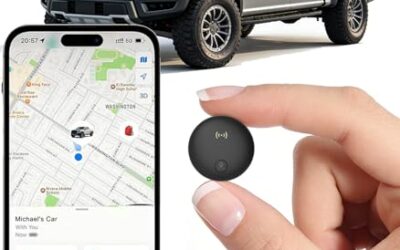
- Supports both Apple and Google tracking ecosystems
- Long claimed battery life of up to two years
- Compact 1.3 x 1.3 x 0.3-inch design
Cons
- Not compatible with GPS-only devices or Huawei devices
- UWB distance visualization is limited to Bluetooth range
- Water-resistance information is inconsistent: the current title states IP68, while the feature data states IP65
Specifications
| Color | Graphite Black |
|---|---|
| Dimensions | 1.3 x 1.3 x 0.3 Inches |
| Product Group | Wireless |
Best For / Avoid If
Best for buyers prioritizing
- Supports both Apple and Google tracking ecosystems
- Long claimed battery life of up to two years
- Compact 1.3 x 1.3 x 0.3-inch design
Consider another option if
- Not compatible with GPS-only devices or Huawei devices
- UWB distance visualization is limited to Bluetooth range
- Water-resistance information is inconsistent: the current title states IP68, while the feature data states IP65

Pros
- Long battery capacity for extended vehicle and asset tracking
- Supports multiple alert types through SMS, email, and app notifications
- Designed for fleet, trailer, vehicle, boat, motorcycle, and equipment monitoring
- Includes both magnetic and screw-mount placement options
Cons
- A subscription is required after activation
- The listed dimensions and weight indicate a larger form factor than a compact personal tracker
- Designed for authorized vehicle and asset use, not people or pets
Specifications
| Color | Black |
|---|---|
| Dimensions | 3.54 x 2.48 x 1.46 inches |
| Product Group | Wireless |
| Binding | Electronics |
Best For / Avoid If
Best for buyers prioritizing
- Long battery capacity for extended vehicle and asset tracking
- Supports multiple alert types through SMS, email, and app notifications
- Designed for fleet, trailer, vehicle, boat, motorcycle, and equipment monitoring
Consider another option if
- A subscription is required after activation
- The listed dimensions and weight indicate a larger form factor than a compact personal tracker
- Designed for authorized vehicle and asset use, not people or pets
FAQ
Can I share a vehicle’s location without sharing my phone location?
Sometimes. A connected vehicle service or standalone tracker may report the vehicle independently. Availability depends on the vehicle, service, tracker, account, and region. Check which source the recipient’s map displays.
Does turning off phone location stop vehicle tracking?
Not always. It may stop an app from using the phone’s location, but a vehicle modem or separate tracker can have its own location service and account.
Will deleting a location-sharing app remove other users?
Not necessarily. Revoke access in the service account and check the vehicle’s authorized-user list. Removing an app from a phone is not the same as deleting an account or ending a share.
Can someone see where my car is through a shared vehicle account?
Possibly. Permissions vary by manufacturer and service. Review the account’s user roles and location features, and remove access that is no longer needed.