To check aftermarket TPMS sensor batteries, use a TPMS scan tool that can activate each sensor and report battery status, if that sensor supports the feature. Most sensor batteries are sealed inside the sensor, so a warning or failed scan cannot confirm battery failure by itself; first check tire pressure, sensor compatibility, and signal reception.
- Set tire pressures using the vehicle’s cold-pressure placard or owner’s manual, not the tire sidewall maximum.
- Use a TPMS tool that supports the sensor brand, sensor type, and vehicle system.
- A missing signal can mean a dead battery, but it can also mean the wrong protocol, a damaged sensor, or a scan problem.
- Many aftermarket sensors have sealed batteries. Replacing the complete sensor may be required when its battery fails.
What you need before checking a TPMS sensor battery
Start with the vehicle’s year, make, and model, plus the sensor brand and part number if available. Aftermarket sensors may be programmable, vehicle-specific, or compatible with only certain TPMS protocols. A tool that reads one sensor family may not activate another, even if both sensors fit the wheel.
You can check pressure with a reliable tire gauge and inspect the dashboard for warning messages. A TPMS activation or diagnostic tool is needed to test sensor transmissions. Some tools show a battery condition or battery voltage; others show only a sensor ID, pressure, temperature, or signal response. The tool’s supported functions depend on its hardware, software, and sensor coverage.
A phone app alone generally cannot read a wheel sensor directly unless it connects through compatible TPMS hardware. Vehicle model year also matters: sensor frequencies, protocols, relearn procedures, and display features can differ across vehicles. For pressure checks, this guide to digital tire pressure gauges with memory explains what gauge memory can record.
How to check aftermarket TPMS sensor batteries
- Check the tire pressures first. Measure all tires when cold, following the vehicle’s placard or manual. If pressure is low, correct it before diagnosing the sensor. The warning may reflect an actual pressure problem rather than a battery fault.
- Record the warning and symptoms. Note whether the TPMS light stays on, flashes before staying on, or appears with a message about a specific tire. Also note recent tire work, wheel changes, sensor programming, or battery disconnection. These details can help separate a sensor issue from a setup or communication issue.
- Identify the sensor and vehicle system. Check service records, invoices, sensor packaging, or a scan result for the sensor manufacturer and part number. If you cannot identify it, a tire shop can often inspect or scan the sensor. Do not assume that every aftermarket sensor works with every vehicle.
- Use a compatible TPMS tool to activate each wheel sensor. Follow the tool instructions and select the correct vehicle and sensor option. Hold the tool near the tire’s sidewall at the position its instructions specify. Scan each wheel, including the spare if the vehicle monitors one.
- Compare the results across wheels. Record which sensors respond and what values appear. A sensor that reports pressure and temperature is transmitting, but that alone does not prove its battery has years of life remaining. A sensor that does not respond needs further checks before you label its battery dead.
- Check battery status only if the tool supports it. Some TPMS tools display a battery condition or voltage estimate. Treat that as a diagnostic clue, not a universal pass-or-fail test. Sensor design and tool support affect what the reading means.
- Recheck after correcting setup issues. If sensors were recently installed or replaced, confirm that they were programmed for the vehicle and that the required relearn was completed. A successful scan and correct relearn can restore communication, but neither repairs a physically failed sensor.
What TPMS scan results can tell you
| Scan result | Possible meaning | Next check |
|---|---|---|
| Sensor responds and reports pressure | The sensor is transmitting now. This does not measure remaining battery life unless the tool provides a supported battery reading. | Compare displayed pressure with a gauge and check whether the vehicle receives the sensor data. |
| Battery status reads low | The tool detects a low condition according to its support for that sensor. It is a strong reason to investigate, not proof of the exact repair. | Confirm sensor identity and tool compatibility. Ask a tire professional whether the sensor battery is replaceable or the full sensor must be replaced. |
| No response from one sensor | Possible weak or dead battery, incompatible tool setting, sensor damage, or a problem with the sensor’s transmitter. | Check the selected vehicle and sensor protocol, then repeat the activation according to tool instructions. |
| No sensors respond | The tool may be set up incorrectly, may not support the sensor type, or may have a problem. A vehicle-side issue is also possible. | Check tool settings and try a known-compatible tool or professional TPMS scan. |
| Sensor responds, but vehicle warning remains | The vehicle may need a relearn, may not accept that sensor’s protocol, or may have a receiver or system fault. | Follow the vehicle-specific relearn procedure and scan the vehicle TPMS system if the warning persists. |
Can you test a TPMS sensor battery with a multimeter?
Usually not without removing and opening the sensor, and opening a sealed sensor can damage it or compromise its seal. A direct voltage reading also may not show how the battery performs while the sensor transmits. The internal battery type and construction vary by sensor, so there is no universal voltage threshold that proves an aftermarket TPMS battery is good or bad.
A TPMS activation tool is the safer first check because it tests whether the sensor transmits and may show supported battery information. Even then, a single response does not guarantee reliable operation over time. If a shop must remove a tire to inspect the sensor, ask whether the sensor uses a replaceable battery or requires complete sensor replacement.
Why a TPMS warning may not mean a dead battery
TPMS sensors send wireless data to the vehicle. A warning can appear if the tire pressure is outside the vehicle’s expected range, a sensor stops transmitting, a replacement sensor has not been programmed or relearned, or the vehicle cannot receive its signal. Damage during tire service can also affect a sensor.
Warning-light behavior varies by vehicle. A flashing light followed by a steady light can indicate a system fault on some vehicles, but drivers should use the owner’s manual to interpret their own warning. Do not treat a TPMS warning as a substitute for checking pressure with a gauge. A dashboard reading may be delayed, unavailable, or limited to certain tires.
Use the vehicle’s specified cold tire pressure when adjusting inflation. Tire pressure changes with temperature, so a reading can differ between cold and warm conditions. For general tire safety information, see NHTSA’s tire safety guidance.
Can aftermarket TPMS sensor batteries be replaced?
It depends on sensor construction. Many sensors use a sealed internal battery that is not intended for separate replacement. In that case, a failed battery means replacing the sensor assembly. Some designs may allow service, but the correct procedure and parts depend on the sensor model.
When replacing a sensor, the replacement must match the vehicle’s frequency and communication protocol, or be programmable for that application. The sensor may also need programming and a vehicle-specific relearn. Ask the installer to identify the sensor and confirm that the vehicle recognizes its ID after service. A sensor that physically fits the wheel is not automatically compatible with the vehicle electronics.
Common mistakes
- Calling every no-response result a dead battery. Incorrect tool settings, unsupported sensor protocols, or physical damage can produce the same result.
- Using a generic scanner as a TPMS tester. Many basic code readers do not activate wheel sensors or show their battery status.
- Ignoring tire pressure. A warning can reflect low pressure even when all sensors transmit normally.
- Assuming a new sensor needs no setup. Some sensors require programming, and many vehicles require a relearn after sensor replacement or wheel changes.
- Replacing a sensor based only on a dashboard warning. Confirm the fault with a compatible scan and vehicle-specific diagnosis where possible.
- Opening a sealed sensor to test its battery. This can damage the sensor and may leave it unable to seal correctly in the wheel.
When to get professional help
Visit a tire shop or qualified repair facility if a compatible tool cannot read one sensor, the warning remains after pressure correction and relearn, or the vehicle reports a TPMS system fault. Professional service is also appropriate when the sensor needs tire removal, programming, or replacement. Tire removal can damage a sensor if handled incorrectly, so avoid taking apart a wheel-mounted sensor without the right equipment and procedure.
Ask the shop to distinguish a low-pressure condition from a sensor communication fault, then identify which sensor failed and why. If the scan shows no response, ask whether the tool supports that exact sensor type. If a new sensor is needed, request confirmation that it is programmed for the vehicle and that the relearn completed. For help with the pressure-reading side of the system, see our guide to tire pressure gauge access and range, which covers a different tire setup but reinforces why a physical pressure check matters.
Gear that can help
If you need tire pressure gauges for this job, these picks already appear in our tire pressure gauges guides. Check the full guide for fit and who should skip each one.

Pros
- Wide 0-230 PSI measurement range
- Four selectable pressure units
- Backlit display and integrated flashlight support low-light use
- Ergonomic non-slip grip and sealing nozzle design
Cons
- Product dimensions are 12.6 x 2.2 x 1.4 inches
- Auto-shutoff activates after 30-40 seconds
Specifications
| Color | Black |
|---|---|
| Size | 1 Pack |
| Dimensions | 12.6 x 2.2 x 1.4 inches |
| Weight | 0.5 Pounds |
| Product Group | Automotive Parts and Accessories |
| Binding | Misc. |
Best For / Avoid If
Best for buyers prioritizing
- Wide 0-230 PSI measurement range
- Four selectable pressure units
- Backlit display and integrated flashlight support low-light use
Consider another option if
- Product dimensions are 12.6 x 2.2 x 1.4 inches
- Auto-shutoff activates after 30-40 seconds

Pros
- 0-75 PSI measurement range
- ANSI B40.1 Grade A calibration specification
- Glow dial and 360-degree swivel chuck support low-light and angled use
- Listed for multiple vehicle and bike types
Cons
- Measurement range ends at 75 PSI
- Product binding is listed as Unknown Binding
Specifications
| Color | Black |
|---|---|
| Dimensions | 4.7637795227 x 2.8346456664 x 1.3779527545 inches |
| Weight | 0.6283174467 pounds |
| Product Group | Automotive Parts and Accessories |
| Binding | Unknown Binding |
Best For / Avoid If
Best for buyers prioritizing
- 0-75 PSI measurement range
- ANSI B40.1 Grade A calibration specification
- Glow dial and 360-degree swivel chuck support low-light and angled use
Consider another option if
- Measurement range ends at 75 PSI
- Product binding is listed as Unknown Binding
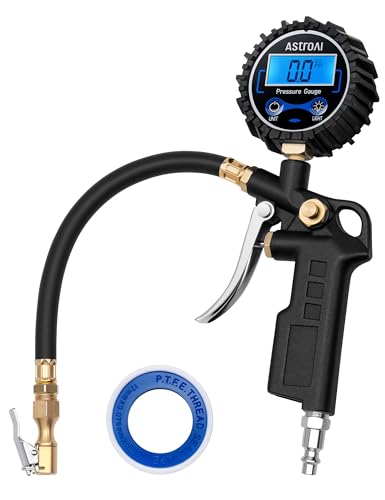
Pros
- Wide 3-250 PSI measurement range
- Digital readout provides 0.1 PSI resolution
- Combines a gauge, hose, locking chuck, and bleed valve in one unit
- Compatible with multiple NPT air compressor outputs
- Supports inflation, deflation, and pressure checks
Cons
- Inflation requires connection to an air compressor
Specifications
| Color | Black |
|---|---|
| Size | 1 Pack Standard |
| Dimensions | 4.96 x 1.06 x 1.5 inches |
| Weight | 0.66 pounds |
| Product Group | Automotive Parts and Accessories |
| Binding | Automotive |
Best For / Avoid If
Best for buyers prioritizing
- Wide 3-250 PSI measurement range
- Digital readout provides 0.1 PSI resolution
- Combines a gauge, hose, locking chuck, and bleed valve in one unit
Consider another option if
- Inflation requires connection to an air compressor
Related reading: How to Reset a TPMS Sensor.
FAQ
Can a TPMS tool show remaining battery life?
Some tools report battery status or voltage for supported sensors. A reading is not a guaranteed estimate of remaining service life, and not every sensor or tool supports this feature.
Will a low TPMS battery turn on the tire-pressure warning light?
A failing sensor can trigger a TPMS system warning, but the warning can also result from low tire pressure, a sensor setup issue, damage, or a vehicle-side fault. Check pressure and scan the system before deciding on a repair.
Can I drive with a TPMS sensor that does not respond?
A nonresponsive sensor leaves you without reliable monitoring from that sensor. Check tire pressure manually and follow the vehicle manual’s instructions. If a tire is low or damaged, make the safety decision using the vehicle and tire guidance, not the sensor fault alone.
Do aftermarket TPMS sensors need programming?
Some do, and many vehicles also need a relearn so the vehicle recognizes each sensor ID. Requirements vary by sensor, vehicle model year, and TPMS system.
Sources and further reading
- Tire Safety (NHTSA): Guidance on tire pressure, inspection, and tire safety.
- Keeping Your Vehicle in Shape (fueleconomy.gov): Maintenance guidance that includes tire care and pressure checks.